
PyG (PyTorch Geometric) is a library built upon PyTorch to easily write and train Graph Neural Networks (GNNs) for a wide range of applications related to structured data.
It consists of various methods for deep learning on graphs and other irregular structures, also known as geometric deep learning, from a variety of published papers.
In addition, it consists of easy-to-use mini-batch loaders for operating on many small and single giant graphs, multi GPU-support, torch.compile support, DataPipe support, a large number of common benchmark datasets (based on simple interfaces to create your own), and helpful transforms, both for learning on arbitrary graphs as well as on 3D meshes or point clouds.
Click here to join our Slack community!

Library Highlights
Whether you are a machine learning researcher or first-time user of machine learning toolkits, here are some reasons to try out PyG for machine learning on graph-structured data.
- Easy-to-use and unified API:
All it takes is 10-20 lines of code to get started with training a GNN model (see the next section for a quick tour).
PyG is PyTorch-on-the-rocks: It utilizes a tensor-centric API and keeps design principles close to vanilla PyTorch.
If you are already familiar with PyTorch, utilizing PyG is straightforward.
- Comprehensive and well-maintained GNN models:
Most of the state-of-the-art Graph Neural Network architectures have been implemented by library developers or authors of research papers and are ready to be applied.
- Great flexibility:
Existing PyG models can easily be extended for conducting your own research with GNNs.
Making modifications to existing models or creating new architectures is simple, thanks to its easy-to-use message passing API, and a variety of operators and utility functions.
- Large-scale real-world GNN models:
We focus on the need of GNN applications in challenging real-world scenarios, and support learning on diverse types of graphs, including but not limited to: scalable GNNs for graphs with millions of nodes; dynamic GNNs for node predictions over time; heterogeneous GNNs with multiple node types and edge types.
Quick Tour for New Users
In this quick tour, we highlight the ease of creating and training a GNN model with only a few lines of code.
Train your own GNN model
In the first glimpse of PyG, we implement the training of a GNN for classifying papers in a citation graph.
For this, we load the Cora dataset, and create a simple 2-layer GCN model using the pre-defined GCNConv:
import torch
from torch import Tensor
from torch_geometric.nn import GCNConv
from torch_geometric.datasets import Planetoid

dataset = Planetoid(root='.', name='Cora')

class GCN(torch.nn.Module):
    def __init__(self, in_channels, hidden_channels, out_channels):
        super().__init__()
        self.conv1 = GCNConv(in_channels, hidden_channels)
        self.conv2 = GCNConv(hidden_channels, out_channels)

    def forward(self, x: Tensor, edge_index: Tensor) -> Tensor:
        # x: Node feature matrix of shape [num_nodes, in_channels]
        # edge_index: Graph connectivity matrix of shape [2, num_edges]
        x = self.conv1(x, edge_index).relu()
        x = self.conv2(x, edge_index)
        return x

model = GCN(dataset.num_features, 16, dataset.num_classes)
We can now optimize the model in a training loop, similar to the standard PyTorch training procedure.
import torch.nn.functional as F

data = dataset[0]
optimizer = torch.optim.Adam(model.parameters(), lr=0.01)

for epoch in range(200):
    pred = model(data.x, data.edge_index)
    loss = F.cross_entropy(pred[data.train_mask], data.y[data.train_mask])

    # Backpropagation
    optimizer.zero_grad()
    loss.backward()
    optimizer.step()
More information about evaluating final model performance can be found in the corresponding example.
Create your own GNN layer
In addition to the easy application of existing GNNs, PyG makes it simple to implement custom Graph Neural Networks (see here for the accompanying tutorial).
For example, this is all it takes to implement the edge convolutional layer from Wang et al.:
$$x_i^{\prime} ~ = ~ \max_{j \in \mathcal{N}(i)} ~ \textrm{MLP}_{\theta} \left( [ ~ x_i, ~ x_j - x_i ~ ] \right)$$
import torch
from torch import Tensor
from torch.nn import Sequential, Linear, ReLU
from torch_geometric.nn import MessagePassing

class EdgeConv(MessagePassing):
    def __init__(self, in_channels, out_channels):
        super().__init__(aggr="max")  # "Max" aggregation.
        self.mlp = Sequential(
            Linear(2 * in_channels, out_channels),
            ReLU(),
            Linear(out_channels, out_channels),
        )

    def forward(self, x: Tensor, edge_index: Tensor) -> Tensor:
        # x: Node feature matrix of shape [num_nodes, in_channels]
        # edge_index: Graph connectivity matrix of shape [2, num_edges]
        return self.propagate(edge_index, x=x)  # shape [num_nodes, out_channels]

    def message(self, x_j: Tensor, x_i: Tensor) -> Tensor:
        # x_j: Source node features of shape [num_edges, in_channels]
        # x_i: Target node features of shape [num_edges, in_channels]
        edge_features = torch.cat([x_i, x_j - x_i], dim=-1)
        return self.mlp(edge_features)  # shape [num_edges, out_channels]
Architecture Overview
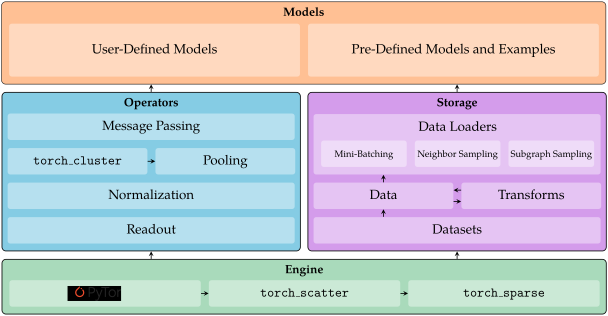
PyG provides a multi-layer framework that enables users to build Graph Neural Network solutions on both low and high levels.
It comprises of the following components:
- The PyG engine utilizes the powerful PyTorch deep learning framework with full
torch.compile and TorchScript support, as well as additions of efficient CPU/CUDA libraries for operating on sparse data, e.g., pyg-lib.
- The PyG storage handles data processing, transformation and loading pipelines. It is capable of handling and processing large-scale graph datasets, and provides effective solutions for heterogeneous graphs. It further provides a variety of sampling solutions, which enable training of GNNs on large-scale graphs.
- The PyG operators bundle essential functionalities for implementing Graph Neural Networks. PyG supports important GNN building blocks that can be combined and applied to various parts of a GNN model, ensuring rich flexibility of GNN design.
- Finally, PyG provides an abundant set of GNN models, and examples that showcase GNN models on standard graph benchmarks. Thanks to its flexibility, users can easily build and modify custom GNN models to fit their specific needs.
Implemented GNN Models
We list currently supported PyG models, layers and operators according to category:
GNN layers:
All Graph Neural Network layers are implemented via the nn.MessagePassing interface.
A GNN layer specifies how to perform message passing, i.e. by designing different message, aggregation and update functions as defined here.
These GNN layers can be stacked together to create Graph Neural Network models.
Expand to see all implemented GNN layers...
- GCN2Conv from Chen et al.: Simple and Deep Graph Convolutional Networks (ICML 2020) [Example1, Example2]
- SplineConv from Fey et al.: SplineCNN: Fast Geometric Deep Learning with Continuous B-Spline Kernels (CVPR 2018) [Example1, Example2]
- NNConv from Gilmer et al.: Neural Message Passing for Quantum Chemistry (ICML 2017) [Example1, Example2]
- CGConv from Xie and Grossman: Crystal Graph Convolutional Neural Networks for an Accurate and Interpretable Prediction of Material Properties (Physical Review Letters 120, 2018)
- ECConv from Simonovsky and Komodakis: Edge-Conditioned Convolution on Graphs (CVPR 2017)
- EGConv from Tailor et al.: Adaptive Filters and Aggregator Fusion for Efficient Graph Convolutions (GNNSys 2021) [Example]
- GATv2Conv from Brody et al.: How Attentive are Graph Attention Networks? (ICLR 2022)
- TransformerConv from Shi et al.: Masked Label Prediction: Unified Message Passing Model for Semi-Supervised Classification (CoRR 2020) [Example]
- SAGEConv from Hamilton et al.: Inductive Representation Learning on Large Graphs (NIPS 2017) [Example1, Example2, Example3, Example4]
- GraphConv from, e.g., Morris et al.: Weisfeiler and Leman Go Neural: Higher-order Graph Neural Networks (AAAI 2019)
- GatedGraphConv from Li et al.: Gated Graph Sequence Neural Networks (ICLR 2016)
- ResGatedGraphConv from Bresson and Laurent: Residual Gated Graph ConvNets (CoRR 2017)
- GINConv from Xu et al.: How Powerful are Graph Neural Networks? (ICLR 2019) [Example]
- GINEConv from Hu et al.: Strategies for Pre-training Graph Neural Networks (ICLR 2020)
- ARMAConv from Bianchi et al.: Graph Neural Networks with Convolutional ARMA Filters (CoRR 2019) [Example]
- SGConv from Wu et al.: Simplifying Graph Convolutional Networks (CoRR 2019) [Example]
- APPNP from Klicpera et al.: Predict then Propagate: Graph Neural Networks meet Personalized PageRank (ICLR 2019) [Example]
- MFConv from Duvenaud et al.: Convolutional Networks on Graphs for Learning Molecular Fingerprints (NIPS 2015)
- AGNNConv from Thekumparampil et al.: Attention-based Graph Neural Network for Semi-Supervised Learning (CoRR 2017) [Example]
- TAGConv from Du et al.: Topology Adaptive Graph Convolutional Networks (CoRR 2017) [Example]
- PNAConv from Corso et al.: Principal Neighbourhood Aggregation for Graph Nets (CoRR 2020) [Example]
- FAConv from Bo et al.: Beyond Low-Frequency Information in Graph Convolutional Networks (AAAI 2021)
- PDNConv from Rozemberczki et al.: Pathfinder Discovery Networks for Neural Message Passing (WWW 2021)
- RGCNConv from Schlichtkrull et al.: Modeling Relational Data with Graph Convolutional Networks (ESWC 2018) [Example1, Example2]
- RGATConv from Busbridge et al.: Relational Graph Attention Networks (CoRR 2019) [Example]
- FiLMConv from Brockschmidt: GNN-FiLM: Graph Neural Networks with Feature-wise Linear Modulation (ICML 2020) [Example]
- SignedConv from Derr et al.: Signed Graph Convolutional Network (ICDM 2018) [Example]
- DNAConv from Fey: Just Jump: Dynamic Neighborhood Aggregation in Graph Neural Networks (ICLR-W 2019) [Example]
- PANConv from Ma et al.: Path Integral Based Convolution and Pooling for Graph Neural Networks (NeurIPS 2020)
- PointNetConv (including Iterative Farthest Point Sampling, dynamic graph generation based on nearest neighbor or maximum distance, and k-NN interpolation for upsampling) from Qi et al.: PointNet: Deep Learning on Point Sets for 3D Classification and Segmentation (CVPR 2017) and PointNet++: Deep Hierarchical Feature Learning on Point Sets in a Metric Space (NIPS 2017) [Example1, Example2]
- EdgeConv from Wang et al.: Dynamic Graph CNN for Learning on Point Clouds (CoRR, 2018) [Example1, Example2]
- XConv from Li et al.: PointCNN: Convolution On X-Transformed Points (NeurIPS 2018) [Example]
- PPFConv from Deng et al.: PPFNet: Global Context Aware Local Features for Robust 3D Point Matching (CVPR 2018)
- GMMConv from Monti et al.: Geometric Deep Learning on Graphs and Manifolds using Mixture Model CNNs (CVPR 2017)
- FeaStConv from Verma et al.: FeaStNet: Feature-Steered Graph Convolutions for 3D Shape Analysis (CVPR 2018)
- PointTransformerConv from Zhao et al.: Point Transformer (2020)
- HypergraphConv from Bai et al.: Hypergraph Convolution and Hypergraph Attention (CoRR 2019)
- GravNetConv from Qasim et al.: Learning Representations of Irregular Particle-detector Geometry with Distance-weighted Graph Networks (European Physics Journal C, 2019)
- SuperGAT from Kim and Oh: How To Find Your Friendly Neighborhood: Graph Attention Design With Self-Supervision (ICLR 2021) [Example]
- HGTConv from Hu et al.: Heterogeneous Graph Transformer (WWW 2020) [Example]
- HEATConv from Mo et al.: Heterogeneous Edge-Enhanced Graph Attention Network For Multi-Agent Trajectory Prediction (CoRR 2021)
- SSGConv from Zhu et al.: Simple Spectral Graph Convolution (ICLR 2021)
- FusedGATConv from Zhang et al.: Understanding GNN Computational Graph: A Coordinated Computation, IO, and Memory Perspective (MLSys 2022)
- GPSConv from Rampášek et al.: Recipe for a General, Powerful, Scalable Graph Transformer (NeurIPS 2022) [Example]
Pooling layers:
Graph pooling layers combine the vectorial representations of a set of nodes in a graph (or a subgraph) into a single vector representation that summarizes its properties of nodes.
It is commonly applied to graph-level tasks, which require combining node features into a single graph representation.
Expand to see all implemented pooling layers...
GNN models:
Our supported GNN models incorporate multiple message passing layers, and users can directly use these pre-defined models to make predictions on graphs.
Unlike simple stacking of GNN layers, these models could involve pre-processing, additional learnable parameters, skip connections, graph coarsening, etc.
Expand to see all implemented GNN models...
GNN operators and utilities:
PyG comes with a rich set of neural network operators that are commonly used in many GNN models.
They follow an extensible design: It is easy to apply these operators and graph utilities to existing GNN layers and models to further enhance model performance.
Expand to see all implemented GNN operators and utilities...
Scalable GNNs:
PyG supports the implementation of Graph Neural Networks that can scale to large-scale graphs.
Such application is challenging since the entire graph, its associated features and the GNN parameters cannot fit into GPU memory.
Many state-of-the-art scalability approaches tackle this challenge by sampling neighborhoods for mini-batch training, graph clustering and partitioning, or by using simplified GNN models.
These approaches have been implemented in PyG, and can benefit from the above GNN layers, operators and models.
Expand to see all implemented scalable GNNs...
Installation
PyG is available for Python 3.10 to Python 3.14.
From PyG 2.3 onwards, you can install and use PyG without any external library required except for PyTorch.
For this, simply run
pip install torch_geometric
Additional Libraries
If you want to utilize the full set of features from PyG, there exists several additional libraries you may want to install:
These packages come with their own CPU and GPU kernel implementations based on the PyTorch C++/CUDA/hip(ROCm) extension interface.
For a basic usage of PyG, these dependencies are fully optional.
We recommend to start with a minimal installation, and install additional dependencies once you start to actually need them.
For ease of installation of these extensions, we provide pip wheels for all major OS/PyTorch/CUDA combinations, see here.
PyTorch 2.12
To install the binaries for PyTorch 2.12, simply run
pip install pyg_lib torch_scatter torch_sparse -f https://data.pyg.org/whl/torch-2.12.0+${CUDA}.html
where ${CUDA} should be replaced by either cpu, cu126, cu130, or cu132 depending on your PyTorch installation.
|
cpu |
cu126 |
cu128 |
cu130 |
cu132 |
| Linux |
✅ |
✅ |
|
✅ |
✅ |
| Windows |
✅ |
✅ |
|
✅ |
✅ |
| macOS |
✅ |
|
|
|
|
PyTorch 2.11
To install the binaries for PyTorch 2.11, simply run
pip install pyg_lib torch_scatter torch_sparse -f https://data.pyg.org/whl/torch-2.11.0+${CUDA}.html
where ${CUDA} should be replaced by either cpu, cu126, cu128, or cu130 depending on your PyTorch installation.
|
cpu |
cu126 |
cu128 |
cu130 |
| Linux |
✅ |
✅ |
✅ |
✅ |
| Windows |
✅ |
✅ |
✅ |
✅ |
| macOS |
✅ |
|
|
|
PyTorch 2.10
To install the binaries for PyTorch 2.10, simply run
pip install pyg_lib torch_scatter torch_sparse -f https://data.pyg.org/whl/torch-2.10.0+${CUDA}.html
where ${CUDA} should be replaced by either cpu, cu126, cu128, or cu130 depending on your PyTorch installation.
|
cpu |
cu126 |
cu128 |
cu130 |
| Linux |
✅ |
✅ |
✅ |
✅ |
| Windows |
✅ |
✅ |
✅ |
✅ |
| macOS |
✅ |
|
|
|
PyTorch 2.9
To install the binaries for PyTorch 2.9, simply run
pip install pyg_lib torch_scatter torch_sparse -f https://data.pyg.org/whl/torch-2.9.0+${CUDA}.html
where ${CUDA} should be replaced by either cpu, cu126, cu128, or cu130 depending on your PyTorch installation.
|
cpu |
cu126 |
cu128 |
cu130 |
| Linux |
✅ |
✅ |
✅ |
✅ |
| Windows |
✅ |
✅ |
✅ |
✅ |
| macOS |
✅ |
|
|
|
Note: Binaries of older versions are also provided for PyTorch 1.4.0, PyTorch 1.5.0, PyTorch 1.6.0, PyTorch 1.7.0/1.7.1, PyTorch 1.8.0/1.8.1, PyTorch 1.9.0, PyTorch 1.10.0/1.10.1/1.10.2, PyTorch 1.11.0, PyTorch 1.12.0/1.12.1, PyTorch 1.13.0/1.13.1, PyTorch 2.0.0/2.0.1, PyTorch 2.1.0/2.1.1/2.1.2, PyTorch 2.2.0/2.2.1/2.2.2, PyTorch 2.3.0/2.3.1, PyTorch 2.4.0/2.4.1, PyTorch 2.5.0/2.5.1, PyTorch 2.6.0, PyTorch 2.7.0/2.7.1, and PyTorch 2.8.0 (following the same procedure).
For older versions, you might need to explicitly specify the latest supported version number or install via pip install --no-index in order to prevent a manual installation from source.
You can look up the latest supported version number here.
NVIDIA PyG Container
NVIDIA provides a PyG docker container for effortlessly training and deploying GPU accelerated GNNs with PyG, see here.
Nightly and Master
In case you want to experiment with the latest PyG features which are not fully released yet, either install the nightly version of PyG via
pip install pyg-nightly
or install PyG from master via
pip install git+https://github.com/pyg-team/pytorch_geometric.git
ROCm Wheels
The external pyg-rocm-build repository provides wheels and detailed instructions on how to install PyG for ROCm.
If you have any questions about it, please open an issue here.
Cite
Please cite our PyG 1.0 and PyG 2.0 papers if you use this code in your own work:
@inproceedings{Fey/Lenssen/2019,
  title={Fast Graph Representation Learning with {PyTorch Geometric}},
  author={Fey, Matthias and Lenssen, Jan E.},
  booktitle={ICLR Workshop on Representation Learning on Graphs and Manifolds},
  year={2019},
}

@inproceedings{Fey/etal/2025,
  title={{PyG} 2.0: Scalable Learning on Real World Graphs},
  author={Fey, Matthias and Sunil, Jinu and Nitta, Akihiro and Puri, Rishi and Shah, Manan, and Stojanovi{\v{c}, Bla{\v{z} and Bendias, Ramona and Alexandria, Barghi and Kocijan, Vid and Zhang, Zecheng and He, Xinwei and Lenssen, Jan E. and Leskovec, Jure},
  booktitle={Temporal Graph Learning Workshop @ KDD},
  year={2025},
}
Feel free to email us if you wish your work to be listed in the external resources.
If you notice anything unexpected, please open an issue and let us know.
If you have any questions or are missing a specific feature, feel free to discuss them with us.
We are motivated to constantly make PyG even better.





 PyG(PyTorch Geometric)是一个基于 PyTorch 的 Python 库,用于在结构化数据(图以及其他不规则结构)上编写和训练图神经网络(GNN),其中融合了大量已发表论文中的方法。