A native Rust/GPUI client for macOS, Linux, and Windows, for a
Herdr daemon you installed yourself. It paints the daemon's terminal cells, split panes included, without
running another terminal emulator or wrapping the TUI.
Unaffiliated project. Not affiliated with, endorsed by, or supported by
Herdr or herdr.dev.
Gallery
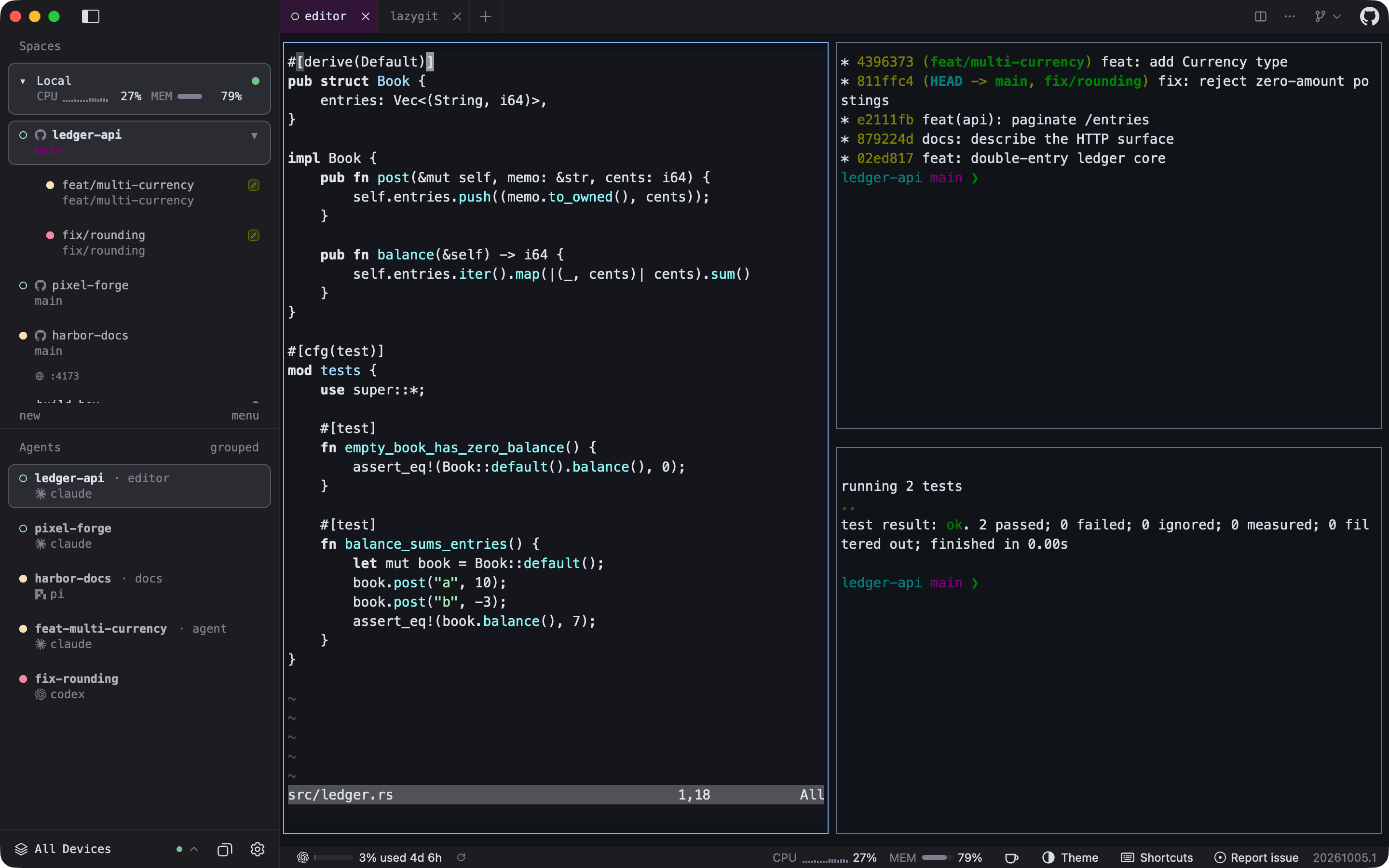
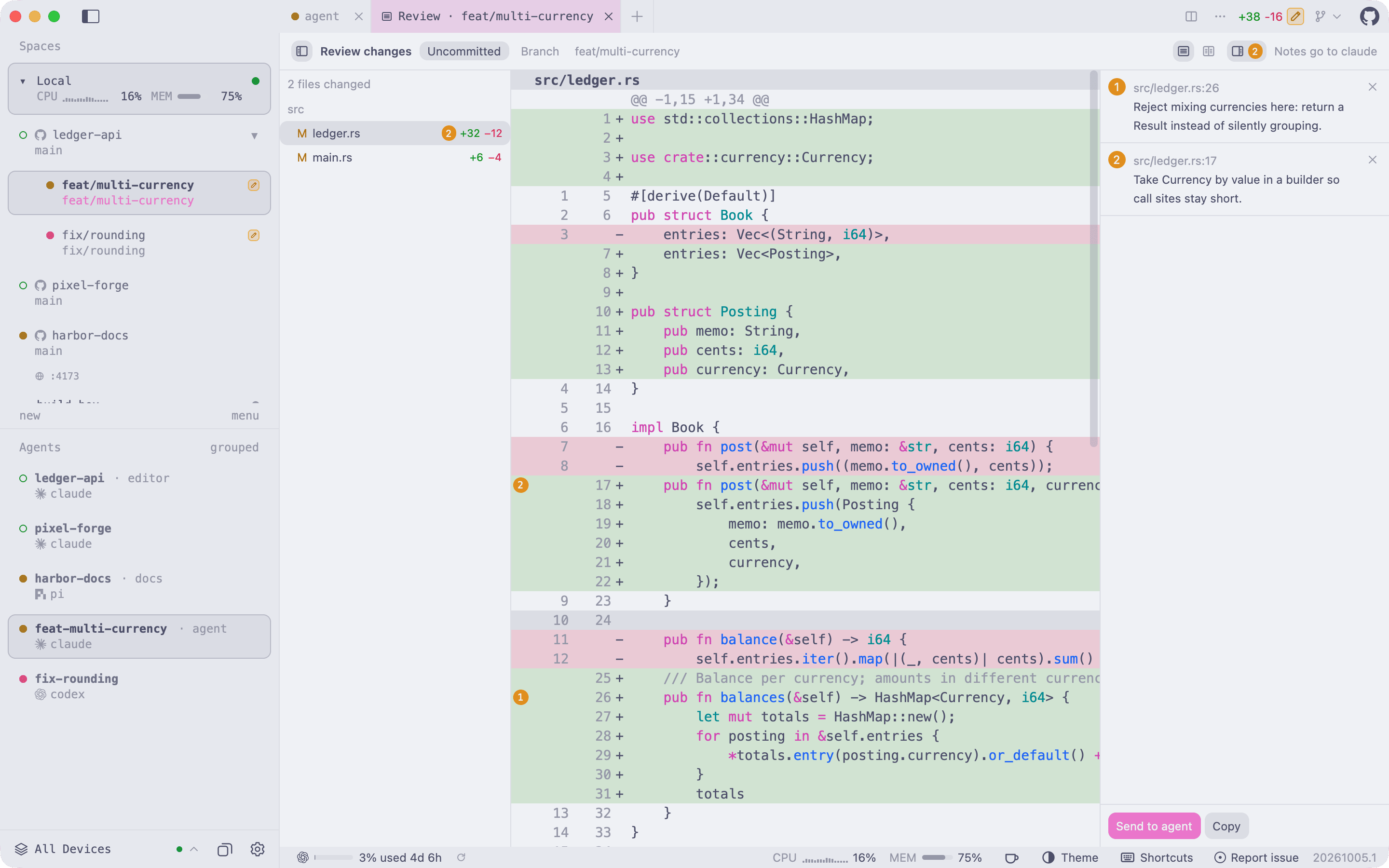
Workspaces, worktrees, and agents in one sidebar. Each agent carries the daemon's status dot (idle, working, or waiting on you), and tabs and splits are painted natively from the daemon's cells.
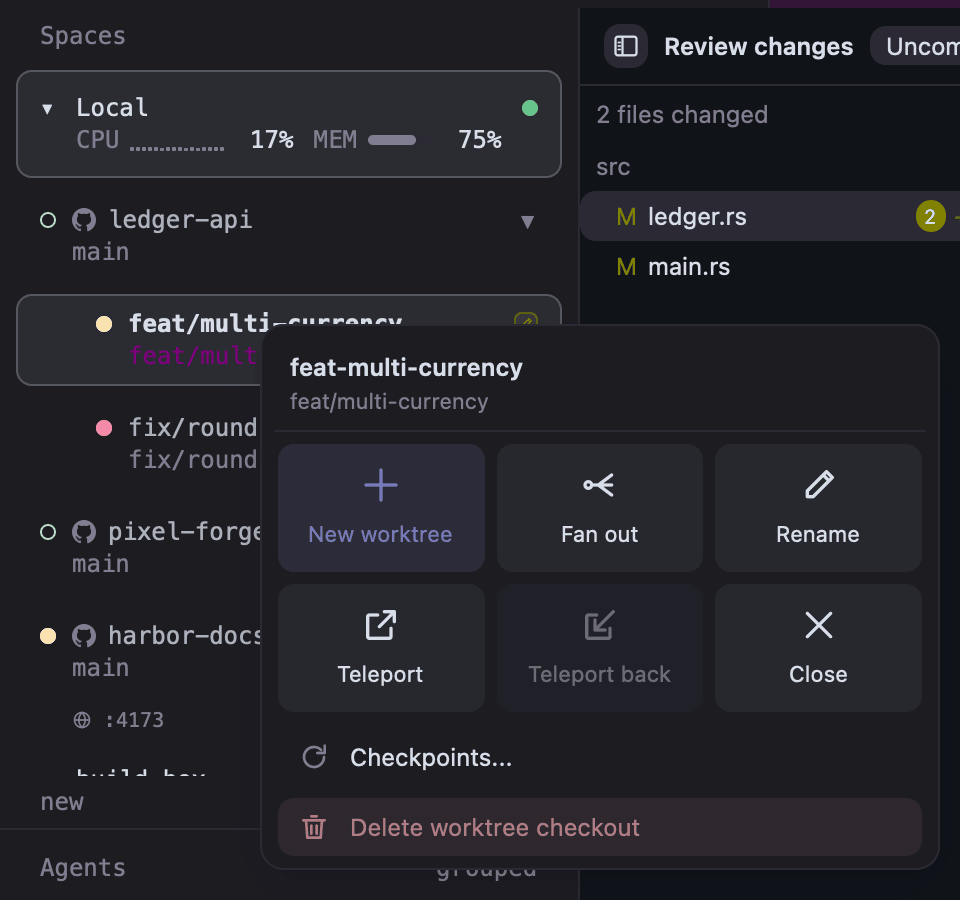
Worktree popover. Right-click a workspace or worktree for a new worktree, fan out, rename, Teleport, checkpoints, close, or delete the checkout.
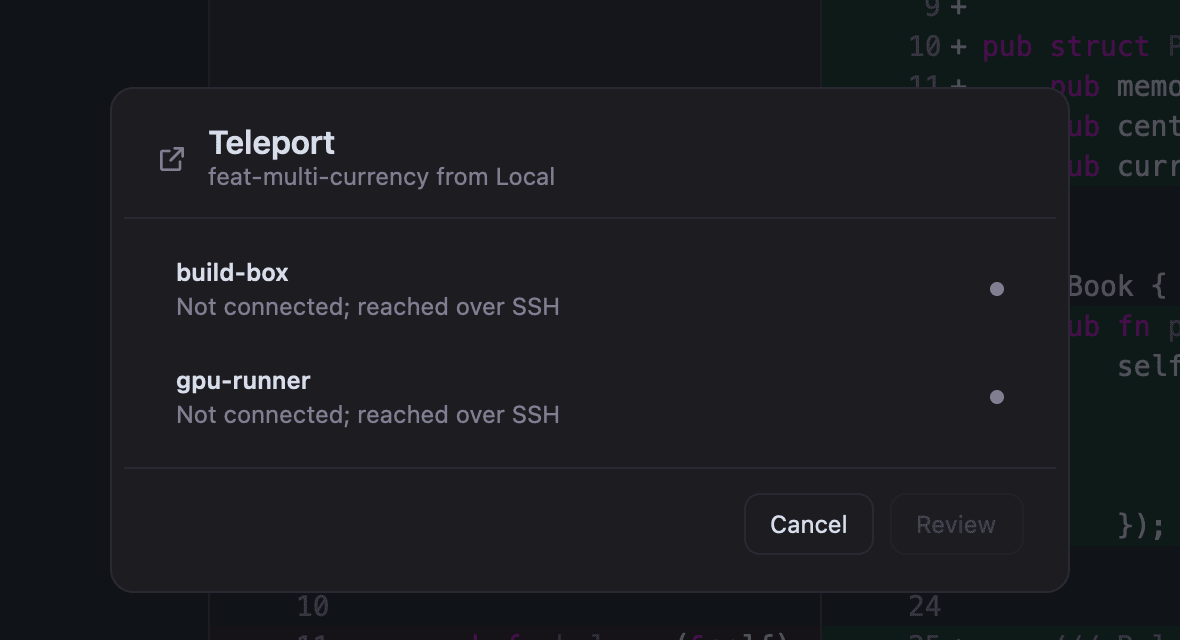
Teleport. Move a worktree to another host with its commits, uncommitted changes, tabs, splits, running programs, and agent sessions.
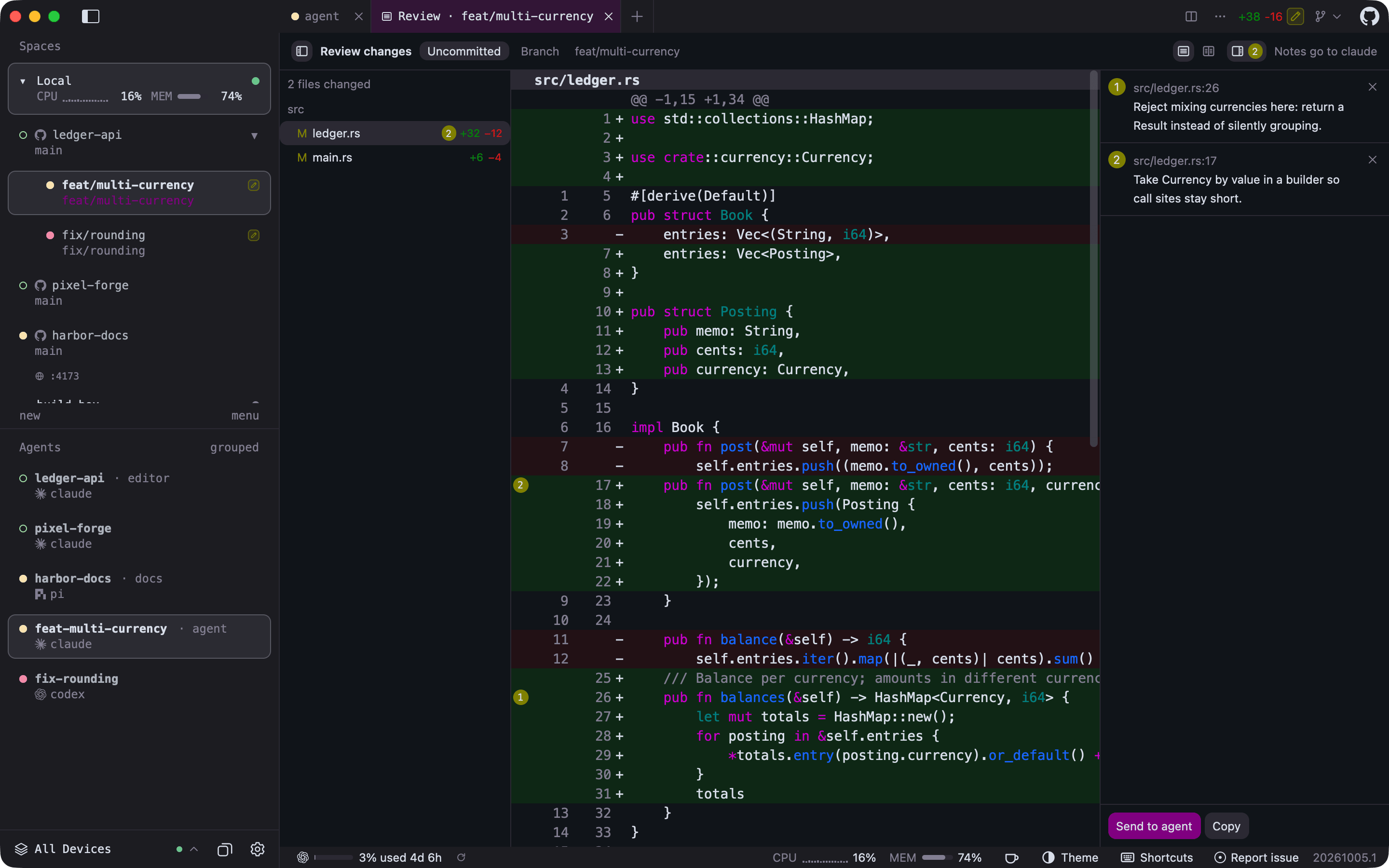
Review an agent's changes. Open Review changes… from the title bar's Git menu, click any line to leave a note like a pull request comment, then Send to agent.
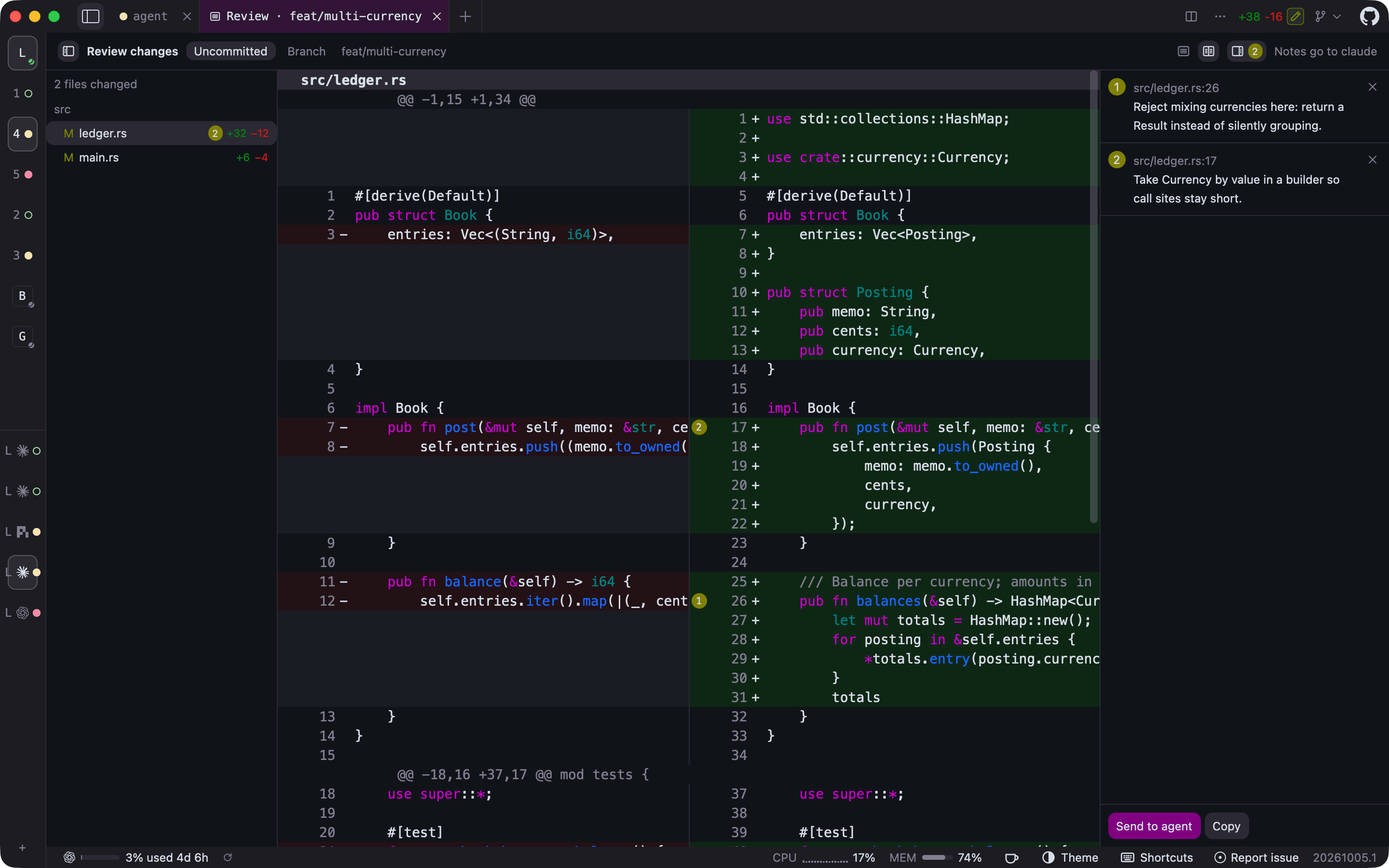
Side-by-side diffs and a collapsed sidebar. Switch the review to side by side, and fold the sidebar to a rail that keeps every workspace and agent one click away.
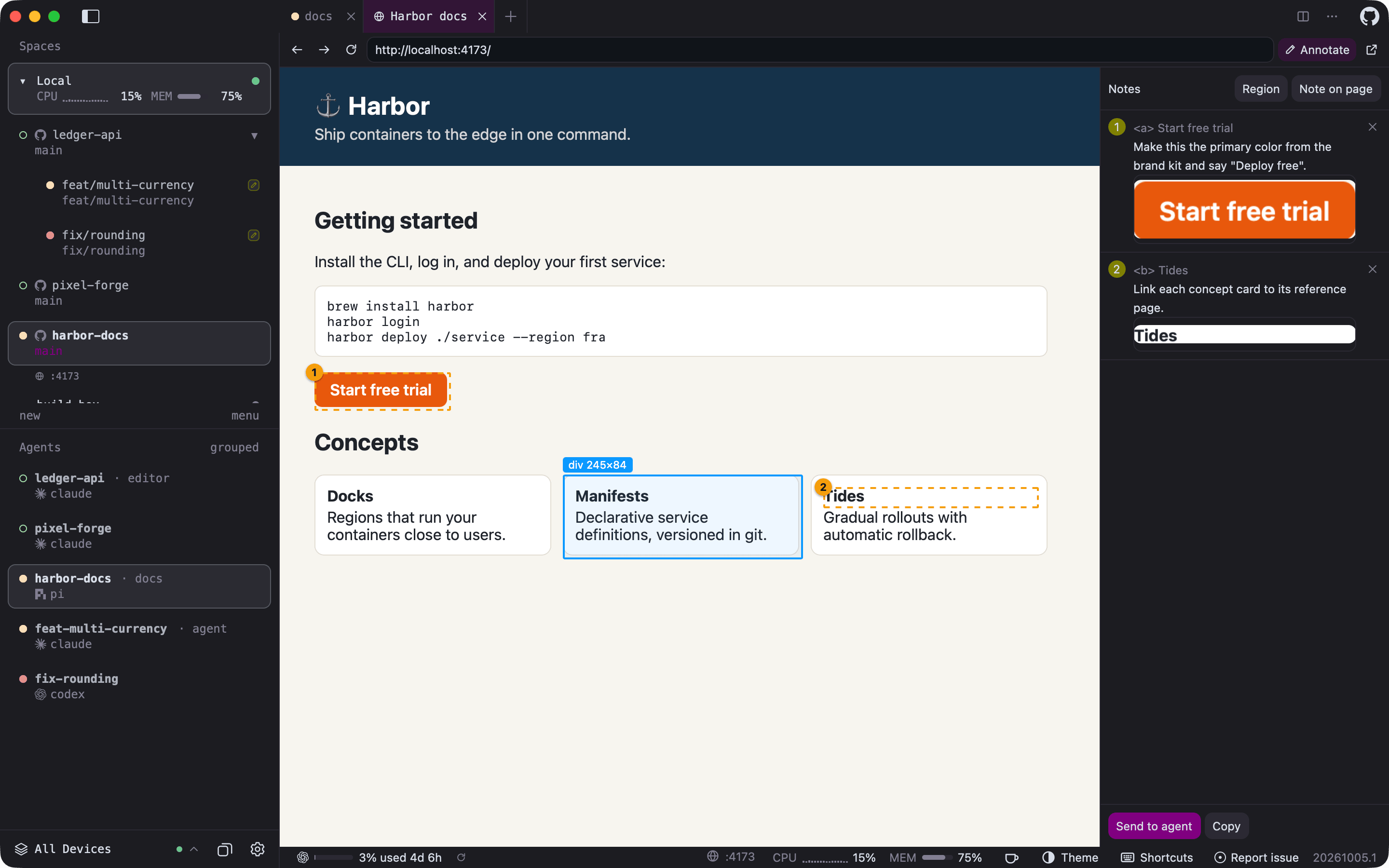
Browser tabs with annotations. An agent opens its page with herdr-gpui browser open; you pick elements or regions, write notes, and send them back to that agent. Listening ports such as :4173 appear under their workspace.
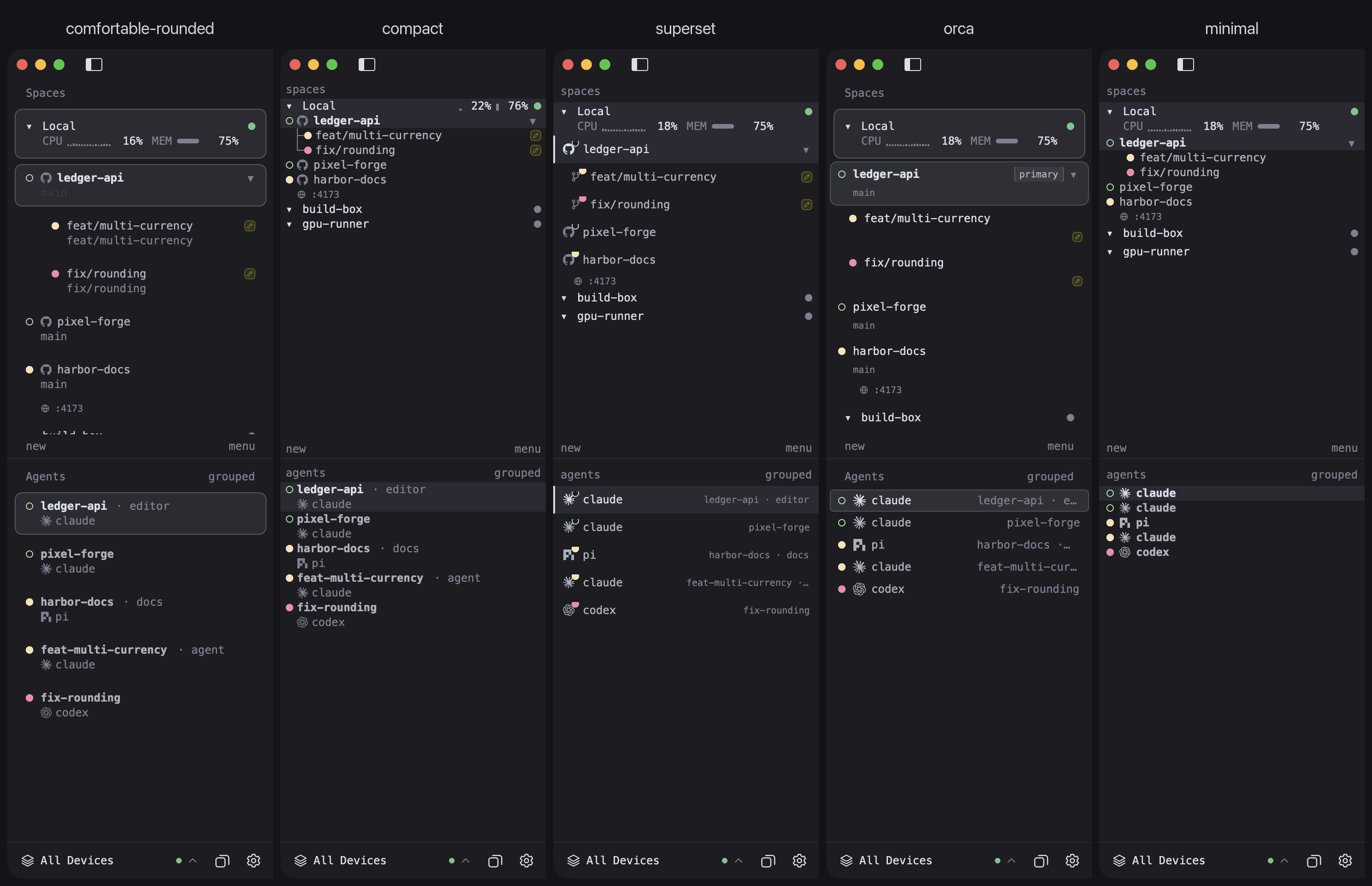
Sidebar layouts. Pick a density or a design of its own from View > Layout or Settings; the choice applies live.
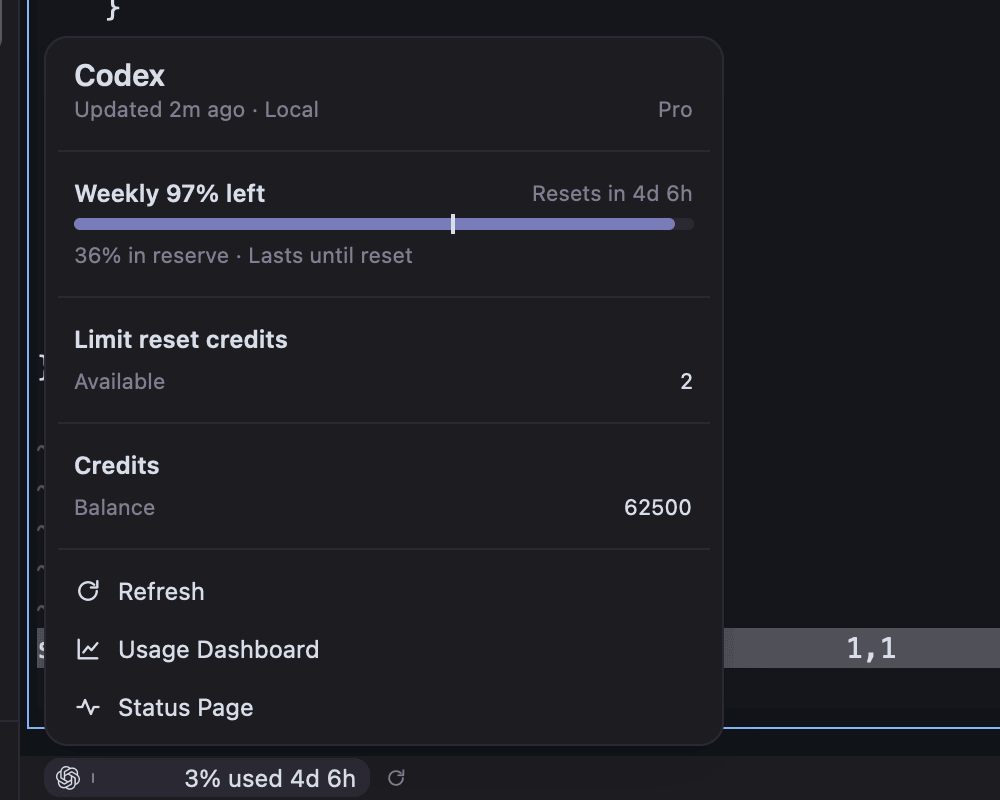
Plan usage. The status bar shows the signed-in AI services closest to their limits; click one for the details.
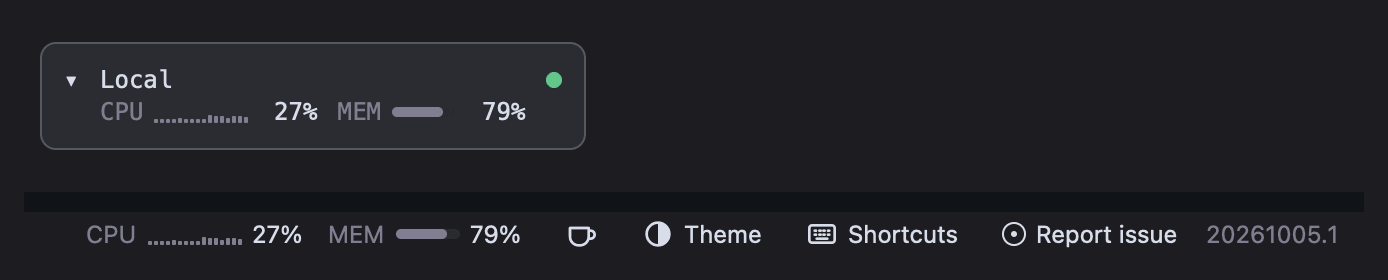
CPU and memory per host. The status bar follows the selected host, and with several hosts each sidebar host row shows its own, read over SSH for remote machines.
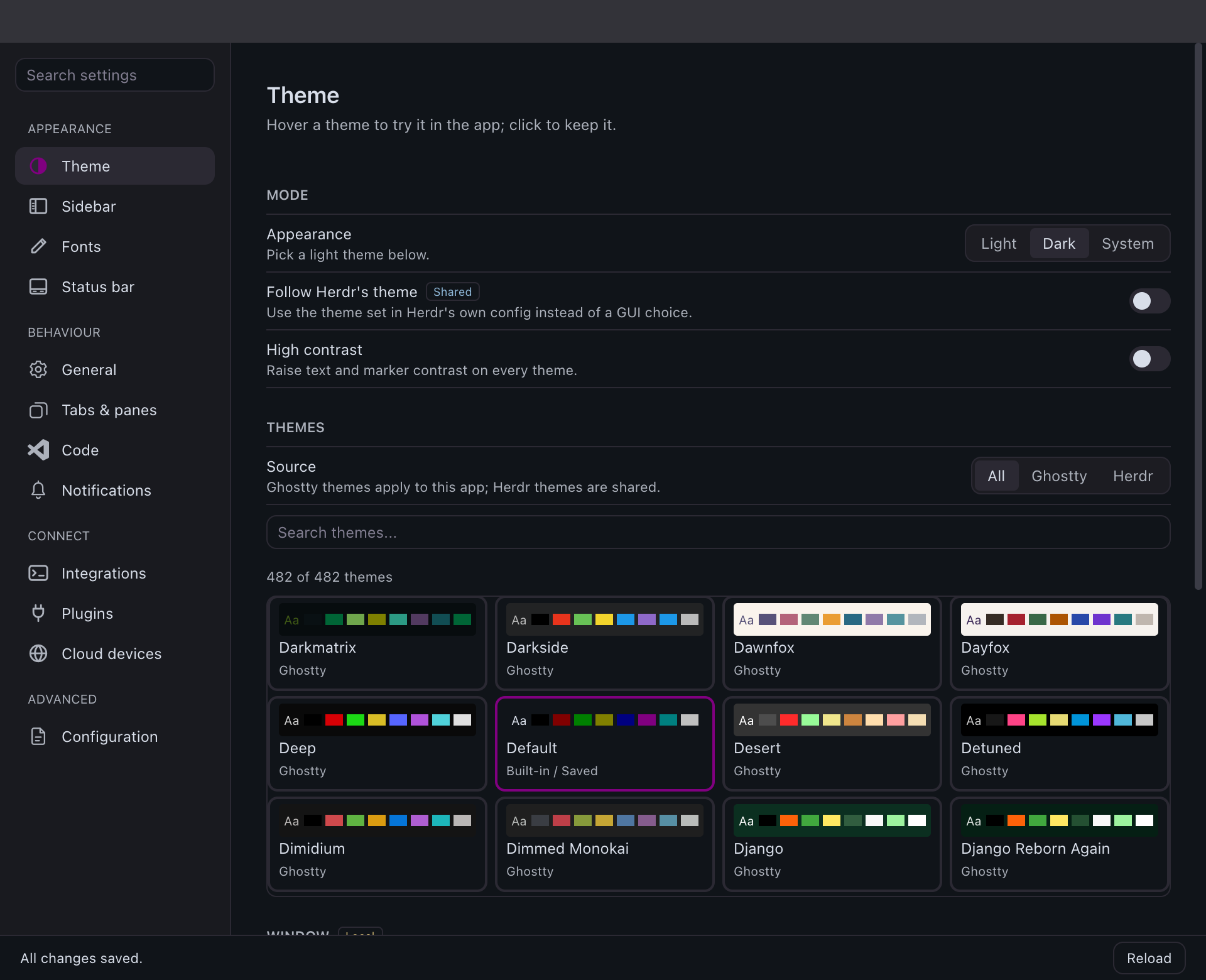
Native settings. A live preview and a searchable grid of every built-in and Ghostty theme, plus fonts, indicators, sounds, and notifications.
Light or dark, or both. Any theme, or a light and dark pair that follows the system appearance; status colours keep their contrast on either.
Requires Homebrew and macOS 14.2 Sonoma or newer, on Apple
Silicon or Intel. The cask installs the signed, notarized universal app.
brew install penso/tap/herdr-gpui
open -a Herdr
brew install resolves casks directly, so --cask is not required. To update it
later, or to install by its short name, tap once first:
brew tap penso/tap
brew install herdr-gpui
The cask is published from the tap by the
release workflow. A cask install updates itself through Homebrew: the in-app
updater detects that Homebrew owns the bundle and runs brew upgrade --cask herdr-gpui for you, so Homebrew's records stay correct. If its metadata is stale,
the updater runs brew update and retries once. The update panel shows progress
throughout. macOS .dmg, experimental Linux packages, and experimental Windows .zips
are also published on Releases.
Linux packages
Each release publishes x86_64 and ARM64 builds as a .deb, an .rpm, an Arch
Linux package, and a plain tarball, all containing the same executable. They need
glibc 2.39 or newer (Ubuntu 24.04, Debian 13, Fedora 40, current Arch, or later).
Download the file for your architecture from
Releases, then:
The package manager pulls in the runtime libraries, including the Vulkan loader;
a Vulkan driver for your GPU must also be present. Packages are not in any
distribution repository, so they never update themselves: install each new
release the same way. Before a release, CI installs each package on Ubuntu 24.04,
Debian 13 and Fedora 42, and the x86_64 Arch package on Arch Linux, then checks that
the executable finds every library. The ARM64 Arch package targets Arch Linux ARM
and is not install-tested.
On NixOS, or anywhere with Nix, build from source with the repository's flake:
nix run github:penso/herdr-gpui
# or add it to a configuration: inputs.herdr-gpui.url = "github:penso/herdr-gpui";
# then environment.systemPackages = [ inputs.herdr-gpui.packages.${system}.default ];
The flake builds with the toolchain pinned in rust-toolchain.toml on x86_64 and
ARM64 Linux. Like the packages, it never updates itself.
From source
Install Rust/rustup and, on macOS, the Xcode command-line tools. The repository
pins Rust 1.96.1 and GPUI 0.3.6 (the gpui-pre snapshot crate); the Rust version
is declared in rust-toolchain.toml and mirrored in mise.toml, so mise install
also provisions it.
git clone https://github.com/penso/herdr-gpui.git
cd herdr-gpui
just run
just run uses the optimized release build with the QA menu enabled;
just run-debug is notably slower with a dense terminal on screen.
On macOS both build a local bundle identified as so.pen.herdr-gpui.dev, so
it never shares a Dock tile or icon cache with an installed release.
Without just: cargo run --locked --release -p herdr-gpui --features qa-menu.
Install the Herdr daemon separately. The app starts an already-installed local
herdr server when the target session is absent, but never installs or upgrades
a daemon. Explicitly confirming session deletion stops that named session first;
closing or removing the GUI leaves daemon sessions and shared Herdr
configuration intact.
Linux Builds
On Ubuntu 24.04 (x86_64 or ARM64), run bash scripts/install-linux-deps.sh
before building. This installs GPUI's X11/Wayland/font development dependencies
and libasound2-dev for Rodio/CPAL native audio. CI and release builds use the
same script. Linux binaries require the system ALSA shared library (libasound2t64
on Ubuntu 24.04), a configured default audio device, and Vulkan for rendering.
Audio normally routes through the desktop's ALSA plugin configuration; no CLI
audio player is required. Custom notification sounds are MP3 only. See
notification sounds.
Windows
Windows is experimental, not a supported platform: CI checks formatting, lints
every target and feature, and runs workspace tests with default and all features
on windows-2025, including headless UI and CLI tests. The release workflow also
builds and CLI-tests the optimized executable, but no native window, renderer,
or live daemon has been exercised. Local
connections use the named pipe the Windows daemon binds, and configuration and
state follow its %APPDATA% / %LOCALAPPDATA% layout. Saved SSH
hosts, in-app updates, saved GitHub credentials, and the avatar disk cache are
unavailable and report that plainly; see
the GUI README.
Each release publishes Herdr-VERSION-x86_64-pc-windows-msvc.zip and
Herdr-VERSION-aarch64-pc-windows-msvc.zip (native ARM64), each containing
herdr-gpui.exe and its license notices. They carry the same checksums,
Sigstore signatures, and build provenance as the other assets, but they are not
Authenticode-signed, so SmartScreen warns on first launch, and they never update
themselves: download each new release manually. The executable is
console-subsystem, so launching it from Explorer also opens a console window.
How it connects
flowchart LR
    subgraph app["Herdr GPUI (this repo)"]
        ui["herdr-gpui<br/>window, painting, input"]
        client["herdr-client<br/>discovery, socket worker, sessions"]
        proto["herdr-protocol<br/>framing, surface patches"]
        ui --> client --> proto
    end

    proto <-->|"bincode frames over<br/>herdr-client.sock"| daemon

    subgraph host["Your machine or a saved SSH host"]
        daemon["herdr daemon"]
        daemon --> terms["terminal processes,<br/>workspaces, agents"]
    end
The daemon owns the terminals and all session state. The GUI attaches to the
binary client socket, renders the surfaces it is sent, and sends semantic
input back. Closing or detaching the GUI leaves the daemon and its terminals
running.
Browser tabs are the exception:
Herdr has no browser panes, so web pages shown beside a workspace's terminals
belong to the GUI alone. Agents in your panes open them with
herdr-gpui browser open URL, which reaches the running app over a local
socket of its own.
Audio Test
The QA menu is excluded from default Cargo builds, including published releases.
just run enables it automatically; with Cargo, use
cargo run --locked --release -p herdr-gpui --features qa-menu.
To manually test native audio in that build, choose QA > Play Sound. It plays the built-in
Done sound on the background Rodio worker, even without a daemon or active pane
and even with notifications muted. HERDR_DISABLE_SOUND and NEXTEST still
suppress playback. See notification sounds
for queue limits and playback details.
Performance
just test-perf opens a daemon-free native fixture with a dense 160x50 terminal,
40 workspaces, and 40 agents. It dispatches real window-local mouse/scroll events
and measures cold frames, warm hover, and both sidebar lists' scrolling. It also
asserts that unchanged terminal cells need zero new text-shaping calls, validates
batched background counts, and compares cached glyphs with freshly shaped ones.
On the development M4 Max, caching and background batching reduced release hover
p95 from about 51 ms to 12 ms, and scrolling from 56 ms to 14 ms. The benchmark
measures CPU event-to-scene construction, not GPU completion or pointer-to-screen
latency. Use just test-perf 50 to set a different calibrated budget; native tests
remain opt-in rather than imposing machine-dependent timings on hosted CI.
See PERFORMANCE.md for the before/after results,
reference mode, workload, deterministic checks, and remaining limitations.


 Herdr GPUI 是 Herdr(一个终端/智能体会话守护进程)的原生桌面客户端,让你在 macOS、Linux 和 Windows 上通过本地 Herdr 守护进程查看终端会话、工作区、Git worktree 和智能体活动。