




What is this?
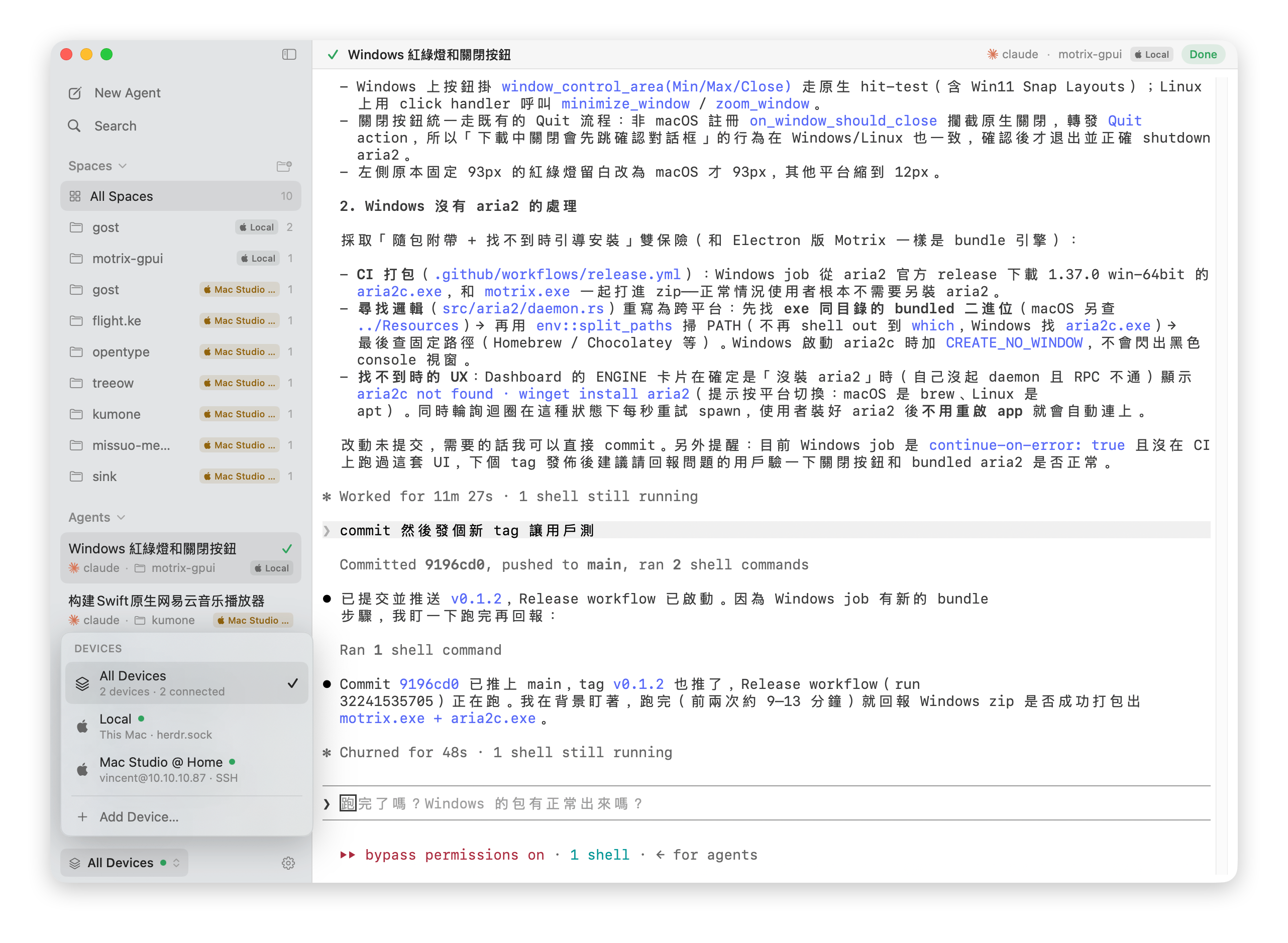
 herdrm is a native macOS console app that sits on top of herdr, a background daemon that owns your coding agents' terminals, letting you see live status and attach to any agent or shell terminal across local and remote (SSH) devices from one sidebar.
herdrm is a native macOS console app that sits on top of herdr, a background daemon that owns your coding agents' terminals, letting you see live status and attach to any agent or shell terminal across local and remote (SSH) devices from one sidebar.Is this a GUI app or a terminal multiplexer like tmux?It is a fully native SwiftUI macOS app, not an Electron wrapper or a chat UI - it gives you a real PTY terminal through a clickable sidebar instead of requiring tmux-style keyboard navigation.
It is a fully native SwiftUI macOS app, not an Electron wrapper or a chat UI - it gives you a real PTY terminal through a clickable sidebar instead of requiring tmux-style keyboard navigation.How do I install herdrm?Install it via Homebrew, or download the herdrm-x.y.z.zip from the Releases page, unzip it, and drag herdrm.app into /Applications. It self-updates afterward through Sparkle.
Install it via Homebrew, or download the herdrm-x.y.z.zip from the Releases page, unzip it, and drag herdrm.app into /Applications. It self-updates afterward through Sparkle.Do I need herdr installed separately?Yes - herdr itself must be installed locally (herdrm will start it automatically if it isn't running) and on any remote machine you want to connect to. Remote devices need OpenSSH access, Tailscale SSH 1.98.0+, or a Keychain-stored password.
Yes - herdr itself must be installed locally (herdrm will start it automatically if it isn't running) and on any remote machine you want to connect to. Remote devices need OpenSSH access, Tailscale SSH 1.98.0+, or a Keychain-stored password.Is herdrm stable enough for daily use?It's explicitly early-stage software without full test coverage, so bugs are expected; there's no CI gate yet and contributors are asked to run make build and make kit-test manually.
It's explicitly early-stage software without full test coverage, so bugs are expected; there's no CI gate yet and contributors are asked to run make build and make kit-test manually.Does it work on Intel Macs or only Apple Silicon?It ships as a universal binary and requires macOS 14 or later, so it runs on both Apple Silicon and Intel Macs.
It ships as a universal binary and requires macOS 14 or later, so it runs on both Apple Silicon and Intel Macs.Where are SSH passwords for remote devices stored?When key-based auth isn't available, herdrm falls back to an in-app password prompt whose value is stored in the macOS login Keychain, never written to a file.
When key-based auth isn't available, herdrm falls back to an in-app password prompt whose value is stored in the macOS login Keychain, never written to a file.Can I use herdrm for free, including commercially?It's licensed under PolyForm Noncommercial 1.0.0: free to use, modify, and share for any noncommercial purpose, but commercial use requires a separate license from the maintainer.
It's licensed under PolyForm Noncommercial 1.0.0: free to use, modify, and share for any noncommercial purpose, but commercial use requires a separate license from the maintainer.Which coding agents can herdrm attach to?It lists advertised CLIs found on your login-shell PATH, including claude, codex, gemini, grok, opencode, and pi, plus plain shell terminals as 'ordinary Herdr shell panes'.
It lists advertised CLIs found on your login-shell PATH, including claude, codex, gemini, grok, opencode, and pi, plus plain shell terminals as 'ordinary Herdr shell panes'.Can I move files between my Mac and a remote SSH host?Yes - a two-pane file manager browses Local and any configured SSH device side by side, with upload/download, progress, cancellation, and explicit Replace/Keep Both conflict handling.
Yes - a two-pane file manager browses Local and any configured SSH device side by side, with upload/download, progress, cancellation, and explicit Replace/Keep Both conflict handling.Why use herdrm instead of just attaching with tmux over SSH?You get the same herdr model (spaces, live status, real PTYs) through a native clickable sidebar with notifications and Cmd+K search, so you don't have to live inside a multiplexer to track multiple agents across machines.
You get the same herdr model (spaces, live status, real PTYs) through a native clickable sidebar with notifications and Cmd+K search, so you don't have to live inside a multiplexer to track multiple agents across machines.What is HerdrKit?HerdrKit is the socket-RPC/SSH/device transport and domain layer, shipped as its own independently testable Swift package separate from the SwiftUI interface code.
HerdrKit is the socket-RPC/SSH/device transport and domain layer, shipped as its own independently testable Swift package separate from the SwiftUI interface code.What are similar projects?WindTerm, herdr-web-ui, tuios, OpenYoink, AceShell, herdr-gpui, Codync, MacPacker
WindTerm, herdr-web-ui, tuios, OpenYoink, AceShell, herdr-gpui, Codync, MacPackerWhich topics is it in?pty, remote-development, ssh-client, terminal-emulator, file-manager, remote-access, swiftui, ssh, coding-agents, macos-app, homebrew, apple-silicon
pty, remote-development, ssh-client, terminal-emulator, file-manager, remote-access, swiftui, ssh, coding-agents, macos-app, homebrew, apple-silicon