omacosy
omakase + macOS + cosy. An omarchy-style setup
for macOS: tiling window management with a real Super key and
Hyprland's dwindle layout, a status bar built for it (bar, popups,
sliders and screen dimming in one process), focus follows mouse,
trackpad workspace swipes, a Mission-Control-style workspace overview
with live previews, focused-window border rings, and one theme switch
that covers everything down to the wallpaper. All of it installs from
this one repo.
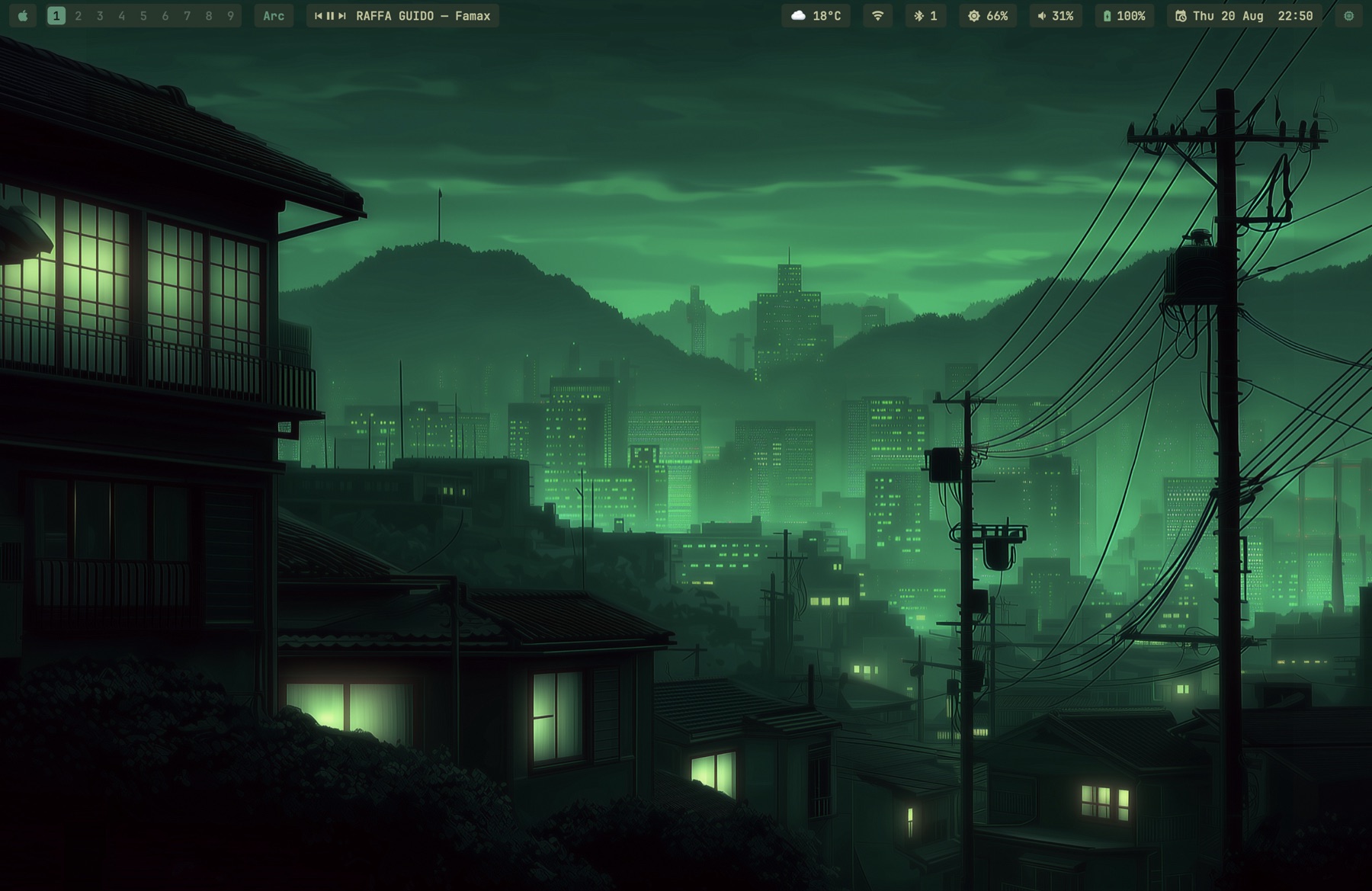
The whole environment idles at about 157MB of memory. Numbers per
process in Memory use.
Most of it is seven small signed binaries (Swift and C) built by the installer,
because several of the existing tools are broken on macOS 26. The
details are under What's inside.
Built for macOS 26 (Tahoe) on one desk: a MacBook Pro plus one
external display. It tries to generalize (display roles instead of
hardware names, per-display notch detection), but so far it has only
run on this machine. The permission setup is real work. Issues and
PRs welcome; support promises are not made.
Fresh Mac
git clone https://github.com/paulsp94/omacosy.git ~/.local/share/omacosy &&
cd ~/.local/share/omacosy && ./install.sh
The clone location matters. Configs are symlinked into the repo, and
macOS privacy (TCC) blocks launchd services from reading ~/Documents,
~/Desktop and ~/Downloads. If you clone there anyway, the installer
falls back to copying configs; that still works, but edits then need an
install.sh re-run to apply.
The installer is idempotent. It installs Homebrew if missing, runs
brew bundle, compiles the helper binaries, generates the AeroSpace
config from your app choices, symlinks configs (backing up anything it
would replace), hides the native menu bar, applies the default theme,
and starts the services.
See Permissions for the grants it asks of you, what
each one is used for, and what breaks without it. Karabiner-Elements
also asks you to approve its driver extension.
Updating
omacosy-update          # pull, then re-run the installer
omacosy-update --check  # just say whether there is anything new
install.sh rebuilds only the binaries whose sources changed and
restarts their agents, so an update is a pull plus a re-run, and this
command wraps both. It refuses a clone with local edits, and refuses
one whose branch has diverged, rather than deciding either for you.
There is no background update check. The bar makes exactly one network
call (the weather), and a daemon polling GitHub on a timer would
quietly make that two. Nothing here contacts the network unless you
run it.
Permissions
A window manager needs broad permissions, so here is the whole list:
every grant, which binary asks, what it is used for, and what you lose
by refusing it. Everything is refusable; the parts that depend on a
grant hide themselves rather than half-work.
| Grant |
Who asks |
What it does |
Without it |
| Accessibility |
AeroSpace or OmniWM, omacosy-gesture, omacosy-bar (reads the focused app's menus for the app-pill popup), omacosy-ffm (AeroSpace mode only) |
Move, resize and focus other apps' windows. This is the tiling itself, and it is the broadest permission here. |
Nothing tiles. Not optional in practice. |
| Input Monitoring |
Karabiner-Elements, omacosy-gesture (and OmniWM, under that option) |
Karabiner reads keys to remap Caps Lock; omacosy-gesture reads raw trackpad contacts, because macOS 26 stopped carrying touch data in normal events. |
No Super key, no swipe gestures. |
| Screen Recording |
omacosy-overview |
Captures a thumbnail per window for the overview cards, including windows the window manager has stashed offscreen. A screenshot of the visible screen could not see those. |
Cards fall back to app icons and titles. |
| Bluetooth |
omacosy-bar |
Reads adapter power and the paired-device list for the bluetooth pill and its menu. |
The pill hides itself. |
| Location |
omacosy-bar |
Reads only the wi-fi network's name, which macOS classes as location data. No coordinate is ever requested; the authorisation itself is what unlocks CWInterface.ssid(). |
The wi-fi popup's title row reads "wi-fi" instead of your network's name. Everything else is unaffected. |
| Automation |
omacosy-bar, theme-set |
Apple Events to Spotify (what is playing; play/pause/next from the media pill) and to System Events (sleep, lock and restart from the Apple menu; setting the wallpaper). |
The media pill hides; those menu rows do nothing. |
| Files and Folders |
omacosy-bar |
Only if your clone lives in ~/Documents, ~/Desktop or ~/Downloads. The bar reads its palette from the theme directory inside the repo, and macOS walls launchd agents off from those folders. |
The bar hangs at startup waiting on the prompt. Clone to ~/.local/share/omacosy and this never comes up. |
More on Location, because it sounds worse than it is: it buys
exactly one string. The bar requests authorisation and then reads
ssid(). It never asks for a position, holds no coordinate and starts
no location updates. Two things are required and neither alone is
enough: measured on macOS 26.3, an unbundled binary reads nil however
it is authorised, which is why the bar ships inside a minimal .app.
Refuse the grant and you lose the name, nothing else.
What it does not do
- No telemetry, no analytics, no crash reporting. Nothing is sent
anywhere about you or this machine.
- One network call, ever:
https://wttr.in/?format=j1 on a long
timer, for the weather pill. wttr.in infers your city from the IP the
request arrives on; no coordinates are gathered or sent, and the bar
holds no location API. Delete the weather pill and nothing leaves the
machine.
- omacosy's own binaries never run as root.
install.sh uses no
sudo, installs no LaunchDaemon, and every helper it builds runs as
you, in your login session.
- Karabiner-Elements does run as root, and you should know that
before installing. It is a Homebrew dependency here, purely to turn
Caps Lock into Super. It ships a DriverKit system extension plus
daemons that run as root (
Karabiner-VirtualHIDDevice-Daemon,
Karabiner-Core-Service); that is what the driver-extension approval
during install is. It is the most privileged thing this repo puts on
your Mac, and it is third-party. Skip it if that trade is wrong for
you; you lose the Super key and keep everything else.
- Nothing here reads your keystrokes. No omacosy binary opens a
keyboard event tap. Only Karabiner sees keys, which is inherent to
remapping one.
omacosy-gesture's event tap is gesture-only and
listen-only (1 << NSEventTypeGesture, kCGEventTapOptionListenOnly),
so it cannot see or alter a keystroke. Debug logs
(/tmp/omacosy-*.log) carry window titles, app names and workspace
numbers, never input.
Grants are tied to a binary's code signature. With an Apple Development
identity present, install.sh signs every helper with a stable
identifier so rebuilds keep their grants; without one, macOS treats
each rebuild as a new app and you re-grant after every install.
App choices
Keybindings launch apps defined in config/apps.conf. Defaults are
Ghostty, Safari, Spotify, Slack (terminal, browser, music, messenger).
Override any of them in config/apps.local.conf (gitignored), then
re-run install.sh:
# config/apps.local.conf — your picks win over apps.conf
TERMINAL=Korren
BROWSER=Arc
Your personal shell config belongs in ~/.zshrc.local; the repo's
zshrc wires the CLI stack and sources it.
What's inside
| Piece |
Tool |
Config |
| Tiling WM |
AeroSpace or OmniWM via omacosy-wm-switch |
config/aerospace/aerospace.template.toml, config/omniwm/settings.toml |
| Super key |
Karabiner (Caps Lock → cmd+ctrl+alt) |
config/karabiner/ (copied, not symlinked — TCC) |
| Status bar, popups, shade |
omacosy-bar (self-compiled launchd agent, one process draws all of it) |
helper/bar.swift |
| Window borders + fullscreen shroud |
omacosy-borders (self-compiled launchd agent) |
helper/borders.swift, config/borders.conf |
| Focus follows mouse |
omacosy-ffm (self-compiled launchd agent; parked under OmniWM, whose native ffm takes over) |
helper/ffm.swift, config/ffm-ignore |
| Trackpad gestures |
omacosy-gesture (self-compiled launchd agent; engine absorbed from aerospace-swipe, MIT) |
helper/gesture/, config/gesture/ (live copy: ~/.config/omacosy/gesture.json) |
| Workspace overview |
omacosy-overview (self-compiled resident daemon) |
helper/overview.swift |
| Dwindle split direction |
AeroSpace: on-focus-changed hook running omacosy-helper split-hint; OmniWM: native dwindle + a preselect in omacosy-spawn (omarchy's right/below insertion) |
config/aerospace/aerospace.template.toml, helper/main.swift |
| Workspace / window navigation |
omacosy-ws, omacosy-cycle, omacosy-float, omacosy-wm-switch; under OmniWM all of it rides omacosy-omni, a held-socket IPC client |
bin/, helper/gesture/omniwm.c |
| Terminal look & spawn size |
Ghostty (hidden titlebar; new windows spawn small so tiling never flashes full-screen) |
config/ghostty/config |
| Park/restore the stack |
omacosy-toggle |
bin/omacosy-toggle |
| System glue |
omacosy-helper (self-compiled) |
helper/main.swift |
| Prompt |
starship |
config/starship.toml |
| Shell |
zsh |
zsh/zshrc + your ~/.zshrc.local |
| CLI stack |
fzf, eza, zoxide, ripgrep, bat, lazygit, btop |
wired in zsh/zshrc |
Why so much of it is self-built:
- AutoRaise broke on macOS 26 (cooperative activation), so
omacosy-ffm focuses windows through the same SkyLight calls
AeroSpace uses.
- aerospace-swipe broke because CGEvent taps stopped carrying
multi-touch data on macOS 26.3. We fixed it (raw MultitouchSupport
frames) and offered the fixes upstream as
#29 and
#30; once
the daemon had to serve both window managers and carried more of
our patches than upstream commits, the engine moved in-tree as
omacosy-gesture (MIT notice kept).
- JankyBorders keeps a bitmap per window and costs hundreds of MB.
omacosy-borders strokes one CAShapeLayer that the WindowServer
rasterizes, driven by SkyLight notifications for focus, move and
resize, so the ring glides with drags without polling.
- Mission Control cannot see AeroSpace's virtual workspaces, so a
workspace overview cannot be had any other way than
omacosy-overview capturing them itself.
omacosy-helper covers wallpaper setting (System Events
scripting half-broke in macOS 14+), CoreAudio output switching,
IOBluetooth control, cursor position, per-display notch detection,
and the dwindle split hint.omacosy-bar holds the window model in memory and subscribes to
the system's own publishers: SkyLight for window churn, IOBluetooth
for connects, SCDynamicStore for the network, IOPS for battery,
CoreAudio for volume, DisplayServices for brightness, Spotify's own
broadcast for the track. It polls for nothing macOS announces; its
only timers are the weather fetch and the clock. A workspace switch
repaints in 2.5 ms because it asks no one anything; the shell bar it
replaced took 164 ms to answer the same event.
The bar
One process draws all of it: bar, popups and sliders are surfaces of
helper/bar.swift. Transparent bar, everything a flat radius-4 pill.
A popup stays open while the pointer is anywhere in the bar or the
popup, and closes when it is in neither. The bar hides itself when a
window takes the whole display, and comes back if you put the pointer
on the very top edge, so brightness and volume stay reachable mid-film
without leaving fullscreen. The climb happens only when a fullscreen
window actually covers the bar — otherwise the top edge belongs to the
auto-hidden native menu bar, which reveals ABOVE the bar and stays
clickable (app menus were unreachable before that fix). It drops back
behind everything when the pointer leaves. Under OmniWM the bar simply
stays visible in its reserved strip and never plays this game.
If the native menu bar ever gets stuck revealed over the bar (a
Tahoe bug, most often poked by a Focus mode's menu-bar icon),
killall SystemUIServer resets it.
Workspace icons
You can set workspace icons in the optional
~/.config/omacosy/workspace-icons.conf file. Each non-comment line has one
workspace name, an equals sign, and either one Unicode scalar or a reverse-DNS
application bundle identifier.
1 = ★
14 = ◆

4 = com.apple.Safari
The bar first uses a configured icon. It then uses the icon of the sole app on
that workspace, and finally shows the workspace's last digit. Exact workspace
names win. In this example, workspace 14 uses ◆, not the 4 shorthand.
The shorthand applies only to multi-digit, all-numeric workspace names ending
in 1 through 9 when they have no valid exact declaration.
The bar reads the file once at startup. To apply an edit, restart it with:
launchctl kickstart -k "gui/$(id -u)/com.omacosy.bar"
Malformed lines are logged and ignored. A well-formed bundle identifier that
does not resolve to an installed app is unavailable. It blocks shorthand for
that exact workspace, then the bar falls back to the sole app or the digit.
Image paths are unsupported because the bar resolves configured app icons at
startup and does no config-file or image-file I/O while it draws.
- Apple menu: the REAL one, read over Accessibility — About This
Mac, System Settings, Recent Items (drills in, with app and
file-type icons resolved locally since AX exposes none), Force Quit,
the power verbs — plus omacosy's Next Theme at the bottom. Hidden
hold-Option duplicates are collapsed; falls back to a hand-rolled
list without the Accessibility grant.
- App menus: clicking the front-app pill drops that app's actual
menu bar into a popup — File/Edit/… drill into their real items,
nested submenus included, and clicking a leaf performs it directly
via AXPress with no native menu ever appearing. Shortcuts sit
right-aligned; enabled-state is not rendered because apps validate
menu items only when a menu opens, so closed-menu reads lie. Menus
taller than the screen scroll. The one thing the auto-hidden native
bar still owned, gone.
- Workspaces: one segmented capsule per monitor showing only that
monitor's workspaces; accent pill on the focused one; click to jump.
- Media: prev / play-pause / next + track title (Spotify). Centered
on flat displays, left cluster on notched ones (per-display notch
detection via
NSScreen.safeAreaInsets), hidden when Spotify isn't
running.
- Bluetooth: device menu (click to connect/disconnect), power
toggle.
- WiFi: the pill is the icon alone; the popup names the network and
adds ip and router, signal with a verdict, link rate and security
generation, channel with its band and width. The name is in the popup
because an SSID can be arbitrarily wide, and on a notched display a
long one pushed the right cluster under the notch. The name needs the
Location grant (see Permissions).
- Weather: wttr.in, cached details popup.
- Volume: scroll adjusts, click opens slider + output-device menu,
right-click mutes.
- Brightness: scroll adjusts, click opens a slider (DisplayServices,
no deps). Scrolling past 0 keeps going: a shade dims the display
below its hardware minimum by scaling gamma, so there is no overlay
window in the z-order and screenshots come out normal. It survives
sleep/wake and it reaches external displays, which have no backlight
API. Gamma is reset when the setting process exits, so a crash or an
uninstall restores the screen by itself.
- Battery / Clock (calendar popup) / Activity (floating
btop).
- Floats: appears only while the workspace holds floating windows;
click surfaces the next one.
Keybindings — Super = hold Caps Lock
Karabiner remaps Caps Lock to cmd+ctrl+alt (a combo macOS never
uses), so omarchy's scheme works letter-for-letter without breaking
typing or app shortcuts. Caps Lock tapped alone is Escape.
| Chord |
Action |
| Navigation |
|
Super+1..9 |
switch to this display's workspace N |
Super+tab / Super+shift+tab |
next / previous workspace, within this display's set |
Super+b |
back and forth between the last two workspaces |
Alt+tab / Alt+shift+tab |
cycle windows on this workspace, floats included |
Ctrl+Alt+tab |
cycle focus between displays |
Super+arrows |
focus the window in that direction |
Super+s |
surface the next floating window (and bring the cursor) |
| Moving windows |
|
Super+shift+arrows |
AeroSpace: move the window in that direction. OmniWM: swap tiles (ctrl+opt+shift+arrows stacks into the neighbor as a group instead) |
Super+shift+1..9 |
move the window to workspace N and follow it |
Super+shift+o |
throw the window to the same slot on the other display |
Super+shift+space |
throw the WHOLE workspace to the other display |
| Layout |
|
Super+w |
close window |
Super+t |
toggle floating |
Super+j |
toggle split direction |
Super+- / Super+= |
resize |
Super+f |
fullscreen — on notched displays the camera strip is blacked out so it reads as true fullscreen, while the window stays in its workspace (swipes still reach it) |
Super+n |
native macOS fullscreen (a separate Space — outside the workspace model, avoid unless an app needs it) |
Super+r |
resize mode (h/j/k/l, -/=, esc) — AeroSpace only; OmniWM has no binding modes |
Super+shift+; |
service mode (esc reload, r flatten, ⌫ close others) |
| Apps and system |
|
Super+enter / Super+shift+enter |
terminal / browser |
Super+space |
launcher (Raycast; the OmniWM option opens OmniWM's command palette instead) |
Super+shift+f / +m / +g |
files / music / messenger (set in apps.conf) |
Super+shift+t |
next theme |
Super+shift+b |
next wallpaper of the current theme |
Super+shift+l |
lock the screen |
Super+k |
keybinding cheatsheet (this table, rendered from the config) |
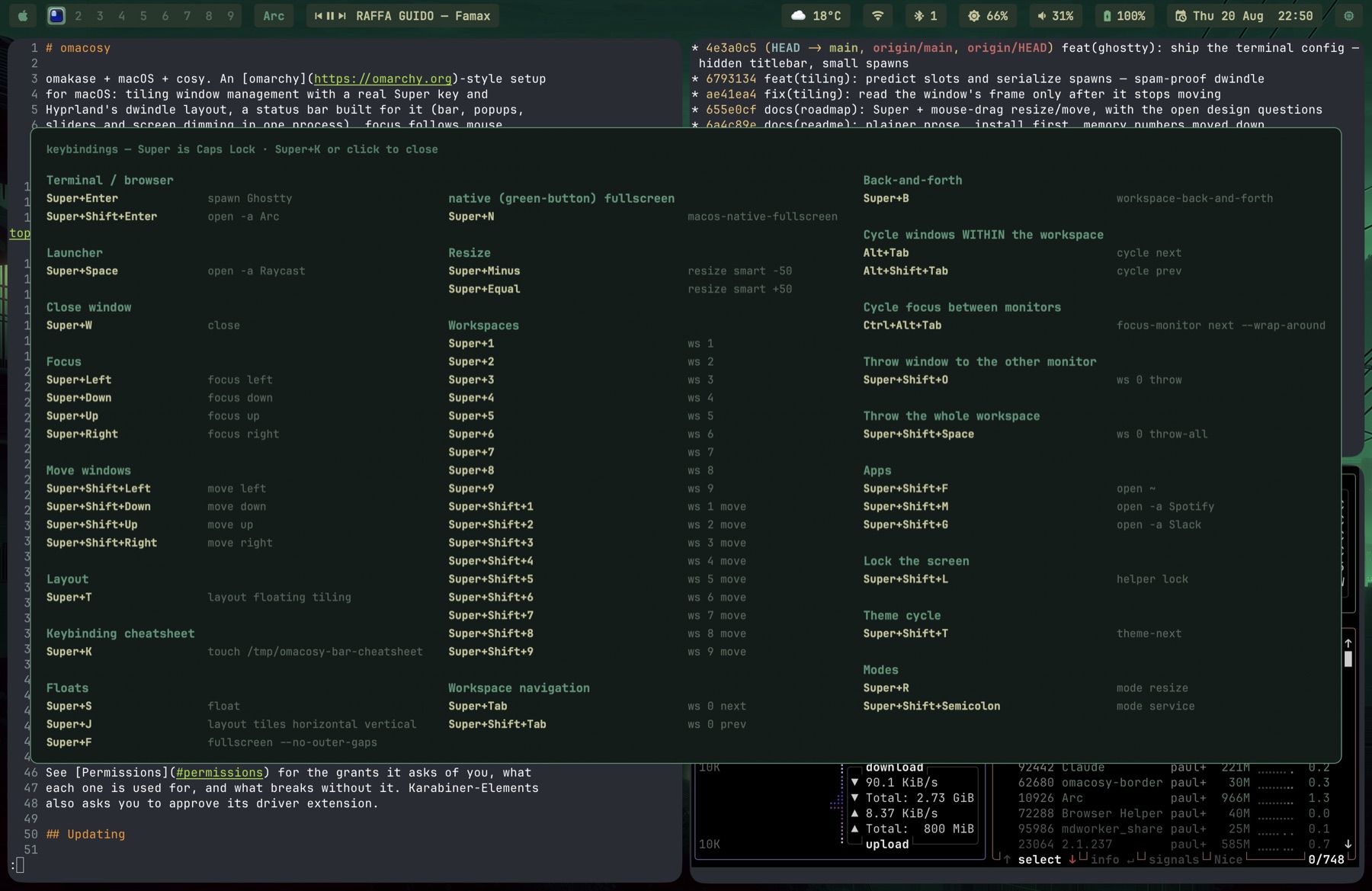
Screenshots, clipboard and app switching stay macOS's own
(Cmd+Shift+3/4/5, Cmd+C/V, Cmd+Tab). Alt+Tab above is the
window-scoped switcher macOS lacks.
On the modifier space. omarchy layers Super+Ctrl and Super+Alt
on top of Super. This setup cannot: Super IS cmd+ctrl+alt, so those
modifiers are already spent and Shift is the only layer left, two
against omarchy's four. Bindings that would collide are re-homed by
mnemonic (lock is Super+Shift+L, not Super+Ctrl+L), and the
overflow lives in binding modes instead.
Each display owns an independent set of nine workspaces, omarchy style:
main holds 1–9, secondary holds 11–19. Same last digit means the same
slot, and the bar and overview render only the slot digit. Super+N
switches the focused monitor's slot N (via omacosy-ws);
Super+Shift+N moves the window to that slot; Super+Shift+O throws
the window to the same slot on the other monitor. Windows open on the
workspace you're on; nothing is auto-assigned by app.
**U

 omacosy — настройка окружения рабочего стола для macOS в стиле omarchy: настоящее тайлинговое управление окнами с раскладкой dwindle как в Hyprland, собственный статус-бар, настоящая клавиша Super, фокус, следующий за мышью, свайпы рабочих пространств на трекпаде и живой обзор рабочих пространств — всё устанавливается из одного репозитория.