





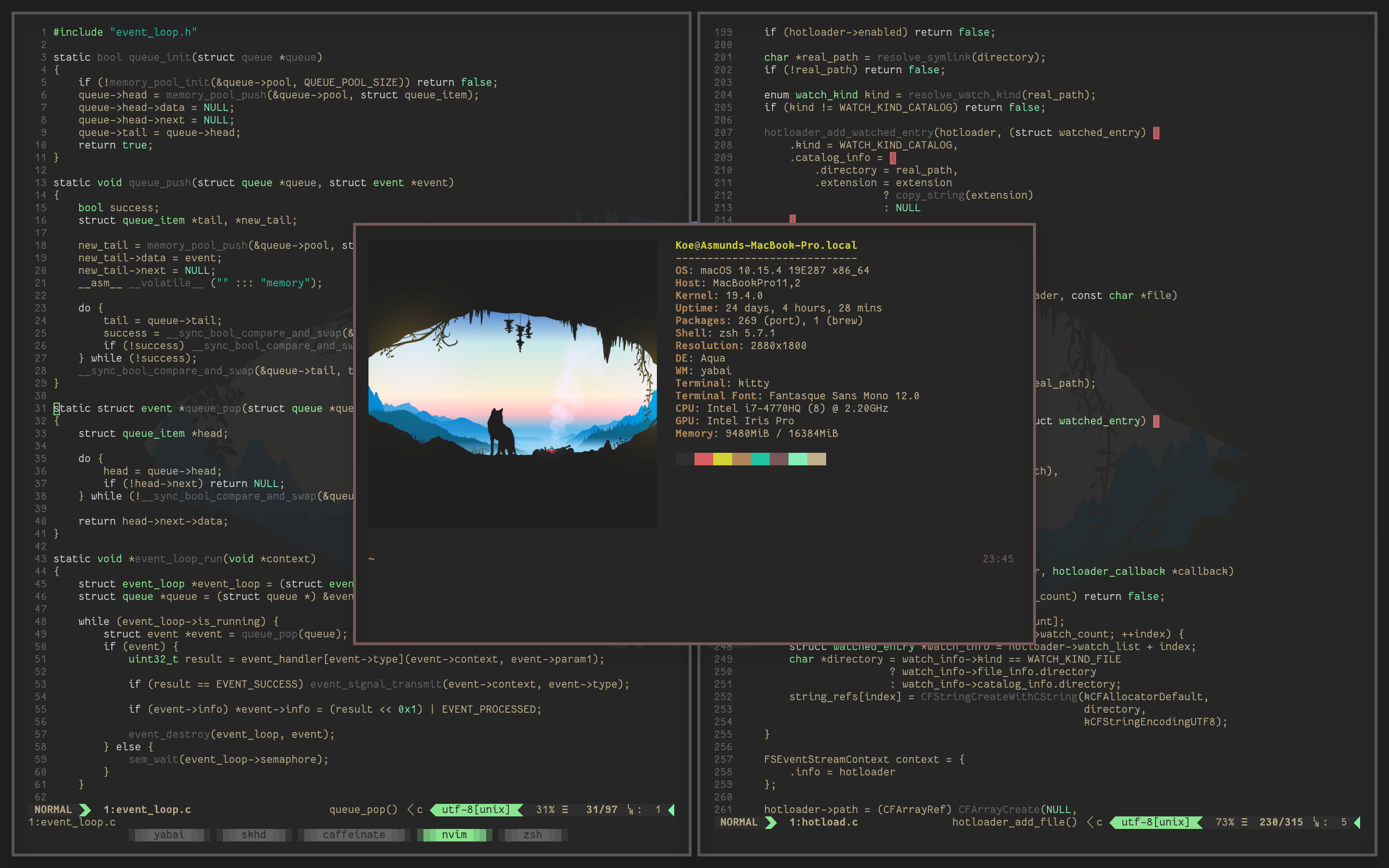
What is this?
 Yabai is a tiling window manager for macOS that extends the system's built-in window manager, arranging windows automatically using a binary space partitioning algorithm.
Yabai is a tiling window manager for macOS that extends the system's built-in window manager, arranging windows automatically using a binary space partitioning algorithm.Is this a separate app I open, or something that runs in the background and I control via a terminal?It's a background utility controlled through its own command-line interface; you don't interact with a window like a regular app.
It's a background utility controlled through its own command-line interface; you don't interact with a window like a regular app.How do I install and set it up?There's no single install command in the README; you follow the yabai wiki, which documents multiple installation methods and how to uninstall it completely.
There's no single install command in the README; you follow the yabai wiki, which documents multiple installation methods and how to uninstall it completely.Do I need anything else to set up keyboard shortcuts?Yabai itself doesn't handle shortcuts; you pair it with skhd (a separate hotkey daemon) or any other third-party shortcut tool to trigger its commands.
Yabai itself doesn't handle shortcuts; you pair it with skhd (a separate hotkey daemon) or any other third-party shortcut tool to trigger its commands.Do I need to disable System Integrity Protection to use it?Partially disabling SIP is optional but required for advanced features, since yabai injects a scripting addition into Dock.app to control the window server with elevated privileges.
Partially disabling SIP is optional but required for advanced features, since yabai injects a scripting addition into Dock.app to control the window server with elevated privileges.Does it work on Intel Macs too, or only Apple Silicon?Both are supported: Intel Macs need macOS Big Sur 11.0+ while Apple Silicon Macs need Monterey 12.0+, up through the current Tahoe 26 release.
Both are supported: Intel Macs need macOS Big Sur 11.0+ while Apple Silicon Macs need Monterey 12.0+, up through the current Tahoe 26 release.What macOS permissions does it need?It requires Accessibility API access to control windows at all, and additionally needs Screen Recording permission if you want window animations enabled.
It requires Accessibility API access to control windows at all, and additionally needs Screen Recording permission if you want window animations enabled.What does binary space partitioning actually do for my windows?It automatically splits your screen into a tree of rectangular regions as you open and close windows, so the layout stays tiled without you manually resizing anything.
It automatically splits your screen into a tree of rectangular regions as you open and close windows, so the layout stays tiled without you manually resizing anything.What else can yabai do besides tiling?It also supports focus-follows-mouse, disabling space-switching animations, and creating more than the default 16 macOS Spaces, among other extras.
It also supports focus-follows-mouse, disabling space-switching animations, and creating more than the default 16 macOS Spaces, among other extras.Are there apps that don't play well with yabai?Apps that use native macOS document tabs, like Terminal and Finder, misbehave when creating tabs under yabai; the recommendation is to avoid tabbing in them or set rules to float those windows.
Apps that use native macOS document tabs, like Terminal and Finder, misbehave when creating tabs under yabai; the recommendation is to avoid tabbing in them or set rules to float those windows.Can I skip disabling SIP entirely?Yes, SIP-related features are optional; basic tiling and window control work without touching System Integrity Protection, it's only needed for the elevated window-server features.
Yes, SIP-related features are optional; basic tiling and window control work without touching System Integrity Protection, it's only needed for the elevated window-server features.What are similar projects?omacosy, AgentOS, KiwiDesk, SketchyBar, polybar, sway, serpantinum, window-sweaters
omacosy, AgentOS, KiwiDesk, SketchyBar, polybar, sway, serpantinum, window-sweatersWhich topics is it in?desktop-environment, ricing, tiling-window-manager, accessibility, macos-app, apple-silicon, c, customization, utility, desktop, productivity, command-line-tool
desktop-environment, ricing, tiling-window-manager, accessibility, macos-app, apple-silicon, c, customization, utility, desktop, productivity, command-line-tool