switch
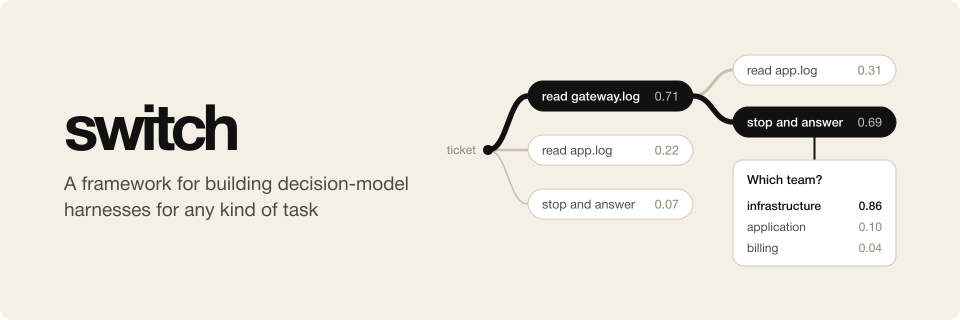
switch is a harness framework for decision models like Jev. It gives a decision model an agent loop for finite
choices. Your code turns the state of a task into typed questions, such as which next step to take from a short list,
and the model picks the answers.
https://github.com/user-attachments/assets/a5d834cb-f55b-4f2c-96cf-61ab1ba1e432
A simple explainer for switch, also on YouTube
A decision model answers typed questions with probabilities and writes no text, so it cannot generate the tool calls
that a coding agent harness such as Pi relies on. switch generates the tool calls for it in code,
and the model only picks one from that finite set. TypeSafe calls these models
System One models, and its Jev was the first;
llama.cpp serves open ones through the same API.
switch puts what many people already write by hand, a decision-model API called over several steps, behind one
abstract interface. You implement a domain, which defines the state of a task and the functions that turn a state into
the model's questions and its answers into the next state. Chess is a domain, and so is a rubric judge for evals.
Uses
A main use is a judge in an eval. At the end of a task run that involves many documents, the usual judge extracts the
text of the PDF, Word and Markdown files and puts all of it into the context. When the visual formatting of the output
is a criterion, every page has to go in as an image too. With 200 pages and a question that needs only a few of them,
most of that context is wasted. With switch, the decision model navigates the documents and takes in only what it
needs. The rubric judge works this way. It reads parts of files, looks at page
images and searches for terms, one step at a time, until it can grade each rubric item.
switch works with any decision model that pi-ai lists as a
classifier, Jev among them, as docs/DECISION_MODEL_API.md explains. Jev itself is weak
at chess, and as a judge it is not yet good enough to replace the strongest chat models. Once a better model has
generated enough data, an open decision model can be fine-tuned on one domain. Trained in a harness like switch's, it
should do that job both better and more cheaply. A narrow domain leaves a lot to gain, since an agent built for one
specific job could cost a hundredth of what a general model costs.
Concepts
- Domain: your code for one kind of task, such as chess or routing a support ticket. It gives each case as a state
machine.
- Case: one task of a domain, such as one game, loaded from a case folder.
- State: JSON with everything the domain needs to know about where a case is.
- Question function: gives the questions that the model must answer in a state. When it gives none, the run ends.
- Question and answer: a
bool, choice or score question, by id. Every answer comes with the model's
probabilities.
- Pick: a choice question whose answers are the state's choices, such as the legal moves. The
picking helper
builds it from a list of choices.
- Transition function: gives the next state from a state and the model's answers.
- View function: optional. Turns a state into what the model reads, within a token budget.
- Step: one round of questions, answers and transition.
- Outcome: optional. How a case ended in the domain's terms, such as "white wins".
- Trace: every state, question and answer of a run, in one file. A replay reads it and asks no model.
- Harness: a program that runs a domain on case folders, with switch's
run and replay commands.
How a run works
- The domain makes the case's initial state.
- The question function gives the state's questions. If there are none, the run ends.
- The model reads the view of the state and answers every question.
- The transition function makes the next state from the answers, and the run goes back to step 2.
A run also ends when a request fails, or at a step limit that a domain may set as a safety net.
docs/MATH.md writes the loop down in symbols.
Install
switch needs Node.js 22.18 or newer. Add it to a project from npm:
npm install @osolmaz/switch
| Import |
What it gives |
@osolmaz/switch |
The loop, the domain types, the pick helper, traces and replay |
@osolmaz/switch/models |
piAiDecider, which asks a classifier model that pi-ai lists |
@osolmaz/switch/cli |
commandLine, which gives a harness the run and replay commands |
@osolmaz/switch/testing |
A fake decider for tests that make no model calls |
The examples and the viewer live in this repository and are not on npm. To run them, clone it and
install its workspace with pnpm:
git clone https://github.com/osolmaz/switch.git
cd switch
pnpm install
Examples
- Rubric judge grades a saved answer to a task against the task's rubric.
- Chess plays chess against random moves, Stockfish, or itself.
- WikiRace races from one Wikipedia article to another by following links.
Write a domain
A domain gives initial, questions and transition, and optionally view. This one routes a support ticket. The
model reads logs one at a time until it picks stop, and then a last step asks which team gets the ticket.
import {
  type Choice,
  type ChoiceQuestion,
  type DomainShared,
  type JsonObject,
  picking,
  type StateMachine,
} from "@osolmaz/switch";

export interface Ticket {
  readonly text: string;
  readonly logs: Readonly<Record<string, string>>;
}

/** Where a ticket is: the logs read so far, with what each one said, whether reading is over, and the team. */
interface TriageState extends JsonObject {
  readonly read: readonly { readonly log: string; readonly text: string }[];
  readonly done: boolean;
  readonly team: string | null;
}

/** A log to read, or null to stop reading; the transition gets the choice back. */
interface ReadLog extends Choice {
  readonly log: string | null;
}

export const TRIAGE: DomainShared = { name: "triage", version: "0.1.0", limits: { steps: 20, windowShare: 0.9 } };

const TEAM: ChoiceQuestion = {
  type: "choice",
  instructions: "Which team should handle the ticket?",
  criteria: { billing: "Billing", infra: "Infrastructure", app: "Application" },
};

export function triageMachine(ticket: Ticket): StateMachine<TriageState> {
  const pick = picking<TriageState, ReadLog>({
    instructions: "Which log should be read next to route this ticket?",
    limit: 20,
    choices: (state) => [
      ...Object.keys(ticket.logs)
        .filter((log) => !state.read.some((entry) => entry.log === log))
        .map((log) => ({ type: "read-log", key: log, text: `Read ${log}`, log })),
      { type: "stop", key: "stop", text: "Stop reading: the evidence is enough", log: null, priority: -1 },
    ],
    transition: (state, { log }) =>
      Promise.resolve(
        log === null
          ? { ...state, done: true }
          : { ...state, read: [...state.read, { log, text: ticket.logs[log] ?? "" }] },
      ),
  });
  return {
    initial: () => Promise.resolve({ read: [], done: false, team: null }),
    questions: (state) => {
      if (state.team !== null) return {};
      return state.done ? { team: TEAM } : pick.questions(state);
    },
    transition: (state, answers) => {
      if (!state.done) return pick.transition(state, answers);
      const team = answers["team"];
      return Promise.resolve({ ...state, team: team?.type === "choice" ? team.choice : "unknown" });
    },
    view: (state) => Promise.resolve({ decisionState: { ticket: ticket.text, read: state.read } }),
  };
}
Run it with any classifier model that pi-ai lists. pi-ai finds the key in the environment, such as
TYPESAFE_API_KEY:
import { builtinModels } from "@earendil-works/pi-ai/providers/all";
import { run } from "@osolmaz/switch";
import { piAiDecider } from "@osolmaz/switch/models";

const decider = piAiDecider("typesafe/jev-latest", { registry: builtinModels() });
const result = await run(TRIAGE, triageMachine(ticket), decider);
// result.state is the last state, result.trace the trace, and result.ended "done", "step limit" or "failed".
docs/DOMAINS.md has the rules of picks, stop choices, views, limits and choice types.
Write a harness
A harness turns a domain into a program that runs case folders. Its setup returns a runner:
import { basename } from "node:path";
import { type Runner, runnerOf } from "@osolmaz/switch";
import { TRIAGE, triageMachine } from "./index.ts";
import { loadTicket } from "./load.ts";

export function triageSetup(): Promise<Runner> {
  return Promise.resolve(
    runnerOf({
      ...TRIAGE,
      caseId: (folder) => Promise.resolve(basename(folder)),
      load: async (folder) => triageMachine(await loadTicket(folder)),
      outcome: ({ state }) => ({ team: state.team }),
    }),
  );
}
commandLine makes it a program with run and replay. It is a Commander
program, so the harness can add commands of its own:
import { commandLine } from "@osolmaz/switch/cli";
import { triageSetup } from "./setup.ts";

await commandLine({ triage: { setup: triageSetup } })
  .name("triage")
  .parseAsync();
docs/DOMAINS.md covers definitions, a domain's own flags and API keys.
Run, watch and replay
examples/chess/src/main.ts run examples/chess/cases/white-seed-1 --out runs/chess
examples/chess/src/main.ts view runs/chess
examples/chess/src/main.ts replay examples/chess/cases/white-seed-1 runs/chess/cases/white-seed-1/trace.jsonl --fork 5 --out runs/fork
run writes a run folder with each case's result, trace and requests. A stopped run goes on where it stopped.view plays a run back in the browser, step by step, and follows cases live. It is the
viewer, a separate package in this repository that the examples add.replay runs a case again from its trace without the model. With --fork <n>, it repeats the first n steps and
lets a model go on from there.
docs/DOMAINS.md says when a replay fails and what a run folder holds.
License
MIT

 switch 是一个 TypeScript 框架,用于围绕决策模型(如 Jev)构建 harness。它为模型提供一个智能体循环,在一组简短、有限的带类型下一步选项中做选择,直到模型能给出最终答案。