hayamimi (早耳)


Real-time, multilingual speech-to-text on CPU only. Live subtitles, a
browser dashboard, speaker labels, and on-the-fly translation -- no GPU, no
cloud API, under 2GB RAM.
日本語版 README は README.ja.md にあります。
"早耳" (hayamimi) is Japanese for "quick ear" -- someone who picks up on
things fast. That's the design goal: partial subtitles appear while you're
still talking, and a finalized line lands roughly 100ms after you stop.
Why
Most CPU-only real-time transcription setups fall back to a single
general-purpose model (Whisper) and accept its accuracy ceiling. hayamimi
instead routes each utterance to whichever specialist model is best for its
language, all running as quantized (INT8) ONNX models via
sherpa-onnx -- no PyTorch, no CUDA.
On real broadcast Japanese audio (see docs/results/scorecard.md), that routing
gets 3.8% CER (remeasured 2026-09-01 with the head-dropout fix and CJK
number normalization in the pipeline), vs whisper-large-v3-turbo's 13.8%
on the same clips, while running at 10-50x realtime on a 6-core desktop CPU.
A full comparison against Whisper variants, cloud STT APIs, and other local
models -- including the languages where hayamimi loses -- is in
docs/results/comparison.md.
Features
| Feature |
What it does |
| 5-route language catalog |
ja/zh/ko/yue/en+24 EU languages each go to a dedicated best-in-class model; everything else (~1600 languages) falls back to Meta's Omnilingual ASR |
| Partial subtitles |
in-progress draft text updates every ~0.5s while you're still speaking |
| Fast finals |
a finalized line typically lands ~100ms after you stop talking (ja; see docs/design/goals.md for other languages) |
| Two-pass refinement |
after 2s of silence, recent utterances are batch re-decoded for a higher-accuracy "clean" transcript (ja real-broadcast CER 15.5% -> 12.0%) |
| Speaker labels |
--speakers tags each utterance S1/S2/... live via CAM++ nearest-centroid matching, then the refine pass re-diarizes each group with pyannote segmentation-3.0 and remaps clusters onto the same S{n} labels (mean DER 25.7% -> 13.9% on 5 AMI meetings, see Limitations) |
| Translation |
--translate en,zh,ko,es,... translates Japanese lines live (en via FuguMT; any other M2M-100 target code is accepted if the model's vocabulary supports it -- zh/ko/es have measured quality, see docs/design/translate_m2m.md) |
| Hotwords / user dictionary |
--hotwords biases decoding toward proper nouns (currently has no effect on the ja tier -- see Limitations); --replace does post-hoc find/replace and works everywhere |
| CJK number normalization |
conservative kanji-numeral -> arabic-digit conversion (ja/zh/yue only): magnitude numbers, 点-decimals, and digit-string years/codes; idioms/proper nouns are left alone by default (scripts/itn_cjk.py) |
| Runtime dictionary APIs |
RoutedASR.set_replacements()/set_itn_overrides() swap the find/replace and ITN exclude/force dictionaries mid-session; with --serve, GET/POST /replacements and /itn_overrides do the same over HTTP |
| Structured events + runtime config |
every stage of the pipeline (finals, translations, model loads, warnings, session summaries...) publishes to an EventHub an embedding app can listen to directly; --serve additionally exposes GET/POST /config and POST /reset for changing language/translation/VAD settings and resetting a session without restarting the process -- see "Embedding: runtime control and structured events" below |
| OBS overlay + dashboard |
--serve starts a local HTTP server with a browser-source overlay and a live dashboard |
| Network audio input |
--input ws accepts mic audio over a WebSocket (phone, ESP32/stackchan) and feeds it through the same pipeline, including --serve's dashboard/overlay |
| Memory-bounded |
LRU model eviction keeps resident models under a configurable cap (default: <2GB total) |
| CPU-only |
every model runs as quantized ONNX via sherpa-onnx; no GPU or PyTorch required |
Demo UI
--serve starts a local server exposing three views:
http://localhost:8833/dashboard -- the live dashboard: a partial-text
strip for in-progress speech, a finals feed with language badges, speaker
chips, and per-line latency, inline translations under each line, and a
second column with the refined (two-pass) transcript as it lands.http://localhost:8833/ -- a minimal OBS browser-source overlay
(add this URL as a Browser Source in OBS for stream captions). The
confirmed line and the in-progress line are separate rows; append
?show=final or ?show=partial to render only one of them, so each
can be placed and styled as its own OBS source.http://localhost:8833/transcript -- plain scrolling transcript
history.
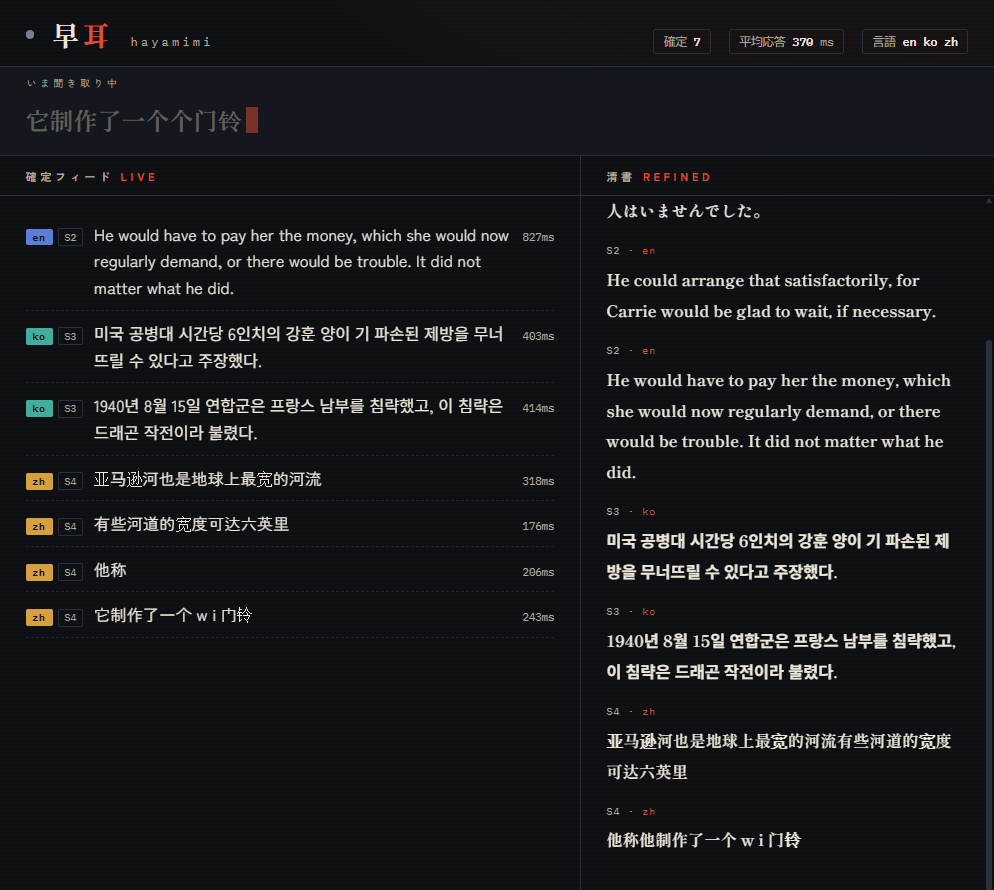
🎬 Watch the demo video — real 4-language audio (ja/en/ko/zh) transcribed live, replayed frame-accurately from a captured session.
--input ws runs a WebSocket ingest endpoint instead of reading the local
microphone, so a phone or a stackchan-class ESP32 board can stream mic audio
over the LAN and get it transcribed through hayamimi's normal pipeline:
.venv/Scripts/python scripts/realtime_transcribe.py --input ws --serve
# -> ws://<host>:8766/ingest accepts audio; http://localhost:8833/dashboard shows the results
Protocol: connect to /ingest, send one JSON text frame
({"sr": 16000, "format": "pcm_s16le", "channels": 1}), then stream raw
pcm_s16le audio as binary frames. The server resamples non-16kHz audio and
replies with the same partial/final/translation/refine JSON events the
dashboard's SSE stream carries, so a client can show its own subtitles too.
Only one audio-producing client is accepted at a time; scripts/ws_mic_client.py
is a dependency-free reference client (streams a wav file at real-time pace)
that doubles as a template for a phone/ESP32 implementation.
--input ws binds 127.0.0.1 by default, so the endpoint is localhost-only
until you opt in with --ws-host 0.0.0.0 -- do that only on a network you
trust, since /ingest has no authentication. The bound address is printed
to stderr on startup either way.
Embedding in another app
scripts/realtime_transcribe.py's pieces (RoutedASR, build_vad,
run_stream) are importable, not just CLI-only, and the session they build
can be reconfigured and observed while it runs: hub.add_listener(callback)
delivers structured JSON events (partial, final, refine,
model_load, warning, ...) in-process with no HTTP server, and --serve
adds GET/POST /config and POST /reset over the same session. The full
guide -- the event table, the /config keys, and what POST /reset does --
is in docs/guide/embedding.md. For Flutter/Dart,
see mobile/hayamimi_core/README.md.
Requirements
Python 3.10+ and ffmpeg on PATH. Developed and tested on Windows 11;
macOS/Linux are expected to work (all runtimes are cross-platform) but are
not yet CI-tested end to end — reports welcome.
Quickstart
python -m venv .venv

# Windows
.venv\Scripts\pip install -r requirements.txt
.venv\Scripts\python scripts\download_models.py

# macOS / Linux
.venv/bin/pip install -r requirements.txt
.venv/bin/python scripts/download_models.py

# Real-time transcription from your microphone
.venv/Scripts/python scripts/realtime_transcribe.py     # Windows
.venv/bin/python scripts/realtime_transcribe.py          # macOS/Linux

# With the dashboard + OBS overlay
.venv/Scripts/python scripts/realtime_transcribe.py --serve
# -> open http://localhost:8833/dashboard in a browser
scripts/download_models.py pulls ~3.1GB of pretrained models into
models/ (git-ignored). Pass --minimal for a ~1.1GB ja/en-only install
(ReazonSpeech, whisper-tiny, Silero VAD, Japanese punctuation). See
THIRD_PARTY_NOTICES.md for what each model's license commits you to.
CLI reference
All flags are on scripts/realtime_transcribe.py:
| Flag |
Default |
Description |
--wav PATH |
mic input |
simulate streaming from a 16kHz mono WAV file instead of the microphone |
--no-realtime |
off |
with --wav, don't sleep between chunks (fast batch processing) |
--input {mic,wav,ws} |
mic, or wav if --wav is given |
audio source; ws accepts audio over the network (see below) |
--ws-host HOST |
127.0.0.1 |
bind host for --input ws's /ingest endpoint; pass 0.0.0.0 to accept LAN clients |
--ws-port PORT |
8766 |
port for --input ws's /ingest endpoint |
--threads N |
4 |
inference threads per model |
--no-partial |
off |
disable in-progress draft subtitles |
--min-silence SEC |
0.35 |
silence duration that ends an utterance; lower = snappier finals, more splits |
--max-speech SEC |
12.0 |
force-finalize an utterance after this many seconds of continuous speech |
--max-resident N |
3 |
max non-tier0 models kept resident (LRU eviction); <=0 = unlimited |
--serve [PORT] |
off, 8833 |
serve the dashboard + OBS overlay at http://localhost:PORT |
--no-refine |
off |
disable the second-pass re-decode of utterance groups |
--transcript PATH |
none |
append refined transcript lines to this file |
--hotwords PATH |
none |
hotword list (one per line) to bias decoding toward proper nouns -- currently has no effect on the ja tier (ReazonSpeech's byte-level BPE tokens.txt can't encode them; a startup warning tells you how many failed). Use --replace for ja proper nouns instead |
--replace PATH |
none |
user dictionary: wrong=right per line, applied to all output |
--mode {single,balanced,fast} |
balanced |
language-switching preset. balanced switches only when both language detectors agree (see docs/eval/lid.md); single pins the language given by --lang and never switches; fast switches on every detection, matching pre-v0.2.0 behavior. Individual flags below override the preset |
--lang-switch-guard SEC |
2.0 |
treat a new-language detection shorter than this as noise: it can never count toward confirming a switch (see --lid-switch-confirm) and it suppresses the omnilingual fallback on an empty decode (0 disables) |
--lid-switch-confirm N |
2 |
consecutive new-language detections (each >= --lang-switch-guard long) required before the session actually switches language; raise for stickier single-language sessions |
--speakers |
off |
label utterances with speaker ids (S1, S2, ...); the refine pass re-diarizes each group with pyannote segmentation-3.0 |
--speaker-remap-threshold T |
0.35 |
cosine-similarity threshold for mapping the refine pass's local diarization clusters onto the session's global S{n} labels (the live fast path keeps its own 0.45 threshold) |
--translate [LANGS] |
off, en |
translate Japanese lines to these comma-separated languages. en uses the dedicated FuguMT module; any other M2M-100 target code (zh, ko, es, fr, ...) is accepted if the model's vocabulary supports it -- unvalidated targets (anything outside zh/ko/es) print a quality-not-measured note, see docs/design/translate_m2m.md |
Architecture
                          ┌─────────────┐
  mic / wav ───────────▶ │  Silero VAD │  0.35s end-of-speech + 0.8s preroll
                          └──────┬──────┘
                                 │ speech segment
                                 ▼
                   ┌───────────────────────────┐
                   │  whisper-tiny spoken-LID   │  runs on first ~4s while
                   │  (+ char-set arbitration)  │  the segment is still coming in
                   └─────────────┬─────────────┘
                                 │ language tag
                 ┌───────────────┼────────────────┬─────────────┬──────────────┐
                 ▼               ▼                ▼             ▼              ▼
             ┌───────┐      ┌─────────┐      ┌──────────┐  ┌─────────┐   ┌──────────┐
             │  ja   │      │   zh    │      │  ko/yue  │  │ en + 24 │   │  ~1600   │
             │ Reazon│      │Paraformer│      │SenseVoice│  │EU langs │   │  other   │
             │Speech │      │   -zh   │      │  small   │  │Parakeet │   │Omnilingual│
             │Zipform│      │         │      │          │  │TDT v3   │   │  ASR     │
             └───┬───┘      └────┬────┘      └────┬─────┘  └────┬────┘   └────┬─────┘
                 └───────────────┴────────────────┴─────────────┴─────────────┘
                                                │
                     partial (every ~0.5s)      │      final (~0.1s after end-of-speech)
                     ◀───────────────────────────┴───────────────────────▶
                                                │
                          ┌─────────────────────┼─────────────────────┐
                          ▼                     ▼                     ▼
                 ┌────────────────┐   ┌──────────────────┐   ┌────────────────┐
                 │ ja punctuation  │   │ speaker labeling  │   │  translation    │
                 │ (BERT restore)  │   │ (CAM++, --speakers)│   │ (FuguMT/M2M-100)│
                 └────────────────┘   └──────────────────┘   └────────────────┘
                                                │
                     2s silence: batch re-decode recent utterances (two-pass refine)
                                                │
                                                ▼
                              dashboard / OBS overlay / transcript file
Models are lazy-loaded on first use; an LRU cache evicts the
least-recently-used non-Japanese models (--max-resident) so memory stays
bounded no matter how many languages a session wanders through.
End-to-end (LID -> routing -> decode -> ja punctuation), real speech, no
preroll/two-pass (single clips). en uses WER, all others use CER (yue
t2s-normalized). Full methodology in docs/results/scorecard.md.
| Language |
Clips |
LID accuracy |
Route |
Mean error |
Mean RTF |
| ja |
15 |
15/15 |
ReazonSpeech |
3.8% |
0.090 |
| en |
15 |
15/15 |
Parakeet v3 |
2.3% |
0.102 |
| zh |
12 |
12/12 |
Paraformer-zh |
6.6%* |
0.084 |
| ko |
12 |
12/12 |
SenseVoice |
8.1% |
0.060 |
| yue |
12 |
12/12 |
SenseVoice |
6.1% |
0.043 |
RTF (real-time factor) well under 0.2 across every route means each route
runs 9-16x faster than realtime on CPU alone -- see docs/design/goals.md for the
full target table and docs/results/benchmarks.md for the complete iteration log
(30+ measured changes, latency/memory/accuracy tradeoffs and why each one was
made or rejected).
Headline numbers from that log:
- Japanese CER 3.8% on real broadcast audio, vs. 13.8% for
whisper-large-v3-turbo on the same clips. The optional refine-time ja
second opinion (--refine-ja-second-opinion) measured 4.0% on a separate
50-minute broadcast set (hayamimi-paper harness).
- *zh's 6.6% includes ~1.3pt of numeral-notation mismatch: the pipeline now
writes arabic numerals ("1000") where some references spell them in kanji
("一千") -- a scoring-convention gap, not misrecognition.
- ~100ms mean final latency (ja, punctuated); ~236ms mean / 552ms max
across a 5-language soak test with every feature enabled.
- <2GB RAM with
--max-resident 3 (1.35GB at --max-resident 2).
Limitations (honest list)
- Code-switching mid-sentence is not supported. The router picks one
language per utterance; a sentence that mixes Japanese and English within
itself will have the minority-language portion mangled or dropped.
Utterance-level switching (e.g. an interpreter alternating full sentences)
works well; word-level switching within one sentence does not.
- Very short utterances after a jingle/sting/BGM burst can misroute.
The language-switch guard (
--lang-switch-guard, paired with
--lid-switch-confirm) mitigates this but confidently-wrong LID+decode
combinations (where the garbled text happens to match the wrong
language's character set) remain a known blind spot -- see
docs/results/benchmarks.md's iteration #29 for a quantified before/after.
--lid-switch-confirm 1 --lang-switch-guard 0 fully disables the sticky
hysteresis (every detection switches the session immediately), trading
noise robustness for maximum responsiveness -- useful when validating
whether the lock itself, rather than its tuning, is the right call for
your setup.
- A session's very first utterance always confirms against SenseVoice
before deciding the language (see
docs/eval/noise.md's dual-LID confirm
section), so a whisper-tiny bootstrap misfire can no longer route the
session to a language with no matching model. Languages outside
SenseVoice's 5 (ja/en/zh/ko/yue) -- European/--minimal-uncovered ones --
still need --lang-switch-guard-length segments repeated
--lid-switch-confirm times to become the session's confirmed language,
so a legitimate European-language session establishes with a short delay
at startup rather than instantly.
--hotwords currently has no effect on the ja (ReazonSpeech) tier.
ReazonSpeech's tokens.txt is byte-level BPE, incompatible with the
modeling_unit=cjkchar encoding hayamimi uses for hotwords, so every
hotword fails to encode (sherpa-onnx only reports this as stderr warnings
and still exits 0 -- see GitHub issue #1). hayamimi now prints a startup
warning telling you how many hotwords failed to encode; use --replace
for ja proper nouns instead. A real fix needs either a matching
bpe.model for the ReazonSpeech release (not currently shipped) or a
from-scratch byte-BPE hotword encoder -- tracked as future work.- Two overlapping speakers are not separated, even after the refine
pass -- pyannote segmentation-3.0 can flag overlap regions, but hayamimi
doesn't do overlap-aware transcription (whichever speaker's turn is
processed first wins). What the refine pass does do now: instead of
a plain majority vote across a group's live-pass labels, each finalized
group (silence gap or 25s length

 hayamimi is a real-time, multilingual speech-to-text tool that runs entirely on CPU, giving you live subtitles, a browser dashboard, speaker labels, and on-the-fly translation without a GPU or cloud API.