









44.7K ·GitHub
Что это такое?
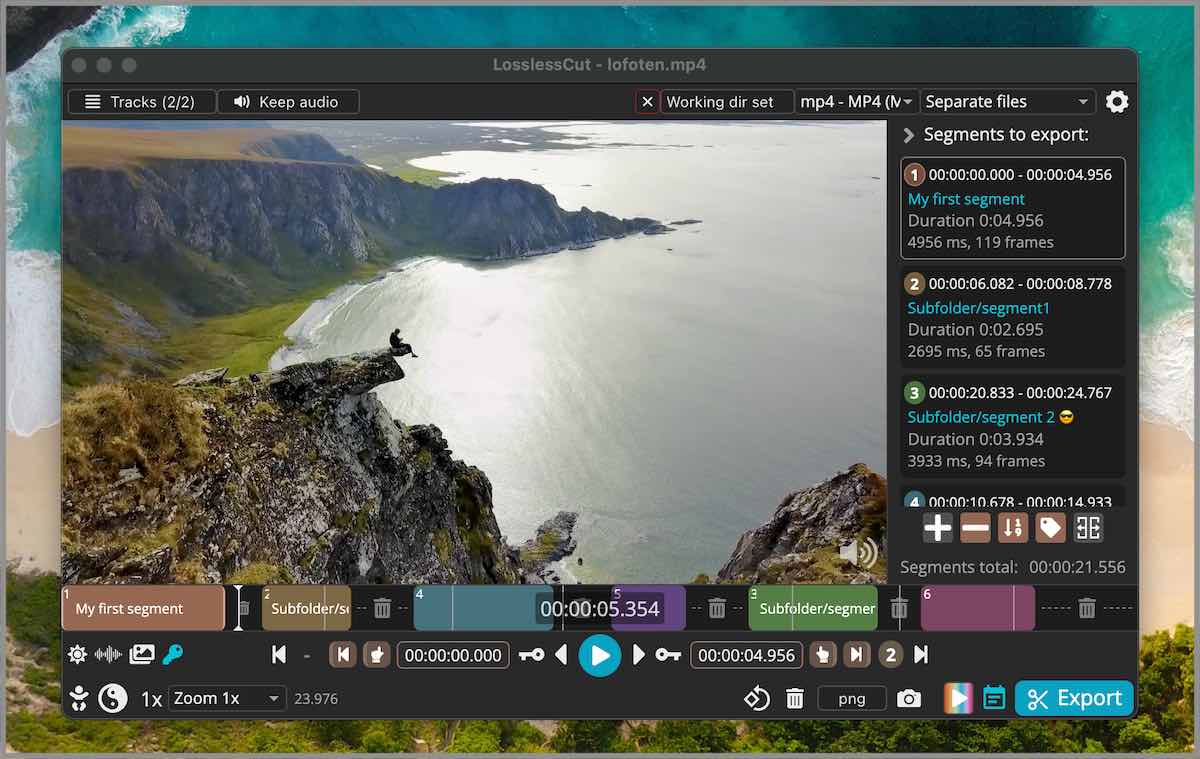
 LosslessCut — кроссплатформенный графический интерфейс для FFmpeg, который позволяет очень быстро и без потерь качества резать, обрезать, объединять и переупаковывать (ремуксить) видео- и аудиофайлы без перекодирования.
LosslessCut — кроссплатформенный графический интерфейс для FFmpeg, который позволяет очень быстро и без потерь качества резать, обрезать, объединять и переупаковывать (ремуксить) видео- и аудиофайлы без перекодирования.Это видеоредактор или просто инструмент для обрезки?Это настольное приложение с графическим интерфейсом на основе Electron/FFmpeg. Скорее это инструмент для нарезки и переупаковки, а не полноценный редактор: он делает нарезку без потерь, управляет дорожками и редактирует метаданные, но не занимается перекодированием и эффектами.
Это настольное приложение с графическим интерфейсом на основе Electron/FFmpeg. Скорее это инструмент для нарезки и переупаковки, а не полноценный редактор: он делает нарезку без потерь, управляет дорожками и редактирует метаданные, но не занимается перекодированием и эффектами.Нужно ли отдельно устанавливать FFmpeg?Нет, исполняемые файлы FFmpeg и ffprobe входят в релиз приложения: они загружаются для каждой платформы в процессе сборки.
Нет, исполняемые файлы FFmpeg и ffprobe входят в релиз приложения: они загружаются для каждой платформы в процессе сборки.Работает ли это с любым видеоформатом?Воспроизведение опирается на HTML5-плеер Chromium, поэтому нативно воспроизводятся только некоторые форматы (MP4, MOV, WebM, Matroska, OGG, WAV с H264/AV1/VP8/VP9/H265 и т. д.). Файлы, которые не поддерживаются, можно конвертировать в низкокачественную копию для предпросмотра, но сама нарезка всё равно выполняется без потерь на исходном файле.
Воспроизведение опирается на HTML5-плеер Chromium, поэтому нативно воспроизводятся только некоторые форматы (MP4, MOV, WebM, Matroska, OGG, WAV с H264/AV1/VP8/VP9/H265 и т. д.). Файлы, которые не поддерживаются, можно конвертировать в низкокачественную копию для предпросмотра, но сама нарезка всё равно выполняется без потерь на исходном файле.Умеет ли оно пакетный экспорт нескольких файлов?Пока нет — в README прямо отмечено «без массового/пакетного экспорта» как текущее ограничение быстрого сценария работы с несколькими файлами.
Пока нет — в README прямо отмечено «без массового/пакетного экспорта» как текущее ограничение быстрого сценария работы с несколькими файлами.Можно ли автоматизировать нарезку без графического интерфейса?Да, есть базовый CLI и HTTP API для скриптовой нарезки, а также продвинутый язык выражений на основе JS для запросов и изменений сегментов.
Да, есть базовый CLI и HTTP API для скриптовой нарезки, а также продвинутый язык выражений на основе JS для запросов и изменений сегментов.Можно ли импортировать список точек нарезки из другой программы?Да, сегменты можно импортировать и экспортировать как маркеры глав MP4/MKV, текстовые файлы, главы YouTube, CSV, CUE или XML-списки монтажных решений (DaVinci, Final Cut Pro).
Да, сегменты можно импортировать и экспортировать как маркеры глав MP4/MKV, текстовые файлы, главы YouTube, CSV, CUE или XML-списки монтажных решений (DaVinci, Final Cut Pro).Может ли оно скачивать видео напрямую, например по ссылке?Да, оно поддерживает загрузку видео по HTTP без потерь качества, включая потоки HLS (.m3u8).
Да, оно поддерживает загрузку видео по HTTP без потерь качества, включая потоки HLS (.m3u8).What are similar projects?filmcraft, shotcut, FFmpeg-Builds, OpenCut, mpv, Recordly, shrimply, ffmpeg-libav-tutorial
filmcraft, shotcut, FFmpeg-Builds, OpenCut, mpv, Recordly, shrimply, ffmpeg-libav-tutorialWhich topics is it in?lossless, video-editor, codec, player, gpl, raspberry-pi, video-processing, ffmpeg, editor, audio, electron, video
lossless, video-editor, codec, player, gpl, raspberry-pi, video-processing, ffmpeg, editor, audio, electron, video