TokenEconomizer: Experience-Driven Black-Box Cost Control for Coding Agents
Aaron J. Li1,
Weijia Xu2,
Chandan Singh2,
Zixiao Chen3,
Jeevana Priya Inala2,
Charlotte Siska3,
Acar Tamersoy3,
Bin Yu1,
Ion Stoica1,
Michel Galley2,
Jianfeng Gao2
1UC Berkeley 2Microsoft Research 3Microsoft Security
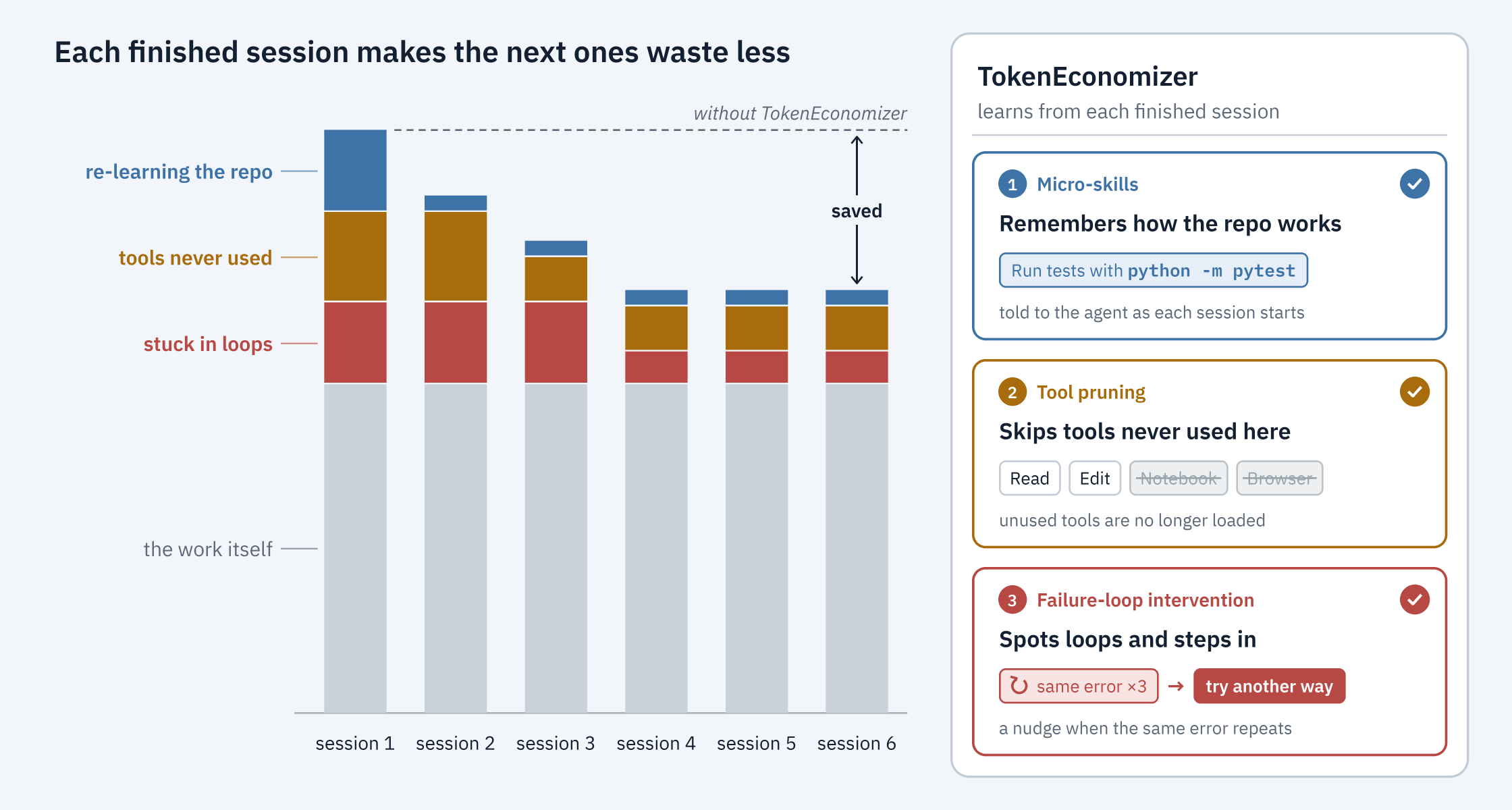
Our measurement on SWE-Bench tasks: 18.4–30.9% lower mean cost across five agent–model
combinations, cheaper in all 30 repository × combination cells, and Pass@1 up in
4 of 5. Results
TokenEconomizer makes coding agents cheaper to run in the repositories you work in often,
without changing the agent itself. It learns from the sessions an agent has already run in a
repository, and uses that experience to cut waste in the sessions that follow. It has three
mechanisms:
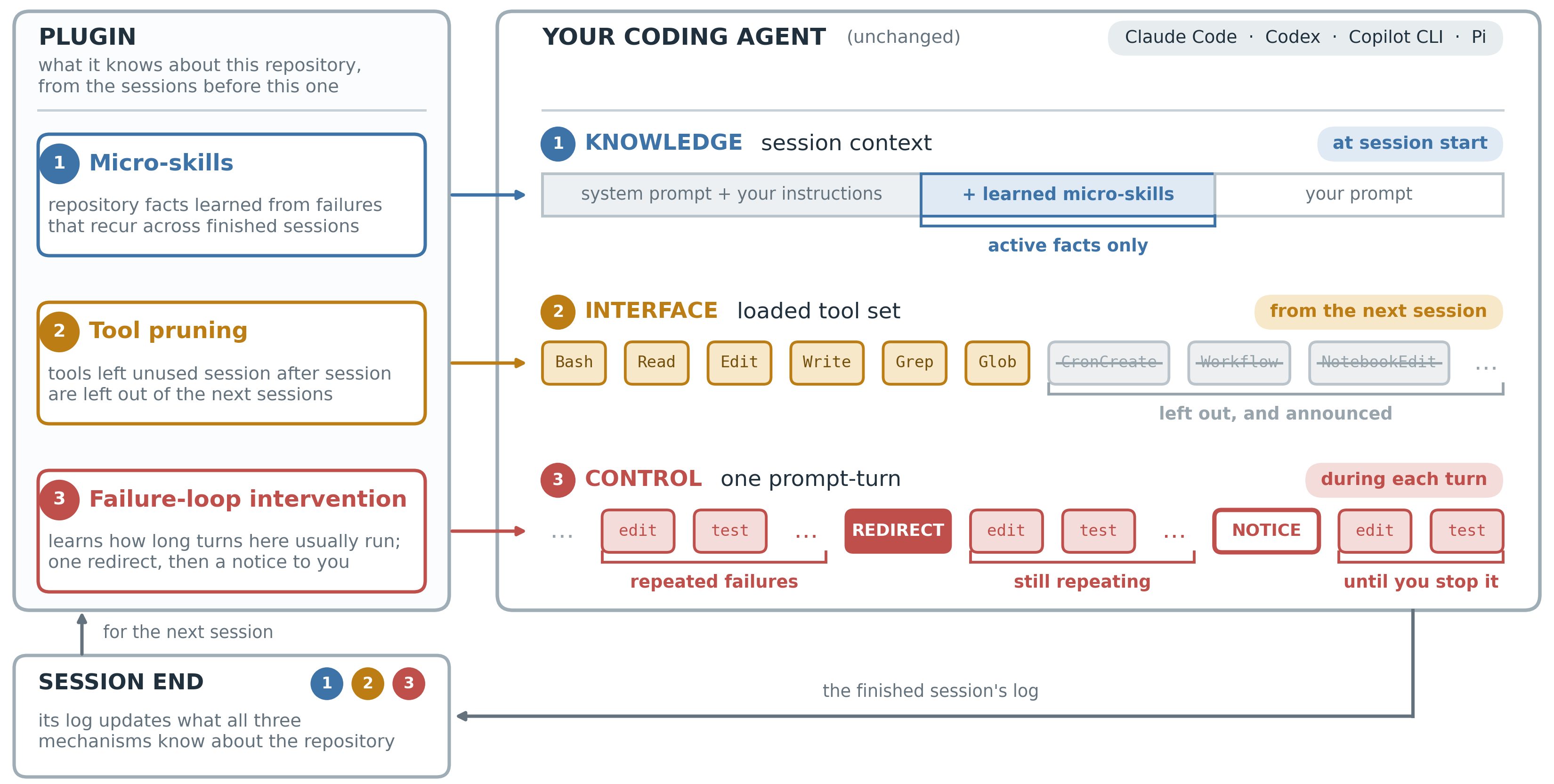
Micro-skills: remember how the repository works. Sessions keep rediscovering the same
facts: a build step that must run first, the spelling of a command that works here
(python -m pytest where pytest is missing, npx tsc where tsc is), an environment
variable a command needs, where generated files live. Micro-skills learns such facts, in any
language, from two sources: failures that repeat across sessions, and a model that reviews the
recent sessions every k sessions (k = 3) and proposes facts. A fact is stated at the start
of each session once three sessions have confirmed it, and dropped when later sessions
contradict it.
Tool pruning: stop loading tools that go unused. Every loaded tool's definition is sent with
every request. A tool that goes unused over p prompts spread across at least m sessions, or
over s sessions of any length (p = 10, m = 2, s = 5), is left out of the next sessions
through the agent's own settings. One command brings it back.
Failure-loop intervention (the loop guard): step in when a turn is stuck. When a turn (the
agent's work on one prompt) keeps hitting the same failures, a judge model checks whether it is
stuck. If the judge is at least c sure (c = 0.7), the agent gets a redirect (a short note,
added to its context, to try another approach), at most r times per turn (r = 1). If the
turn is still stuck after that, TokenEconomizer tells you how to stop it; it never stops a turn
itself.
TokenEconomizer is a plugin for Claude Code, Codex, the GitHub Copilot CLI and Pi,
with experimental support for opencode, Cursor Agent, Grok Build, Hermes Agent,
the Antigravity CLI and Factory Droid. Each italic
letter above is a setting, shown with its default (Settings), and each mechanism can be turned on or
off. The plugin announces each action in one line, and if any part of it fails, your session
carries on as if it were not installed. Its model calls (the fact proposer, and the judge with the
redirect it writes) run through your own agent, on the same plan or login, and their cost is
included in its reports. What it learns stays on your machine, in ~/.tokeneconomizer.
Results
The paper ran five agent–model combinations on the same 277 SWE-Bench tasks from six repositories.
Each task ran as its own session, and each repository's tasks ran in order, starting with nothing
learned. Costs include every model call TokenEconomizer made. Within each repository and
combination, cost fell by 5–40%. The savings held on Web-Bench (16–21% lower) and on two
security-auditing benchmarks where every task is in a new repository (6–20% lower). The
project page has interactive charts, per-repository numbers
and nine annotated runs, and experiments/ reruns the SWE-Bench and
Web-Bench experiments.
How it works
Coding agents are built to finish tasks, not to keep them cheap. Every turn pays again for the
agent's instructions, every loaded tool, and the conversation so far. Developers use the same
agent on the same repository again and again, so much of that cost repeats: the same facts
rediscovered, the same unused tools sent, the same kinds of failing loops. TokenEconomizer leaves
the agent's model, weights and code alone and learns across a repository's sessions instead of
treating each one on its own, so whatever the plugin spends is paid back over the sessions that
follow. Four principles guide the mechanisms:
Work through what the agent already reads. Facts enter the context at session start, and
tools are removed through the agent's own settings, so nothing depends on the agent learning a
new tool.
Count cost as it is billed. Most tokens in a session are cached re-reads, so cost is
computed with cache pricing, and it includes the plugin's own model calls.
Protect task success. Facts form only from repeated evidence, tools are removed only after
going unused, and the loop guard leaves alone a turn that is still making progress.
Keep every action reversible. A fact that later sessions contradict is dropped, removed
tools can be given back, and the loop guard only redirects and tells you: stopping a turn is
your call.
Quick start
You need one of these agents, signed in any way it supports, and Python 3.10 or newer on
PATH. The plugin needs no API key of its own and never handles credentials, so any plan or
login works.
Install
Run these commands in the folder where you want to keep the clone. Claude Code, Codex, the
Copilot CLI and opencode run the plugin from the clone, so leave it in place. Then start the agent
in one of your repositories.
Claude Code
git clone https://github.com/microsoft/TokenEconomizer.git
claude plugin marketplace add "$PWD/TokenEconomizer"
claude plugin install tokeneconomizer@tokeneconomizer
Start claude, trust the folder (Yes, I trust this folder), and run
/tokeneconomizer:status, allowing its script if asked. Once per machine, and again after Claude
Code updates, run /tokeneconomizer:toolprune refresh-catalog.
Start codex, choose Trust and continue for the folder, then at Hooks need review
choose Trust all and continue. The hooks take effect from your next Codex session, so quit
(/exit), start codex again, and check with $tokeneconomizer:status.
Start copilot, choose Yes, and remember this folder for future sessions, and run
/tokeneconomizer:status, choosing Yes to run its script. Once per machine, and again after
Copilot updates, run /tokeneconomizer:toolprune refresh-catalog.
Pi
pi install git:github.com/microsoft/TokenEconomizer
Start pi and run /te status.
Factory Droid (experimental; micro-skills, the loop guard and session cost, not tool pruning)
git clone https://github.com/microsoft/TokenEconomizer.git
cd TokenEconomizer
python scripts/build_plugin.py --droid
droid plugin marketplace add "$PWD/dist/tokeneconomizer-droid"
droid plugin install tokeneconomizer@tokeneconomizer-droid --scope user
Start a new Droid session (its hooks are snapshotted at startup) and run
/tokeneconomizer-status. Droid keeps each session's token usage in a settings file beside its
log, so folded sessions are priced like any other host's. Its TUI has no persistent per-tool
setting, so tool pruning stays off; and because droid exec writes a session log of its own,
micro-skills' paid proposer and the loop guard's judge stay off until droid_sidecall is on
(when on, they may use only Droid's read-only Read tool).
See docs/DROID.md for what works and how to import earlier sessions.
Reload Cursor, confirm tokeneconomizer appears in Customize, then send a prompt in a repository.
Check its state from a terminal with ~/.tokeneconomizer/bin/te --host cursor status. Cursor's
published hooks provide session, prompt, tool-result and completion events. Its transcript format
and per-session token usage are not a supported public interface, so the adapter records needed
hook events locally and reports session cost as unavailable. Cursor support is macOS and Linux
only: on Windows, Cursor runs hook commands through PowerShell, and this plugin's launcher is a
POSIX shell script.
Grok runs Claude Code plugins, so this is the Claude Code plugin: grok loads plugin/hooks/hooks.json
and TokenEconomizer recognises the grok session in the hook payload. (If you already installed it
for Claude Code, grok reads ~/.claude/plugins and runs it in your sessions; this version reads
those as grok sessions.) Micro-skills and the loop guard only; tool pruning is not available.
Confirm tokeneconomizer is enabled in grok plugin list, start grok, and check with
~/.tokeneconomizer/bin/te --host grok status.
The learned facts arrive with the session's first tool call, not at its start
(its limits).
Start agy and send a prompt in a repository, then check with
~/.tokeneconomizer/bin/te --host antigravity status. agy has no plugin commands, so the
plugin's commands run from a terminal. The plugin makes no model call through agy, which has no
option that runs a prompt with every tool off, so the paid proposer and the loop guard are off
and tool pruning is not available. macOS and Linux only:
on Windows agy runs hook commands through cmd /c, and this plugin's launcher is a POSIX shell
script. See its limits.
The one file serves both generations: opencode 1.x reads its server entry, 2.x its setup.
Start opencode and send a prompt, then check in the repository with
~/.tokeneconomizer/bin/te --host opencode status. opencode has no plugin commands, so the
plugin's commands run from a terminal.
Hermes Agent (experimental; micro-skills and the loop guard, on the classic CLI and one-shot
runs)
Link it rather than running hermes plugins install, which leaves the launchers behind when given
this directory and refuses the whole repository at its security scan. Send a prompt, then check in the repository with ~/.tokeneconomizer/bin/te --host hermes status.
If the install worked, the status command prints a short status block. refresh-catalog
records every tool a session loads (without a model call), so that tool pruning can consider all
of them. Keep the marketplace path absolute, as above: the Copilot CLI reads a relative path such
as ./TokenEconomizer as the name of a GitHub repository.
To update:
Agent
Update
Claude Code, Copilot CLI, opencode
git pull in the clone
Factory Droid
git pull in the clone, then the build_plugin.py --droid and install lines again
Hermes Agent
git pull in the clone, then hermes gateway restart
Antigravity CLI
build the bundle again and agy plugin install it
Codex
git pull in the clone, then the codex plugin add line again
Pi
pi update --extensions
plugin/README.md walks through each agent in more detail, including
uninstalling, using Copilot with your own model key, and troubleshooting.
Supported versions
Agent
Supported
Older versions
Claude Code
2.1.300 to 2.1.310
not supported
Codex
0.153.1 to 0.164.0
not supported
Copilot CLI
1.0.83 to 1.0.102
not supported
Pi
1.2.0 to 1.3.0
0.99.x: load the extension by path (below)
Cursor Agent (experimental)
3.24.9 and cursor-agent 2026.11.05, macOS and Linux (below)
not tested
Grok Build (experimental)
1.0.70
not tested
opencode (experimental)
1.19.5 and 2.2.0
not tested
Hermes Agent (experimental)
0.22.5
not tested
Antigravity CLI (experimental)
agy 1.5.1, macOS and Linux
not tested
Factory Droid (experimental)
0.233.0, macOS (below)
not tested
The commands above were tested on the oldest and newest version in each range; newer versions
have not been tested yet.
Codex before 0.141.0 does not run plugin hooks at all.
Pi 0.99.x: instead of pi install, clone the repository and start each session with
pi --extension /path/to/TokenEconomizer/plugin/pi/tokeneconomizer.ts, using your clone's
full path; git pull in the clone updates it.
opencode support is experimental: it was tested on 1.19.5 and 2.2.0 only, and not in the
2.x terminal UI.
Cursor Agent support is experimental. Cursor 3.24.9 loaded the local plugin. On
cursor-agent 2026.11.05, cursor-agent --trust -p delivered sessionStart, postToolUse,
afterShellExecution and sessionEnd, but not beforeSubmitPrompt or stop; context returned
from sessionStart and postToolUse reached the model. Prompts are then counted from Cursor's
own transcript and a run that ends as completed closes its turn. Session usage stays unavailable,
and the interactive TUI has not been tested.
Grok Build support is experimental: it was verified on 1.0.70 only, against its documented
hook contract and live hook payloads. Learned facts reach the model with the session's first tool
call, and tool pruning is not available. See its limits.
Antigravity CLI support is experimental: it was written against agy 1.5.1's hook contract
and transcript format, which are not a public interface, and only micro-skills' LLM-free facts
are supported: the plugin makes no model call through agy. See its limits.
Hermes Agent support is experimental: it was tested on 0.22.5 only, with a scripted local
model and one free real model, on the classic CLI and one-shot runs only. Micro-skills and a
redirect reaching a real model are verified there; the still-stuck notice reaching a person is
not. Its other surfaces (the Ink TUI, the Desktop app, messaging platforms, cron) and
subagents are ignored, and tool pruning is not available. See
its limits.
Factory Droid support is experimental: it was tested on 0.233.0 only, on macOS. Droid
documents the hook contract this adapter uses, and the plugin's own hook output is covered by
tests; a learned fact reaching a live Droid model was verified on 2026-11-05 (a new session
received the 793-character block as hookSpecificOutput.additionalContext and the model
repeated it). Droid's TUI has no persistent per-tool setting (Factory issue #65), so tool
pruning is not available; its session logs are read for micro-skills and the loop guard, and
priced from the usage Droid writes beside each log. See its notes.
Everyday commands
Work as usual; the plugin needs nothing from you. To see or change what it does, use its
commands. They have the same names on every agent; only the way you type them differs:
Agent
Type a command as
Claude Code, Copilot CLI
/tokeneconomizer:<command>
Codex
$tokeneconomizer:<command>
Pi
/te <command>
opencode
from a terminal: ~/.tokeneconomizer/bin/te --host opencode <command>
Cursor Agent
from a terminal: ~/.tokeneconomizer/bin/te --host cursor <command>
Grok Build
from a terminal: ~/.tokeneconomizer/bin/te --host grok <command>
Hermes Agent
from a terminal: ~/.tokeneconomizer/bin/te --host hermes <command>
Antigravity CLI
from a terminal: ~/.tokeneconomizer/bin/te --host antigravity <command>
what it learned and did here, and what your sessions cost
microskills
the facts it injects, and those still forming
toolprune
the tools it left out, and the evidence (not on Pi, opencode, Hermes Agent, the Antigravity CLI or Factory Droid)
toolprune restore
give them back; they will not be removed again
config
every setting in effect
config set microskills=on
turn a mechanism on (or =off) in this repository; add --global for every repository
Inside an agent, a command costs one model turn; from a terminal it is free. The other commands
(repos, doctor, config unset, ...) and each agent's permission prompts are listed under
Commands.
Settings
Tool pruning and the loop guard are on by default; with these defaults, the plugin calls a model
only when a turn shows signs of looping: the judge, and the redirect it writes if it finds the
turn stuck. Micro-skills is off by default, because its proposer adds model calls and how much it
saves depends on the repository and the work you do there. What each of these calls reads, how
often it runs and which model it uses are listed under
Model calls. Each mechanism has its own switch
(microskills, toolprune, loopguard) that takes on or off, and the italic letters above
are these settings:
Setting
Default
What it sets
k
microskills_propose_every
3
sessions between runs of micro-skills' fact proposer
p
toolprune_evidence
10
prompts a tool must go unused before it is left out
m
toolprune_min_sessions
2
sessions those prompts must span
s
toolprune_sessions
5
or this many sessions, of any length
q
toolprune_quiet_minutes
60
minutes your sessions here must be idle before a deny list is written
e
loopguard.envelope_min_samples
5
turns here that ended well (no failing check after the last edit) before the loop guard acts
c
loopguard.judge_confidence
0.7
how sure the judge must be that a turn is stuck
r
loopguard_nudges
1
redirects per turn before the guard only tells you
b
loopguard.backstop_mult
2.5
how many times its usual length a churning turn may run before it is redirected without the judge
droid_sidecall
off
on Droid, allow the plugin's own model calls, which run droid exec
Change them with config set, shown here in Claude Code's form (other agents type it as in
Everyday commands):
/tokeneconomizer:config set microskills=on                 # turn micro-skills on
/tokeneconomizer:config set microskills_propose_every=5    # k = 5: propose facts less often
/tokeneconomizer:config set toolprune_evidence=20          # p = 20: wait for twenty unused prompts
/tokeneconomizer:config set loopguard_nudges=2             # r = 2: redirect twice before telling you
On Droid, the plugin's own calls run droid exec, which writes a session log of its own, so
they stay off until config set droid_sidecall=on (TE_DROID_SIDECALL=1 does the same from a
terminal). When on, they run with --only-tools Read, so Read is the only tool they may use.
With them off, microskills=envfacts still learns and the loop guard keeps its rule-based
backstop; only the paid fact proposer and the judge wait.
Tool pruning counts prompts so that long sessions weigh more, and requires m sessions so that a
single session never decides alone. It writes the deny list only once your sessions in the
repository have been idle for q minutes (or, at the latest, a day after the list formed): a
conversation resumed after its tools change must write its whole history to the prompt cache again
instead of reading it, and after an idle hour that cache has expired anyway.
On Claude Code, the plugin can also learn from a repository's earlier sessions, read from Claude
Code's own logs oldest first and without any model call. This is off by default, and a
repository's history is read only before the plugin has learned from any session there, so turn
it on right after installing: with config set history_import=on --global, the first session in
each repository reads that repository's earlier sessions in the background (see Earlier
sessions). A deny list that rests on those earlier sessions
waits for toolprune apply, even under auto.
Besides on and off, two modes are useful: toolprune=propose only proposes the deny list, and
nothing changes until you run toolprune apply; microskills=envfacts learns facts only from
repeated failures, with no model calls.
To change a single session, set an environment variable when you start the agent:
TE_DISABLE=1 claude turns the whole plugin off, and TE_LOOPGUARD=off codex turns off one
mechanism (likewise TE_MICROSKILLS and TE_TOOLPRUNE). Every setting and its default are
listed under Settings; each one's environment variable is TE_ plus
its name in capitals.
What it does on each agent
Micro-skills and the loop guard work the same way on every agent. Each agent learns on its own:
facts, tool evidence and the loop guard's sense of a usual turn are kept per agent and
repository, while settings are shared. Tool pruning acts through each agent's own settings, so
what it can leave out differs:
Agent
Tool pruning leaves out
Written to
Claude Code
single tools
.claude/settings.local.json
Codex
capability packages
.codex/config.toml
Copilot CLI
whole MCP servers
.github/copilot/settings.local.json
Pi
nothing (Pi loads only four tools)
—
Cursor Agent
nothing yet
—
Grok Build
nothing yet
—
opencode
nothing yet
—
Hermes Agent
nothing yet
—
Antigravity CLI
nothing yet
—
Factory Droid
nothing (no persistent per-tool setting in the TUI)
—
Tool pruning adds only its own entries and never touches deny rules you wrote; a settings file it
creates is kept out of git (.git/info/exclude). On Claude Code, the session-start line that says
what it left out shows only in the detailed transcript (Ctrl+O), so check with
/tokeneconomizer:toolprune. toolprune restore removes the plugin's entries and nothing else,
and tools you give back are not removed again. If the plugin cannot edit a file safely (a
.codex/config.toml your repository commits, a settings file that is not valid JSON, a symlink
that leads out of the repository), the list stays a proposal and the session start says why;
toolprune apply tries again. docs/PLUGIN.md records how each agent's
hooks and settings were verified to behave, and docs/ARCHITECTURE.md
how the package fits together.
When a turn gets stuck
The loop guard first learns how long a turn in this repository usually runs: it waits until e
turns here have ended well, on their own and with no failing check after the last edit. After
that, a turn that shows signs of looping (the same failures repeating, or errors piling up) goes
to the judge. One case is redirected without the judge: a turn that runs past b times the usual
length while churning the same edits through the same failures. If a turn is still stuck after its
redirects, you see one line that ends with how to stop it:
TokenEconomizer: this turn still looks stuck after a redirect ([email protected], 46 tool
calls). Press Esc to interrupt it.
Where that line appears, and how to stop the turn, in the terminal UI and in a headless run
(claude -p, codex exec, copilot -p, pi -p, opencode run, hermes -z):
Agent
Interactive: where it shows
How to stop
Headless: where it shows
How to stop
Claude Code
in Claude's reply
Esc
in the final reply
Ctrl+C
Codex
in the conversation
Esc, then /stop
not shown
Ctrl+C
Copilot CLI
in the conversation
Esc twice
on stdout
Ctrl+C
Pi
as a notification
Esc
on stderr
Ctrl+C
opencode
as a notification
Esc
on stderr
Ctrl+C
Hermes Agent
in the model's reply
Ctrl+C
in the final reply
Ctrl+C
Factory Droid
in the model's reply
Interrupt the agent
in the final reply
Ctrl+C
Claude Code shows a plugin's own lines only in its detailed transcript (Ctrl+O), so the
plugin asks Claude to repeat this one in its reply; the model may word it differently or leave
it out.
Codex: Esc interrupts the turn, but a command it started keeps running until /stop.
codex exec prints no hook messages.
Pi: Ctrl+C ends a headless run, but a command it started runs on until it finishes.
opencode 2.x prints the line to the opencode server's error output, not in its terminal UI.
Hermes Agent: the plugin asks the model to repeat the line, since no hook was found to reach
the person's view; a model may word it differently or leave it out.
In a headless run nobody may be watching, so a flagged turn runs until it ends or reaches the
agent's own limits; afterwards, te status counts the redirects and "still stuck" notices.
The installable plugin: manifests, hook files, launchers, slash commands, the Pi extension, the opencode and Hermes plugins, the Droid bundle (.factory-plugin/)
The package is standard-library only. Run the tests with python -m pytest tests (add
experiments/tests for the benchmark side), and build a self-contained plugin bundle with
python3 scripts/build_plugin.py --out dist/marketplace.
Reproducing the experiments
The code behind the paper's results -- a harness that runs Claude Code, Codex and the Copilot CLI
on SWE-Bench and Web-Bench, the launchers, and the evaluated task sets -- is in
experiments/, whose README gives the setup and one command per
result. It is not part of the installed plugin; the two share only tokeneconomizer/.
Citation
@misc{li2026tokeneconomizer,
  title         = {{TokenEconomizer}: Experience-Driven Black-Box Cost Control for Coding Agents},
  author        = {Li, Aaron J. and Xu, Weijia and Singh, Chandan and Chen, Zixiao and
                   Inala, Jeevana Priya and Siska, Charlotte and Tamersoy, Acar and Yu, Bin and
                   Stoica, Ion and Galley, Michel and Gao, Jianfeng},
  year          = {2026},
  eprint        = {2610.22732},
  archivePrefix = {arXiv},
  primaryClass  = {cs.CL},
  url           = {https://arxiv.org/abs/2610.22732}
}



 TokenEconomizer 是一个基于经验的系统,能让编程助手(如 Claude Code 或 Codex)在你经常使用的仓库中运行时更省钱,且无需修改助手本身。它会从你在某个仓库中过去的会话里学习,并利用这些经验减少后续会话中的浪费。