synaplan README

项目的 README,来自 github.com/metadist/synaplan。合并为一个 markdown 文件:README.md。

Synaplan. Own the flow. Your knowledge, your models, your channels.

Build AI assistants on your own documents and put them wherever work happens: web, WhatsApp, email, Outlook, Nextcloud and ownCloud. Mix local models with the best cloud AI, see what every answer costs, and decide what the AI is allowed to do – open source, on your server or ours.

Run it in up to five minutes  ·  Try it hosted  ·  Docs  ·  Discord

Latest release GitHub stars Discord

Self-hosting is free. The hosted version opens with a paid plan or an invitation code – ask us at [email protected].

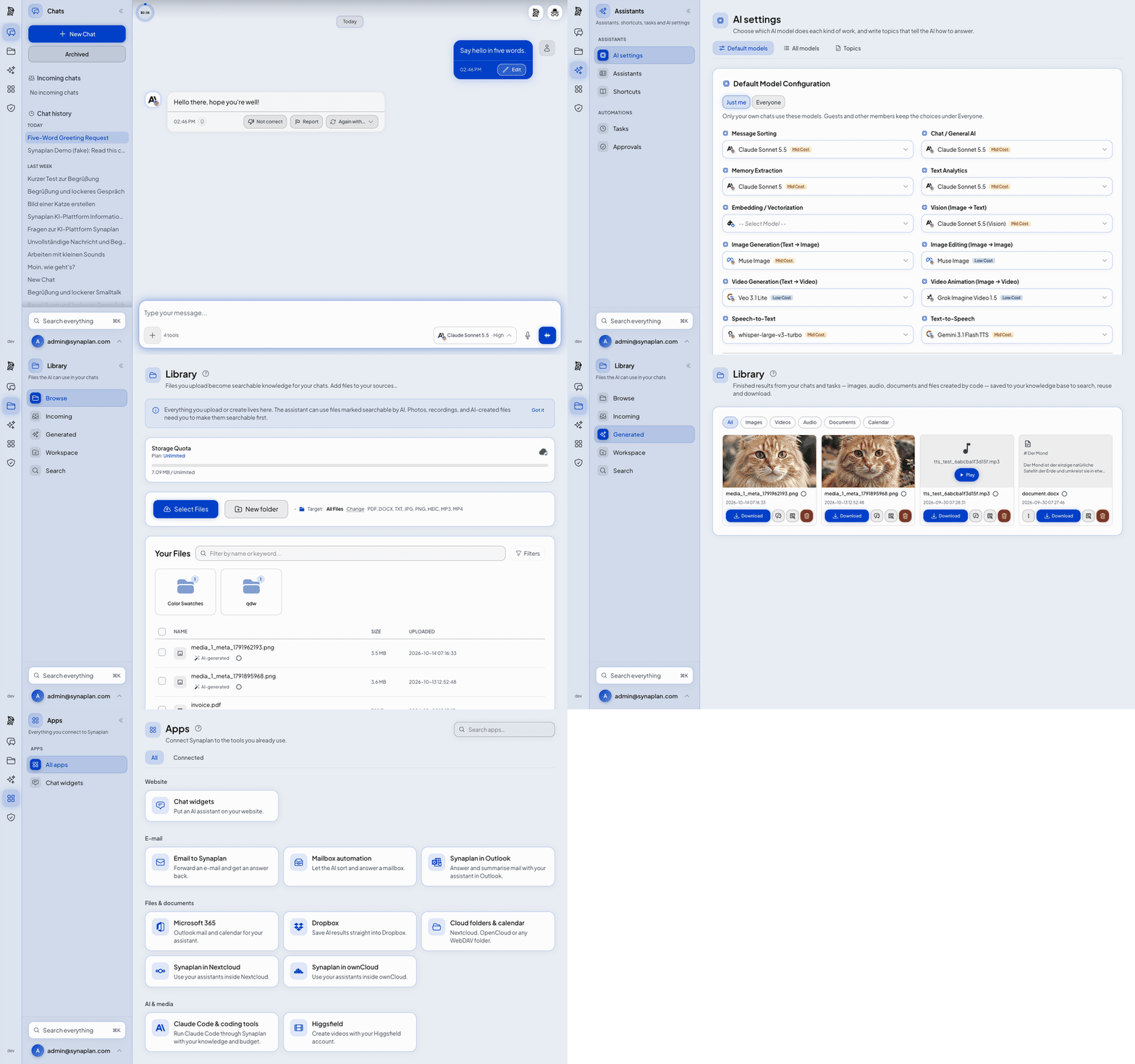
A thirty-second tour of Synaplan: a chat answer and its cost, default models with cost badges, the file library, generated images and audio, and connected apps

Chat, the cost of every answer, your files, generated media and connected apps – in about 30 seconds.


Why Synaplan

Running in production at Megaherz Yoga · SANI Pflegedienst · National Secure Cloud · PlateArt


Quickstart

You need: Docker with Compose v2 and 8 GB of RAM.

git clone https://github.com/metadist/synaplan.git
cd synaplan
make up

Open http://localhost:5173, log in as [email protected] / admin123 and say hello. Your first message starts the Synaplan Demo – no API key needed (40 messages a day for 14 days, how it works). When you're ready, add your own key (free: Groq) or run local models with Ollama.

The first start downloads everything and takes 5–15 minutes. After that, Synaplan starts in seconds.

[!IMPORTANT] These logins are for trying Synaplan on your own machine. On a server, use the installer – it creates its own admin password.


Install it your way

Where How Guide
Your machine make up – the quickstart above Quickstart
Published image, no git One compose.yaml, then docker compose up -d Published image
Docker GUI Portainer, Dockge, Synology: paste the compose file as a stack Docker GUI
Closed network No route to the internet, HTTPS on your LAN address Closed network
Linux server The installer pins a release, generates secrets and runs a smoke test On a server
Kubernetes Helm charts for clusters synaplan-charts
One click RepoCloud · Elestio –

A Linux server in one line:

curl -fsSL https://raw.githubusercontent.com/metadist/synaplan/main/install.sh | \
  bash -s -- --mode server --domain https://ai.example.com

Public sector & sovereign cloud (EU/CH): synaplan.eu covers openDesk, Nextcloud and OpenCloud deployments, on-premises or in an EU cloud.


How it compares

People usually arrive comparing Synaplan with a chat window or an app builder. This is what each project is for. It is not a scoreboard.

Synaplan Open WebUI LibreChat Dify
What it is A team platform: chat, your files as knowledge, a site widget, and the same assistant on WhatsApp and email A chat interface for local and cloud models A chat app for many providers A builder for AI apps and workflows
First run Several containers, about 4 GB One container A Compose stack A Compose stack, and a hosted cloud
Cost of an answer Shown on the answer Not on the answer Not on the answer In the builder's usage logs, not on the chat answer
Same assistant on your site, WhatsApp and email Yes No No Site widget yes. WhatsApp and email are not built in

If you only want a chat window, Open WebUI or LibreChat gets you there faster.


Take the tour

A tour through Synaplan: chat with live cost tracking, one-key provider setup, per-task model choice, document search, media generation, the embeddable chat widget and white-label branding

▶ Watch the full demo on YouTube  ·  Click any screenshot to see it full size.

Chat with per-model cost tracking
Chat
Every answer shows what it cost
AI provider setup with live key validation
Provider setup
One key, tested and encrypted
Per-task model selection with cost badges
Model choice
A different model per task
Semantic search across uploaded documents
Document search
Answers from your own files
Gallery of AI-generated images and video
Media generation
Images, video and audio in chat
Embed code for the chat widget
Chat widget
One snippet, any website
System prompt editor
AI instructions
Your own system prompts
File manager with folders and storage quota
Files
Uploads become knowledge
Plugin view showing Synaform collections
Plugins
Extend without forking
Admin panel with system info and user counts
Admin
Users, usage and health
White-label branding settings
Branding
White-label the whole app

One AI, everywhere you work

The same assistant, the same knowledge, the same model policy – on every channel your team and your customers already use.

Surface What it does Get it
Web app Full chat and admin UI, light and dark, five languages This repo
Mobile apps Chat, documents and voice on iPhone and Android – on web.synaplan.com or your own server App Store · Google Play
Outlook add-in Find and process mail inside Outlook (Web, new & classic, Mac) without sending it anywhere Synamail
Chat widget Your assistant on any website with one snippet, human takeover included Widget guide
WhatsApp & email The AI answers on the channel the question came in on WhatsApp · Email
Nextcloud, ownCloud & OpenCloud Use your assistants inside your file cloud, with its files as knowledge – your file store stays in charge Nextcloud · ownCloud · OpenCloud
Synaplan Desktop Pair a computer and run skills on it (no installer yet – build from source) synaplan-desktop
MCP & Claude Code Your knowledge and memories as MCP tools, plus an Anthropic-compatible endpoint MCP guide

Connects to Microsoft 365 · Dropbox · Nextcloud / ownCloud / WebDAV · CalDAV · IMAP · Jira & Confluence · your own MCP servers – how to connect


Under the hood

Full feature list, every AI provider, all building blocks and developer commands: Platform reference.

Troubleshooting

Problem What to do
"Port already in use" on start A port Synaplan needs is taken – see Port conflicts
Containers stop right after start Give Docker at least 8 GB of RAM, then check docker compose logs -f backend
Chat gives no answers Use the Synaplan Demo, paste one provider key, or add the local-ai profile – see the quickstart
First start seems stuck The first start downloads all images and takes 5–15 minutes. docker compose logs -f startup-notes shows where it is
Anything else Ask in Discord or open a GitHub issue

Learn more


Help shape what's next

We build Synaplan in the open. Tell us what you'd use it for, vote on ideas or show what you built in Discussions – we read everything.


License

Apache-2.0 · Built in Düsseldorf by metadist · Member of the Open Source Business Alliance

OSBA member

If Synaplan helps you own your flow, a ⭐ helps the next team find it.

Star history of metadist/synaplan

synaplan (metadist/synaplan)

正在搜索数据库…

这是什么?Synaplan 是一个开源、可自托管的 AI 平台,你可以用它与任意模型对话、对自己的文档进行 RAG 检索、在网站上嵌入聊天小组件、把你的知识以 MCP 工具的形式开放出来,并且能显示每次回答的成本。
这是一个应用,还是一整套应用生态?本仓库是核心的 PHP/Symfony 后端、前端和小组件,你可以用 Docker 自行部署。其他独立仓库(Helm charts、移动应用、桌面配对代理、Outlook 加载项、Nextcloud/OpenCloud 连接器)都会与同一个平台通信。
如何让它跑起来?克隆仓库并运行 make up 来构建并启动 Docker Compose 环境,或使用 curl 一行命令安装程序;生产环境还提供了更轻量的已发布镜像 Compose 文件,以及 Linux 下的 install.sh --mode server 脚本。
安装前我需要准备什么?Docker + Docker Compose v2、Git、至少 8GB 内存(若使用本地 AI,建议 16GB),以及约 4GB 可用磁盘空间。环境启动之后,再添加模型服务商的 API 密钥,或通过 Ollama 运行本地模型。
默认安装有哪些需要注意的地方?开箱即用时,它只绑定到本机。如果要让网络访问,必须正确设置 SYNAPLANHTTPBIND 和 SYNAPLANURL,否则实时聊天将无法连接;此外,在通过普通 HTTP 使用网络地址访问时,浏览器会阻止麦克风和剪贴板功能。
这个软件免费吗?许可证允许哪些用途?自托管软件采用 Apache-2.0 许可证,可以永久免费自行运行。此外还有付费的托管版本,网址为 web.synaplan.com,需要付费套餐或邀请码。
Synaplan 生态系统由哪些部分组成?除了本核心仓库,还有独立项目提供:Kubernetes Helm charts(synaplan-charts)、原生 iOS/Android 应用、桌面配对代理(synaplan-desktop)、Outlook 加载项(Synamail),以及 Nextcloud/OpenCloud 连接器,它们都与同一个后端通信。
我能否在本地运行 AI 模型,而不是把数据发送到云服务商?可以。启用 local-ai 配置文件(COMPOSE_PROFILES=local-ai)后,会拉取 Ollama 和 bge-m3 嵌入模型,使 RAG 和聊天完全在你自己的硬件上运行,无需云端密钥。
Synaplan 可以连接哪些系统?通过「管理 → 连接」,你可以连接 Microsoft 365、Dropbox、Nextcloud/ownCloud/WebDAV、CalDAV 日历、IMAP 邮箱,以及 Jira 和 Confluence;此外,还可以将 WhatsApp 和电子邮件用作聊天渠道。
成本追踪功能如何运作?界面中的每条聊天回答都会准确显示其成本。模型目录的变更(新增模型、价格更新、停用模型)以 seeders 的形式发布,因此现有安装会自动切换到受支持且定价正确的模型。
有哪些类似的项目?ruflo, WeKnora, SurfSense, LangBot, sim, LongMemory, m_flow, DeskcommCRM
作者
metadist
大小
180.8 MB
星标
1K
时长
1年
提交 · 90 天