




Что это такое?
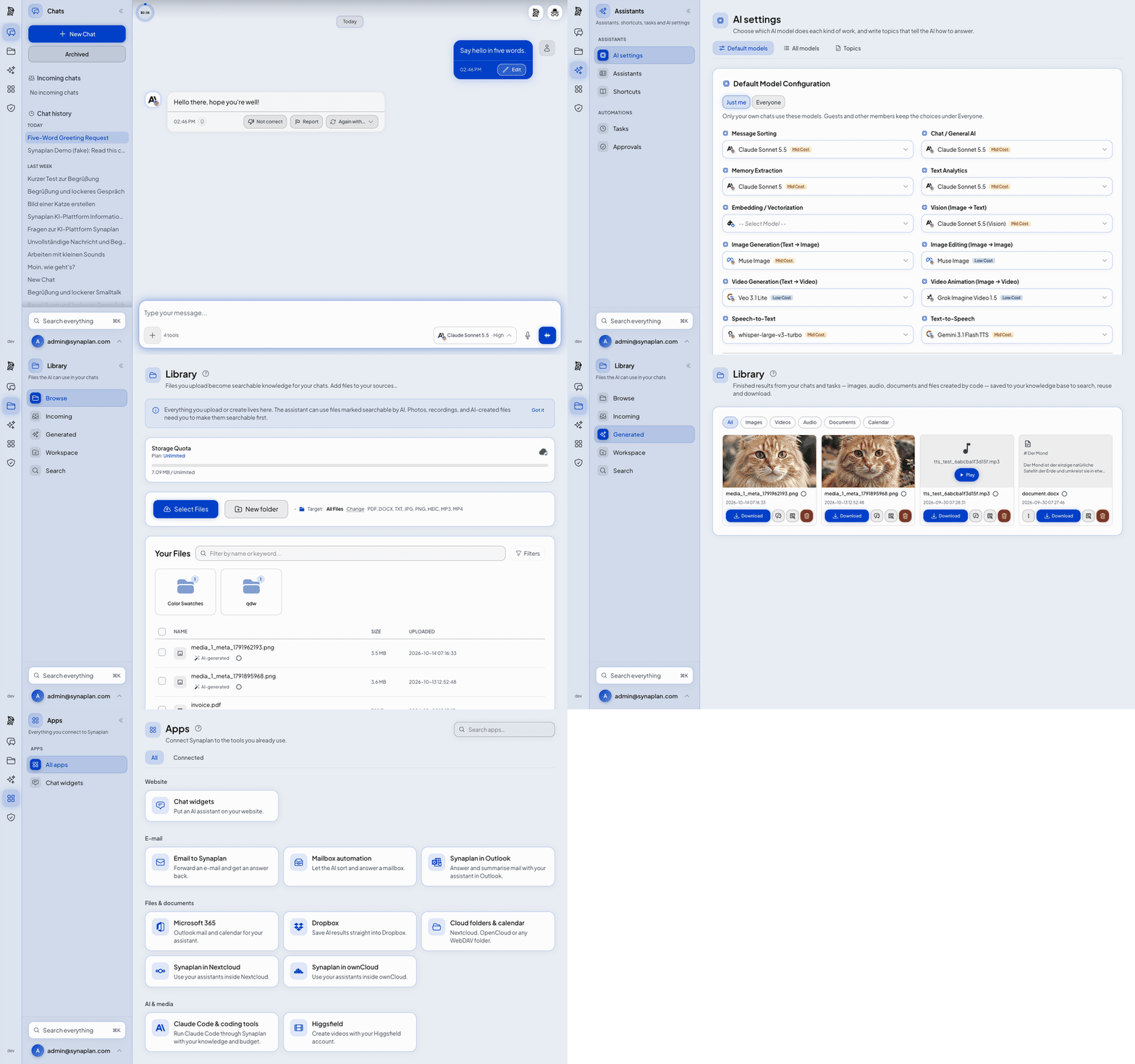
 Synaplan — это платформа с открытым исходным кодом, которую можно развернуть на своём сервере. Она позволяет общаться с любой моделью ИИ, искать по своим документам с помощью RAG, встраивать чат-виджет на свой сайт и открывать вашу базу знаний как инструменты MCP, при этом показывая стоимость каждого ответа.
Это одно приложение или целая экосистема приложений?Этот репозиторий содержит основной бэкенд на PHP/Symfony, фронтенд и виджет, которые вы разворачиваете у себя с помощью Docker. Отдельные репозитории (Helm-чарты, мобильные приложения, десктопный агент сопряжения, надстройка для Outlook, коннекторы для Nextcloud/OpenCloud) работают с той же платформой.
Этот репозиторий содержит основной бэкенд на PHP/Symfony, фронтенд и виджет, которые вы разворачиваете у себя с помощью Docker. Отдельные репозитории (Helm-чарты, мобильные приложения, десктопный агент сопряжения, надстройка для Outlook, коннекторы для Nextcloud/OpenCloud) работают с той же платформой.Как всё запустить?Склонируйте репозиторий и выполните make up, чтобы собрать и запустить стек Docker Compose, или используйте установку одной командой через curl. Для продакшена предусмотрены более лёгкий файл Compose с готовыми образами и скрипт install.sh --mode server для Linux.
Склонируйте репозиторий и выполните make up, чтобы собрать и запустить стек Docker Compose, или используйте установку одной командой через curl. Для продакшена предусмотрены более лёгкий файл Compose с готовыми образами и скрипт install.sh --mode server для Linux.Что нужно установить перед запуском?Docker и Docker Compose v2, Git, минимум 8 ГБ оперативной памяти (рекомендуется 16 ГБ при использовании локального ИИ) и около 4 ГБ свободного места на диске. Ключи API провайдеров или локальную модель через Ollama можно добавить после запуска стека.
Docker и Docker Compose v2, Git, минимум 8 ГБ оперативной памяти (рекомендуется 16 ГБ при использовании локального ИИ) и около 4 ГБ свободного места на диске. Ключи API провайдеров или локальную модель через Ollama можно добавить после запуска стека.Есть ли подводные камни при установке по умолчанию?По умолчанию приложение доступно только с локальной машины. Чтобы открыть его для сети, нужно правильно задать SYNAPLANHTTPBIND и SYNAPLANURL, иначе живой чат не подключится. Кроме того, при работе по обычному HTTP на сетевом адресе браузеры блокируют микрофон и буфер обмена.
По умолчанию приложение доступно только с локальной машины. Чтобы открыть его для сети, нужно правильно задать SYNAPLANHTTPBIND и SYNAPLANURL, иначе живой чат не подключится. Кроме того, при работе по обычному HTTP на сетевом адресе браузеры блокируют микрофон и буфер обмена.Это бесплатно и что разрешает лицензия?Программа для самостоятельного развёртывания распространяется под лицензией Apache-2.0 и может бесплатно использоваться у вас навсегда. Также есть платная облачная версия на web.synaplan.com, для которой нужен платный тариф или инвайт-код.
Программа для самостоятельного развёртывания распространяется под лицензией Apache-2.0 и может бесплатно использоваться у вас навсегда. Также есть платная облачная версия на web.synaplan.com, для которой нужен платный тариф или инвайт-код.Из чего состоит экосистема Synaplan?Помимо основного репозитория, отдельные проекты добавляют Helm-чарты для Kubernetes (synaplan-charts), нативные приложения для iOS и Android, десктопный агент сопряжения (synaplan-desktop), надстройку для Outlook (Synamail) и коннекторы для Nextcloud/OpenCloud. Все они работают с одним и тем же бэкендом.
Помимо основного репозитория, отдельные проекты добавляют Helm-чарты для Kubernetes (synaplan-charts), нативные приложения для iOS и Android, десктопный агент сопряжения (synaplan-desktop), надстройку для Outlook (Synamail) и коннекторы для Nextcloud/OpenCloud. Все они работают с одним и тем же бэкендом.Можно ли запускать модели ИИ локально, а не отправлять данные облачному провайдеру?Да. Если включить профиль local-ai (COMPOSE_PROFILES=local-ai), загрузятся Ollama и модель для эмбеддингов bge-m3, и RAG с чатом смогут работать полностью на вашем собственном оборудовании, без облачного ключа.
Да. Если включить профиль local-ai (COMPOSE_PROFILES=local-ai), загрузятся Ollama и модель для эмбеддингов bge-m3, и RAG с чатом смогут работать полностью на вашем собственном оборудовании, без облачного ключа.К каким системам можно подключить Synaplan?Через раздел Manage → Connections можно подключить Microsoft 365, Dropbox, Nextcloud/ownCloud/WebDAV, календарь CalDAV, почтовые ящики IMAP, Jira и Confluence, а также WhatsApp и электронную почту как каналы чата.
Через раздел Manage → Connections можно подключить Microsoft 365, Dropbox, Nextcloud/ownCloud/WebDAV, календарь CalDAV, почтовые ящики IMAP, Jira и Confluence, а также WhatsApp и электронную почту как каналы чата.Как работает учёт стоимости?Каждый ответ в чате в интерфейсе показывает, сколько он стоил. Изменения в каталоге моделей (новые модели, обновления цен, отключение моделей) поставляются в виде сидеров, поэтому существующая установка автоматически переключается на поддерживаемую модель с корректной ценой.
Каждый ответ в чате в интерфейсе показывает, сколько он стоил. Изменения в каталоге моделей (новые модели, обновления цен, отключение моделей) поставляются в виде сидеров, поэтому существующая установка автоматически переключается на поддерживаемую модель с корректной ценой.Какие есть похожие проекты?ruflo, WeKnora, SurfSense, LangBot, sim, LongMemory, m_flow, DeskcommCRM
ruflo, WeKnora, SurfSense, LangBot, sim, LongMemory, m_flow, DeskcommCRMВ каких он темах?symfony, whatsapp-bot, gdpr, cost-tracking, self-hosted-ai, vector-search, chat, embeddings, php, knowledge-base, local-llm, vue
symfony, whatsapp-bot, gdpr, cost-tracking, self-hosted-ai, vector-search, chat, embeddings, php, knowledge-base, local-llm, vue- Автор
- metadist
- Размер
- 180.8 MB
- Звёзды
- 1K
- Обновлён
- КоммитNov 17Релизv5.8.6Nov 17
- Возраст
- 1 г
- Коммиты · 90 дней