这是什么?
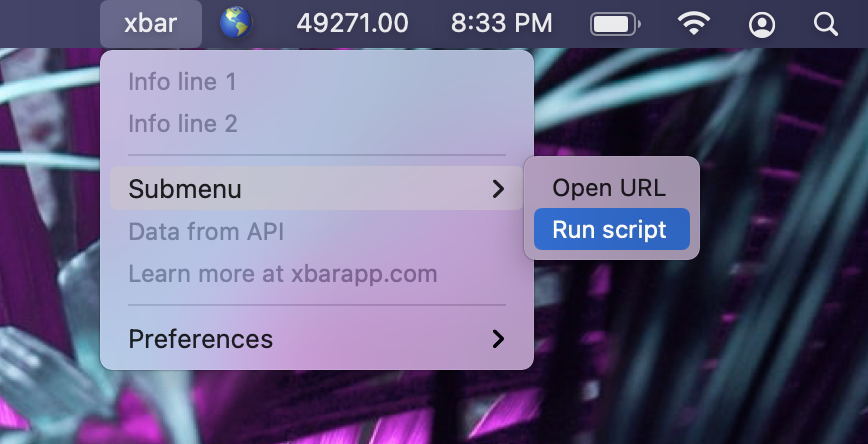
 xbar 是一款 macOS 菜单栏应用,能把任何脚本或程序的输出直接显示在菜单栏里。它是 BitBar 的重启版本,用 Go 从零彻底重写。
xbar 是一款 macOS 菜单栏应用,能把任何脚本或程序的输出直接显示在菜单栏里。它是 BitBar 的重启版本,用 Go 从零彻底重写。那它是需要安装的 Mac 应用,还是命令行工具?它是一个桌面应用,不是命令行工具。当前版本是用 Go 完全重写的,基于 Wails 构建——这是一个用 Go 加 HTML/CSS/JS 开发桌面应用的框架。
它是一个桌面应用,不是命令行工具。当前版本是用 Go 完全重写的,基于 Wails 构建——这是一个用 Go 加 HTML/CSS/JS 开发桌面应用的框架。我怎么把它跑起来?从 GitHub 下载最新版本直接运行就行——不需要编译。要添加插件的话,打开 xbar 菜单里的 Preferences > Plugins...,就能发现和管理插件。
从 GitHub 下载最新版本直接运行就行——不需要编译。要添加插件的话,打开 xbar 菜单里的 Preferences > Plugins...,就能发现和管理插件。用之前还需要安装别的东西吗?不需要。插件就是你自己的脚本或程序,用什么语言都行,xbar 只是显示它们的输出而已。
不需要。插件就是你自己的脚本或程序,用什么语言都行,xbar 只是显示它们的输出而已。我不会写代码也能用吗?基本使用不需要:现成的插件可以直接从在线仓库安装。想自己写的话,只需懂一点基础的脚本知识,而且有官方教程。
基本使用不需要:现成的插件可以直接从在线仓库安装。想自己写的话,只需懂一点基础的脚本知识,而且有官方教程。它支持哪些 macOS 版本?仅支持 macOS——它就住在菜单栏里——需要 Catalina(10.15)或更新版本。
仅支持 macOS——它就住在菜单栏里——需要 Catalina(10.15)或更新版本。插件存放在磁盘上的哪个位置?我以前的 BitBar 插件怎么办?插件就是 ~/Library/Application Support/xbar/plugins 目录下的普通文件。如果你以前用 BitBar,只要把旧插件移到这个文件夹里就装好了。
插件就是 ~/Library/Application Support/xbar/plugins 目录下的普通文件。如果你以前用 BitBar,只要把旧插件移到这个文件夹里就装好了。有没有现成插件的合集?有——有一个可以浏览的在线插件仓库;如果里面没有合适的,还有官方教程教你自己写插件。
有——有一个可以浏览的在线插件仓库;如果里面没有合适的,还有官方教程教你自己写插件。是谁把 BitBar 重做成了 xbar?Mat Ryer(@matryer)和 Lea Anthony(@leaanthony)用 Go 配合 Wails——他们自己开发的、用 Go 和 Web 技术构建桌面应用的框架——从零彻底重写了它。
Mat Ryer(@matryer)和 Lea Anthony(@leaanthony)用 Go 配合 Wails——他们自己开发的、用 Go 和 Web 技术构建桌面应用的框架——从零彻底重写了它。What are similar projects?Doll, OpenYoink, BetterDisplay, window-sweaters, FineTune, pliss, Mouser, macos-sysdata
Doll, OpenYoink, BetterDisplay, window-sweaters, FineTune, pliss, Mouser, macos-sysdata