Android Everything
Search your Android phone from Windows with the speed and workflow of Everything.



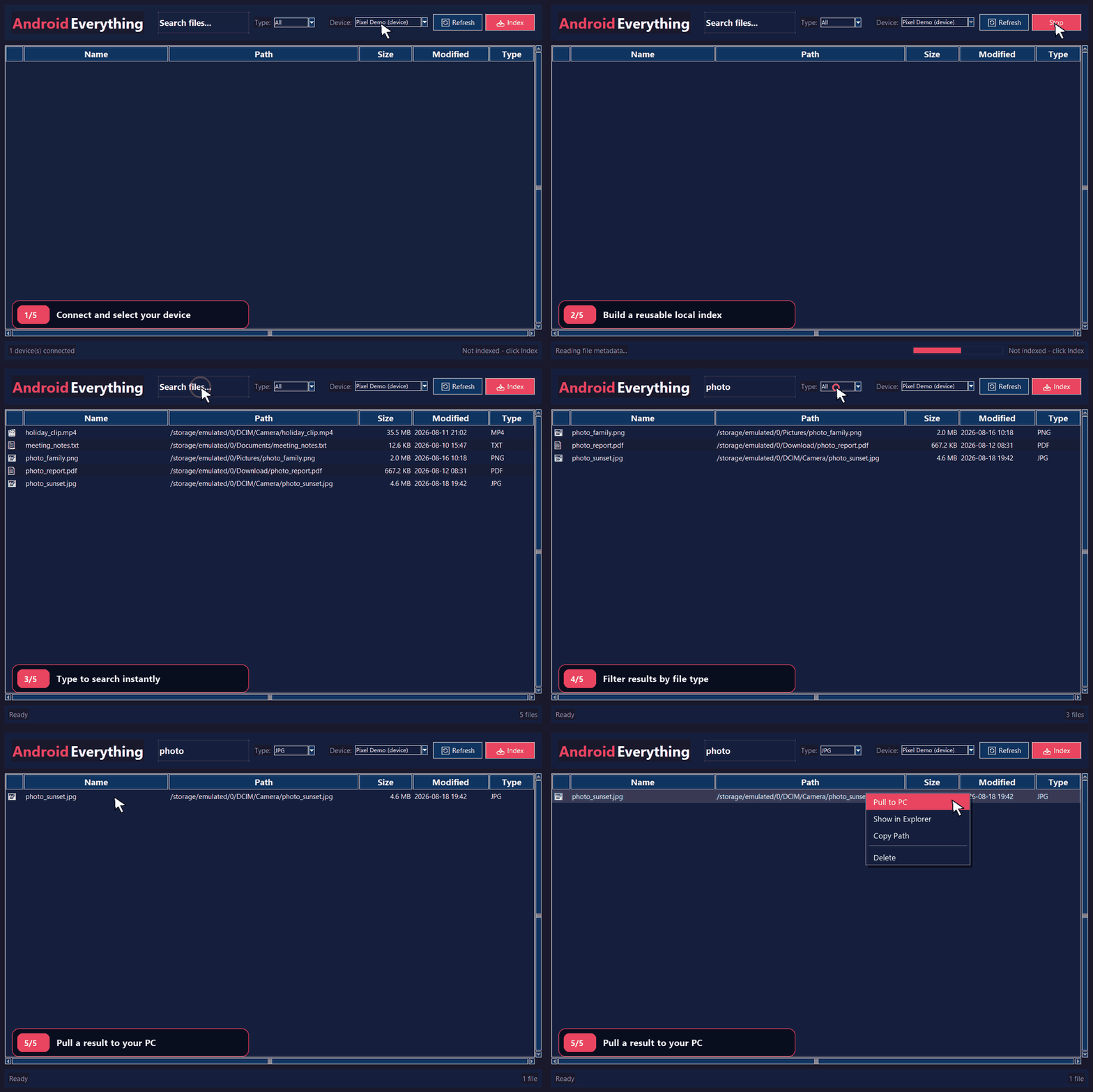
The demo uses a simulated device and synthetic file names; no personal phone data is recorded.
Android Everything connects through Android Debug Bridge (ADB), creates a local
SQLite/FTS5 metadata index, and turns Android file browsing into a responsive,
search-as-you-type Windows workflow. Index once, then find files by name or path
without reopening folders across the phone for every search.
Start searching in three steps
- Download and extract the complete Windows ZIP for v0.1.6.
- Connect and authorize the phone: enable USB debugging, connect it over USB, and approve the computer on the device.
- Run and search: start
AndroidEverything.exe, select the device, click Index, and begin typing.
The package contains AndroidEverything.exe, ADB, its required DLLs, and the
Android Platform Tools notice. Python and a separate ADB installation are not
required. Keep all extracted files together.
[!TIP]
If the phone is shown as unauthorized, unlock it and accept the USB debugging prompt, then click Refresh.
Why Android Everything?
| Task |
File Explorer / MTP workflow |
Android Everything workflow |
| Find a file anywhere on the phone |
Open storage and navigate folders |
Type a name or path and see matches immediately |
| Repeat a search |
Browse the device again |
Query the reusable local index |
| Narrow a result set |
Navigate or reorganize folders |
Filter by extension and sort any result column |
| Bring a file to Windows |
Browse to it, then copy it |
Pull, open, or reveal the selected result |
The experience is inspired by the fast workflow of
Everything for local Windows files. Android
Everything is an independent open-source project and is not affiliated with or
endorsed by voidtools.
Highlights
- True substring search across names and Android paths, so
hot can match photo.jpg
- Reusable local index of names, paths, sizes, extensions, and modification times
- Safe SQLite FTS5 trigram queries for spaces, quotes, parentheses, hyphens, and other special characters
- Atomic indexing that preserves the previous usable index if a refresh fails or is cancelled
- Deduplicated multi-storage discovery that resolves Android mount aliases before scanning internal storage, SD cards, and USB media
- Strict scan diagnostics that preserve the previous index on unexpected remote listing errors
- Explicit device binding so indexing, pulling, and deleting remain tied to the selected ADB serial
- Serialized device mutations so deleting during a refresh cannot leave stale search results
- Desktop file actions to pull, open, reveal in Explorer, copy paths, or delete after confirmation
- No third-party runtime dependencies when running the Python source
How it works
flowchart LR
    Device[Android Device] -->|USB debugging| ADB[ADB]
    ADB -->|file metadata| Scanner[Scanner / File Indexer]
    Scanner -->|atomic index update| Database[(SQLite + FTS5)]
    Database -->|fast local queries| Search[Search Engine]
    Search -->|results| UI[Tkinter Windows UI]
    UI -->|index, pull, delete| ADB
ADB → Scanner → SQLite/FTS5 → Tkinter
- ADB discovers devices and performs serial-bound Android file operations.
- Scanner reads metadata and prepares a complete replacement index.
- SQLite/FTS5 commits the new index atomically and serves local searches.
- Tkinter presents the familiar Windows desktop search and file-action workflow.
Download and verify
Current release: v0.1.6
Place the ZIP and checksum file in the same directory, then verify them in
PowerShell:
$expected = (Get-Content .\AndroidEverything-v0.1.6-windows-SHA256.txt).Split()[0]
$actual = (Get-FileHash .\AndroidEverything-v0.1.6-windows.zip -Algorithm SHA256).Hash.ToLowerInvariant()
$actual -eq $expected
The result should be True. The bundled ADB comes from
Android SDK Platform Tools.
Keep adb.exe, AdbWinApi.dll, and AdbWinUsbApi.dll beside
AndroidEverything.exe after extraction.
Documentation and requirements
Running from source additionally requires Python 3.8 or later with Tkinter and
Android SDK Platform Tools.
Run from source
Clone the repository:
git clone https://github.com/luli395/android_everything.git
cd android_everything
Add Platform Tools to PATH, or point the application to ADB explicitly:
$env:ANDROID_EVERYTHING_ADB = "C:\path\to\platform-tools\adb.exe"
Connect and authorize the phone, then confirm that ADB sees it:
adb devices
Start the application:
python main.py
Select a device, click Index, and search by file name or Android path.
Configuration
Defaults are defined in config.py.
| Environment variable |
Purpose |
ANDROID_EVERYTHING_ADB |
Absolute path to adb.exe; if unset, the application searches its package directory and PATH. |
ANDROID_EVERYTHING_DATA_DIR |
Optional override for the index and application-log directory. |
The SQLite index and log are stored under
%LOCALAPPDATA%\AndroidEverything by default.
Privacy
All searches and indexed metadata remain local to the PC. The index can contain
device serials and Android file paths, so do not share
%LOCALAPPDATA%\AndroidEverything\files.db. Files pulled from a phone should
also remain outside the repository.
The README GIF is generated from an in-memory demo backend and contains only
synthetic paths and file names.
Development
Run the syntax check and unit tests:
python -m compileall -q .
python -m unittest discover -s tests -v
Build the standalone executable and complete Windows package with PyInstaller:
.\scripts\build_windows.ps1 -AdbPath "C:\path\to\platform-tools\adb.exe"
Regenerate the privacy-safe README demo from the real Tkinter widgets:
python -m pip install Pillow
python .\scripts\create_demo_gif.py
The capture utility is development-only; Pillow is not an application runtime
dependency. It requires a visible Windows desktop session and never connects to
ADB or reads the local application database.
Project structure
android_everything/
|-- main.py                  # Application entry point
|-- adb_wrapper.py           # ADB discovery and file operations
|-- file_indexer.py          # Device scanner and atomic indexing pipeline
|-- database.py              # SQLite and FTS5 persistence
|-- device_mutation.py       # Per-device indexing/deletion coordination
|-- search_engine.py         # Search API and query cache
|-- path_utils.py            # Safe Windows download-path handling
|-- config.py                # Application defaults
|-- docs/                    # User guide and README media
|-- scripts/                 # Windows packaging and demo-capture tools
`-- ui/                      # Tkinter window, file list, and styling
Bug reports and focused pull requests are welcome. See
CONTRIBUTING.md and SECURITY.md.
License
Licensed under the MIT License.

 Android Everything 让你在 Windows 上以 Everything 搜索工具的速度和手感搜索安卓手机的文件,它用 ADB 把文件元数据拉到本地 SQLite FTS5 索引中。