



Что это?
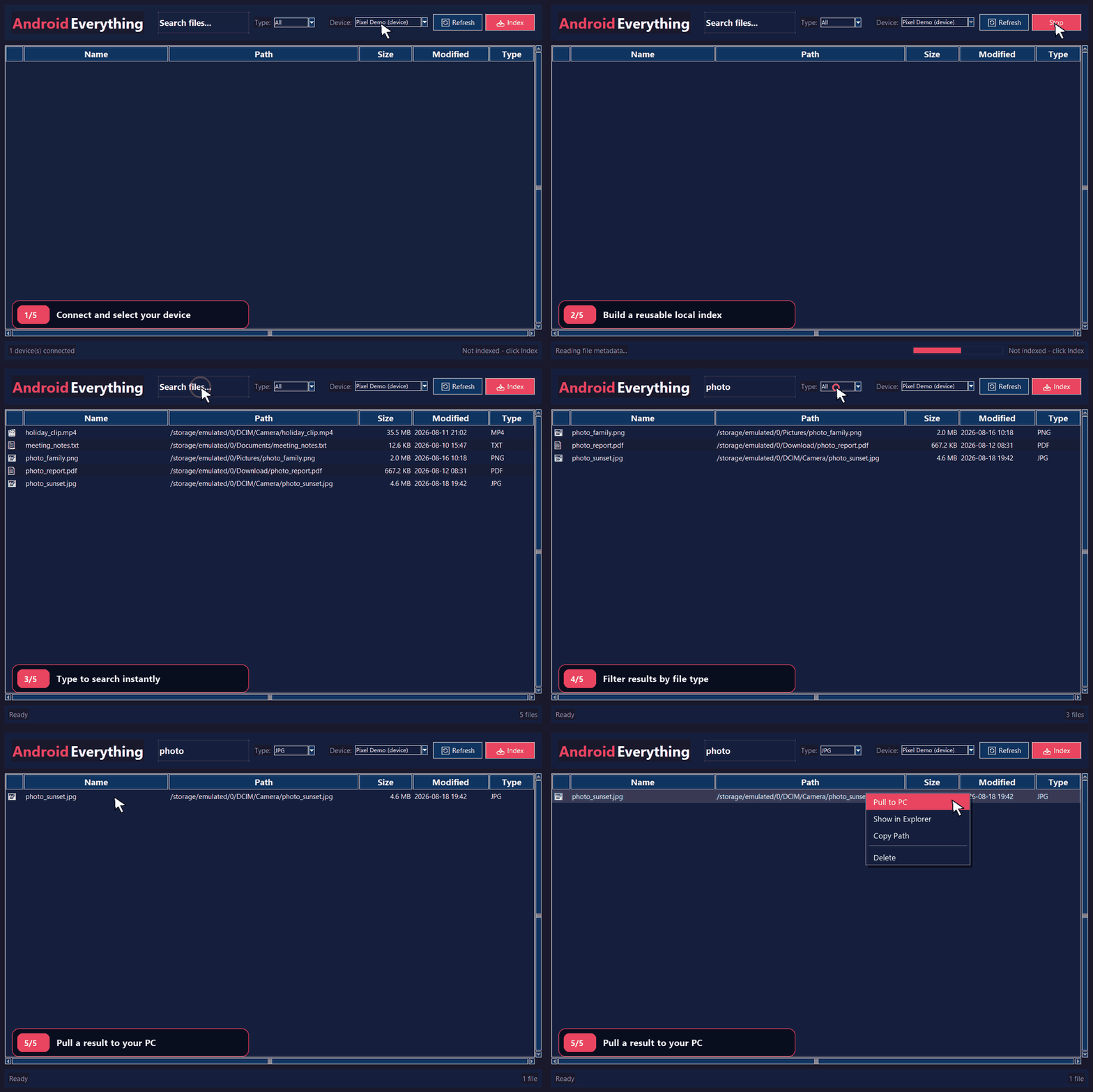
 Android Everything позволяет искать файлы на Android-телефоне из Windows со скоростью и ощущениями от поисковика Everything, подтягивая метаданные файлов через ADB в локальный индекс SQLite FTS5.
Android Everything позволяет искать файлы на Android-телефоне из Windows со скоростью и ощущениями от поисковика Everything, подтягивая метаданные файлов через ADB в локальный индекс SQLite FTS5.Это приложение с GUI или консольный инструмент?Это отдельное настольное GUI-приложение для Windows, построенное на Tkinter, а не CLI-инструмент, хотя его можно запустить и из Python-исходников.
Это отдельное настольное GUI-приложение для Windows, построенное на Tkinter, а не CLI-инструмент, хотя его можно запустить и из Python-исходников.Как его запустить?Скачайте и распакуйте Windows ZIP релиза v0.1.6, подключите телефон по USB с включённой и подтверждённой отладкой, затем запустите AndroidEverything.exe, выберите устройство, нажмите Index и начните печатать для поиска.
Скачайте и распакуйте Windows ZIP релиза v0.1.6, подключите телефон по USB с включённой и подтверждённой отладкой, затем запустите AndroidEverything.exe, выберите устройство, нажмите Index и начните печатать для поиска.Нужны ли заранее Python или отдельная установка ADB?Нет, в упакованном ZIP уже есть AndroidEverything.exe, ADB и нужные DLL, так что Python и отдельная установка ADB не нужны; они требуются только при запуске из исходников.
Нет, в упакованном ZIP уже есть AndroidEverything.exe, ADB и нужные DLL, так что Python и отдельная установка ADB не нужны; они требуются только при запуске из исходников.Что может пойти не так при подключении телефона?Если телефон отображается как неавторизованный, нужно разблокировать его, подтвердить запрос отладки по USB на самом устройстве и нажать Refresh в приложении, чтобы продолжить.
Если телефон отображается как неавторизованный, нужно разблокировать его, подтвердить запрос отладки по USB на самом устройстве и нажать Refresh в приложении, чтобы продолжить.Можно ли это использовать на Mac или Linux, или это только для Windows?Это только для Windows: релиз нацелен на Windows 10 и новее, а входящие в комплект исполняемые файлы ADB - это Windows-бинарники.
Это только для Windows: релиз нацелен на Windows 10 и новее, а входящие в комплект исполняемые файлы ADB - это Windows-бинарники.Куда попадают мои данные с телефона?Все поиски и проиндексированные метаданные остаются локально на вашем ПК в %LOCALAPPDATA%\AndroidEverything; ничего не выгружается, но индексный файл лучше никому не передавать, так как в нём могут быть серийные номера устройств и пути к файлам.
Все поиски и проиндексированные метаданные остаются локально на вашем ПК в %LOCALAPPDATA%\AndroidEverything; ничего не выгружается, но индексный файл лучше никому не передавать, так как в нём могут быть серийные номера устройств и пути к файлам.Что будет, если обновление индекса упадёт или будет прервано на середине?Android Everything выполняет индексацию атомарно, поэтому если обновление падает или прерывается, сохраняется предыдущий рабочий индекс вместо повреждённого.
Android Everything выполняет индексацию атомарно, поэтому если обновление падает или прерывается, сохраняется предыдущий рабочий индекс вместо повреждённого.Можно ли удалять или вытягивать файлы с телефона прямо из приложения?Да, результаты поиска поддерживают файловые действия на ПК, включая выгрузку файлов в Windows, их открытие, показ в Проводнике, копирование путей или удаление после подтверждения.
Да, результаты поиска поддерживают файловые действия на ПК, включая выгрузку файлов в Windows, их открытие, показ в Проводнике, копирование путей или удаление после подтверждения.Он учитывает несколько мест хранения на телефоне?Да, он выполняет дедуплицированное обнаружение по нескольким накопителям, разрешая псевдонимы монтирования Android, прежде чем сканировать внутреннюю память, SD-карты и USB-носители.
Да, он выполняет дедуплицированное обнаружение по нескольким накопителям, разрешая псевдонимы монтирования Android, прежде чем сканировать внутреннюю память, SD-карты и USB-носители.What are similar projects?rustcast, DigUp, forel, Game-Optimizer-CPUs-Threads-Optimizer, EverythingToolbar, NanaZip, spacedrive, FinderSearch
rustcast, DigUp, forel, Game-Optimizer-CPUs-Threads-Optimizer, EverythingToolbar, NanaZip, spacedrive, FinderSearchWhich topics is it in?file-search, adb, file-manager, windows-10, privacy-first, search, windows-app, sqlite, utility, local-first, productivity, android
file-search, adb, file-manager, windows-10, privacy-first, search, windows-app, sqlite, utility, local-first, productivity, android