



What is this?
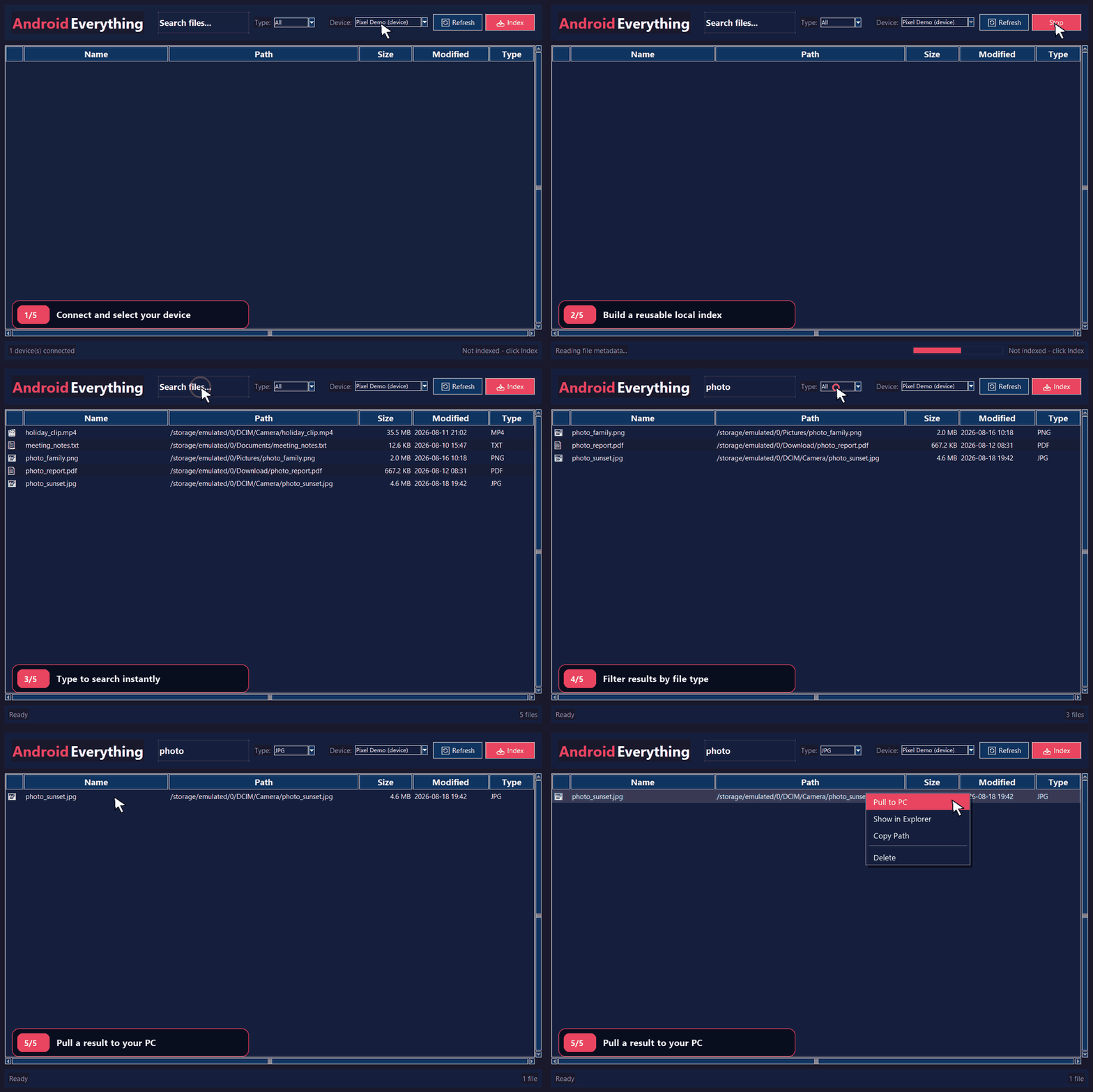
 Android Everything lets you search your Android phone's files from Windows with the speed and feel of the Everything search tool, using ADB to pull file metadata into a local SQLite FTS5 index.
Android Everything lets you search your Android phone's files from Windows with the speed and feel of the Everything search tool, using ADB to pull file metadata into a local SQLite FTS5 index.Is this a GUI app or a command-line tool?It is a standalone Windows desktop GUI application built with Tkinter, not a CLI tool, though it can also be run from Python source.
It is a standalone Windows desktop GUI application built with Tkinter, not a CLI tool, though it can also be run from Python source.How do I get it running?Download and extract the Windows ZIP for release v0.1.6, connect your phone over USB with debugging enabled and authorized, then run AndroidEverything.exe, select the device, click Index, and start typing to search.
Download and extract the Windows ZIP for release v0.1.6, connect your phone over USB with debugging enabled and authorized, then run AndroidEverything.exe, select the device, click Index, and start typing to search.Do I need Python or a separate ADB install first?No, the packaged ZIP already bundles AndroidEverything.exe, ADB, and its required DLLs, so Python and a separate ADB installation are not needed; they are only required if you run from source.
No, the packaged ZIP already bundles AndroidEverything.exe, ADB, and its required DLLs, so Python and a separate ADB installation are not needed; they are only required if you run from source.What can go wrong when connecting the phone?If the phone shows as unauthorized, you need to unlock it, accept the USB debugging prompt on the device, and click Refresh in the app to proceed.
If the phone shows as unauthorized, you need to unlock it, accept the USB debugging prompt on the device, and click Refresh in the app to proceed.Can I use this on Mac or Linux, or is it Windows-only?It is Windows-only: the release targets Windows 10 or later and the bundled ADB executables are Windows binaries.
It is Windows-only: the release targets Windows 10 or later and the bundled ADB executables are Windows binaries.Where does my phone data end up?All searches and the indexed metadata stay local on your PC under %LOCALAPPDATA%\AndroidEverything; nothing is uploaded, though you should avoid sharing the index file since it can contain device serials and file paths.
All searches and the indexed metadata stay local on your PC under %LOCALAPPDATA%\AndroidEverything; nothing is uploaded, though you should avoid sharing the index file since it can contain device serials and file paths.What happens if an index refresh fails or is cancelled midway?Android Everything performs atomic indexing, so if a refresh fails or is cancelled, the previous usable index is preserved instead of being left corrupted.
Android Everything performs atomic indexing, so if a refresh fails or is cancelled, the previous usable index is preserved instead of being left corrupted.Can I delete or pull files from my phone through the app?Yes, search results support desktop file actions including pulling files to Windows, opening them, revealing them in Explorer, copying paths, or deleting them after confirmation.
Yes, search results support desktop file actions including pulling files to Windows, opening them, revealing them in Explorer, copying paths, or deleting them after confirmation.Does it handle multiple storage locations on the phone?Yes, it performs deduplicated multi-storage discovery that resolves Android mount aliases before scanning internal storage, SD cards, and USB media.
Yes, it performs deduplicated multi-storage discovery that resolves Android mount aliases before scanning internal storage, SD cards, and USB media.What are similar projects?rustcast, DigUp, forel, Game-Optimizer-CPUs-Threads-Optimizer, EverythingToolbar, NanaZip, spacedrive, FinderSearch
rustcast, DigUp, forel, Game-Optimizer-CPUs-Threads-Optimizer, EverythingToolbar, NanaZip, spacedrive, FinderSearchWhich topics is it in?file-search, adb, file-manager, windows-10, privacy-first, search, windows-app, sqlite, utility, local-first, productivity, android
file-search, adb, file-manager, windows-10, privacy-first, search, windows-app, sqlite, utility, local-first, productivity, android