Strata combines spatial Miller-column navigation with familiar Icons and List views, instant fuzzy filename search, rich previews, and native Linux desktop integration. It is designed for Omarchy and works on compatible GTK4 Linux environments.
Contents
Features
- Three browser modes: navigable Columns, an Icons grid, and a sortable List table.
- Keyboard-first control: Vim-style movement, navigation history, location entry, pane filtering, fuzzy search, file operations, and quick previews. An optional footer and F1 shortcut reference help you learn each mode; the footer also highlights when files are available to paste. See keyboard navigation and paste destinations.
- Fast recursive search: press Ctrl+K to find files and directories by name or path while the tree is still being indexed. Global search covers Home and all mounted local drives, regardless of the current folder. Hover the search field to see the included locations. The dialog warns when results are incomplete; folder-scoped filtering/search remains separate. URI-native remote shares are not yet included.
- Rich previews and thumbnails: bounded previews for text, source code, images, camera RAW, PDF, audio, and video, with native parser-backed formats isolated from the application.
- Responsive filesystem work: cancellable directory loading, bounded streaming, incremental monitoring, stable selection, and virtualized large directories.
- Everyday file operations: create folders, rename, cut, copy, paste, trash, permanent delete, sorting, hidden files, pins, and history.
- Remote locations: browse GIO/GVfs locations such as authenticated SMB shares from the location field.
- Adaptive appearance: compact or airy density, six bundled themes, custom themes, and live Omarchy Quattro theme following.
- Updates in the app: opt-in automatic checks, release notes, verified downloads, and in-place installation for release binaries.
- System file chooser: opt in through Settings → General → System file chooser, the installer, or
strata --install-portal; see portal setup.
Installation
Arch Linux and Omarchy are the primary supported environments. Current binaries require glibc 2.39 or newer and the runtime libraries listed below.
Interactive installation
The interactive installer detects the Linux architecture, glibc version, Arch
Linux, and Omarchy 3 or 4. It installs the latest verified stable release and
offers optional desktop-menu, default-folder-handler, "Open file location", system
file chooser, SMB, broader image/RAW, and Omarchy keybind integration:
curl -fsSL https://raw.githubusercontent.com/lgse/strata/main/install.sh | bash
The installer shows every privileged package operation before asking to run it.
It verifies both the published SHA-256 digest and GitHub Actions provenance before
installing anything from the release archive. The binary is installed per-user at
~/.local/bin/strata.
For an unattended Arch or Omarchy installation, pass --non-interactive. This
installs required dependencies and the binary without prompting; optional
integrations remain disabled unless explicitly selected:
curl -fsSL https://raw.githubusercontent.com/lgse/strata/main/install.sh \
  | bash -s -- --non-interactive \
      --with-smb \
      --with-raw \
      --with-desktop-entry \
      --with-folder-association \
      --with-omarchy-keybinds
Each --with-* flag implies --non-interactive, and folder association implies
the desktop entry and --with-file-manager. Use --with-file-manager by itself
to enable only "Open file location" integration. File chooser replacement is
separate: use --with-file-chooser to opt in, or --without-file-chooser to keep
your current chooser and dismiss the one-time in-app offer. Neither folder
association nor an unattended install enables the chooser automatically.
Non-interactive package installation requires passwordless sudo or cached credentials. Run ./install.sh --help for the full option list.
AI-assisted installation
Use this option to have a coding agent install and verify the latest release archive.
Give this prompt to a coding agent with terminal access:
Install the latest stable Strata release from https://github.com/lgse/strata safely.

Before changing anything:
1. Confirm this is a glibc-based Linux system with a graphical GTK4 environment.
2. Detect whether the machine is x86_64 or aarch64 and select only the matching
   *-unknown-linux-gnu archive from the canonical lgse/strata GitHub release.
3. Show me the runtime packages you need and ask before using sudo or changing
   my default file-manager association.

Then:
- Install the required GTK4, GtkSourceView 5, Poppler GLib, Fontconfig, Bubblewrap,
  FFmpeg/GStreamer, and desktop-integration runtime dependencies using the system
  package manager. Add gvfs-smb only if I want SMB support.
- Download the archive and its matching .sha256 file from the latest GitHub release.
- Verify the checksum with sha256sum --check and verify GitHub Actions provenance
  with `gh attestation verify <archive> --repo lgse/strata`. Stop on any failure;
  never install an unverified binary.
- Extract it and install `strata` to ~/.local/bin/strata without overwriting an
  unrelated file. Ensure ~/.local/bin is on PATH.
- Ask whether I want a per-user desktop entry and inode/directory association;
  if yes, install the archive's io.github.lgse.Strata.desktop and io.github.lgse.Strata.svg
  under ~/.local/share, pointing Exec at the installed binary, then refresh the
  desktop database and icon cache.
- Separately ask whether Strata should handle "Open file location" requests. If
  yes, verify no other per-user service provides org.freedesktop.FileManager1,
  then install the archive's io.github.lgse.Strata.FileManager1.service under
  ~/.local/share/dbus-1/services with Exec pointing at the installed binary.
- Launch `strata`, report its installed version/source release, and verify the
  desktop association if one was requested. Do not weaken the preview sandbox.
Manual installation
Install the release archive directly if you prefer to perform each step yourself.
1. Check the architecture and install dependencies
case "$(uname -m)" in
  x86_64)  target=x86_64-unknown-linux-gnu ;;
  aarch64) target=aarch64-unknown-linux-gnu ;;
  *) echo "Strata has no prebuilt release for $(uname -m)" >&2; exit 1 ;;
esac
printf 'Use the %s release archive.\n' "$target"
getconf GNU_LIBC_VERSION   # must report glibc 2.39 or newer
On Arch Linux or Omarchy:
sudo pacman -S --needed bubblewrap ffmpeg ffmpegthumbnailer fontconfig \
  gst-libav gst-plugins-good gtk4 gtksourceview5 gvfs poppler-glib
# Optional SMB and broader camera RAW support:
sudo pacman -S --needed gvfs-smb imagemagick libraw dcraw
GTK 4.12 or newer and glibc 2.39 or newer are required. Other glibc-based distributions may work when they provide equivalent runtime libraries, but their package names and binary compatibility vary. Systems with an older glibc must build Strata from source.
Device discovery requires the GVfs UDisks2 volume monitor (gvfs on Arch and
Fedora; gvfs-daemons on Debian/Ubuntu). Without that backend, removable drives
may be absent from Devices. SMB support remains optional.
2. Download and verify
From the latest release, download the .tar.gz matching $target and its identically named .sha256 file. Then verify both its digest and signed GitHub Actions provenance:
cd ~/Downloads
archive="strata-<version>-${target}.tar.gz"
sha256sum --check "${archive}.sha256"
gh attestation verify "$archive" --repo lgse/strata
tar -xzf "$archive"
Both verification commands must succeed. Install the binary and confirm it starts:
install -Dm755 "${archive%.tar.gz}/strata" "$HOME/.local/bin/strata"
command -v strata
strata
If command -v fails, add $HOME/.local/bin to your shell's PATH. Every archive contains SOURCE_COMMIT, identifying the exact source revision used by GitHub Actions.
Debug a release crash
Download the matching strata-<version>-<target>.debug asset from the same release and place it beside the installed strata binary, keeping its filename unchanged. Then run coredumpctl debug strata; GDB will load its Rust function names and source lines.
3. Update or uninstall
For a manual installation, use Settings → Updates for verified in-app updates, or repeat the download, verification, and install steps for a newer release. An in-app update also refreshes an already installed desktop entry and application icon from the new archive; it never creates desktop metadata that was not installed before. If the user opted into Strata's system file chooser, the update restarts the portal frontend so subsequent dialogs use the newly installed build. Package-managed installations are updated only by their system package manager. To remove a per-user installation:
rm -f ~/.local/bin/strata \
  ~/.local/share/applications/io.github.lgse.Strata.desktop \
  ~/.local/share/dbus-1/services/io.github.lgse.Strata.FileManager1.service \
  ~/.local/share/icons/hicolor/scalable/apps/io.github.lgse.Strata.svg
update-desktop-database ~/.local/share/applications 2>/dev/null || true
gtk-update-icon-cache -qtf ~/.local/share/icons/hicolor 2>/dev/null || true
User preferences and custom themes remain under the XDG configuration directories so an uninstall does not destroy personal settings.
Usage and desktop integration
Launch Strata with an optional local directory:
strata                 # home directory
strata ~/Documents     # a specific directory
Useful shortcuts include Ctrl+K for recursive search, Ctrl+L for a path or URI, Ctrl+F to filter the current pane, Ctrl+Z to undo the latest move or move to Trash, Space for preview, F2 to rename, and Alt+arrow keys for history and parent navigation.
Desktop entry
Every release archive ships io.github.lgse.Strata.desktop and the Strata application icon io.github.lgse.Strata.svg. Install both to give Strata a per-user launcher with its own icon in launchers, docks, task switchers, and window overviews, and optionally make Strata the default directory handler:
cd ~/Downloads/"${archive%.tar.gz}"
install -Dm644 io.github.lgse.Strata.svg \
  ~/.local/share/icons/hicolor/scalable/apps/io.github.lgse.Strata.svg
install -d ~/.local/share/applications
sed "s|^Exec=strata |Exec=$HOME/.local/bin/strata |" io.github.lgse.Strata.desktop \
  > ~/.local/share/applications/io.github.lgse.Strata.desktop
update-desktop-database ~/.local/share/applications
gtk-update-icon-cache -qtf ~/.local/share/icons/hicolor 2>/dev/null || true
xdg-mime default io.github.lgse.Strata.desktop inode/directory
xdg-mime query default inode/directory
The final command should print io.github.lgse.Strata.desktop. The desktop entry's filename matches the io.github.lgse.Strata application ID that Strata's windows report, so desktop shells match a running window to this entry and draw its Icon value. Log out and back in if a shell caches launcher icons.
When building from source, mise run install-local installs the binary, icon, and desktop entry in the same locations, and mise run uninstall-local removes them.
"Open file location" from other applications
Browsers and GTK/GNOME applications reveal a file by calling the org.freedesktop.FileManager1 D-Bus interface instead of consulting the inode/directory association. The interactive installer offers this separately; for unattended installation, pass --with-file-manager. Folder association enables it automatically.
For a source installation, enable Strata as the per-user activatable provider explicitly:
mise run install-file-manager
For an AUR package, copy its inactive service template into your per-user service directory:
install -Dm644 /usr/share/strata/io.github.lgse.Strata.FileManager1.service \
  ~/.local/share/dbus-1/services/io.github.lgse.Strata.FileManager1.service
For a release archive installation, install the included service manually instead:
cd ~/Downloads/"${archive%.tar.gz}"
install -d ~/.local/share/dbus-1/services
sed "s|^Exec=/usr/bin/strata |Exec=$HOME/.local/bin/strata |" \
  io.github.lgse.Strata.FileManager1.service \
  > ~/.local/share/dbus-1/services/io.github.lgse.Strata.FileManager1.service
A per-user provider takes precedence over system providers shipped by other file managers. Before enabling Strata manually, remove any other per-user service whose Name is org.freedesktop.FileManager1; two providers for the same name in one service directory are chosen arbitrarily. If another file manager already owns the bus name, exit it before testing. Use mise run uninstall-file-manager for a source installation, or remove the per-user service file, to disable Strata again.
Strata then answers ShowFolders, ShowItems, and ShowItemProperties, opening the directory that holds the named items with those items selected:
busctl --user call org.freedesktop.FileManager1 /org/freedesktop/FileManager1 \
  org.freedesktop.FileManager1 ShowItems ass 1 "file://$HOME/Downloads" ""
Make Strata the Omarchy file manager
The XDG association above handles folders opened by applications. On current Lua-based Omarchy releases, also override the stock Nautilus shortcuts in ~/.config/hypr/bindings.lua so Omarchy launches Strata directly.
First inspect the active bindings and back up your user configuration:
omarchy menu keybindings --print | grep -i "file manager"
cp ~/.config/hypr/bindings.lua ~/.config/hypr/bindings.lua.bak.$(date +%s)
Append these overrides to ~/.config/hypr/bindings.lua:
-- Use Strata instead of Nautilus for Omarchy's file-manager shortcuts.
hl.unbind("SUPER + SHIFT + F")
hl.unbind("SUPER + ALT + SHIFT + F")
o.bind("SUPER + SHIFT + F", "File manager", { launch = "strata" })
o.bind("SUPER + ALT + SHIFT + F", "File manager (cwd)",
  "uwsm-app -- strata \"$(omarchy-cmd-terminal-cwd)\"")
The stock shortcut is Super+Shift+F, not Ctrl+Shift+F. To support the Ctrl chord too, first confirm that it is not assigned to another action, then optionally append:
o.bind("CTRL + SHIFT + F", "File manager", { launch = "strata" })
Apply and validate the configuration:
hyprctl reload
hyprctl configerrors
omarchy menu keybindings --print | grep -i "file manager"
hyprctl configerrors should produce no errors. These user overrides survive Omarchy updates; do not edit files under /usr/share/omarchy/.
Network shares
Press Ctrl+L, enter an address such as smb://server/share, and press Enter. Strata uses GIO/GVfs and prompts for credentials when required. Install your distribution's SMB GVfs backend (gvfs-smb on Arch) to enable SMB browsing.
Theming
Open Settings → Theme & appearance from the gear menu or with Ctrl+,. Theme changes apply immediately across the interface.
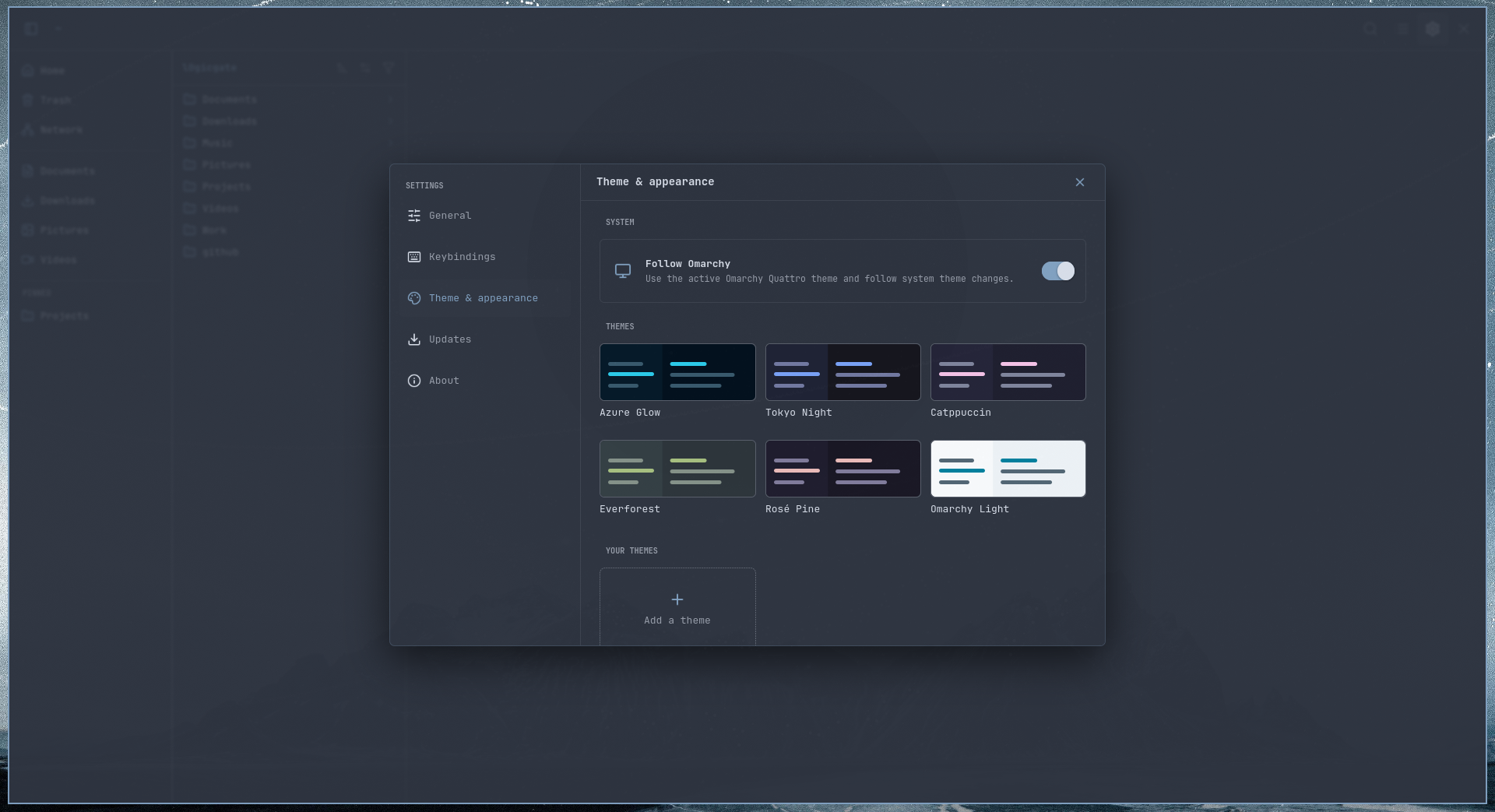
Follow Omarchy Quattro
On Omarchy Quattro, turn on Follow Omarchy under Settings → Theme & appearance. Strata maps the active Omarchy palette to its semantic colors, monitors the current theme, and updates live whenever Omarchy's theme changes.
This integration supports Omarchy Quattro only. The switch is hidden when Strata cannot find a valid Quattro current-theme state; legacy Omarchy theme layouts are not supported.
Bundled themes
Choose any included theme from Settings → Theme & appearance: Azure Glow, Tokyo Night, Catppuccin, Everforest, Rosé Pine, or Omarchy Light. Selecting a bundled theme turns off Omarchy following and keeps that theme active across restarts.
Custom themes
Select Add a theme, enter a name, and choose the semantic colors for the background, surfaces, text, accent, danger, muted and highlighted elements, borders, and dimmed text. Strata previews edits live and saves completed themes under Your themes.
Custom themes are stored as shareable TOML files in ~/.config/strata/themes/. See Themes for the schema, file location, and Omarchy color mapping.
Release channels
Strata defaults to the Stable channel: only final tagged releases are ever offered, and a Stable install never receives, sees, or is notified about a prerelease.
To try upcoming changes early, choose a channel in Settings → Updates. Preview receives curated alpha, beta, and release-candidate builds but excludes nightlies. Nightly receives every recognised prerelease, including daily development builds. The update dialog and release notes always identify the exact build kind.
When a prerelease installation selects Stable, the Updates card immediately offers the newest stable release as the channel target—even when that requires a semantic downgrade—and labels the action Return to stable. Preview and Nightly selections use the same card for ordinary forward updates, so channel changes never create a separate competing rollback card.
See Releasing for the tag grammar these channels rely on and, for maintainers, how a release candidate is cut and promoted.
Under the hood
Why search stays fast
Strata walks and indexes the selected directory tree on a background thread, never on GTK's UI thread. Results appear






 Strata is a fast, keyboard-first file manager for modern Linux desktops, built around spatial Miller-column navigation plus Icons and List views, with fuzzy search and rich file previews.