
Omarchy-Spotify README

The project's README from github.com/stappmus/Omarchy-Spotify. As one markdown file: README.md.

Omarchy Spotify

Spotify in Quickshell—not Chromium.

Omarchy Spotify brings the Spotify experience you already know into a fast, beautiful Omarchy plugin. It uses about 60 MB of RAM instead of roughly 950 MB for the Spotify desktop client, follows your active Omarchy theme, and keeps your music close with an integrated mini player.

Pair it with Omasing and lyrics for the song you are playing are fetched for you, ready when you want them.

Install

omarchy plugin add https://github.com/stappmus/Omarchy-Spotify.git --enable

Requires Omarchy 4 and a personal Spotify Premium account.

Why you will love it

Familiar from the first click

The layout is inspired by the Spotify client, so there is almost nothing new to learn. Your library and playlists live in the sidebar, search stays at the top, the player stays at the bottom, and artist and album names take you straight to their pages.

Prefer to keep your hands on the keyboard? The whole app is designed for that too.

Shortcut What it does
Ctrl+F or / Search
Ctrl+F or / again Toggle this area / all of Spotify
Tab / F6 Move between sidebar, search, the song list, and the player
Arrow keys Move to a control; Enter activates
C Row actions; arrows or Enter choose
Space Play or pause
Ctrl+Left / Ctrl+Right Previous or next song
Shift+Left / Shift+Right Seek 10 seconds
Ctrl+Up / Ctrl+Down Change volume
M Mute or restore volume
Ctrl+Shift+A Open the current song's artist
Ctrl+Shift+B Open the current song's album
Ctrl+/ See every keyboard shortcut
Ctrl+H Hide visible shortcut hints

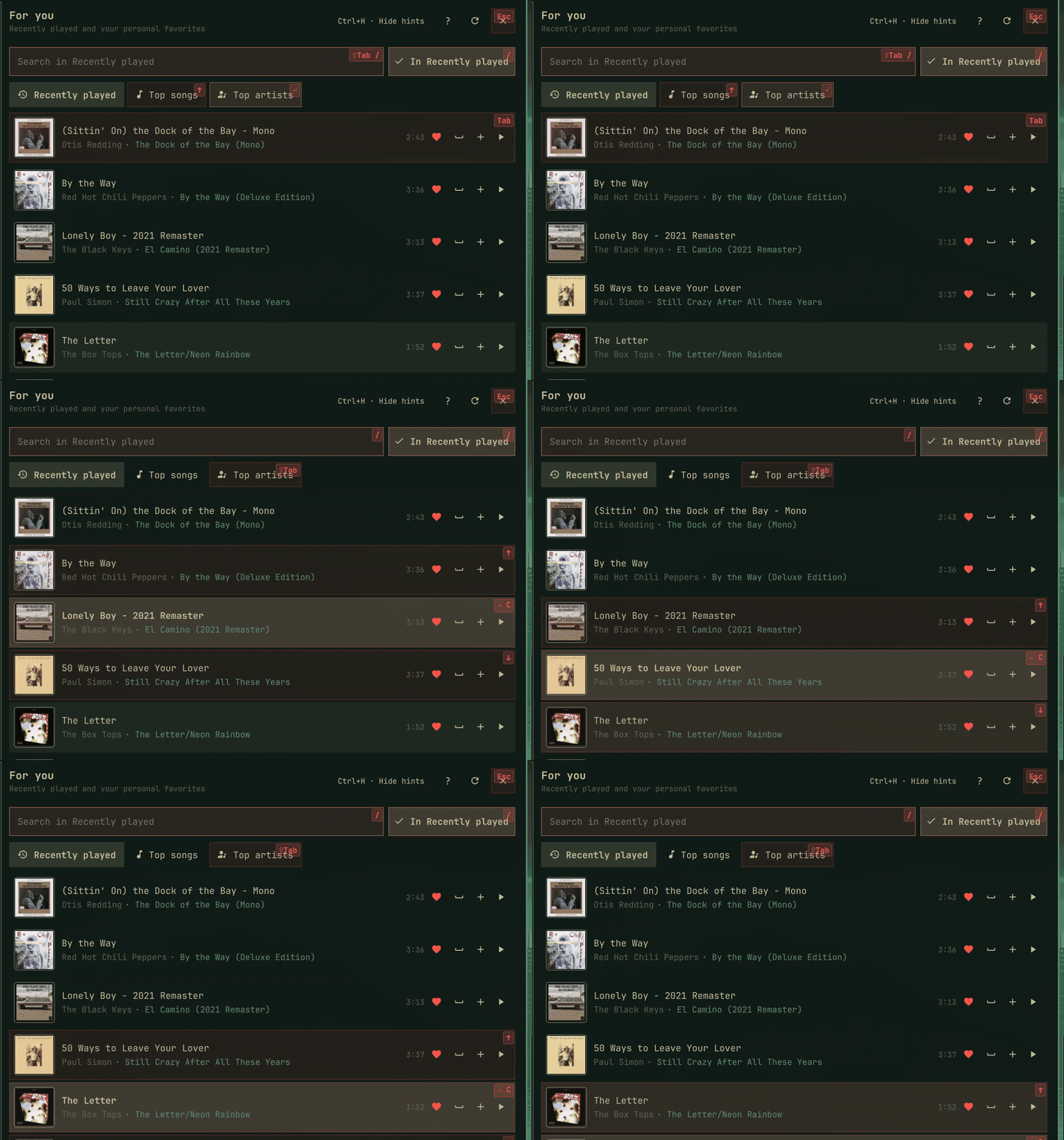
The first shortcut, Tab, or opening the player from the keyboard lights matching controls with the next key. Hold Ctrl, Shift, or Alt to see those chords; the matching hints remain until you release the held modifiers. While hints are visible, the header keeps a Ctrl+H · Hide hints action in reach. It turns hints off until you enable them again in Settings.

Shortcut hints guiding focus down the Recently played song list

The mini-player takes keyboard focus when it is opened from a shortcut. Use Tab or the arrow keys to select every control, Enter to activate buttons, left/right to adjust a selected slider, and Esc to close. The playback shortcuts above work there too; Ctrl+S toggles shuffle, Ctrl+R cycles repeat, Ctrl+Shift+L opens lyrics, Ctrl+Shift+A and Ctrl+Shift+B open the current artist or album in the full player, and O expands the full player.

See it in action

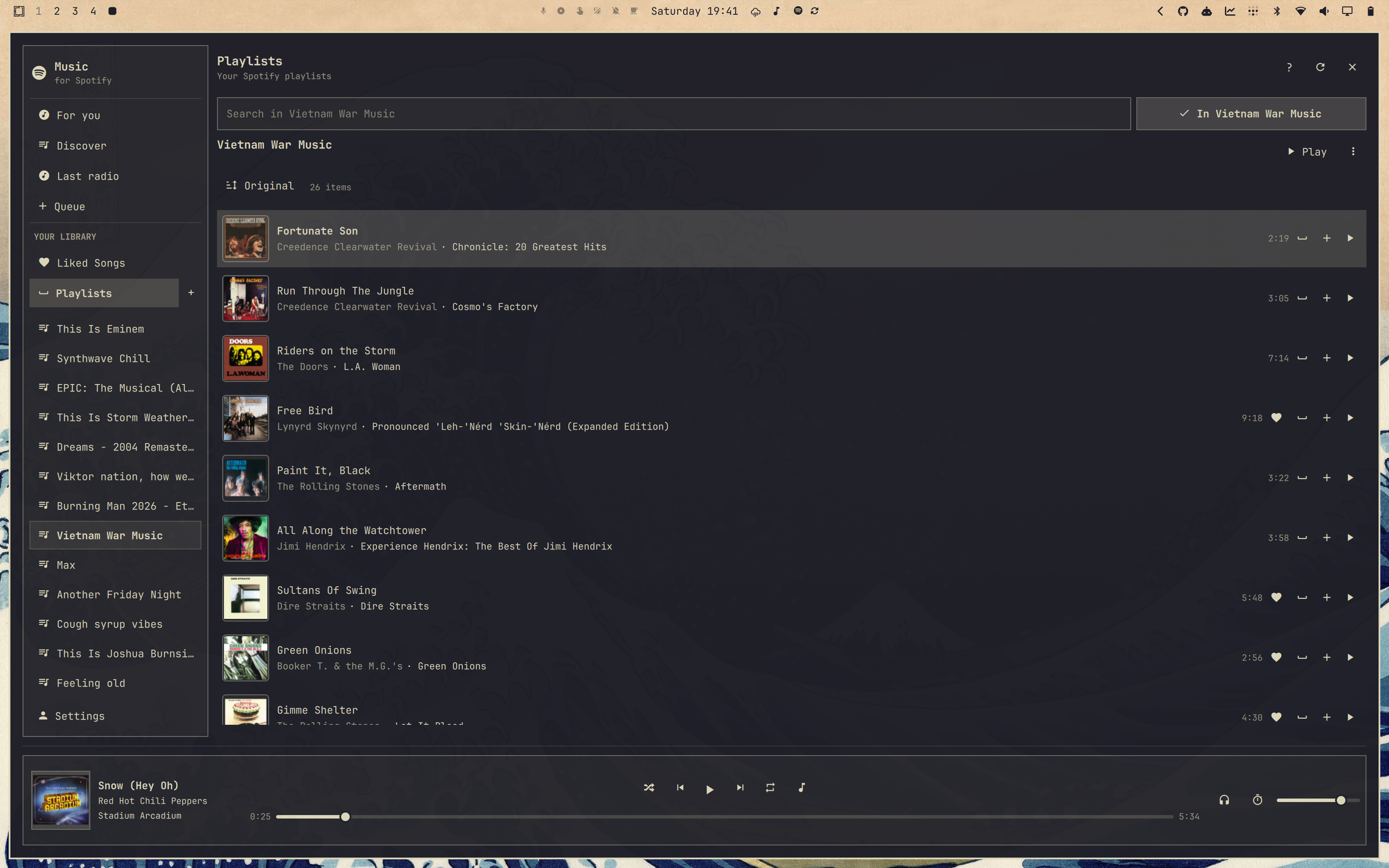
Your playlists, instantly familiar

Everything is where you expect it to be—just faster, lighter, and dressed in your Omarchy theme.

Vietnam War Music playlist in Omarchy Spotify

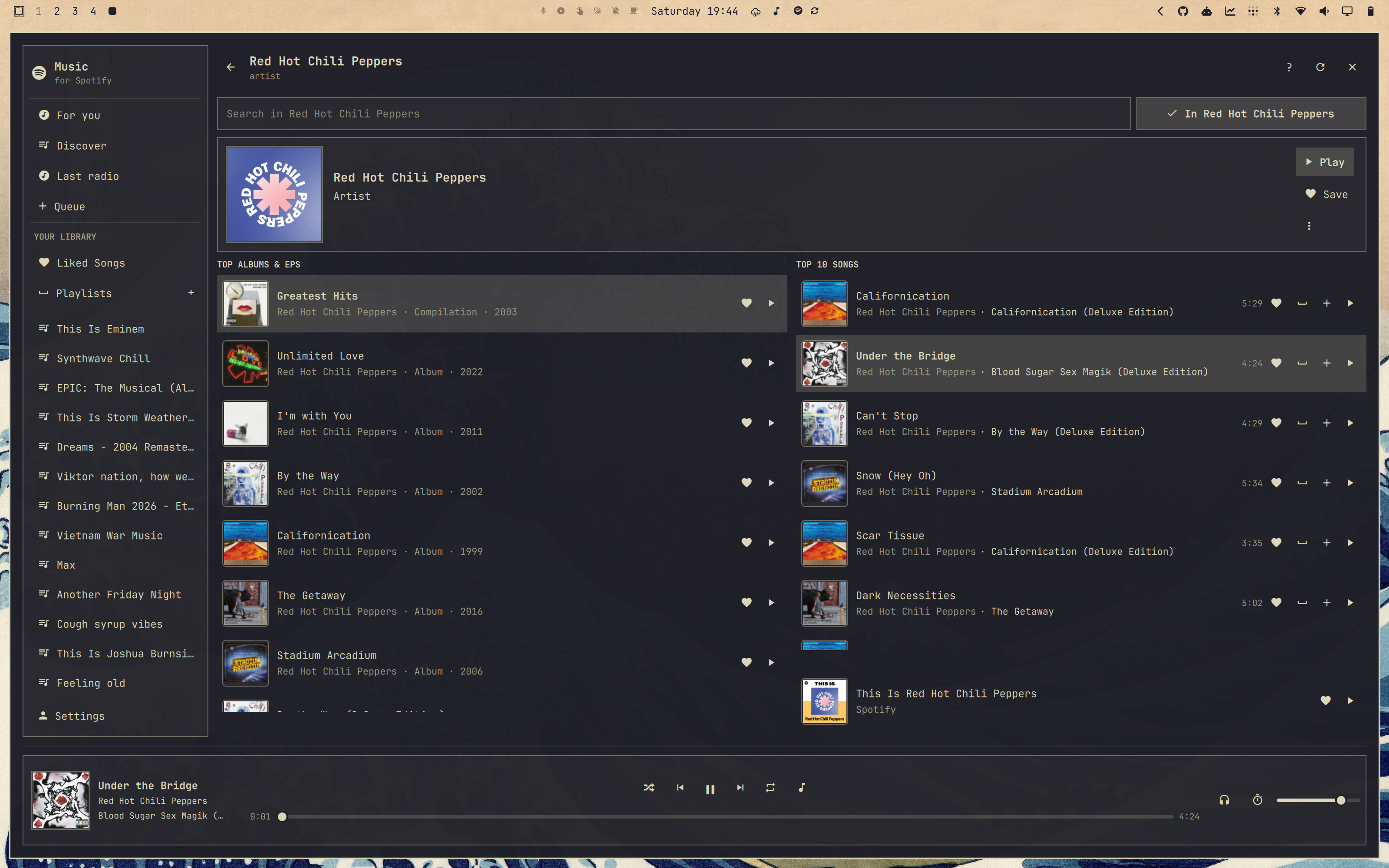
Everything from an artist, in one view

Top albums and EPs sit beside the artist's ten biggest songs, with their This Is playlist and full catalog only a search away.

Red Hot Chili Peppers artist page with Under the Bridge playing

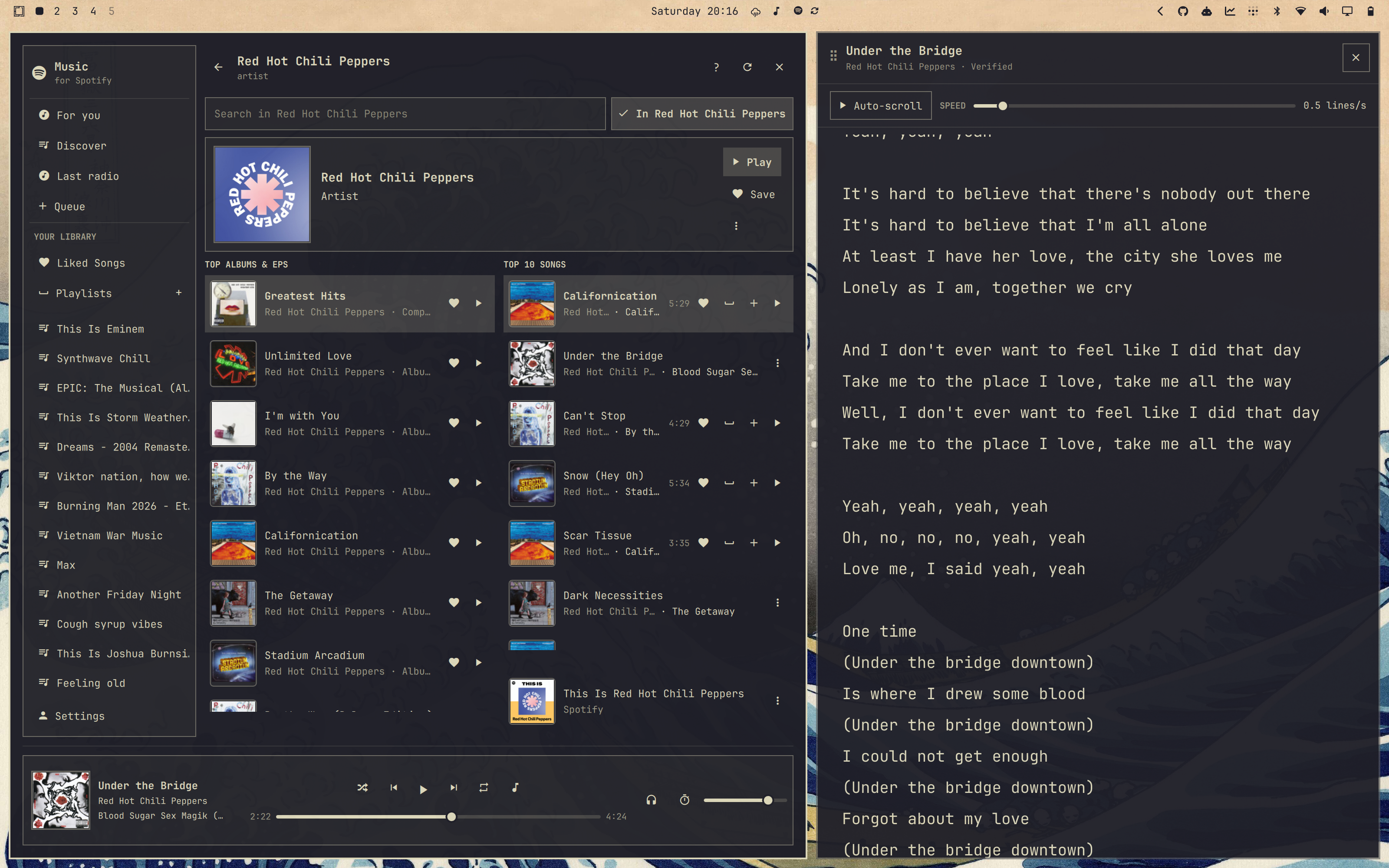
Lyrics, already matched to the song

One click sends the current track to Omasing, where the lyrics are fetched and lined up with your playback position—ready to auto-scroll as you listen.

Omarchy Spotify beside Omasing lyrics for Under the Bridge

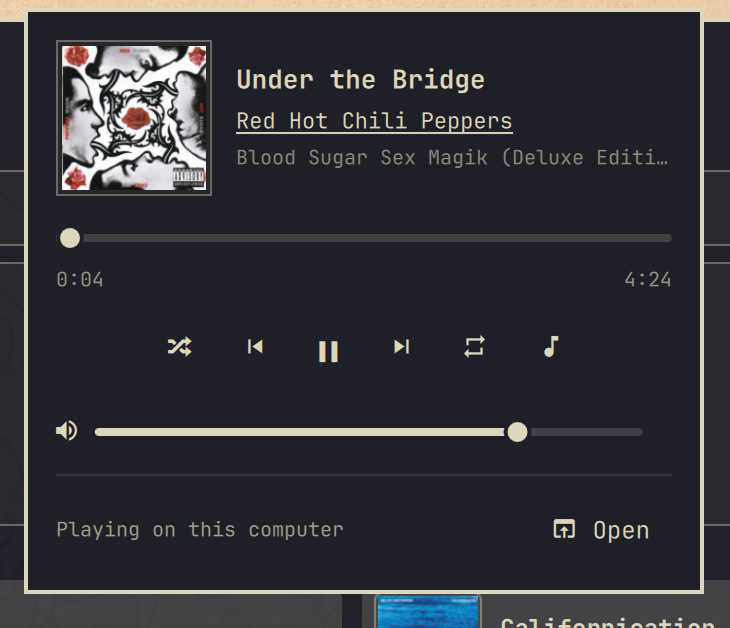
A mini player that belongs in your desktop

The essentials are always one click away, without reopening the full app.

Omarchy Spotify mini player playing Under the Bridge

Set it up

To replace Omarchy's existing Super+Shift+M · Music binding, add this to ~/.config/hypr/bindings.lua:

  hl.unbind("SUPER + SHIFT + M") -- previously: Music
  o.bind("SUPER + SHIFT + M", "Omarchy Spotify",
    "omarchy shell -q quickshell.spotify.player togglePlayer")

Run hyprctl reload and check hyprctl configerrors after saving. Until the binding is replaced, Omarchy's stock Music binding stays active and the Settings choice below has no effect on the shortcut.

In Omarchy Spotify's Settings, choose whether that shortcut launches Omarchy's Music app, toggles the full player, or toggles the mini-player. Separate bindings can call toggleMiniPlayer or toggleFullPlayer on the same quickshell.spotify.player target.

Raise or lower Spotify volume from a keybinding without opening the player:

omarchy shell -q quickshell.spotify.player volumeUp
omarchy shell -q quickshell.spotify.player volumeDown

Each step is 5%, the same as Ctrl+Up / Ctrl+Down. This changes Spotify's own volume, including speakers, not the computer's output level.

Click the Spotify icon on the left side of the bar. The mini-player asks you to Set up and continue, then Spotify sign-in finishes in your browser. You can move the widget later with Omarchy's bar controls.

Local playback installs an exact-version backend only after its GitHub build provenance matches this plugin version's tag and the checkout's backend inputs still match that tagged source. If verification is unavailable, setup builds the locked Rust source locally or offers Omarchy's packaged spotifyd fallback instead of executing an unverified download.

Seeing "Spotify is busy." or slow searches?

The plugin's Spotify Web API client ID is shared by every install worldwide, and Spotify rate-limits requests per app, not per user. When that shared quota runs out you see Spotify is busy. Try again in N seconds. and searches that stall even though nothing is wrong on your side.

You can use a personal Spotify Developer app with a separate quota. This does not provide unlimited requests or restore restricted endpoints.

  1. Add http://127.0.0.1:8989/login as the app's redirect URI.
  2. Set Spotify Developer app client ID in the plugin settings. Leave it empty to use the shipped app. Invalid IDs produce an error.
  3. Authorize the selected app. Changing the ID clears the current session and account data; stored sessions are isolated by client ID.

Development apps require an eligible Premium owner and allowlisted users, and have endpoint restrictions. See Spotify's quota modes. The local Connect authorization remains separate.

Remove it completely

Run the bundled uninstaller from outside the plugin directory:

cd "$HOME" && "$HOME/.config/omarchy/plugins/quickshell.spotify/scripts/uninstall.sh"

It disables and removes the plugin, stops and removes both user services, restarts the shell, and deletes all plugin-owned configuration, cached audio, backend build files, installed binaries, playback state, runtime sockets, old configuration backups, and matching GNOME Keyring entries.

If you prefer to inspect and paste the main steps individually:

plugin_dir="$HOME/.config/omarchy/plugins/quickshell.spotify"
cd "$HOME"
omarchy plugin disable quickshell.spotify 2>/dev/null || true
"$plugin_dir/scripts/remove-runtime.sh" --purge
omarchy plugin remove quickshell.spotify --yes
omarchy restart shell

The cleanup deliberately leaves unrelated software alone. A source checkout outside Omarchy's plugin directory, separate plugins such as Omasing, and the spotifyd package remain in place. If this plugin was the only reason you installed the fallback package, remove it with:

omarchy pkg drop spotifyd

Very old installation instructions may also have added a custom Hyprland shortcut. The uninstaller reports any such references without rewriting your personal configuration. Check both the live config and, when applicable, its chezmoi source:

rg -n 'quickshell\.spotify|Omarchy Spotify' \
  "$HOME/.config/hypr" "$HOME/.local/share/chezmoi" 2>/dev/null

Remove only the matching custom lines, apply the dotfiles change, and run hyprctl reload. Omarchy's stock Super+Shift+M Music shortcut will then be used again.

More music, less app

Your Spotify password is entered only on Spotify's own page. Omarchy Spotify stores your saved session in GNOME Keyring and clears it when you log out.

Want the details? Read the technical notes or see the memory benchmark.

Omarchy Spotify is an independent project and is not affiliated with Spotify. Spotify is a trademark of Spotify AB.

Licensed under the MIT License.

Omarchy-Spotify (stappmus/Omarchy-Spotify)

Searching Database…

What is this?Omarchy Spotify is a lightweight Spotify client built specifically for the Omarchy Linux desktop, running inside Quickshell instead of a Chromium-based wrapper so it uses far less memory than the official desktop app.
Is this a standalone app or does it plug into something else?It's an Omarchy plugin written in QML for Quickshell, not a separate browser-based app — it lives in your Omarchy bar, follows your Omarchy theme, and includes a built-in mini player.
How do I set it up?Click the Spotify icon on the left side of your Omarchy bar; the mini-player prompts you to 'Set up and continue', then Spotify sign-in finishes in your browser.
What do I need before installing it?You need Omarchy 4 and a personal Spotify Premium account; local playback additionally needs a Rust-built backend (or the packaged spotifyd fallback) that setup verifies or builds automatically.
Why do I sometimes see 'Spotify is busy' or slow searches?The plugin ships one shared Spotify Web API client ID used by every install worldwide, and Spotify rate-limits by app rather than by user, so global demand can throttle everyone; you can register your own Spotify Developer app for a separate, still-limited quota.
Does it ever see my Spotify password?No — your password is entered only on Spotify's own sign-in page; the plugin stores the resulting session in GNOME Keyring and clears it when you log out.
What is Omasing and how does it fit in?Omasing is a companion Omarchy app that automatically fetches and lines up lyrics for whatever track is playing in Omarchy Spotify, ready to auto-scroll with playback position.
Can I control playback without opening the player?Yes — dedicated keybindings can raise or lower Spotify's own volume in 5% steps and toggle the mini-player or full player, and almost every action (play/pause, skip, seek, mute, shuffle) has its own keyboard shortcut.
What audio quality can I get for local playback?Local playback can be set up to 320 kbps.
How do I fully remove it?Run the bundled uninstaller from outside the plugin directory — it disables the plugin, stops its services, and deletes all plugin-owned config, cache, binaries, and keyring entries, while leaving Omasing and the spotifyd fallback package untouched.
Creator
stappmus
Size
20.8 MB
Stars
234
Age
2mo
Commits · 90 Days