
381 ·GitHub
Что это?
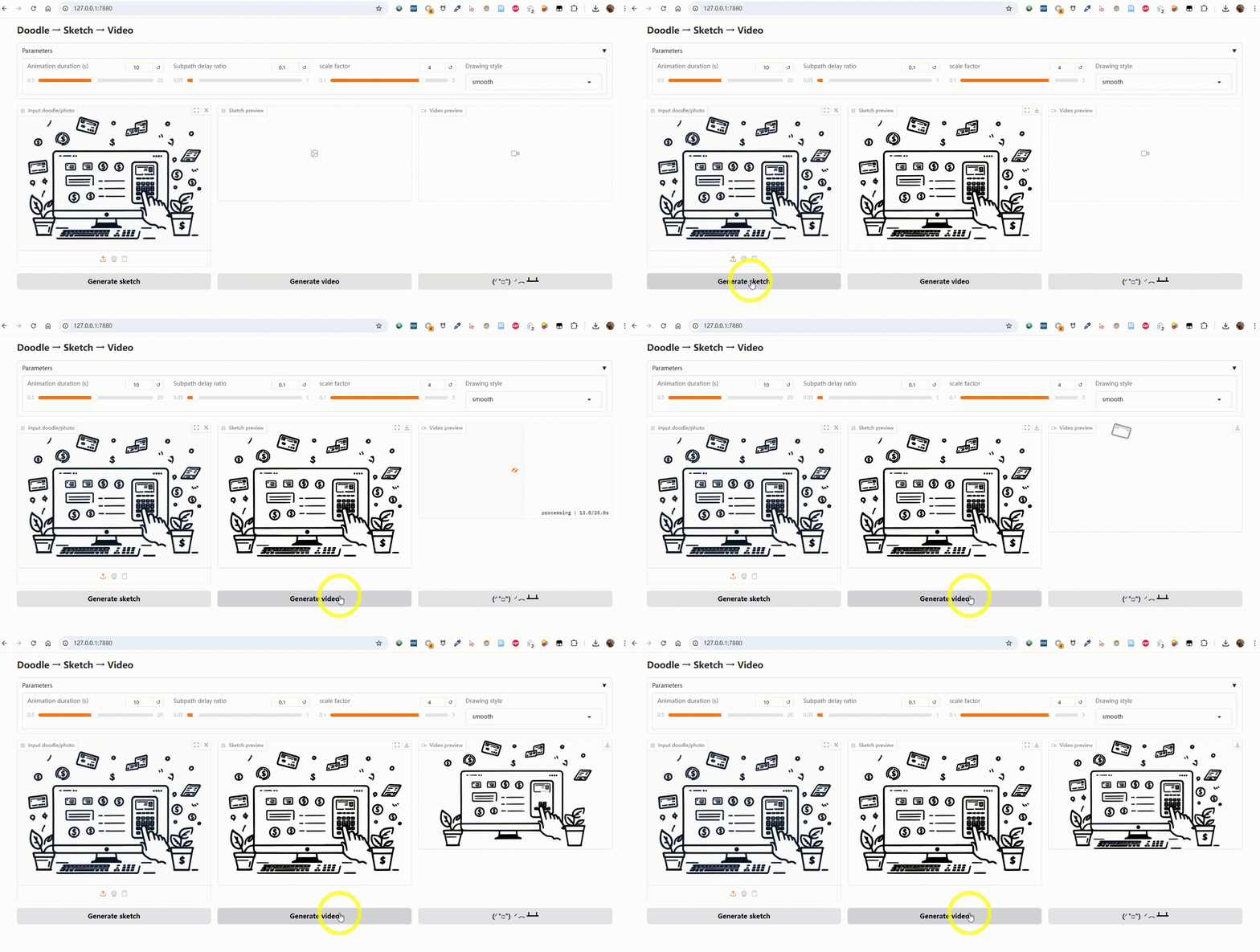
 Sketch2Motion превращает фото, каракулю или набросок в анимированное MP4-видео в стиле рисунка, как будто кто-то рисует его от руки.
Sketch2Motion превращает фото, каракулю или набросок в анимированное MP4-видео в стиле рисунка, как будто кто-то рисует его от руки.Это библиотека для импорта или отдельное приложение?Это отдельный инструмент с веб-интерфейсом на Gradio, который вы запускаете локально; импортировать его как библиотеку не предполагается.
Это отдельный инструмент с веб-интерфейсом на Gradio, который вы запускаете локально; импортировать его как библиотеку не предполагается.Как это запустить?Склонируйте репозиторий, установите Python-зависимости, затем запустите Gradio-приложение и откройте его в браузере.
Склонируйте репозиторий, установите Python-зависимости, затем запустите Gradio-приложение и откройте его в браузере.Что нужно установить, кроме Python?Нужен Python 3.9+, а также Gradio и Manim как Python-пакеты, и ffmpeg с Potrace в системном PATH для рендеринга и трассировки.
Нужен Python 3.9+, а также Gradio и Manim как Python-пакеты, и ffmpeg с Potrace в системном PATH для рендеринга и трассировки.Есть ли подводные камни установки, которые стоит учитывать?ffmpeg и Potrace нужно устанавливать отдельно и добавлять в PATH (сами через pip они не подтягиваются), что часто становится причиной неудач при настройке на Windows.
ffmpeg и Potrace нужно устанавливать отдельно и добавлять в PATH (сами через pip они не подтягиваются), что часто становится причиной неудач при настройке на Windows.Кому это пригодится?Художникам, любителям или создателям контента, которые хотят превратить статичный рисунок или фото в распространяемую анимацию «процесса рисования» без ручной векторной анимации.
Художникам, любителям или создателям контента, которые хотят превратить статичный рисунок или фото в распространяемую анимацию «процесса рисования» без ручной векторной анимации.Работает ли это на Windows, macOS и Linux?Да, в README есть инструкции по установке ffmpeg и Potrace на Windows, macOS и Linux.
Да, в README есть инструкции по установке ffmpeg и Potrace на Windows, macOS и Linux.Можно сохранить исходные цвета в анимации?Да, есть опциональный конвейер с сохранением цвета: он квантизирует изображение до 16 цветов, отдельно трассирует каждый цветовой слой через Potrace и рендерит цветную рисовальную анимацию.
Да, есть опциональный конвейер с сохранением цвета: он квантизирует изображение до 16 цветов, отдельно трассирует каждый цветовой слой через Potrace и рендерит цветную рисовальную анимацию.Какие стили и форматы анимации можно выбрать?Можно настроить длительность, коэффициент задержки подпутей, масштаб зума и выбрать стиль рисования (linear, smooth, thereandback, wiggle), а рендерить в альбомном 16:9 или портретном 9:16.
Можно настроить длительность, коэффициент задержки подпутей, масштаб зума и выбрать стиль рисования (linear, smooth, thereandback, wiggle), а рендерить в альбомном 16:9 или портретном 9:16.Зачем добавлять последний кадр в начало?Инструмент автоматически добавляет финальный нарисованный кадр в начало видео, создавая короткую паузу, которая даёт анимации более завершённое вступление.
Инструмент автоматически добавляет финальный нарисованный кадр в начало видео, создавая короткую паузу, которая даёт анимации более завершённое вступление.Как технически выглядит результат?Изображения трассируются в векторную графику SVG (со встроенным цветом фона), а затем рендерятся в MP4 с помощью анимационного движка Manim.
Изображения трассируются в векторную графику SVG (со встроенным цветом фона), а затем рендерятся в MP4 с помощью анимационного движка Manim.What are similar projects?WanGP, magic-animate, goku-image-to-svg-tool, storycast, IOPaint, reelmimic, 3dicon, onetake
WanGP, magic-animate, goku-image-to-svg-tool, storycast, IOPaint, reelmimic, 3dicon, onetakeWhich topics is it in?image-to-video, gradio, image-editing, image, webui, svg, ffmpeg, video-generation, i18n, image-processing, video, animation
image-to-video, gradio, image-editing, image, webui, svg, ffmpeg, video-generation, i18n, image-processing, video, animation