


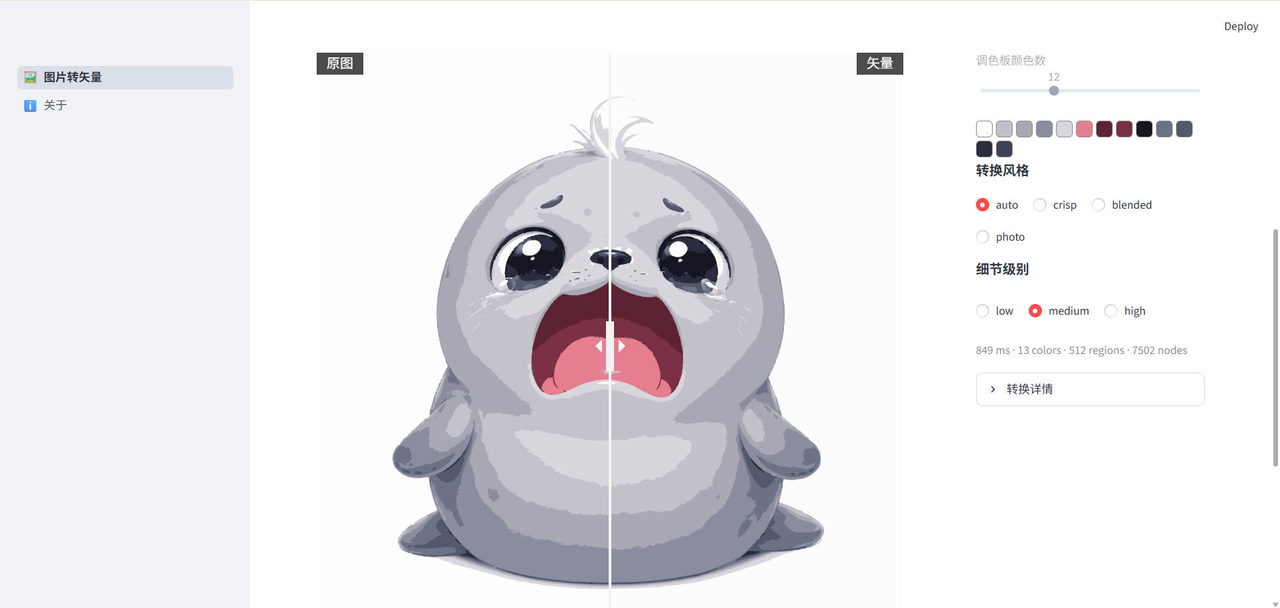
What is this?
 A Streamlit web app that wraps the open-source Vecto (.NET) vectorization engine to turn raster images like PNG or JPG into clean, editable SVG files, with a live original/vector/split-view comparison before you export.
A Streamlit web app that wraps the open-source Vecto (.NET) vectorization engine to turn raster images like PNG or JPG into clean, editable SVG files, with a live original/vector/split-view comparison before you export.Is this its own vectorizer, or just a UI on top of another engine?It's a Streamlit front-end wrapped around the Vecto CLI engine (an open-source .NET vectorization core). The engine does the actual tracing (ImageSharp decode plus polygon fitting); this project just handles the web UI, parameter passing, three-way preview, and export.
It's a Streamlit front-end wrapped around the Vecto CLI engine (an open-source .NET vectorization core). The engine does the actual tracing (ImageSharp decode plus polygon fitting); this project just handles the web UI, parameter passing, three-way preview, and export.How do I start using it?Easiest way is to open the hosted instance at image-to-svg.streamlit.app in a browser, no install needed. To run it locally, clone the repo and launch the Streamlit app; the Vecto binary (v0.4.2, linux-x64) already ships inside tools/vecto.
Easiest way is to open the hosted instance at image-to-svg.streamlit.app in a browser, no install needed. To run it locally, clone the repo and launch the Streamlit app; the Vecto binary (v0.4.2, linux-x64) already ships inside tools/vecto.Do I need to download the Vecto engine myself?No, a single-file Vecto binary (v0.4.2, linux-x64) is bundled directly in the repo at tools/vecto, so it works out of the box; you'd only grab a different build from Vecto's own releases if you're not on linux-x64.
No, a single-file Vecto binary (v0.4.2, linux-x64) is bundled directly in the repo at tools/vecto, so it works out of the box; you'd only grab a different build from Vecto's own releases if you're not on linux-x64.Any catch when running it locally or heavily?The included Vecto binary targets linux-x64 only, so other platforms need a manual download; also, a single conversion can peak at 60-490MB of memory, which the author says is fine for personal use but worth knowing before scaling it up.
The included Vecto binary targets linux-x64 only, so other platforms need a manual download; also, a single conversion can peak at 60-490MB of memory, which the author says is fine for personal use but worth knowing before scaling it up.What image formats can I upload?PNG, JPG, BMP, GIF, TGA, TIFF, WebP, PBM, and PPM are all accepted, and conversion starts automatically the moment you upload.
PNG, JPG, BMP, GIF, TGA, TIFF, WebP, PBM, and PPM are all accepted, and conversion starts automatically the moment you upload.How does this compare to Vectorizer.AI or Inkscape's bitmap trace?Per the README's comparison table, it matches Vectorizer.AI on browser-based, auto-on-upload conversion while staying fully open-source and free like Inkscape, and it adds a draggable split-view comparison and bilingual UI that none of the alternatives combine.
Per the README's comparison table, it matches Vectorizer.AI on browser-based, auto-on-upload conversion while staying fully open-source and free like Inkscape, and it adds a draggable split-view comparison and bilingual UI that none of the alternatives combine.Can I also get a raster image back out, not just SVG?Yes, after tracing you can export either the vector SVG or render it back to PNG at a chosen zoom/scale multiplier.
Yes, after tracing you can export either the vector SVG or render it back to PNG at a chosen zoom/scale multiplier.Is the parameter control limited compared to using Vecto directly?No, the README states the UI exposes the full Vecto CLI parameter set unmodified, including palette (auto or fixed color count with swatch preview), style, detail, and diagnostic info.
No, the README states the UI exposes the full Vecto CLI parameter set unmodified, including palette (auto or fixed color count with swatch preview), style, detail, and diagnostic info.Is the interface only in Chinese?No, the app has a one-click language toggle between Chinese and English.
No, the app has a one-click language toggle between Chinese and English.What are similar projects?sharp, cell-lct, PCB_lightgraph_Portable, photosuite, open-pencil-cloud, vectorcraft, floorplan-3d, pdfkit
sharp, cell-lct, PCB_lightgraph_Portable, photosuite, open-pencil-cloud, vectorcraft, floorplan-3d, pdfkitWhich topics is it in?png, streamlit, vector-graphics, bilingual, converter, design-tools, opensource, image-editing, svg, graphics, design, image-processing
png, streamlit, vector-graphics, bilingual, converter, design-tools, opensource, image-editing, svg, graphics, design, image-processing