🇺🇸
🇨🇳
🇯🇵
🇮🇹
🇰🇷
🇷🇺
🇧🇷
🇪🇸

Intro
A gentle introduction to video technology, although it's aimed at software developers / engineers, we want to make it easy for anyone to learn. This idea was born during a mini workshop for newcomers to video technology.
The goal is to introduce some digital video concepts with a simple vocabulary, lots of visual elements and practical examples when possible, and make this knowledge available everywhere. Please, feel free to send corrections, suggestions and improve it.
There will be hands-on sections which require you to have docker installed and this repository cloned.
git clone https://github.com/leandromoreira/digital_video_introduction.git
cd digital_video_introduction
./setup.sh
WARNING: when you see a ./s/ffmpeg or ./s/mediainfo command, it means we're running a containerized version of that program, which already includes all the needed requirements.
All the hands-on should be performed from the folder you cloned this repository. For the jupyter examples you must start the server ./s/start_jupyter.sh and copy the URL and use it in your browser.
Changelog
- added DRM system
- released version 1.0.0
- added simplified Chinese translation
- added FFmpeg oscilloscope filter example
- added Brazilian Portuguese translation
- added Spanish translation
Index
Basic terminology
An image can be thought of as a 2D matrix. If we think about colors, we can extrapolate this idea seeing this image as a 3D matrix where the additional dimensions are used to provide color data.
If we chose to represent these colors using the primary colors (red, green and blue), we define three planes: the first one for red, the second for green, and the last one for the blue color.
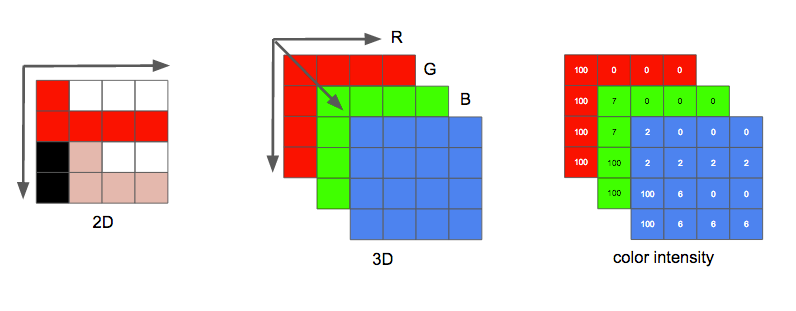
We'll call each point in this matrix a pixel (picture element). One pixel represents the intensity (usually a numeric value) of a given color. For example, a red pixel means 0 of green, 0 of blue and maximum of red. The pink color pixel can be formed with a combination of the three colors. Using a representative numeric range from 0 to 255, the pink pixel is defined by Red=255, Green=192 and Blue=203.
Other ways to encode a color image
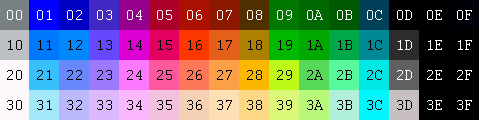
Many other possible models may be used to represent the colors that make up an image. We could, for instance, use an indexed palette where we'd only need a single byte to represent each pixel instead of the 3 needed when using the RGB model. In such a model we could use a 2D matrix instead of a 3D matrix to represent our color, this would save on memory but yield fewer color options.
For instance, look at the picture down below. The first face is fully colored. The others are the red, green, and blue planes (shown as gray tones).
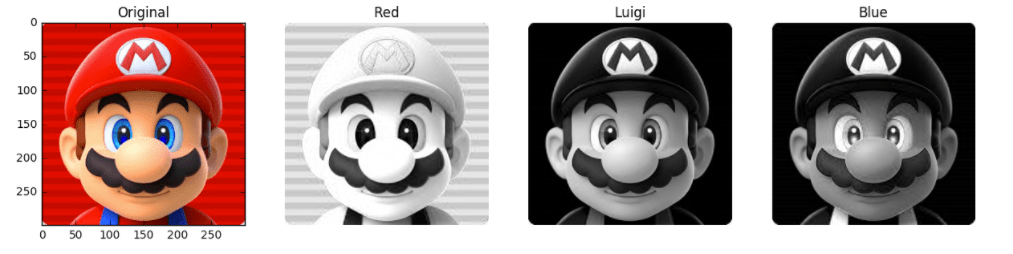
We can see that the red color will be the one that contributes more (the brightest parts in the second face) to the final color while the blue color contribution can be mostly only seen in Mario's eyes (last face) and part of his clothes, see how all planes contribute less (darkest parts) to the Mario's mustache.
And each color intensity requires a certain amount of bits, this quantity is known as bit depth. Let's say we spend 8 bits (accepting values from 0 to 255) per color (plane), therefore we have a color depth of 24 bits (8 bits * 3 planes R/G/B), and we can also infer that we could use 2 to the power of 24 different colors.
It's great to learn how an image is captured from the world to the bits.
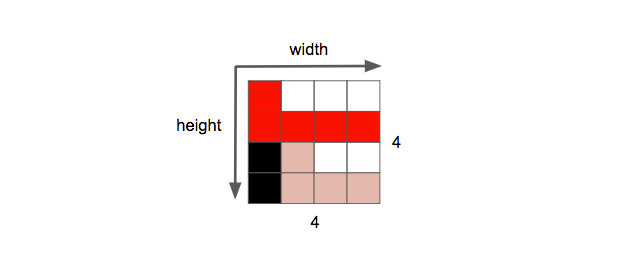
Another property of an image is the resolution, which is the number of pixels in one dimension. It is often presented as width × height, for example, the 4×4 image below.
Hands-on: play around with image and color
You can play around with image and colors using jupyter (python, numpy, matplotlib and etc).
You can also learn how image filters (edge detection, sharpen, blur...) work.
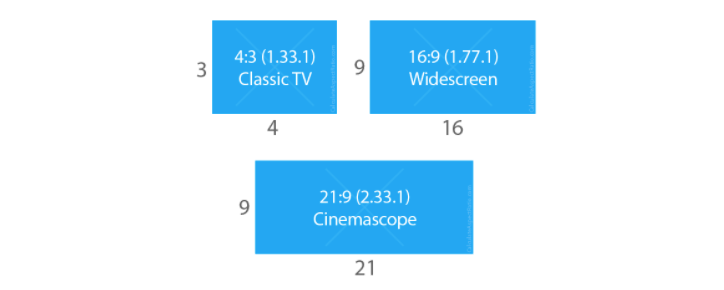
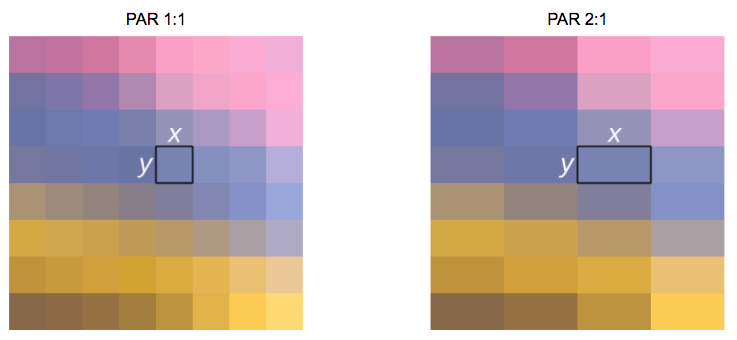
Another property we can see while working with images or video is the aspect ratio which simply describes the proportional relationship between width and height of an image or pixel.
When people says this movie or picture is 16x9 they usually are referring to the Display Aspect Ratio (DAR), however we also can have different shapes of individual pixels, we call this Pixel Aspect Ratio (PAR).
DVD is DAR 4:3
Although the real resolution of a DVD is 704x480 it still keeps a 4:3 aspect ratio because it has a PAR of 10:11 (704x10/480x11)
Finally, we can define a video as a succession of n frames in time which can be seen as another dimension, n is the frame rate or frames per second (FPS).
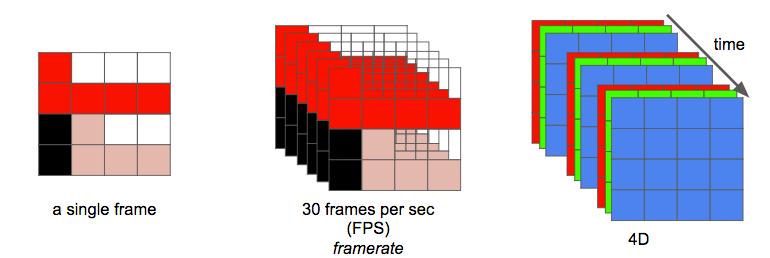
The number of bits per second needed to show a video is its bit rate.
bit rate = width * height * bit depth * frames per second
For example, a video with 30 frames per second, 24 bits per pixel, resolution of 480x240 will need 82,944,000 bits per second or 82.944 Mbps (30x480x240x24) if we don't employ any kind of compression.
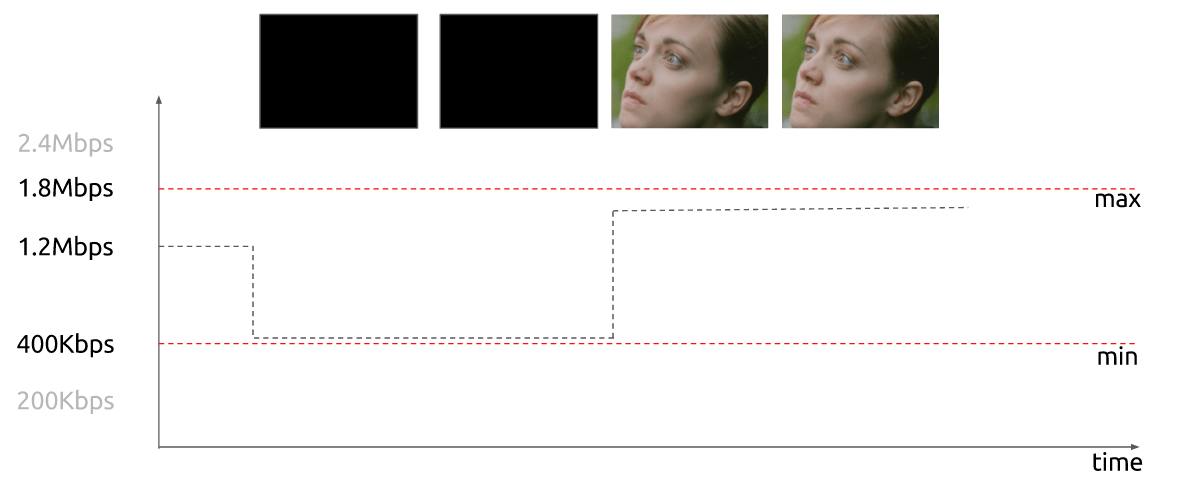
When the bit rate is nearly constant it's called constant bit rate (CBR) but it also can vary then called variable bit rate (VBR).
This graph shows a constrained VBR which doesn't spend too many bits while the frame is black.
In the early days, engineers came up with a technique for doubling the perceived frame rate of a video display without consuming extra bandwidth. This technique is known as interlaced video; it basically sends half of the screen in 1 "frame" and the other half in the next "frame".
Today screens render mostly using progressive scan technique. Progressive is a way of displaying, storing, or transmitting moving images in which all the lines of each frame are drawn in sequence.
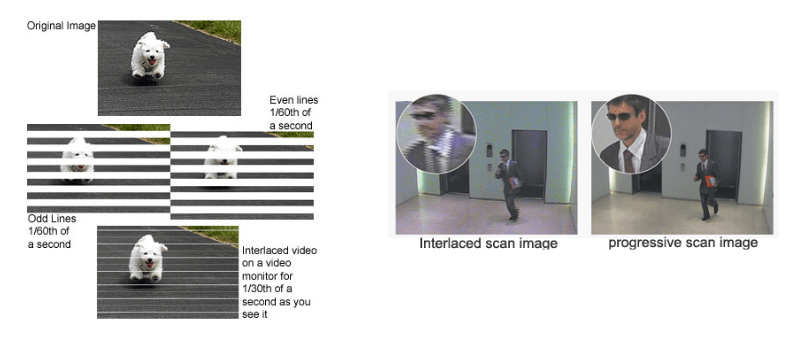
Now we have an idea about how an image is represented digitally, how its colors are arranged, how many bits per second do we spend to show a video, if it's constant (CBR) or variable (VBR), with a given resolution using a given frame rate and many other terms such as interlaced, PAR and others.
Hands-on: Check video properties
You can check most of the explained properties with ffmpeg or mediainfo.
Redundancy removal
We learned that it's not feasible to use video without any compression; a single one hour video at 720p resolution with 30fps would require 278GB*. Since using solely lossless data compression algorithms like DEFLATE (used in PKZIP, Gzip, and PNG), won't decrease the required bandwidth sufficiently we need to find other ways to compress the video.
* We found this number by multiplying 1280 x 720 x 24 x 30 x 3600 (width, height, bits per pixel, fps and time in seconds)
In order to do this, we can exploit how our vision works. We're better at distinguishing brightness than colors, the repetitions in time, a video contains a lot of images with few changes, and the repetitions within the image, each frame also contains many areas using the same or similar color.
Colors, Luminance and our eyes
Our eyes are more sensitive to brightness than colors, you can test it for yourself, look at this picture.
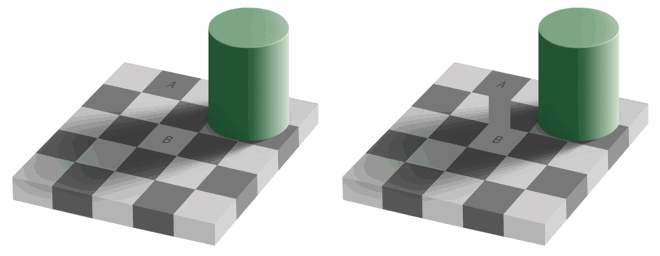
If you are unable to see that the colors of the squares A and B are identical on the left side, that's fine, it's our brain playing tricks on us to pay more attention to light and dark than color. There is a connector, with the same color, on the right side so we (our brain) can easily spot that in fact, they're the same color.
Simplistic explanation of how our eyes work
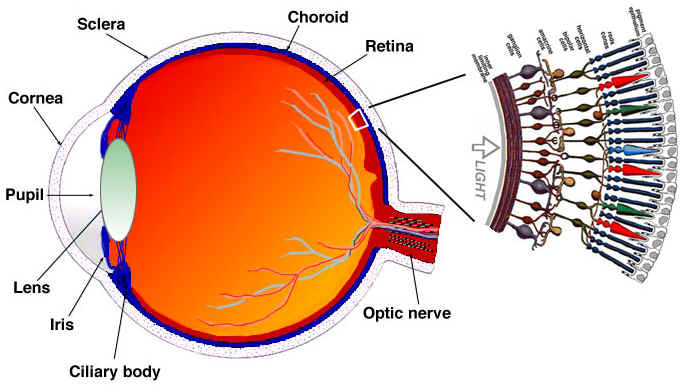
The eye is a complex organ, it is composed of many parts but we are mostly interested in the cones and rods cells. The eye contains about 120 million rod cells and 6 million cone cells.
To oversimplify, let's try to put colors and brightness in the eye's parts function. The rod cells are mostly responsible for brightness while the cone cells are responsible for color, there are three types of cones, each with different pigment, namely: S-cones (Blue), M-cones (Green) and L-cones (Red).
Since we have many more rod cells (brightness) than cone cells (color), one can infer that we are more capable of distinguishing dark and light than colors.
Contrast sensitivity functions
Researchers of experimental psychology and many other fields have developed many theories on human vision. And one of them is called Contrast sensitivity functions. They are related to spatio and temporal of the light and their value presents at given init light, how much change is required before an observer reported there was a change. Notice the plural of the word "function", this is for the reason that we can measure Contrast sensitivity functions with not only black-white but also colors. The result of these experiments shows that in most cases our eyes are more sensitive to brightness than color.
Once we know that we're more sensitive to luma (the brightness in an image) we can try to exploit it.
Color model
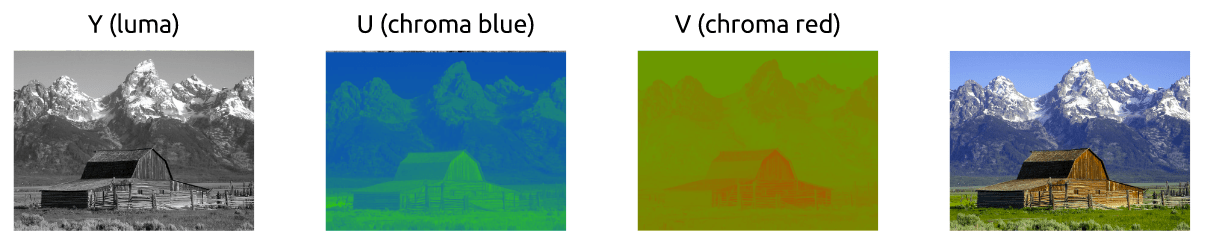
We first learned how to color images work using the RGB model, but there are other models too. In fact, there is a model that separates luma (brightness) from chrominance (colors) and it is known as YCbCr*.
* there are more models which do the same separation.
This color model uses Y to represent the brightness and two color channels Cb (chroma blue) and Cr (chroma red). The YCbCr can be derived from RGB and it also can be converted back to RGB. Using this model we can create full colored images as we can see down below.
Converting between YCbCr and RGB
Some may argue, how can we produce all the colors without using the green?
To answer this question, we'll walk through a conversion from RGB to YCbCr. We'll use the coefficients from the standard BT.601 that was recommended by the group ITU-R* . The first step is to calculate the luma, we'll use the constants suggested by ITU and replace the RGB values.
Y = 0.299R + 0.587G + 0.114B
Once we had the luma, we can split the colors (chroma blue and red):
Cb = 0.564(B - Y)
Cr = 0.713(R - Y)
And we can also convert it back and even get the green by using YCbCr.
R = Y + 1.402Cr
B = Y + 1.772Cb
G = Y - 0.344Cb - 0.714Cr
* groups and standards are common in digital video, they usually define what are the standards, for instance, what is 4K? what frame rate should we use? resolution? color model?
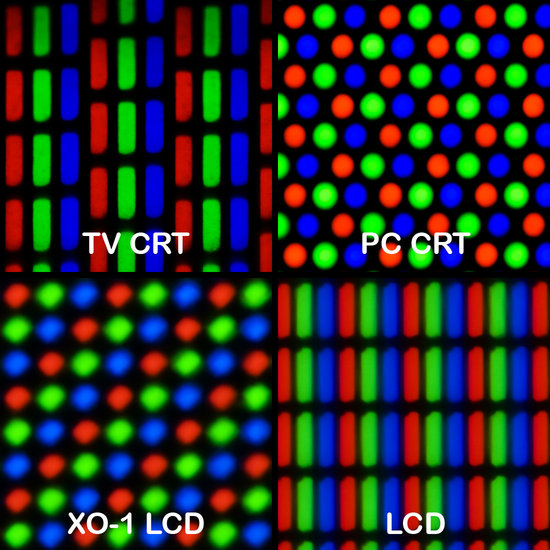
Generally, displays (monitors, TVs, screens and etc) utilize only the RGB model, organized in different manners, see some of them magnified below:
Chroma subsampling
With the image represented as luma and chroma components, we can take advantage of the human visual system's greater sensitivity for luma resolution rather than chroma to selectively remove information. Chroma subsampling is the technique of encoding images using less resolution for chroma than for luma.
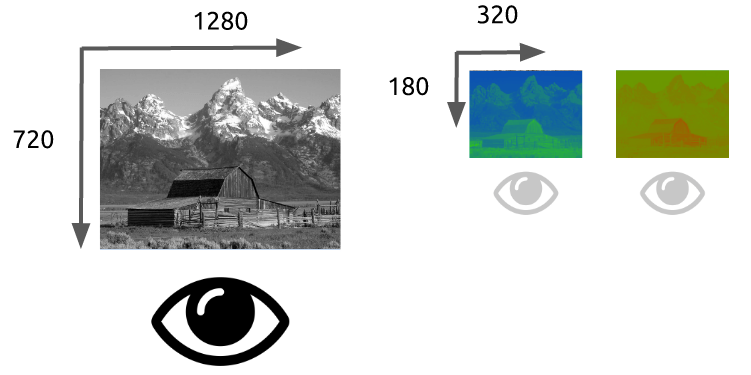
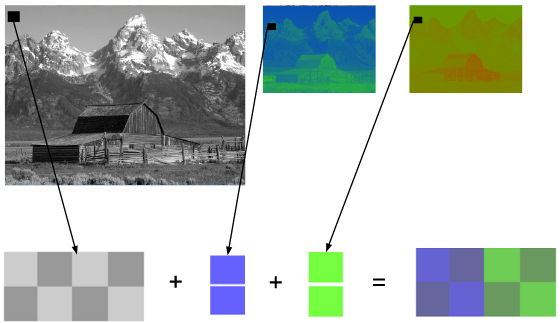
How much should we reduce the chroma resolution?! It turns out that there are already some schemas that describe how to handle resolution and the merge (final color = Y + Cb + Cr).
These schemas are known as subsampling systems and are expressed as a 3 part ratio - a:x:y which defines the chroma resolution in relation to a a x 2 block of luma pixels.
a is the horizontal sampling reference (usually 4)x is the number of chroma samples in the first row of a pixels (horizontal resolution in relation to a)y is the number of changes of chroma samples between the first and seconds rows of a pixels.
An exception to this exists with 4:1:0, which provides a single chroma sample within each 4 x 4 block of luma resolution.
Common schemes used in modern codecs are: 4:4:4 (no subsampling), 4:2:2, 4:1:1, 4:2:0, 4:1:0 and 3:1:1.
You can follow some discussions to learn more about Chroma Subsampling.
YCbCr 4:2:0 merge
Here's a merged piece of an image using YCbCr 4:2:0, notice that we only spend 12 bits per pixel.
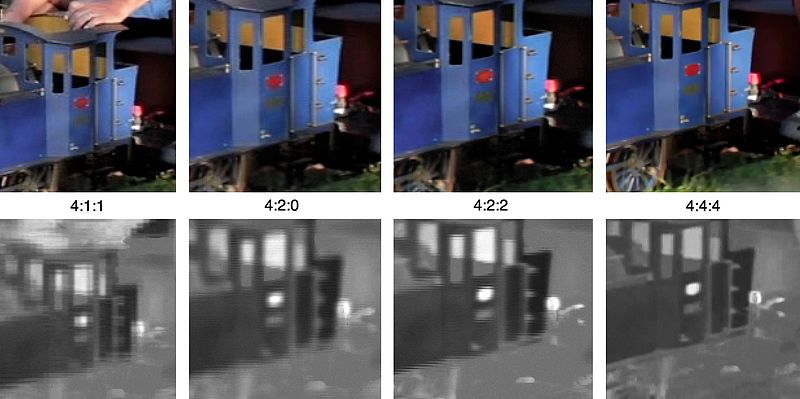
You can see the same image encoded by the main chroma subsampling types, images in the first row are the final YCbCr while the last row of images shows the chroma resolution. It's indeed a great win for such small loss.
Previously we had calculated that we needed 278GB of storage to keep a video file with one hour at 720p resolution and 30fps. If we use YCbCr 4:2:0 we can cut this size in half (139 GB)* but it is still far from ideal.
* we found this value by multiplying width, height, bits per pixel and fps. Previously we needed 24 bits, now we only need 12.
Hands-on: Check YCbCr histogram
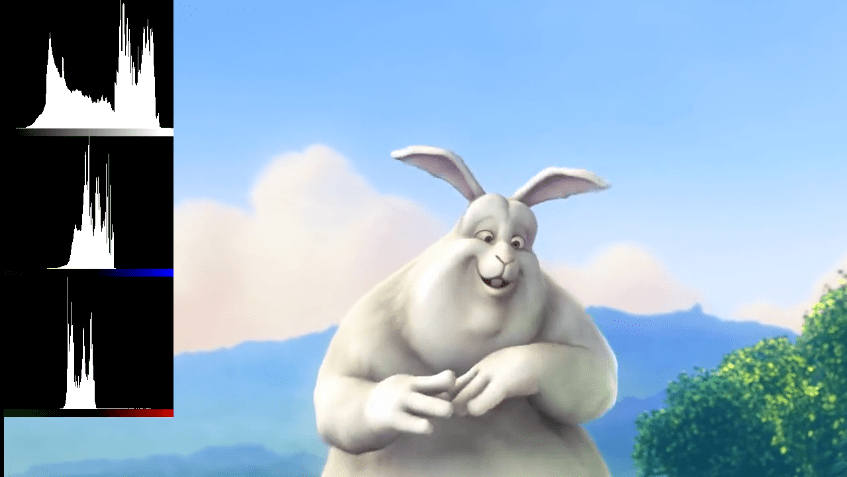
You can check the YCbCr histogram with ffmpeg. This scene has a higher blue contribution, which is showed by the histogram.
Color, luma, luminance, gamma video review
Watch this incredible video explaining what is luma and learn about luminance, gamma, and color.
Hands-on: Check YCbCr intensity
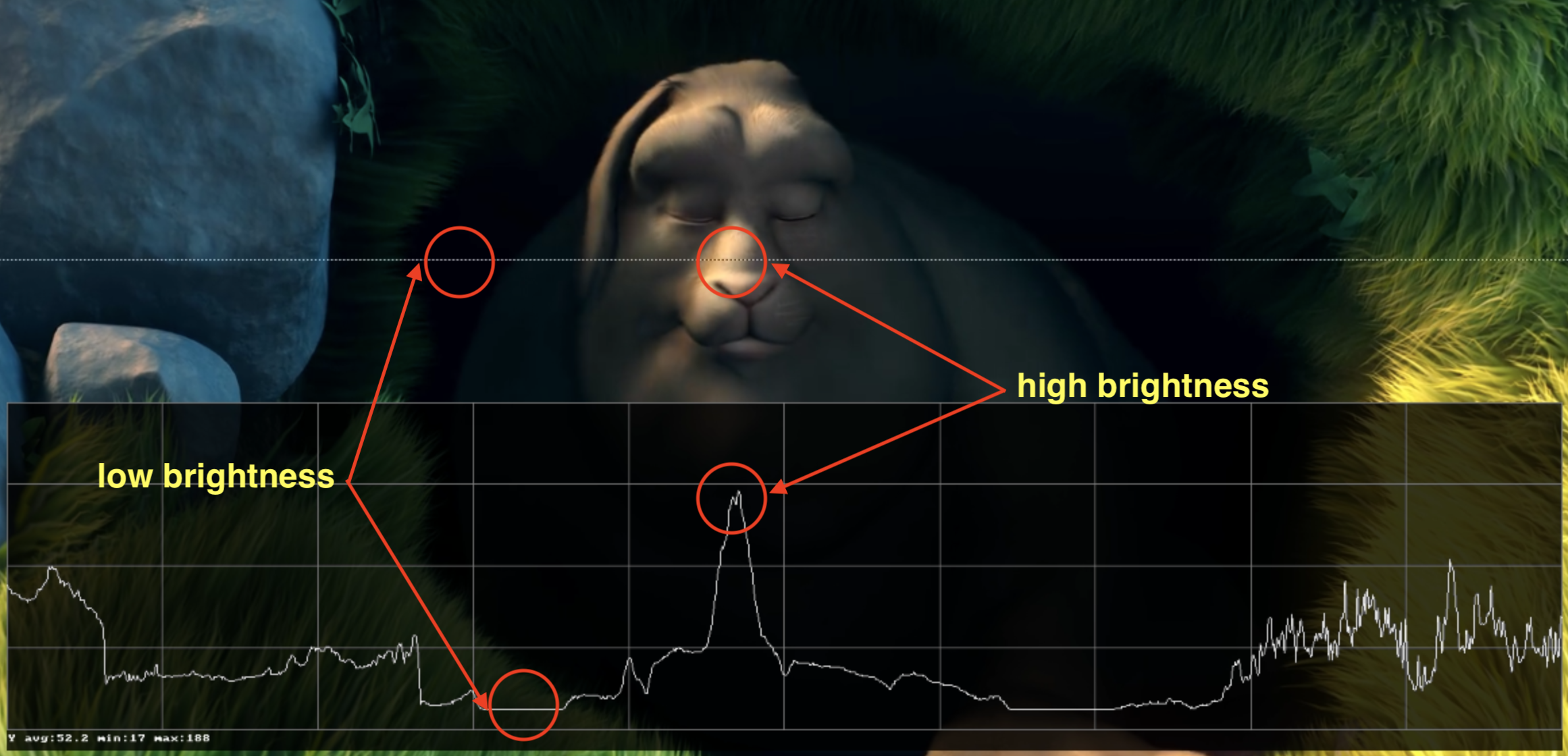
You can visualize the Y intensity for a given line of a video using FFmpeg's oscilloscope filter.
ffplay -f lavfi -i 'testsrc2=size=1280x720:rate=30000/1001,format=yuv420p' -vf oscilloscope=x=0.5:y=200/720:s=1:c=1
Frame types
Now we can move on and try to eliminate the redundancy in time but before that let's establish some basic terminology. Suppose we have a movie with 30fps, here are its first 4 frames.


We can see lots of repetitions within frames like the blue background, it doesn't change from frame 0 to frame 3. To tackle this problem, we can abstractly categorize them as three types of frames.
I Frame (intra, keyframe)
An I-frame (reference, keyframe, intra) is a self-contained frame. It do

 Бесплатное практическое руководство, которое простым языком объясняет основы цифрового видео: как устроены изображения и цвет, как работают сжатие видео и кодеки (H.264, H.265, VP9, AV1) и как устроена потоковая передача видео через интернет.