firstmate



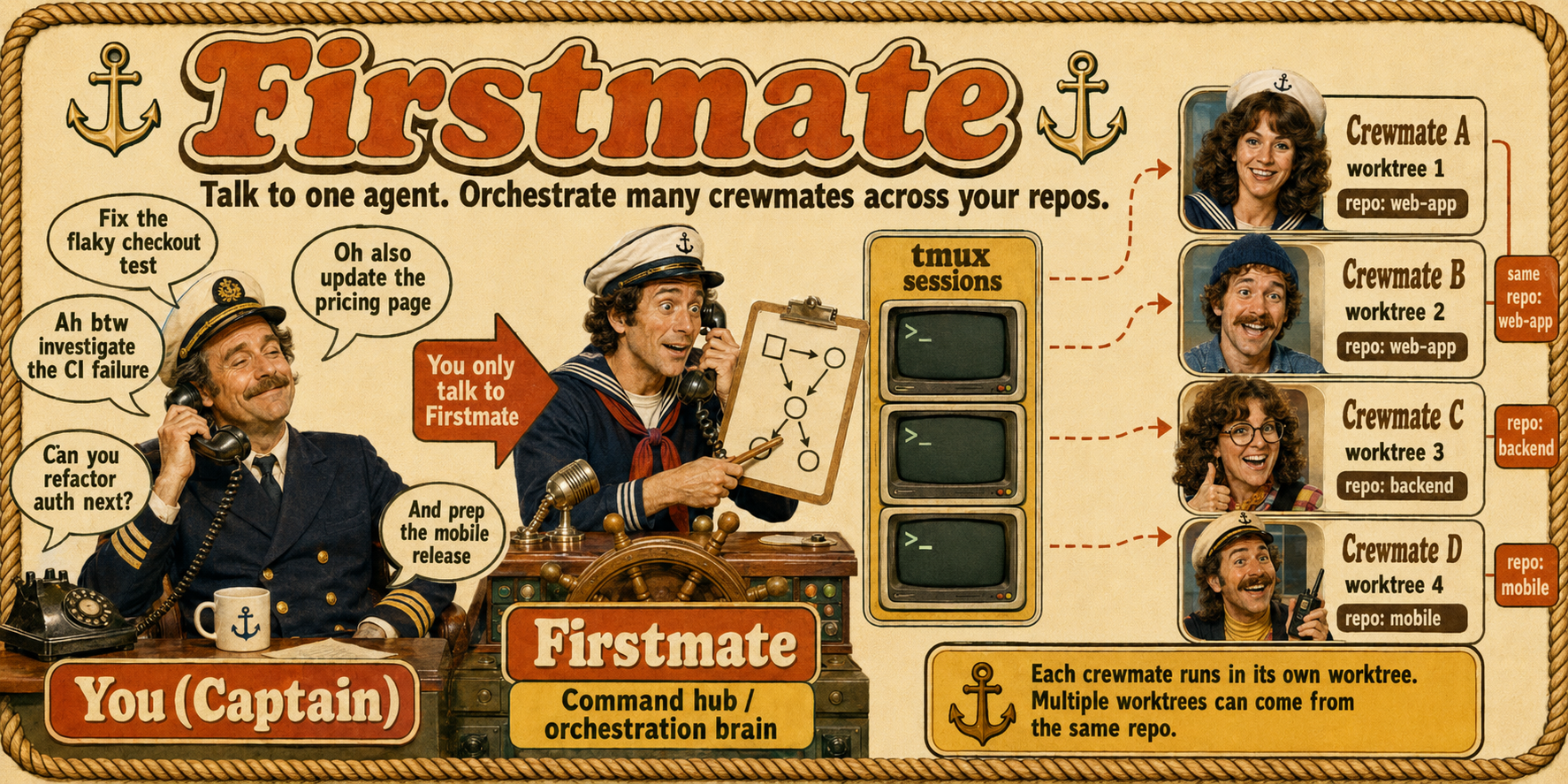
Talk to one agent. Ship with a crew.
What it is
You can run one coding agent easily.
But the moment you want three project tasks done in parallel - fixes, investigations, plans, audits - you become a tab-juggler: babysitting sessions, copy-pasting context between repos, forgetting which terminal had the failing test.
firstmate flips the model.
You talk to a single agent - the first mate - and it runs the crew for you: spawning autonomous agents in a visible session backend, giving each a clean git worktree, supervising them to completion, and handing you finished PRs, approved local merges, or standalone investigation reports.
For larger fleets, you can opt in to persistent secondmates: second mates that are still ordinary direct reports, but run from their own isolated firstmate homes on this machine or another SSH-reachable host.
firstmate is not a model, not a harness, not a skill, not an MCP server, and not a CLI.
firstmate is an agent distro for running a crew of agents.
An agent distro is a portable directory of instructions, skills, tooling, policies, and state conventions that turns a general-purpose agent into a specialized one.
There is no app to install: the cloned repo is the distro - AGENTS.md, bundled firstmate skills, and helper scripts that any terminal coding agent can follow.
Launching a supported harness inside it for your primary session instantiates your first mate - and makes you the captain.
Features
- One liaison - you talk only to the first mate; it dispatches, supervises, escalates only real decisions, and reports plain outcomes.
- A visible crew - every crewmate works in its own tmux window, Herdr tab, or experimental zellij tab, cmux workspace, or Orca terminal you can watch or type into; the first mate reconciles.
- Disposable worktrees - each task runs in a clean treehouse git worktree, or an Orca-managed worktree when
backend=orca, so parallel work on one repo never collides.
- Two task shapes - ship tasks deliver authorized changes; scout tasks leave standalone investigation reports when the intake contract warrants separate research.
- Explicit project modes - each project ships via
no-mistakes, direct-PR, or local-only, with an optional +yolo merge-autonomy flag.
- Optional secondmates - opt in to persistent second mates that run from isolated firstmate homes with their own
FM_HOME, state, projects, and session lock, either locally or as a whole home on an SSH-reachable host, with guarded updates and recovery that never turns an unavailable remote route into a local replacement.
- Event-driven, zero-token supervision - a bash watcher sleeps on the fleet and wakes the first mate only when something needs you; verified primary harnesses also get a turn-end backstop that blocks or follows up on a blind stop when work is under way and supervision is not live.
- Optional Relay - opt in with one local
.env pairing token so firstmate can answer your public mentions on X and Discord alike, act on normal reversible mention requests through the same lifecycle as chat requests, acknowledge spawned work, and post up to three public-safe completion follow-ups within seven days for genuine milestones and the final outcome without changing non-Relay behavior; a final reply promised in a thread becomes durable state that is reconciled from disk, so a restart or a compacted conversation cannot lose it; dry-run preview records would-be replies and dismissals locally before go-live.
- Strict project boundary - the first mate is read-only over your projects except for the narrow guarded and captain-approved operations authorized by hard rule 1, including fleet sync's guarded safe branch pruning; crewmates make every other project change behind the configured merge authority.
- Restart-proof - all state lives on disk and in the active session backend (tmux by hard default, herdr or cmux when selected or auto-detected, zellij/orca when explicitly selected); kill the session anytime and the next one reconciles, including confirmed-dead secondmate agents, and carries on.
Full detail on every feature lives in docs/architecture.md.
Quick Start
Requirements
- A verified primary agent harness: Claude Code, Grok, Pi,
pi-signed, Oh My Pi (omp), Codex, OpenCode, or Cursor Agent CLI.
- Git and the GitHub CLI, authenticated through
gh auth login.
- The CLI and dependencies for your selected runtime backend; tmux is the reference default.
The first mate detects and offers to install supported missing tools after you approve.
Backend-specific setup is linked in Documentation.
Recommended harnesses
Claude Code, Grok, and Pi are equal co-primary recommendations for running the primary firstmate session, with pi-signed supported as Pi's distinct signed-wrapper identity.
Claude Code uses a tracked Stop hook for tokenless watcher re-arm and rewake, Grok uses background-notify wake cycles, and Pi uses its tracked primary watcher extension.
All three have verified turn-end guard paths when launched with their documented setup.
Pick whichever one matches your subscription and workflow.
Oh My Pi (omp), a Pi fork, is verified as a primary with the same extension-owned watcher model as Pi and a stronger turn-end guard: its blocking session_stop hook compels a continuation instead of requesting one.
Codex and OpenCode are also verified and supported as primary harnesses; Codex uses bounded foreground checkpoints, and OpenCode uses a TUI plugin, so both carry more harness-specific supervision tradeoffs than the three co-primaries.
Cursor Agent CLI is verified as a primary too, using a tracked project-scope .cursor/hooks.json whose stop hook parks on the watcher between turns, closest in shape to Claude Code's.
Launch it with --trust, or none of its project hooks load; it also has no turn-end hook in headless cursor-agent -p, so run the primary session interactively.
Install and launch
gh auth login
git clone https://github.com/kunchenguid/firstmate
cd firstmate
Then launch one of the co-primary harnesses; AGENTS.md takes over from there:
Claude Code
claude
Grok
grok --trust
Pi
pi
# or, when the signed wrapper is installed
FM_PI_HARNESS=pi-signed pi-signed
Oh My Pi
omp
# or, when starting from inside a Claude Code pane
FM_OMP_HARNESS=omp omp
Start omp with this checkout as its working directory: it auto-discovers the tracked .omp/extensions/*.ts files with no trust dialog, and naming them with -e as well would load each twice.
For Grok, --trust is needed once per clone so project hooks and the turn-end guard load; /hooks-trust inside Grok works too.
For Pi, approve the project trust prompt once per clone on first launch so the tracked .pi/extensions/*.ts files auto-load.
Pi's /calm toggle hides supported transcript chrome, including canonically classified Firstmate operational user rows, and uses a Calm-only animated working boat during active runs while preserving all model context and session data.
Those Calm-hidden operational inputs remain ordinary user-role messages with unchanged delivery, ordering, authority, persistence, and exports.
The preference persists for the effective Firstmate home, and toggling it off restores ordinary rendering.
Calm's current behavior and supported limits are separate from its version-scoped maintainer evidence.
Pi's /supervision-model command pins a cheaper model and a shallower reasoning effort for the supervision branch alone, from the eligible models and thinking levels Pi itself reports, and with no pin the branch normally follows your own conversation's model and effort; see the configuration schema.
Talk to it
> ahoy! look at my github project xyz, then fix the flaky login test and add dark mode

# firstmate checks its toolchain (asking your consent before installing anything),
# clones the project under projects/ and spawns two isolated workers in the active backend.
# Minutes later:

  PR ready for review, captain: https://github.com/you/xyz/pull/42
  (fix flaky login test - risk: low - CI green)

> alright merge it
More backends
Setup guides for tmux (the default) and every other supported backend (herdr, zellij, Orca, cmux) are linked in Documentation below.
How It Works
            you (the captain)
                  │  chat: requests, decisions, "merge it"
                  ▼
 ┌─────────────────────────────────────┐
 │ firstmate            (this repo)    │
 │ reads projects/ + firstmate routes  │
 │ writes guarded backlog/briefs/state │
 └──┬──────────────┬───────────────┬───┘
    │ backend sends / status files │
    ▼              ▼               ▼
 ┌────────┐   ┌────────┐      ┌────────┐
 │fm-task1│   │fm-task2│  ... │fm-taskN│   tmux windows, herdr/zellij tabs, cmux workspaces, or Orca terminals
 │crewmate│   │crewmate│      │crewmate│   one autonomous agent each
 └───┬────┘   └───┬────┘      └───┬────┘
     ▼            ▼               ▼
  treehouse worktree, Orca worktree, or isolated secondmate home
     │
     ├─ ship: project mode ► PR/local merge ► teardown
     │
     └─ scout: report at data/<id>/report.md ► decision inventory ► relay findings ► teardown
You chat with the first mate.
It routes each request to a crewmate in its own session endpoint and git worktree, supervises the fleet with a zero-token event-driven watcher, and brings you finished PRs, approved local merges, or investigation reports.
Optional secondmates extend this to persistent local or whole-home remote second mates, dispatch profiles let you steer which harness handles which task, and opt-in Relay lets the same fleet answer public mentions.
codex-app is not a runtime backend yet; docs/codex-app-backend.md owns the Codex App boundary.
Full architecture - the supervision engine, worktree isolation, secondmates, dispatch profiles, project modes, optional Relay, fleet sync, and self-update - is in docs/architecture.md.
Built-in skills
Firstmate ships these user-invocable built-in skills.
Claude and grok use the slash form shown here; codex uses the same names with $, such as $afk.
| Skill |
What it does |
/afk |
Enter away-mode supervision: the sub-supervisor self-handles routine notifications in bash, escalates captain-relevant events and bounded declared-external-wait rechecks as batched digests, and actively alerts if delivery gets stuck while you step away |
/ahoy |
Recap visible session events since the prior real captain message plus visibly unanswered captain decisions, then guide the captain through any open decisions one at a time in agent-judged impact order; fall back to Bearings when invoked as the session's first real captain message |
/bearings |
Generate a concise four-section chat digest from bounded fleet state, including registered remote-home ledgers; use /bearings file to also replace today's dated report in data/, and add include PRs for live GitHub enrichment |
/updatefirstmate |
Fast-forward the running firstmate and its secondmates, then persist and restart every live mate successfully left on the target commit - including already-current homes - with an honest re-read nudge only when restart cannot be proven |
/stow |
Sweep the session for uncaptured durable knowledge, persist the open work records this session knows are unfiled or now wrong, curate tiered startup memory with decay and cold archival, enforce each home's budget or surface the required decision, cascade to registered second mates, and report what is safe to reset |
Bearings invocation examples:
/bearings returns the fresh four-section digest in chat only./bearings include PRs keeps chat-only mode and opts into live PR enrichment./bearings file replaces today's data/status-report-<YYYY-MM-DD>.md from scratch and links it from the four-section chat digest./bearings file include PRs combines the dated report with live PR enrichment.
Agent-only reference skills live under .agents/skills/ and are loaded by firstmate at the trigger points named in AGENTS.md.
Two-tier skill layout
Firstmate's skills live in two separate places with different audiences:
.agents/skills/ - agent-loaded skills (this section's table, plus firstmate's agent-only reference skills). Every one of these assumes a live firstmate home and is meaningless, or actively misleading, installed anywhere else, so each carries metadata.internal: true in its frontmatter. That flag hides them from installer discovery (tools like the skills.sh npx skills add installer) without affecting how firstmate itself loads them - frontmatter metadata is inert to the agent's own skill loader.skills/ - public, installer-facing skills meant to be installed standalone into any project, independent of firstmate.
Each one is a self-contained skill with no dependency on firstmate's paths, tools, or vocabulary.
Today that is skills/stow, a generic session-knowledge-sweep skill that routes findings by explicit instruction first, then existing local conventions, then a private .stow-notes.md fallback, and curates tiered entries through decay, local archival, and user-approved on-demand offload proposals.
It intentionally shares no code with the firstmate-internal .agents/skills/stow it is named after, so the two can evolve independently.
Documentation
- docs/architecture.md - maintainer architecture for the crew, supervision, worktrees, secondmates, and project modes.
- docs/configuration.md - environment variables,
FM_HOME, runtime backend selection, optional Relay and its X and Discord setup steps, trusted external process-event adapter setup, the files you set, and harness support.
- docs/extension-bindings.md - maintainer architecture for the narrow trusted external
process-event-adapter/1 package, binding, handshake, and evidence boundary.
- docs/remote-secondmates.md - current setup, routing, transfer, recovery, and safety behavior for whole-home remote second mates.
- docs/calm.md - current Pi
/calm behavior and supported presentation limits.
- docs/voice-relay.md - the optional spoken interface: setup on both machines, measured round-trip cost, what a spoken answer may read, and what this build does not do yet.
- docs/wedge-alarm.md - configure the active alert for an away-mode escalation delivery that gets stuck.
- docs/tmux-backend.md - current setup and limits for the tmux reference backend.
- docs/herdr-backend.md - current setup, CI coverage, safety boundaries, and limits for the Herdr backend.
- docs/zellij-backend.md - current setup and limits for the experimental Zellij backend.
- docs/orca-backend.md - current setup and limits for the experimental Orca backend.
- docs/cmux-backend.md - current setup, socket security, and limits for the experimental cmux backend.
- docs/codex-app-backend.md - the current blocked Codex App backend boundary and rollout contract.
- docs/verification/runtime-backends.md - active maintainer verification for runtime backend guarantees.
- docs/gitlab-merge-watch.md - maintainer verification for watching and merging GitLab merge requests on arbitrary instances.
- docs/turnend-guard.md - the primary session's current "no turn ends blind" backstop, scope, loop safety, and compatibility limits.
- docs/verification/supervision.md - active maintainer verification for session-start, guard, continuity, and wedge integrations.
- docs/supervision-protocols/ - rendered primary-harness watcher protocols for Claude, Codex, OpenCode, Pi and
pi-signed, omp, Grok, Cursor, and unknown harness fallback.
- docs/scripts.md - the
bin/ toolbelt reference.
- docs/documentation-audiences.md - documentation audiences and the machine-checked placement boundary.
AGENTS.md - the supervisor contract, role boundary, and routing index for conditional procedures.- CONTRIBUTING.md - how to contribute, including the dev/test commands.
Contributing
Contributions are welcome - see CONTRIBUTING.md for the workflow, repo conventions, and how to run the tests.
License
MIT - see LICENSE.

 firstmate 是一个 agent 发行版:你与一名「大副」agent 对话,由它生成并监督一组并行工作的编程 agent,最后交给你完成的 PR、已批准的本地合并,或调查报告。