
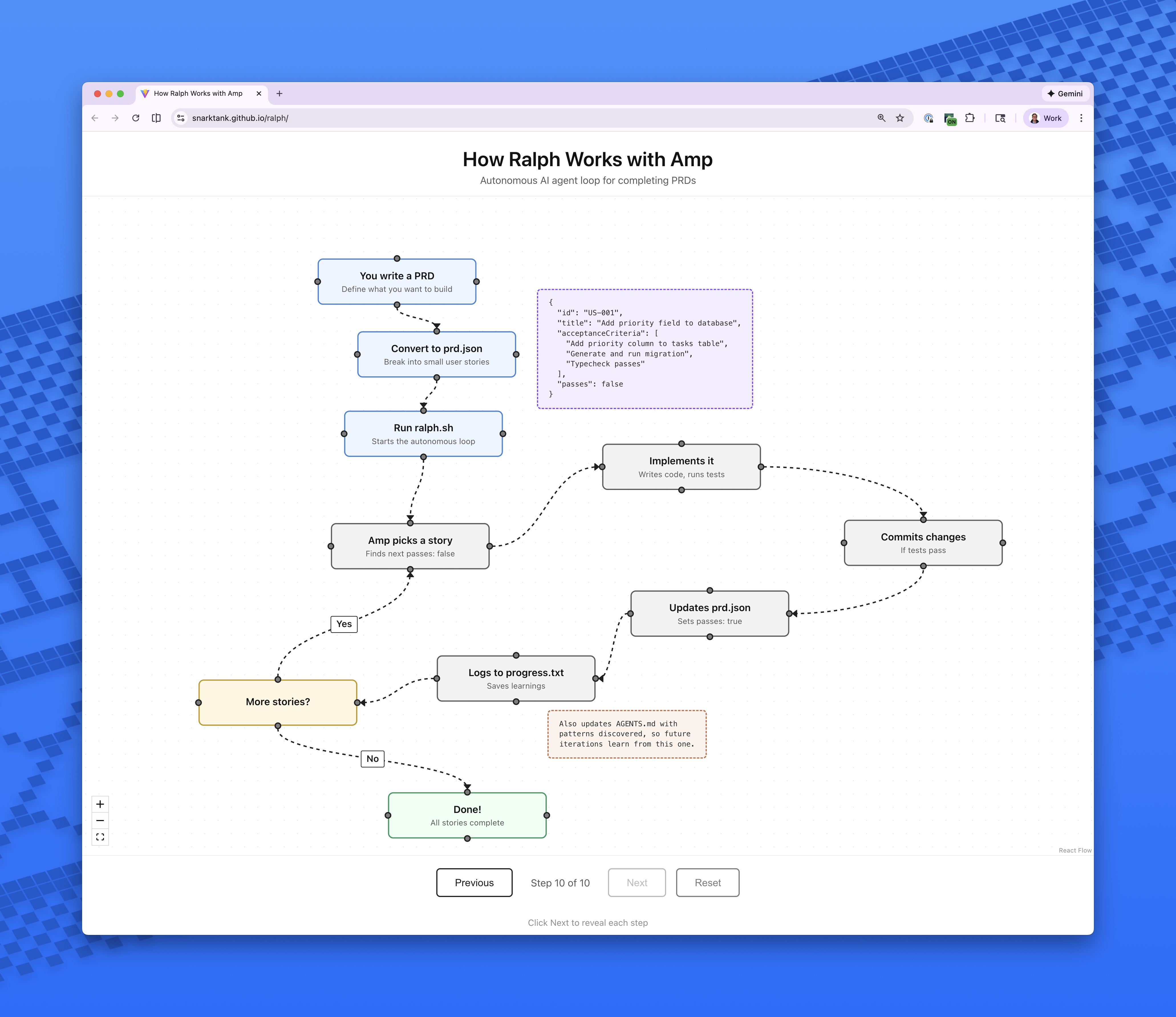
What is this?
 Ralph is an autonomous AI agent loop that runs AI coding tools (Amp or Claude Code) over and over until every item in your PRD is done. Each iteration starts a fresh instance with clean context.
Ralph is an autonomous AI agent loop that runs AI coding tools (Amp or Claude Code) over and over until every item in your PRD is done. Each iteration starts a fresh instance with clean context.Is this an app I install, or something that lives inside my project?Neither an app nor a service — it's a handful of files: a bash loop (ralph.sh), prompt templates, and skills you copy into your project, install globally, or add via the Claude Code marketplace.
Neither an app nor a service — it's a handful of files: a bash loop (ralph.sh), prompt templates, and skills you copy into your project, install globally, or add via the Claude Code marketplace.How do I actually use it on a feature?Generate a PRD with the /prd skill, convert it to prd.json with the /ralph skill, then run Ralph — 10 iterations by default, picking the backend with --tool amp or --tool claude.
Generate a PRD with the /prd skill, convert it to prd.json with the /ralph skill, then run Ralph — 10 iterations by default, picking the backend with --tool amp or --tool claude.What do I need to have before I can run it?An authenticated Amp CLI (the default) or Claude Code, jq installed (brew install jq on macOS), and a git repository for your project. That's the whole list.
An authenticated Amp CLI (the default) or Claude Code, jq installed (brew install jq on macOS), and a git repository for your project. That's the whole list.Can I just throw a big feature at it?No — every PRD item must be small enough to finish within one context window; epics like 'add authentication' or 'build the entire dashboard' are too big and should be split.
No — every PRD item must be small enough to finish within one context window; epics like 'add authentication' or 'build the entire dashboard' are too big and should be split.How does it handle frontend stories?Frontend stories must include 'Verify in browser using dev-browser skill' in their acceptance criteria. Ralph then uses the dev-browser skill to open the page, interact with the UI, and confirm the change actually works.
Frontend stories must include 'Verify in browser using dev-browser skill' in their acceptance criteria. Ralph then uses the dev-browser skill to open the page, interact with the UI, and confirm the change actually works.What is the Amp auto-handoff setting for?Adding a setting to ~/.config/amp/settings.json enables automatic handoff when context fills up, so Ralph can keep going on large stories that exceed a single context window.
Adding a setting to ~/.config/amp/settings.json enables automatic handoff when context fills up, so Ralph can keep going on large stories that exceed a single context window.What happens to my previous run when I start a new feature?Ralph automatically archives previous runs when you start a feature with a different branchName, saving them under archive/YYYY-MM-DD-feature-name/.
Ralph automatically archives previous runs when you start a feature with a different branchName, saving them under archive/YYYY-MM-DD-feature-name/.Where does the approach come from?It's based on Geoffrey Huntley's Ralph pattern, and the repo author wrote an in-depth article on how they use Ralph in their own workflow.
It's based on Geoffrey Huntley's Ralph pattern, and the repo author wrote an in-depth article on how they use Ralph in their own workflow.What are similar projects?planning-with-files, operator-memory, codify, autoresearch, orca, pstack-claude, ordewell, deer-flow
planning-with-files, operator-memory, codify, autoresearch, orca, pstack-claude, ordewell, deer-flowWhich topics is it in?context-management, agentic-workflow, agentic-coding, bash, autonomous-agents, coding-agents, claude-skills, agent-memory, workflow-automation, prompt-engineering, git, shell
context-management, agentic-workflow, agentic-coding, bash, autonomous-agents, coding-agents, claude-skills, agent-memory, workflow-automation, prompt-engineering, git, shell