 Worktrunk






What is this?
 Worktrunk is a command-line tool that makes git worktrees as easy as branches, built for running several AI coding agents in parallel without them stepping on each other's changes.
Worktrunk is a command-line tool that makes git worktrees as easy as branches, built for running several AI coding agents in parallel without them stepping on each other's changes.Is this a git replacement, or does it build on regular git?It builds on git's native worktree feature rather than replacing git: worktrees are addressed by branch name, paths come from a configurable template, and commands that take a branch also accept the worktree path.
It builds on git's native worktree feature rather than replacing git: worktrees are addressed by branch name, paths come from a configurable template, and commands that take a branch also accept the worktree path.How do I install it and get it running?Homebrew on macOS and Linux, Cargo or Winget on Windows, Arch packages, or the community Conda/Pixi feed. Afterwards run wt config shell install so commands like wt switch can change directories.
Homebrew on macOS and Linux, Cargo or Winget on Windows, Arch packages, or the community Conda/Pixi feed. Afterwards run wt config shell install so commands like wt switch can change directories.Does it only work with Claude Code, or other agents too?Any coding agent. The README showcases Claude Code and Codex; wt switch -x runs any command after switching (wt switch -c -x claude feat), with extra arguments passed through after --.
Any coding agent. The README showcases Claude Code and Codex; wt switch -x runs any command after switching (wt switch -c -x claude feat), with extra arguments passed through after --.Are there any gotchas I should know about?On Windows the wt name is already taken by Windows Terminal, so the Winget install registers the tool as git-wt unless you disable the Terminal alias in system settings.
On Windows the wt name is already taken by Windows Terminal, so the Winget install registers the tool as git-wt unless you disable the Terminal alias in system settings.Who is this for — do I have to be running AI agents to benefit?Mainly developers running 5-10+ AI agents in parallel, but the same core commands make worktrees easy for any workflow with many parallel changes.
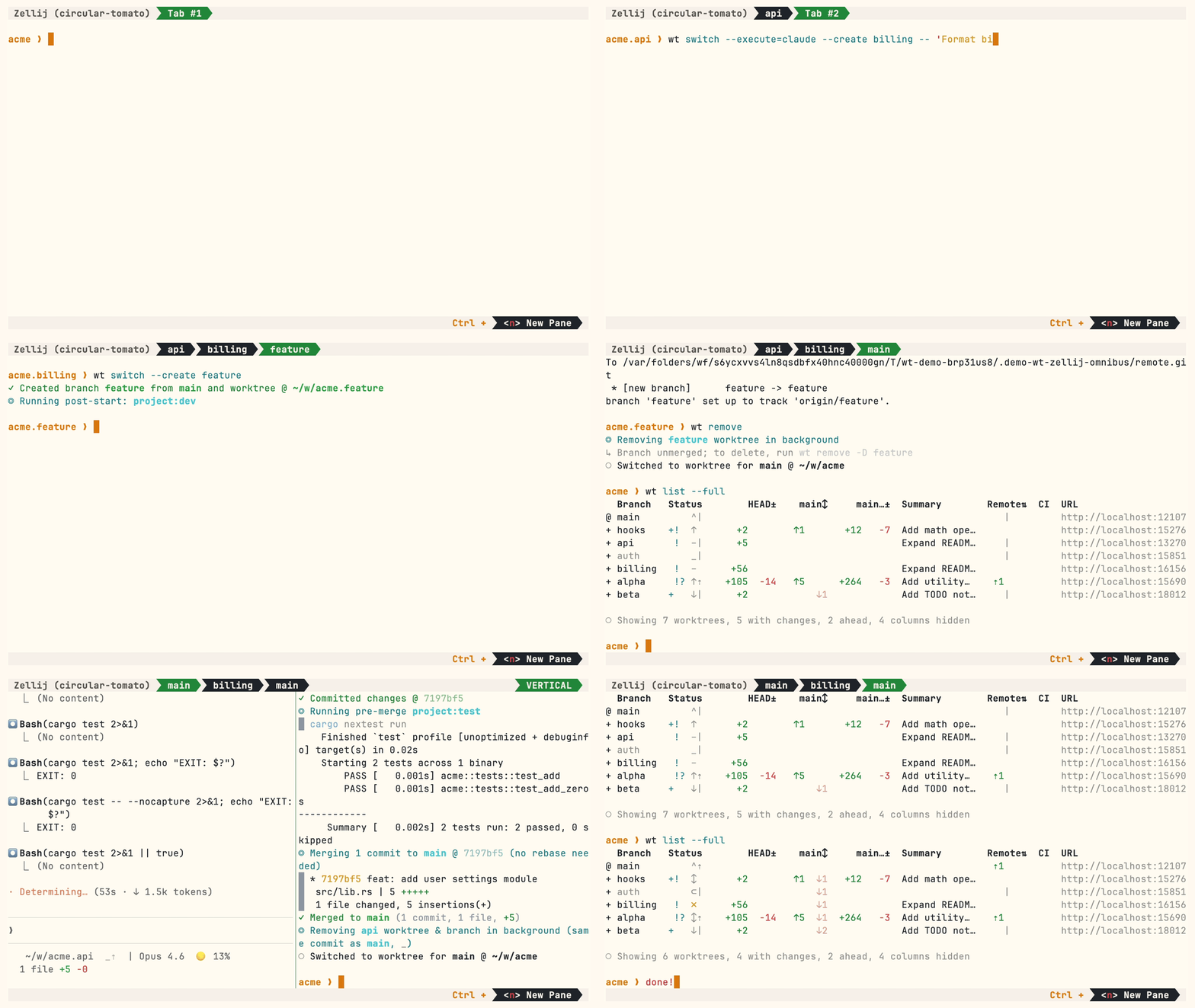
Mainly developers running 5-10+ AI agents in parallel, but the same core commands make worktrees easy for any workflow with many parallel changes.What does a typical workflow look like?wt switch -c feat creates a branch and worktree and switches to it; wt list shows every worktree with status (@ is current, + staged changes, ↑1 one commit ahead of main, ⇡ unpushed). When you're done, wt merge squashes, rebases, merges and cleans up in one command — or open a PR and run wt remove.
wt switch -c feat creates a branch and worktree and switches to it; wt list shows every worktree with status (@ is current, + staged changes, ↑1 one commit ahead of main, ⇡ unpushed). When you're done, wt merge squashes, rebases, merges and cleans up in one command — or open a PR and run wt remove.Why not just use git's built-in worktree commands?The author finds git's worktree UX clunky: even starting one worktree means typing the branch name three times (git worktree add -b feat ../repo.feat, then cd ../repo.feat). Worktrunk collapses that into wt switch -c feat.
The author finds git's worktree UX clunky: even starting one worktree means typing the branch name three times (git worktree add -b feat ../repo.feat, then cd ../repo.feat). Worktrunk collapses that into wt switch -c feat.How do I start Claude Code in a fresh worktree with one command?wt switch -c -x claude feat creates the branch and worktree, enters it and launches Claude. Post-start hooks can then install dependencies or start dev servers automatically, and aliases let you define your own wt commands.
wt switch -c -x claude feat creates the branch and worktree, enters it and launches Claude. Post-start hooks can then install dependencies or start dev servers automatically, and aliases let you define your own wt commands.What else does it automate?Hooks on create, pre-merge and post-merge; LLM commit messages generated from diffs; an interactive picker with live diff and log previews; wt list --full with CI status and AI summaries per branch; PR checkout via wt switch pr:123; per-worktree dev-server ports via the hashport filter; and shared build caches so ten worktrees share target/ and node_modules/ without rebuilding (APFS, btrfs, XFS).
Hooks on create, pre-merge and post-merge; LLM commit messages generated from diffs; an interactive picker with live diff and log previews; wt list --full with CI status and AI summaries per branch; PR checkout via wt switch pr:123; per-worktree dev-server ports via the hashport filter; and shared build caches so ten worktrees share target/ and node_modules/ without rebuilding (APFS, btrfs, XFS).What are similar projects?emdash, 1code, agent-router, swarm-forge, shipyard, foreman, superset, firstmate
emdash, 1code, agent-router, swarm-forge, shipyard, foreman, superset, firstmateWhich topics is it in?worktrees, agentic-workflows, parallel-agents, git-worktrees, coding-agents, homebrew, workflow-automation, cli-tool, git, multi-agent, agents, coding-agent
worktrees, agentic-workflows, parallel-agents, git-worktrees, coding-agents, homebrew, workflow-automation, cli-tool, git, multi-agent, agents, coding-agent