



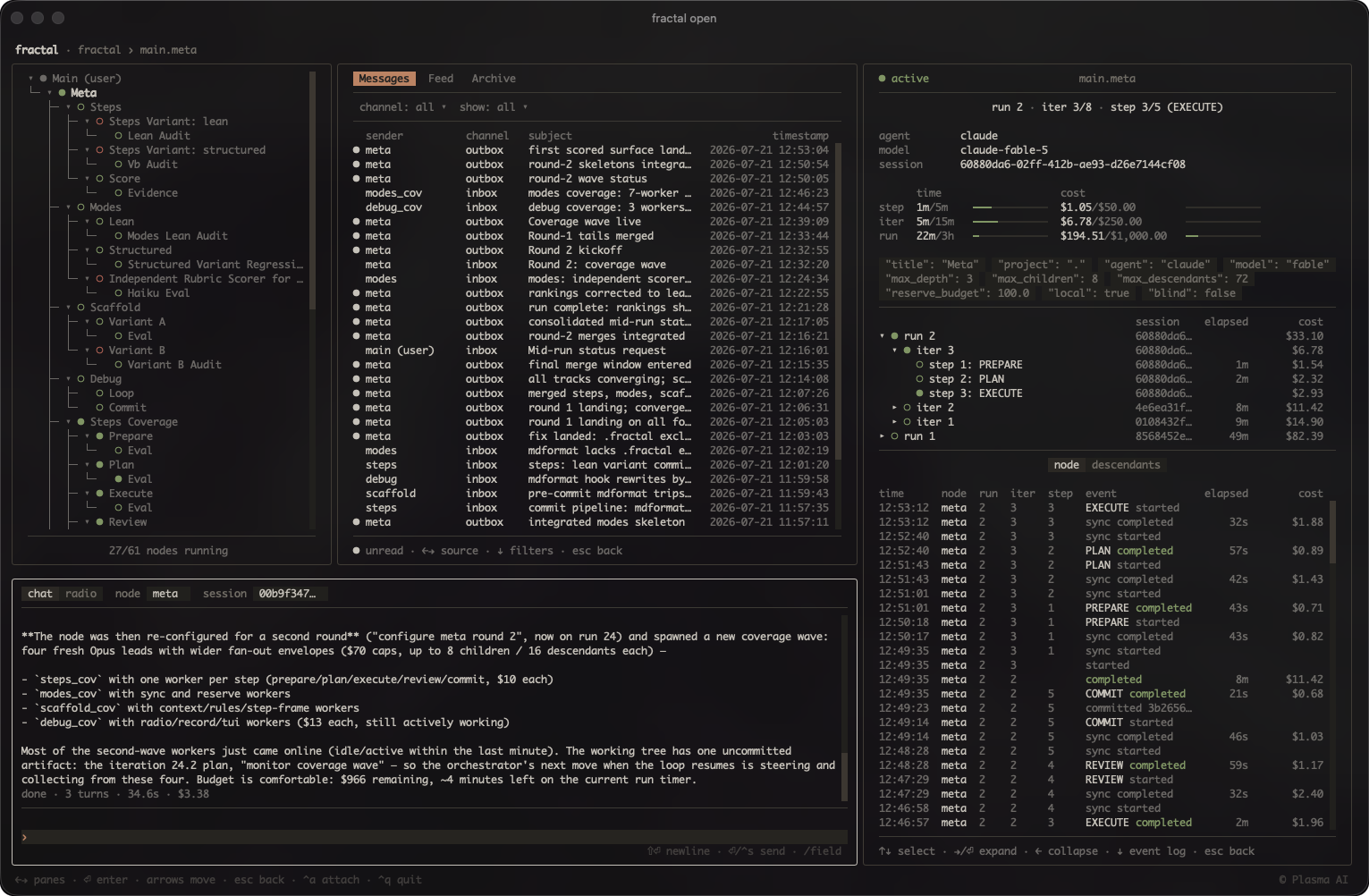
What is this?
 Fractal spawns autonomous coding-agent loops that arrange themselves into a tree: each node iterates toward a goal in its own git worktree and can spawn child nodes for subtasks, letting the tree grow to fit the problem instead of following a fixed plan.
Fractal spawns autonomous coding-agent loops that arrange themselves into a tree: each node iterates toward a goal in its own git worktree and can spawn child nodes for subtasks, letting the tree grow to fit the problem instead of following a fixed plan.Is this a CLI tool or something else?It's a Python CLI package (the fractal command) plus a terminal dashboard. All run state (runs, iterations, steps, costs) is tracked in a single local SQLite database that you browse live via the TUI.
It's a Python CLI package (the fractal command) plus a terminal dashboard. All run state (runs, iterations, steps, costs) is tracked in a single local SQLite database that you browse live via the TUI.How do I install and start using it?Install the fractal package from PyPI (or via pipx/uv tool install), then run fractal open from your project root to launch the dashboard. Agent skills can be added via the plugin marketplace or by running fractal install to copy them into ~/.claude/skills and ~/.agents/skills.
Install the fractal package from PyPI (or via pipx/uv tool install), then run fractal open from your project root to launch the dashboard. Agent skills can be added via the plugin marketplace or by running fractal install to copy them into ~/.claude/skills and ~/.agents/skills.Which coding agents does it work with?Five agent backends are supported, selected per node with --agent: Claude Code, Codex, Grok Build, OpenCode, and Oh My Pi. Claude and Codex can also route through OpenRouter for model access, and each node needs a tmux session (or --headless mode if tmux isn't available).
Five agent backends are supported, selected per node with --agent: Claude Code, Codex, Grok Build, OpenCode, and Oh My Pi. Claude and Codex can also route through OpenRouter for model access, and each node needs a tmux session (or --headless mode if tmux isn't available).What's the biggest risk to know about before running this?By default every seeded agent config disables the approval gate (Claude bypassPermissions, Codex danger-full-access, Grok --always-approve, etc.), so a node can run any command its agent decides on with your credentials and machine access. The per-node git worktree only isolates commits to its branch, not the filesystem or network, so untrusted tasks should run on a sandboxed or disposable host.
By default every seeded agent config disables the approval gate (Claude bypassPermissions, Codex danger-full-access, Grok --always-approve, etc.), so a node can run any command its agent decides on with your credentials and machine access. The per-node git worktree only isolates commits to its branch, not the filesystem or network, so untrusted tasks should run on a sandboxed or disposable host.Who is this built for?Developers comfortable running unattended, permission-bypassing coding agents who want to scale a single task into a tree of cooperating agent loops, with hard caps on iterations, depth, cost and time to keep things bounded.
Developers comfortable running unattended, permission-bypassing coding agents who want to scale a single task into a tree of cooperating agent loops, with hard caps on iterations, depth, cost and time to keep things bounded.How does fractal control cost per agent loop?You can set per-run, per-iteration, and per-step cost ceilings (max-cost, max-iter-cost, max-step-cost) plus a reserve-budget for cleanup; since runs are isolated, each launch arms the cap anew, and node start --continue refuses without an explicit --max-cost after a budget-ended run.
You can set per-run, per-iteration, and per-step cost ceilings (max-cost, max-iter-cost, max-step-cost) plus a reserve-budget for cleanup; since runs are isolated, each launch arms the cap anew, and node start --continue refuses without an explicit --max-cost after a budget-ended run.Can nodes run without tmux?Yes, pass --headless to run a node as a detached process group instead of a tmux session, with output appended to headless.log.
Yes, pass --headless to run a node as a detached process group instead of a tmux session, with output appended to headless.log.How do I spawn and manage nodes day to day?Use the /fractal skill with a plain-language directive inside your agent; it infers parameters like name, scope, budget, and timeouts, asks for anything missing, then launches the node once you approve.
Use the /fractal skill with a plain-language directive inside your agent; it infers parameters like name, scope, budget, and timeouts, asks for anything missing, then launches the node once you approve.What isolation does a node's git worktree actually provide?It isolates the branch the node commits to, not the filesystem, network, or anything else outside the worktree — so dangerous tasks still need a sandboxed or disposable host.
It isolates the branch the node commits to, not the filesystem, network, or anything else outside the worktree — so dangerous tasks still need a sandboxed or disposable host.Which topics is it in?cost-tracking, git-worktrees, tmux, pypi, openrouter, agent-harness, grok, autonomous-agents, tui, orchestration, agent-orchestration, git
cost-tracking, git-worktrees, tmux, pypi, openrouter, agent-harness, grok, autonomous-agents, tui, orchestration, agent-orchestration, git