
Что это такое?
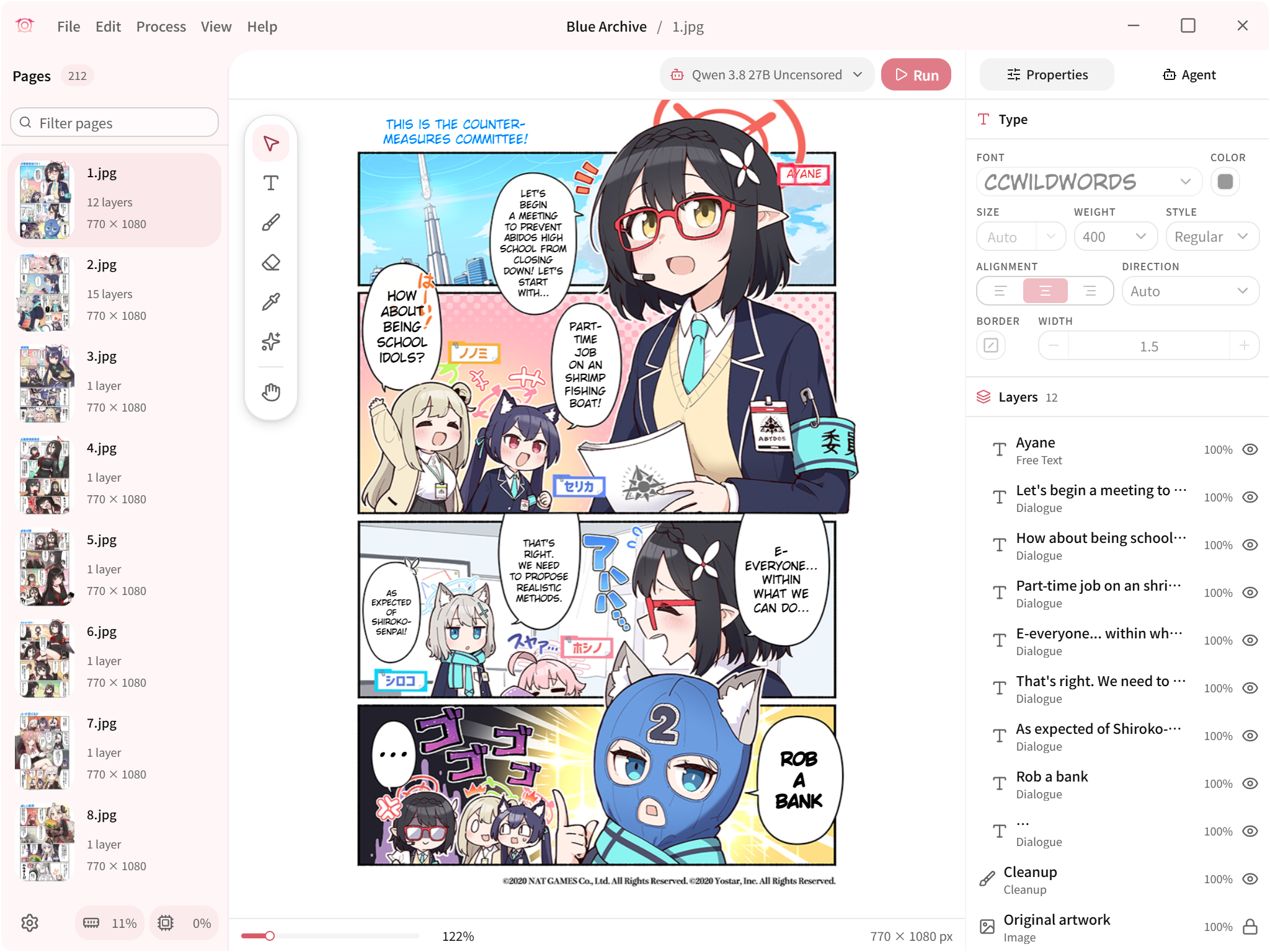
 Koharu — это переводчик манги на основе машинного обучения, написанный на Rust. Он объединяет распознавание объектов, OCR, закрашивание текста (inpainting) и большие языковые модели, чтобы автоматически переводить страницы манги, причём всё работает локально на вашем компьютере.
Koharu — это переводчик манги на основе машинного обучения, написанный на Rust. Он объединяет распознавание объектов, OCR, закрашивание текста (inpainting) и большие языковые модели, чтобы автоматически переводить страницы манги, причём всё работает локально на вашем компьютере.Это консольная утилита или полноценное приложение?Это настольное приложение с графическим интерфейсом: холст на основе WebGPU позволяет вручную подчищать картинку, размещать текст и собирать страницы. Это не библиотека и не консольная утилита.
Это настольное приложение с графическим интерфейсом: холст на основе WebGPU позволяет вручную подчищать картинку, размещать текст и собирать страницы. Это не библиотека и не консольная утилита.Как его запустить?Скачайте готовую сборку для Windows, macOS или Linux со страницы релизов либо установите через WinGet на Windows или Homebrew на macOS.
Скачайте готовую сборку для Windows, macOS или Linux со страницы релизов либо установите через WinGet на Windows или Homebrew на macOS.Есть ли нюансы с ускорением на видеокарте или производительностью?На процессоре всё работает, но заметно медленнее. Ускорение на видеокарте зависит от конкретных сочетаний железа и драйверов: для CUDA нужна видеокарта NVIDIA уровня Turing или новее, а поддержка ROCm у AMD зависит от модели видеокарты, ОС и драйвера. Кроме того, холсту редактора нужен актуальный драйвер видеокарты с поддержкой WebGPU, даже если сам расчёт идёт на процессоре.
На процессоре всё работает, но заметно медленнее. Ускорение на видеокарте зависит от конкретных сочетаний железа и драйверов: для CUDA нужна видеокарта NVIDIA уровня Turing или новее, а поддержка ROCm у AMD зависит от модели видеокарты, ОС и драйвера. Кроме того, холсту редактора нужен актуальный драйвер видеокарты с поддержкой WebGPU, даже если сам расчёт идёт на процессоре.Мои файлы манги куда-то отправляются с компьютера?Нет: по умолчанию модели распознавания изображений и языковые модели работают локально, так что страницы манги остаются на вашем компьютере. Но при желании можно подключить облачные LLM или сервисы машинного перевода.
Нет: по умолчанию модели распознавания изображений и языковые модели работают локально, так что страницы манги остаются на вашем компьютере. Но при желании можно подключить облачные LLM или сервисы машинного перевода.Какие файлы можно загрузить в проект?Koharu поддерживает растровые изображения, архивы и PDF, а многоформатные проекты удобно вести благодаря последовательности страниц.
Koharu поддерживает растровые изображения, архивы и PDF, а многоформатные проекты удобно вести благодаря последовательности страниц.Что происходит с исходным японским текстом после перевода?Генеративные модели закрашивания (например, FLUX.2 Klein или LaMa) убирают исходный текст и восстанавливают рисунок под ним, и только потом поверх выводится перевод.
Генеративные модели закрашивания (например, FLUX.2 Klein или LaMa) убирают исходный текст и восстанавливают рисунок под ним, и только потом поверх выводится перевод.Могу ли я экспортировать готовый перевод, чтобы доработать его вручную?Да, Koharu умеет экспортировать многослойный PSD: можно свести результат в одну картинку для сдачи, а можно продолжать редактировать слои в другой программе.
Да, Koharu умеет экспортировать многослойный PSD: можно свести результат в одну картинку для сдачи, а можно продолжать редактировать слои в другой программе.Что за работа через агента упомянута в списке возможностей?Агент может сам просматривать и менять настройки, а также управлять всей цепочкой — распознаванием объектов, OCR, переводом и закрашиванием — по всему проекту, так что вам не нужно запускать каждый шаг вручную.
Агент может сам просматривать и менять настройки, а также управлять всей цепочкой — распознаванием объектов, OCR, переводом и закрашиванием — по всему проекту, так что вам не нужно запускать каждый шаг вручную.What are similar projects?video-subtitle-remover, ds4, Deep-Live-Cam, jasna, manga-image-translator, qwen38-mtp, Bud-Decision-Studio, MoE4All
video-subtitle-remover, ds4, Deep-Live-Cam, jasna, manga-image-translator, qwen38-mtp, Bud-Decision-Studio, MoE4AllWhich topics is it in?manga, inpainting, japanese, rocm, amd-gpu, webgpu, gguf, image-editing, object-detection, metal, ocr, translation
manga, inpainting, japanese, rocm, amd-gpu, webgpu, gguf, image-editing, object-detection, metal, ocr, translation