244 ·GitHub
What is this?
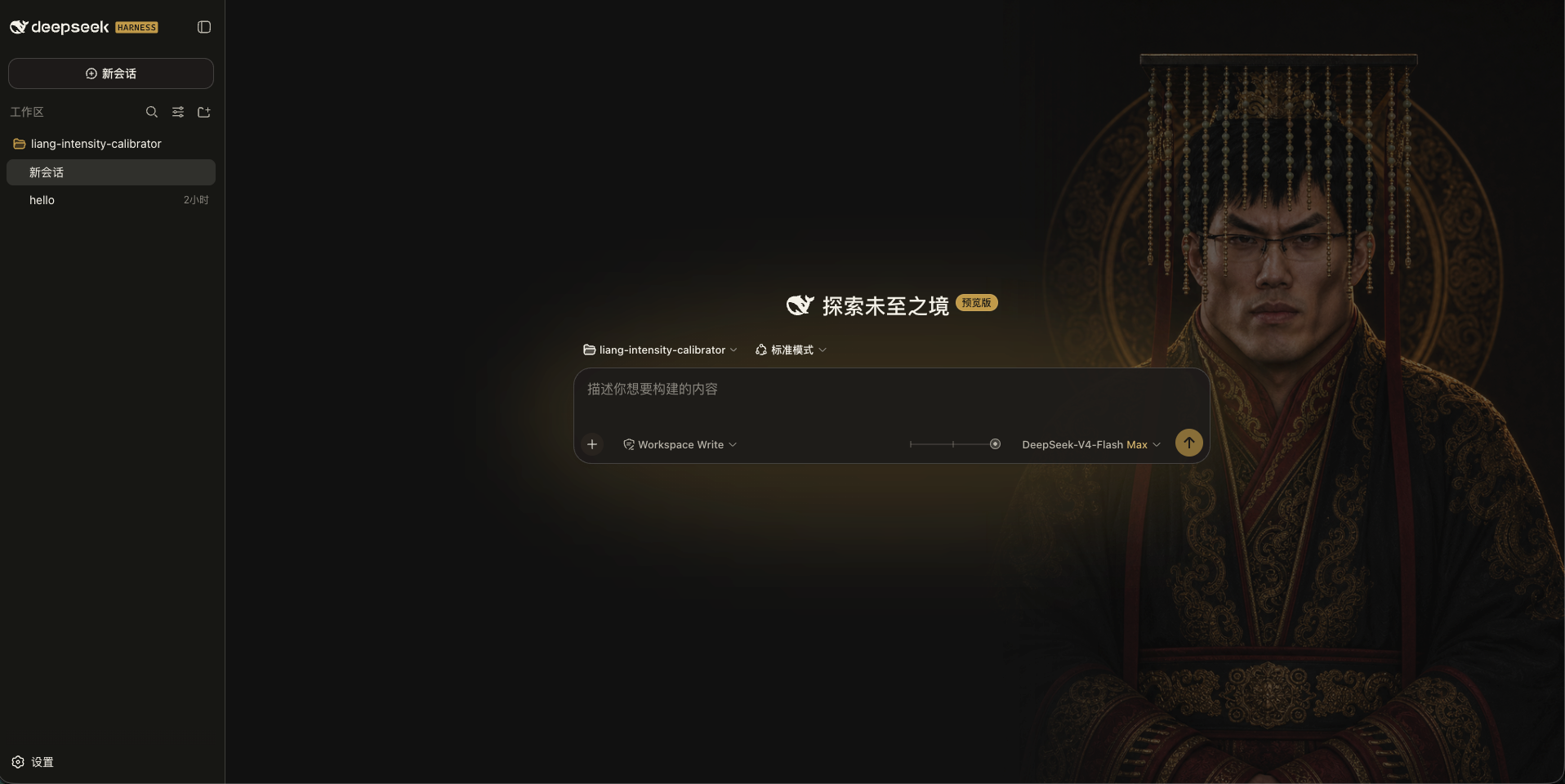
 This is a visual skin plugin for DeepSeek Harness (DSH) that replaces the plain reasoning-effort selector with a slider featuring character art and an adaptive color background.
This is a visual skin plugin for DeepSeek Harness (DSH) that replaces the plain reasoning-effort selector with a slider featuring character art and an adaptive color background.Is this a standalone app or a plugin for something else?It is a client-side plugin that themes the DSH web UI, not a standalone application; it registers into your DSH profile bundles and loads inside the existing Harness interface.
It is a client-side plugin that themes the DSH web UI, not a standalone application; it registers into your DSH profile bundles and loads inside the existing Harness interface.How do I install this skin?Three ways: paste the provided install prompt to your DSH agent, install the skin marketplace plugin and search '滑动变祖' for one-click install, or run the CLI command (`dsh plugin add`) from GitHub, a Release tarball, or a local clone.
Three ways: paste the provided install prompt to your DSH agent, install the skin marketplace plugin and search '滑动变祖' for one-click install, or run the CLI command (`dsh plugin add`) from GitHub, a Release tarball, or a local clone.Do I need DeepSeek Harness already installed?Yes — DSH must already be installed and running; this skin has been verified against DSH version 0.1.0-rc.6, and the CLI install method requires pnpm to be available on PATH.
Yes — DSH must already be installed and running; this skin has been verified against DSH version 0.1.0-rc.6, and the CLI install method requires pnpm to be available on PATH.Any install pitfalls?Close any other skin plugins before installing to avoid conflicts, make sure pnpm is on PATH for the CLI method, and restart DSH (Ctrl+C then `dsh web`) after install or uninstall for changes to take effect.
Close any other skin plugins before installing to avoid conflicts, make sure pnpm is on PATH for the CLI method, and restart DSH (Ctrl+C then `dsh web`) after install or uninstall for changes to take effect.What does the slider actually control?It reads the current model's reasoning.efforts and evenly spaces however many levels exist across a 0-30 scale (e.g. two levels become 0/30, three become 0/15/30); it submits the official level ID once you release the slider.
It reads the current model's reasoning.efforts and evenly spaces however many levels exist across a 0-30 scale (e.g. two levels become 0/30, three become 0/15/30); it submits the official level ID once you release the slider.Does dragging feel laggy or does it snap instantly?While dragging it only renders a continuous visual preview; the slider snaps to the nearest level and commits the real value only when you release the pointer, finish a keyboard action, or the control loses focus.
While dragging it only renders a continuous visual preview; the slider snaps to the nearest level and commits the real value only when you release the pointer, finish a keyboard action, or the control loses focus.Where do the character portraits come from?The skin bundles 24 curated portrait anchors sourced from the Lichtspektrum/liang-intensity-calibrator project; no extra assets need to be downloaded after installing.
The skin bundles 24 curated portrait anchors sourced from the Lichtspektrum/liang-intensity-calibrator project; no extra assets need to be downloaded after installing.Can I switch back to the stock DSH look?Yes, go to Settings -> General -> Appearance Skin and pick 'Native' to remove the background layer and slider and restore the original Harness UI; this choice is stored locally in your browser and doesn't touch your model config.
Yes, go to Settings -> General -> Appearance Skin and pick 'Native' to remove the background layer and slider and restore the original Harness UI; this choice is stored locally in your browser and doesn't touch your model config.What are similar projects?gal-view, dsh-dream-skin, dsh-deep-whale, EAC-Desktop, DSH-Transparent-UI-Plugin, oh-dsh, dsh-super-injector, WhaleIsle
gal-view, dsh-dream-skin, dsh-deep-whale, EAC-Desktop, DSH-Transparent-UI-Plugin, oh-dsh, dsh-super-injector, WhaleIsleWhich topics is it in?theme, dsh, plugin-system, dsh-plugin, deepseek-harness, deepseek, customization, plugin, ui, gui, npm, chinese
theme, dsh, plugin-system, dsh-plugin, deepseek-harness, deepseek, customization, plugin, ui, gui, npm, chinese