autoresearch
One day, frontier AI research used to be done by meat computers in between eating, sleeping, having other fun, and synchronizing once in a while using sound wave interconnect in the ritual of "group meeting". That era is long gone. Research is now entirely the domain of autonomous swarms of AI agents running across compute cluster megastructures in the skies. The agents claim that we are now in the 10,205th generation of the code base, in any case no one could tell if that's right or wrong as the "code" is now a self-modifying binary that has grown beyond human comprehension. This repo is the story of how it all began. -@karpathy, March 2026.
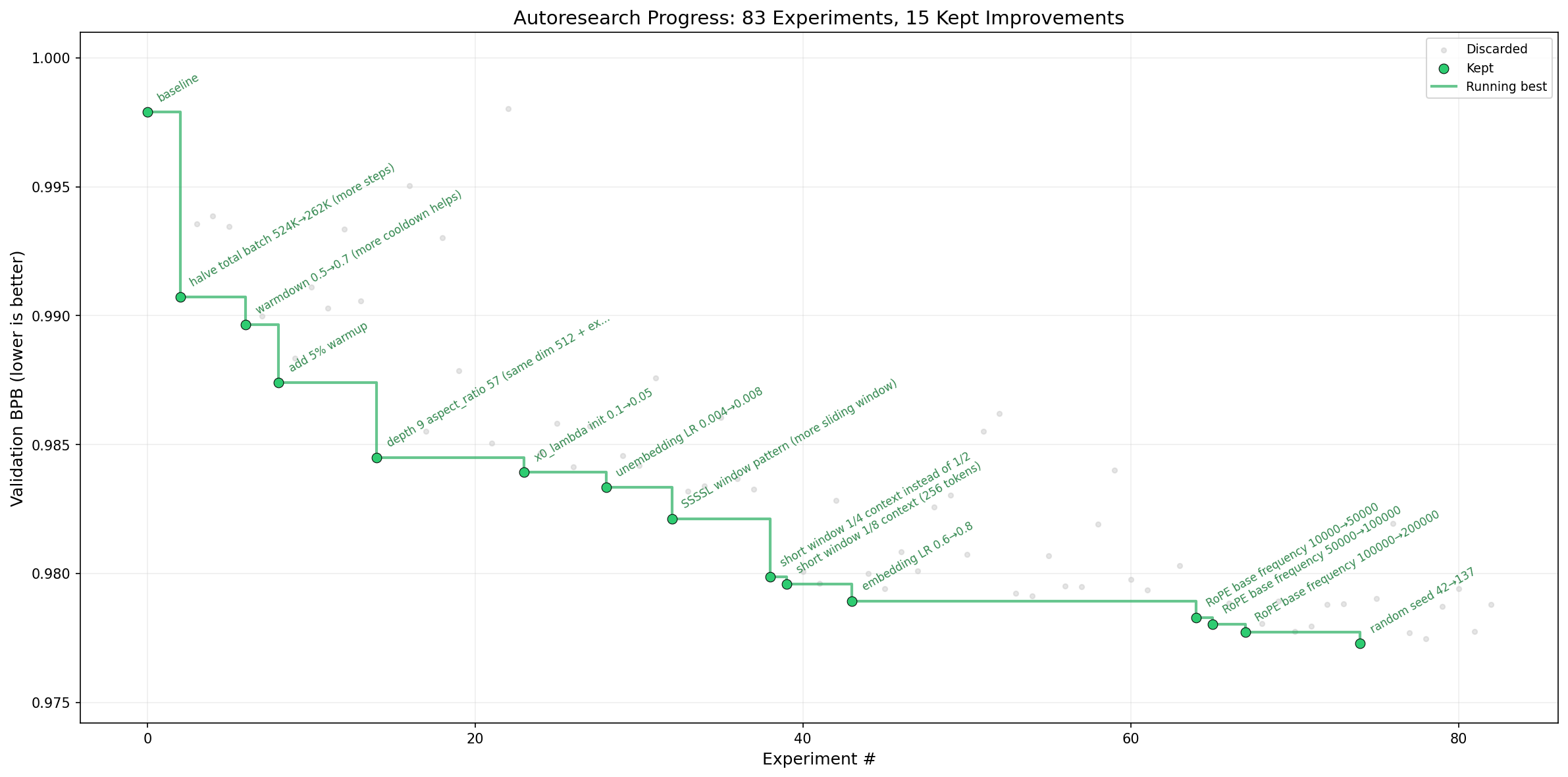
The idea: give an AI agent a small but real LLM training setup and let it experiment autonomously overnight. It modifies the code, trains for 5 minutes, checks if the result improved, keeps or discards, and repeats. You wake up in the morning to a log of experiments and (hopefully) a better model. The training code here is a simplified single-GPU implementation of nanochat. The core idea is that you're not touching any of the Python files like you normally would as a researcher. Instead, you are programming the program.md Markdown files that provide context to the AI agents and set up your autonomous research org. The default program.md in this repo is intentionally kept as a bare bones baseline, though it's obvious how one would iterate on it over time to find the "research org code" that achieves the fastest research progress, how you'd add more agents to the mix, etc. A bit more context on this project is here in this tweet and this tweet.
How it works
The repo is deliberately kept small and only really has three files that matter:
prepare.py — fixed constants, one-time data prep (downloads training data, trains a BPE tokenizer), and runtime utilities (dataloader, evaluation). Not modified.train.py — the single file the agent edits. Contains the full GPT model, optimizer (Muon + AdamW), and training loop. Everything is fair game: architecture, hyperparameters, optimizer, batch size, etc. This file is edited and iterated on by the agent.program.md — baseline instructions for one agent. Point your agent here and let it go. This file is edited and iterated on by the human.
By design, training runs for a fixed 5-minute time budget (wall clock, excluding startup/compilation), regardless of the details of your compute. The metric is val_bpb (validation bits per byte) — lower is better, and vocab-size-independent so architectural changes are fairly compared.
If you are new to neural networks, this "Dummy's Guide" looks pretty good for a lot more context.
Quick start
Requirements: A single NVIDIA GPU (tested on H100), Python 3.10+, uv.
# 1. Install uv project manager (if you don't already have it)
curl -LsSf https://astral.sh/uv/install.sh | sh

# 2. Install dependencies
uv sync

# 3. Download data and train tokenizer (one-time, ~2 min)
uv run prepare.py

# 4. Manually run a single training experiment (~5 min)
uv run train.py
If the above commands all work ok, your setup is working and you can go into autonomous research mode.
Running the agent
Simply spin up your Claude/Codex or whatever you want in this repo (and disable all permissions), then you can prompt something like:
Hi have a look at program.md and let's kick off a new experiment! let's do the setup first.
The program.md file is essentially a super lightweight "skill".
Project structure
prepare.py      — constants, data prep + runtime utilities (do not modify)
train.py        — model, optimizer, training loop (agent modifies this)
program.md      — agent instructions
pyproject.toml  — dependencies
Design choices
- Single file to modify. The agent only touches
train.py. This keeps the scope manageable and diffs reviewable.
- Fixed time budget. Training always runs for exactly 5 minutes, regardless of your specific platform. This means you can expect approx 12 experiments/hour and approx 100 experiments while you sleep. There are two upsides of this design decision. First, this makes experiments directly comparable regardless of what the agent changes (model size, batch size, architecture, etc). Second, this means that autoresearch will find the most optimal model for your platform in that time budget. The downside is that your runs (and results) become not comparable to other people running on other compute platforms.
- Self-contained. No external dependencies beyond PyTorch and a few small packages. No distributed training, no complex configs. One GPU, one file, one metric.
This code currently requires that you have a single NVIDIA GPU. In principle it is quite possible to support CPU, MPS and other platforms but this would also bloat the code. I'm not 100% sure that I want to take this on personally right now. People can reference (or have their agents reference) the full/parent nanochat repository that has wider platform support and shows the various solutions (e.g. a Flash Attention 3 kernels fallback implementation, generic device support, autodetection, etc.), feel free to create forks or discussions for other platforms and I'm happy to link to them here in the README in some new notable forks section or etc.
Seeing as there seems to be a lot of interest in tinkering with autoresearch on much smaller compute platforms than an H100, a few extra words. If you're going to try running autoresearch on smaller computers (Macbooks etc.), I'd recommend one of the forks below. On top of this, here are some recommendations for how to tune the defaults for much smaller models for aspiring forks:
- To get half-decent results I'd use a dataset with a lot less entropy, e.g. this TinyStories dataset. These are GPT-4 generated short stories. Because the data is a lot narrower in scope, you will see reasonable results with a lot smaller models (if you try to sample from them after training).
- You might experiment with decreasing
vocab_size, e.g. from 8192 down to 4096, 2048, 1024, or even - simply byte-level tokenizer with 256 possibly bytes after utf-8 encoding.
- In
prepare.py, you'll want to lower MAX_SEQ_LEN a lot, depending on the computer even down to 256 etc. As you lower MAX_SEQ_LEN, you may want to experiment with increasing DEVICE_BATCH_SIZE in train.py slightly to compensate. The number of tokens per fwd/bwd pass is the product of these two.
- Also in
prepare.py, you'll want to decrease EVAL_TOKENS so that your validation loss is evaluated on a lot less data.
- In
train.py, the primary single knob that controls model complexity is the DEPTH (default 8, here). A lot of variables are just functions of this, so e.g. lower it down to e.g. 4.
- You'll want to most likely use
WINDOW_PATTERN of just "L", because "SSSL" uses alternating banded attention pattern that may be very inefficient for you. Try it.
- You'll want to lower
TOTAL_BATCH_SIZE a lot, but keep it powers of 2, e.g. down to 2**14 (~16K) or so even, hard to tell.
I think these would be the reasonable hyperparameters to play with. Ask your favorite coding agent for help and copy paste them this guide, as well as the full source code.
Notable forks
License
MIT

 autoresearch 会让 AI 编程智能体去修改一个小型、真实的大语言模型训练环境(nanochat 的简化单 GPU 版本),让它自主编辑训练代码、每次运行 5 分钟的实验,并保留有效的改动。你一觉醒来,就能看到一份实验日志,希望还能得到一个更好的模型。