






What is this?
 ChatPaper uses the ChatGPT API to summarize arXiv papers: give it keywords, it downloads the newest matching papers and condenses each into a fixed format, so researchers can quickly decide which ones deserve a careful read.
ChatPaper uses the ChatGPT API to summarize arXiv papers: give it keywords, it downloads the newest matching papers and condenses each into a fixed format, so researchers can quickly decide which ones deserve a careful read.Is it a single summarizer script or a whole toolbox?A whole toolbox: ChatPaper (summaries), ChatReviewer (strengths/weaknesses analysis), ChatImprovement (polishing and translation of drafts), ChatResponse (drafts replies to reviewers) and ChatGenTitle (generates paper titles from abstracts).
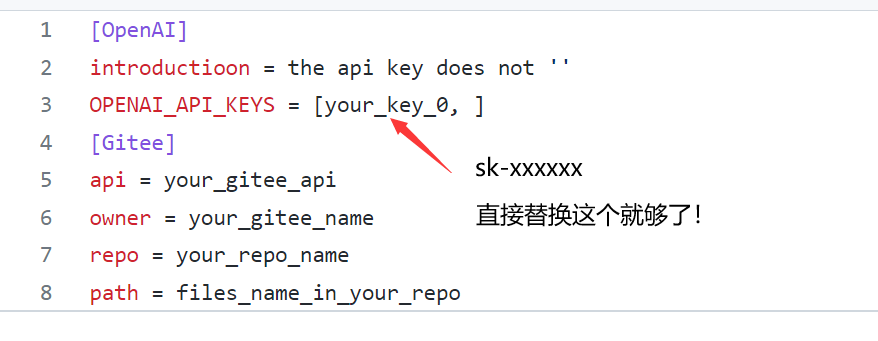
A whole toolbox: ChatPaper (summaries), ChatReviewer (strengths/weaknesses analysis), ChatImprovement (polishing and translation of drafts), ChatResponse (drafts replies to reviewers) and ChatGenTitle (generates paper titles from abstracts).How do I get it running on my machine?Run it as Python scripts (3.9 recommended; Windows, Mac and Linux all work): put your OpenAI key into apikey.ini, install dependencies, then launch chatpaper.py or chatarxiv.py. There is also a Flask mode started with python3 app.py, which serves on localhost port 5000.
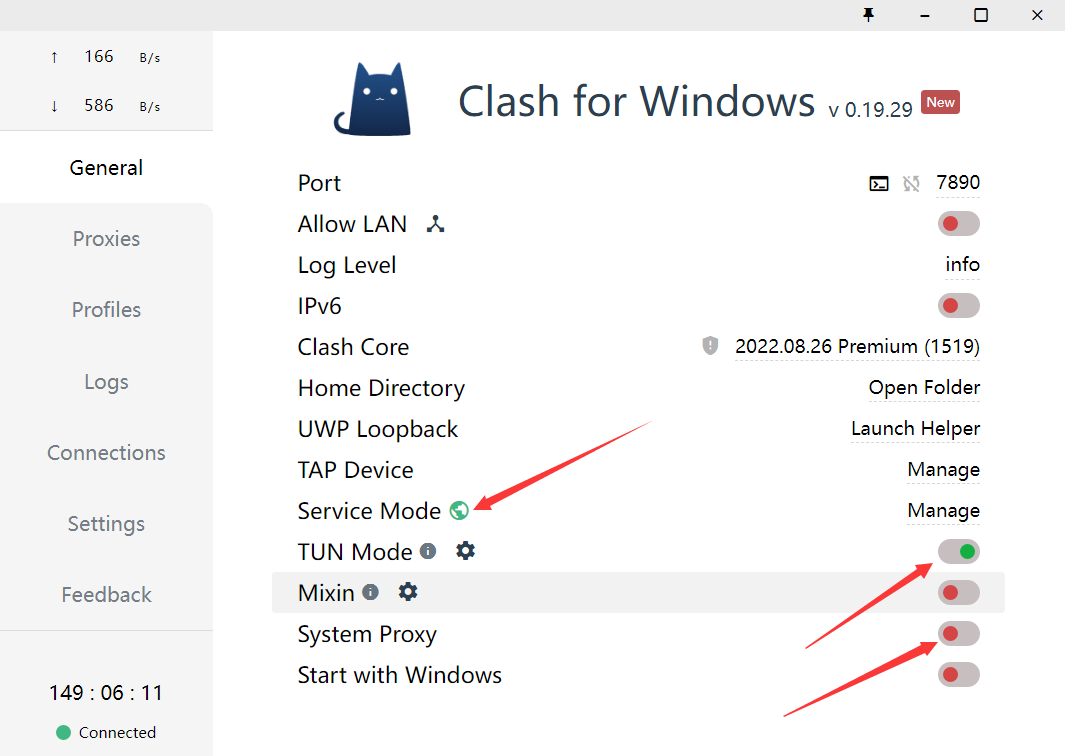
Run it as Python scripts (3.9 recommended; Windows, Mac and Linux all work): put your OpenAI key into apikey.ini, install dependencies, then launch chatpaper.py or chatarxiv.py. There is also a Flask mode started with python3 app.py, which serves on localhost port 5000.Do I need my own ChatGPT account for this to work?Yes — the README says you need an unbanned ChatGPT account and your own OpenAI API key. It also tells you to keep a global proxy running while using the tool, and to install dependencies through a mirror if pip is slow.
Yes — the README says you need an unbanned ChatGPT account and your own OpenAI API key. It also tells you to keep a global proxy running while using the tool, and to install dependencies through a mirror if pip is slow.Anything I should know before trusting its summaries?Survey-type papers are not supported, search keywords cannot contain hyphens (spaces only), overlong sections get bluntly truncated, and the authors themselves pitch it as a first-pass screening tool rather than a deep-read replacement.
Survey-type papers are not supported, search keywords cannot contain hyphens (spaces only), overlong sections get bluntly truncated, and the authors themselves pitch it as a first-pass screening tool rather than a deep-read replacement.What can I feed it besides arXiv keyword searches?Four inputs: arXiv keyword crawls via chatarxiv.py (filter by recent days and top-N papers, up to 50 per search page), single local PDF files, batch runs over a whole local folder, and Google Scholar queries that googlescholarspider.py saves as a CSV sorted by yearly citations.
Four inputs: arXiv keyword crawls via chatarxiv.py (filter by recent days and top-N papers, up to 50 per search page), single local PDF files, batch runs over a whole local folder, and Google Scholar queries that googlescholarspider.py saves as a CSV sorted by yearly citations.What does a summary actually tell you about a paper?Four fixed questions: the research background, prior approaches and their problems, this paper's method step by step, and the results it achieved. Internally it pulls the abstract, introduction, method and conclusion sections and summarizes them in three passes.
Four fixed questions: the research background, prior approaches and their problems, this paper's method step by step, and the results it achieved. Internally it pulls the abstract, introduction, method and conclusion sections and summarizes them in three passes.Can I try it without installing anything?Yes — there is an official hosted version at chatpaper.org with a beginner video tutorial on Bilibili, and the README also explains how to deploy the app on HuggingFace.
Yes — there is an official hosted version at chatpaper.org with a beginner video tutorial on Bilibili, and the README also explains how to deploy the app on HuggingFace.Why did the author build this?He is a reinforcement-learning PhD student at USTC who felt he could not keep up with the daily flood of new arXiv papers, so he built ChatPaper to 'use magic to fight magic': AI summarizes a paper in a minute, you read the summary in a minute.
He is a reinforcement-learning PhD student at USTC who felt he could not keep up with the daily flood of new arXiv papers, so he built ChatPaper to 'use magic to fight magic': AI summarizes a paper in a minute, you read the summary in a minute.What are similar projects?easyread, dsh-Mimir-Academic-research, gpt_academic, PaperSpine, PDFMathTranslate, XRAG, math, Tiersense
easyread, dsh-Mimir-Academic-research, gpt_academic, PaperSpine, PDFMathTranslate, XRAG, math, TiersenseWhich topics is it in?research-tools, flask, arxiv, paper, academic, translation, chatgpt, pdf, generative-ai, openai, research, chinese
research-tools, flask, arxiv, paper, academic, translation, chatgpt, pdf, generative-ai, openai, research, chinese