INSLIB



A portable C library for 3D navigation state estimation. Mail: [email protected]
Example Video
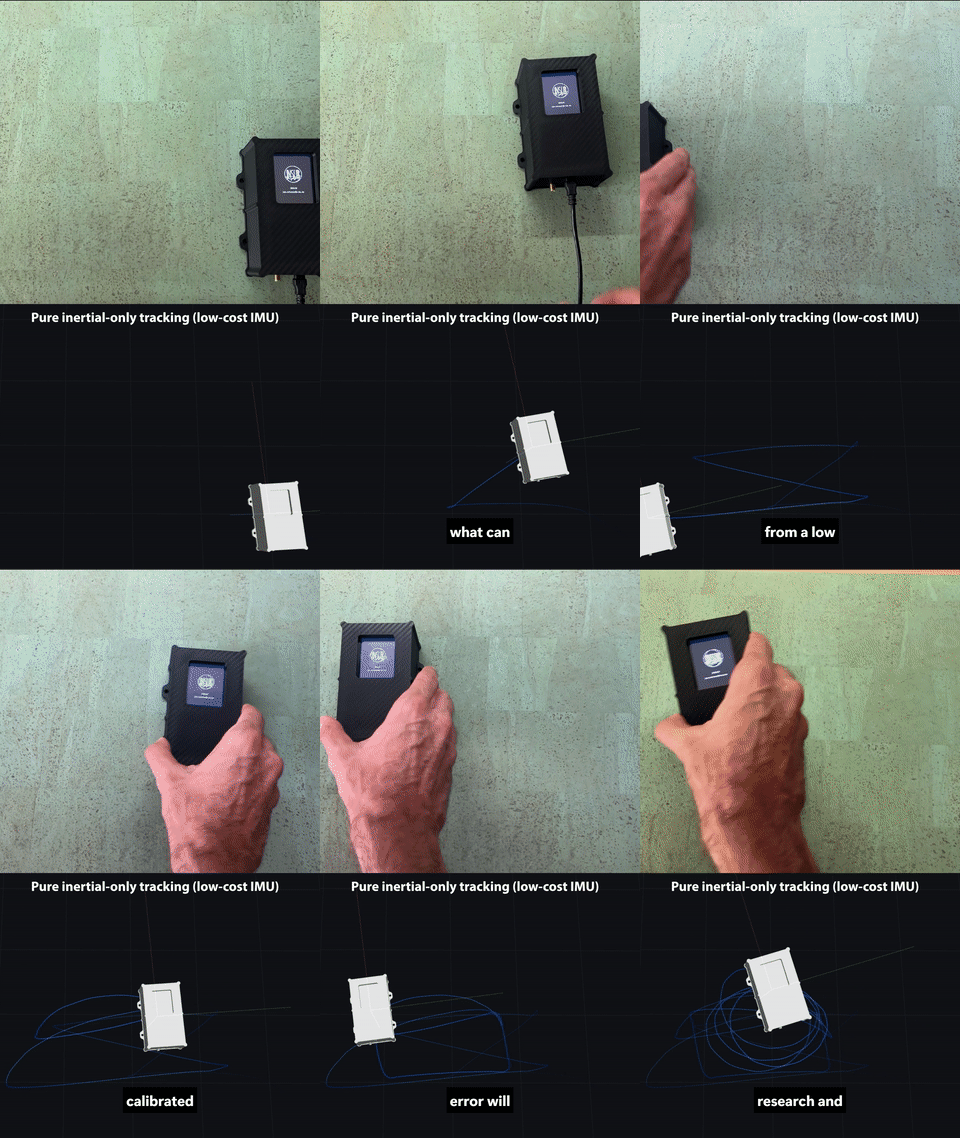
Example video of pure inertial tracking with a TDK ICM-45686 low-cost Inertial Measurement Unit (IMU)
Overview
INSLIB is a portable C library for 3D navigation state estimation. Its core is
a set of Kalman filters fusing measurements from an inertial
measurement unit (IMU) with GNSS/GPS measurements, barometer, magnetometer,
local position references, absolute yaw references, scalar ground speed and
zero-velocity / zero-rotation information.
Typical use cases:
- Drones (UAVs) and autonomous vehicles
- Robotics platforms
- Aerospace
- Cars
- Embedded systems requiring precise tracking
- Post-processing of recorded flights or driving data
The core library is written in pure C (C11), has no external dependencies
and is optimized for embedded microcontrollers. A useful collection of Python
helper programs and GUI apps are included in this repository.
Features
>90% Test Coverage including MC/DC testing (also used in aerospace DO-178 DAL-A or ISO26262 ASIL-D developments)- Requirements traceability: code logic is linked to a machine-checked requirements database (
make reqs), aerospace-style
- Battle tested heavily with real world data and edge cases
- Measurement delay compensation and estimation (e.g. GNSS/GPS receivers typically have more than 100-200 milliseconds of latency due to processing, internal filtering, UART transmission, etc.)
- Suited for UAVs: during a GNSS outage the filter keeps providing an inertial-fused altitude (via the parallel
baro_alt vertical channel) and full attitude, not just raw IMU integration
- UAVs that only need roll/pitch, no yaw/heading, can skip the magnetometer entirely: the standalone
AHRS_MODE_ARS mode (5-state, freely-integrated yaw) runs from IMU data alone
- Robust UDU/Bierman-Thornton Kalman Filter routines for numerically robust square-root filtering (effective precision for covariance is increased)
- Worst-Case-Execution Time (WCET) friendly: no unbounded loops, recursion, suitable for real-time control loops
- Strong static code analysis tests (undefined behaviour sanitizer UBSan, ASan)
- Built-in light-weight World Magnetic Model (WMM) for magnetometer declination compensation
- No heap, no OS dependencies, portable code: runs on bare-metal embedded targets as well as on a desktop computer
- 32-bit float (IEEE 754) for most calculations (except for GNSS/GPS coordinates), no 64-bit double precision hardware floating point unit (FPU) required
- Calibration tools included to calibrate sensor bias, scale, and misalignment without expensive calibration hardware (Tedaldi et al., ICRA 2014)
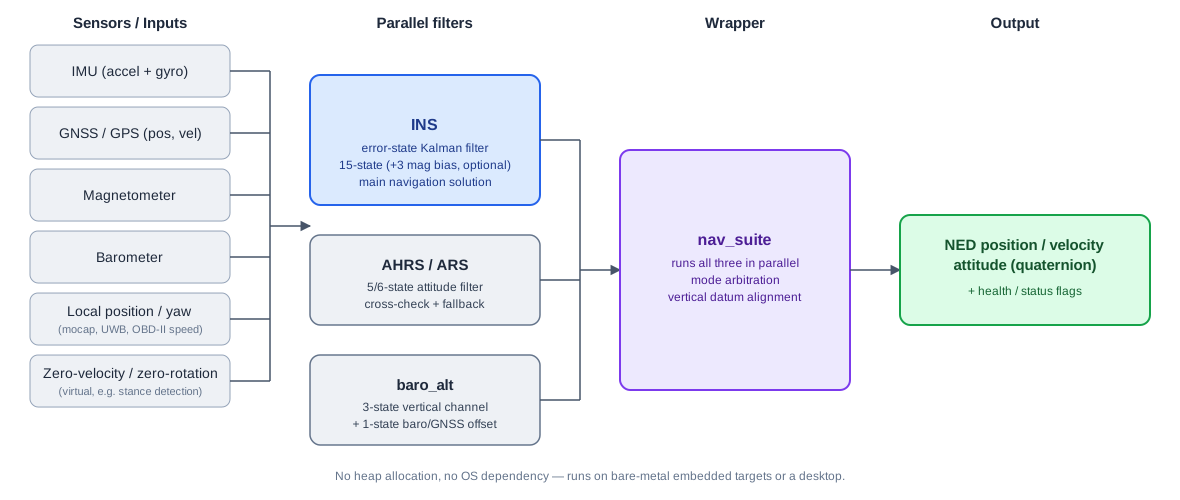
Library Architecture Block Diagram
Post Processing Quickstart
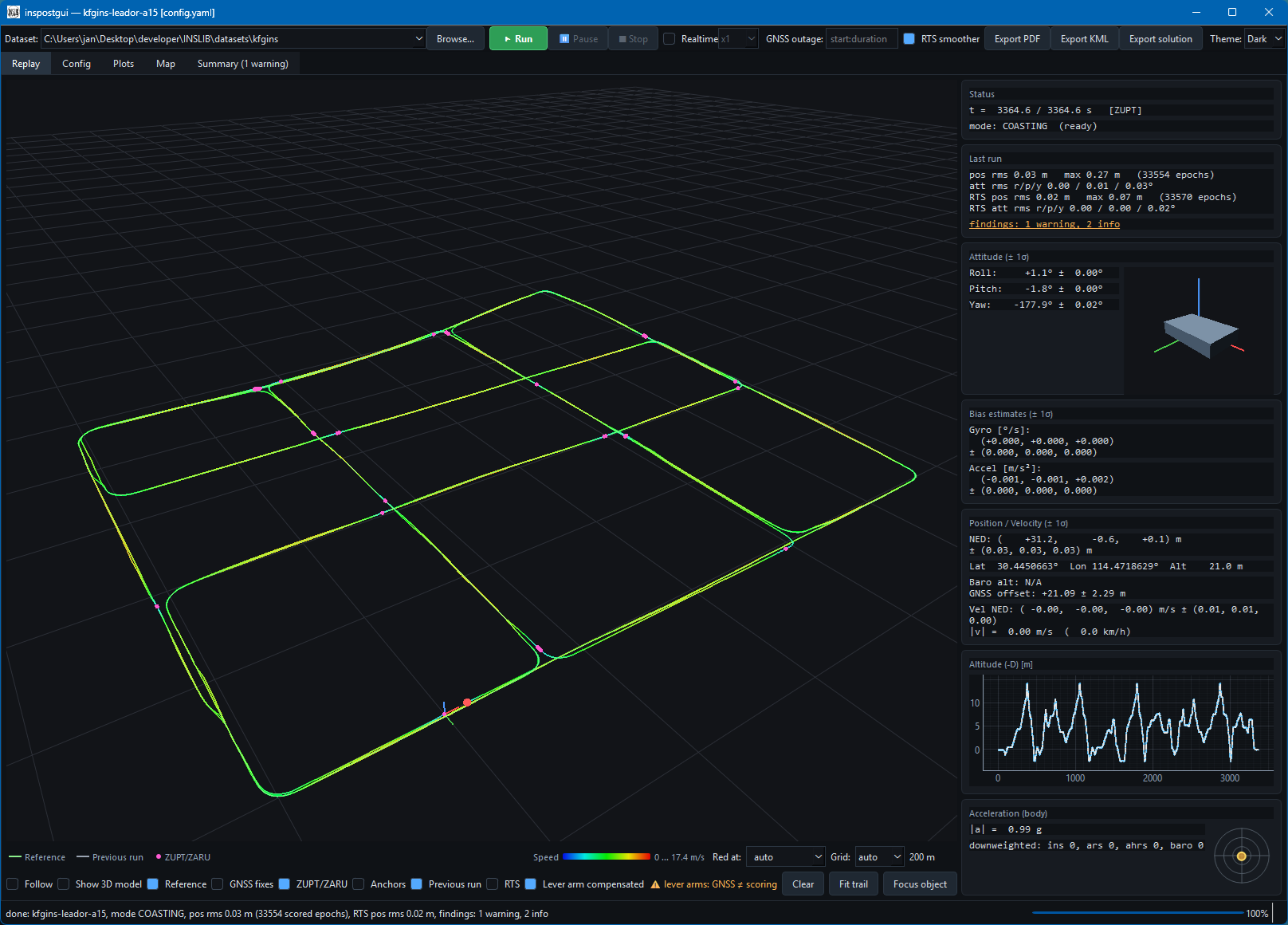
inspostgui.py is a GUI to post-process measurements: pick a dataset directory
(CSVs + config.yaml), tweak its settings, and replay it.
sh python/setup_venv.sh               # one-time (also runs `make pylib`)
. env.sh                              # activate the venv (POSIX/git-bash, any OS)
python3 python/inspostgui.py datasets/fog
The input format is plain CSV, one file per sensor. First item is a common
t_us timestamp in microseconds. IMU example:
# t_us, gyr_frd_x [rad/s], gyr_frd_y [rad/s], gyr_frd_z [rad/s], acc_frd_x [m/s^2], acc_frd_y [m/s^2], acc_frd_z [m/s^2]
0,-0.0016361766,-1.39143679e-08,-0.000272652038,-0.114920214,0.191539065,-9.84495283
50003,-0.0016361766,-1.39143679e-08,-0.000272652038,-0.114920214,0.191539065,-9.84495283
100005,-0.000272652038,-0.000272707696,0.000818123087,-0.0861961461,0.248990132,-9.7587816
GNSS/magnetometer/barometer/speed .csv files follow the same pattern. Example files:
config.yaml
A dataset directory with CSV files carries one config.yaml that
tells the filter how to run: aiding mode, sensor noise, lever arms, which
channels are enabled. Two annotated examples to start from:
doc/example_conf/config_basic.yaml
(GNSS+IMU+baro+mag) and
doc/example_conf/config_local_inertial.yaml
(GNSS-free, pure inertial dead-reckoning). The keys are documented in
doc/INSLIB_manual.pdf, section "Dataset
configuration: config.yaml".
replay.py Command Line Post-Processing Version
replay.py is the command line counterpart to
the inspostgui.py Python GUI above.
sh python/setup_venv.sh               # one-time (also runs `make pylib`)
. env.sh                              # activate the venv (POSIX/git-bash, any OS)
python3 python/replay.py datasets/fog --plot --plot-out /tmp/plots.pdf
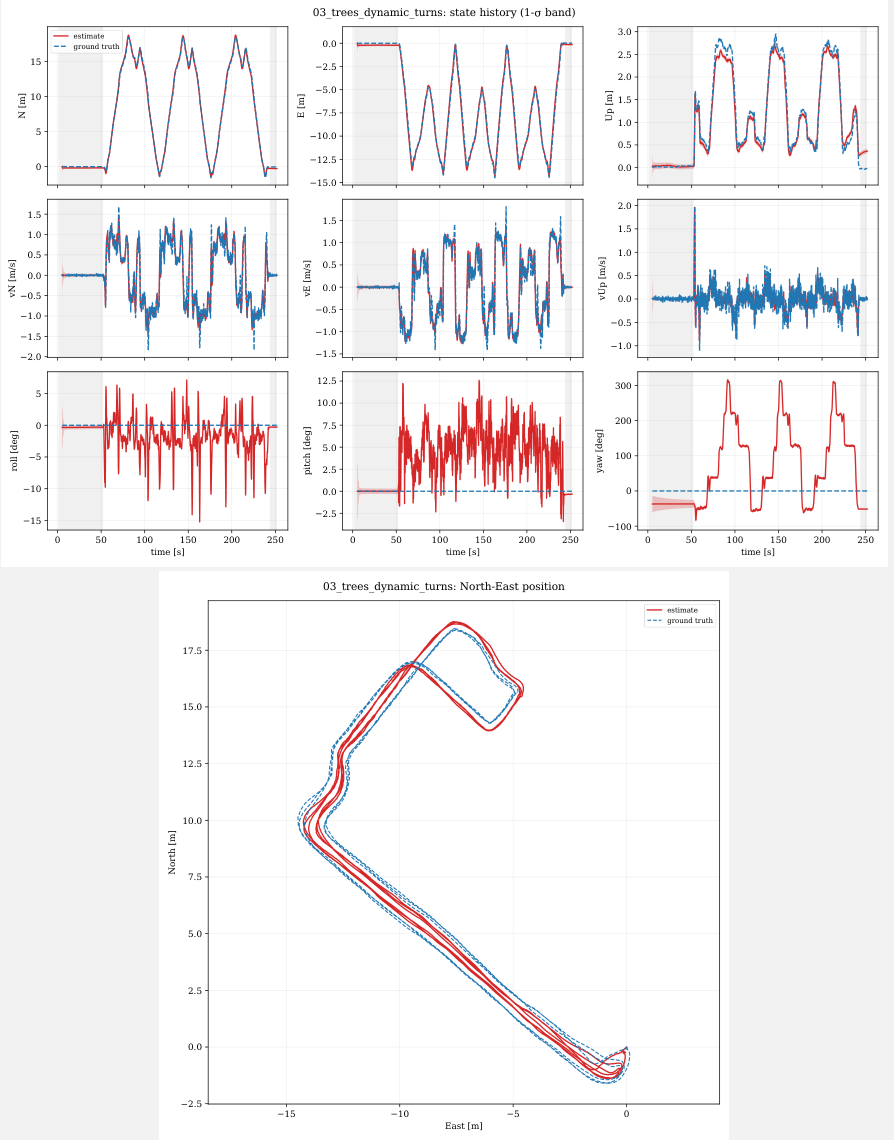
Example PDF plot output from replay.py:
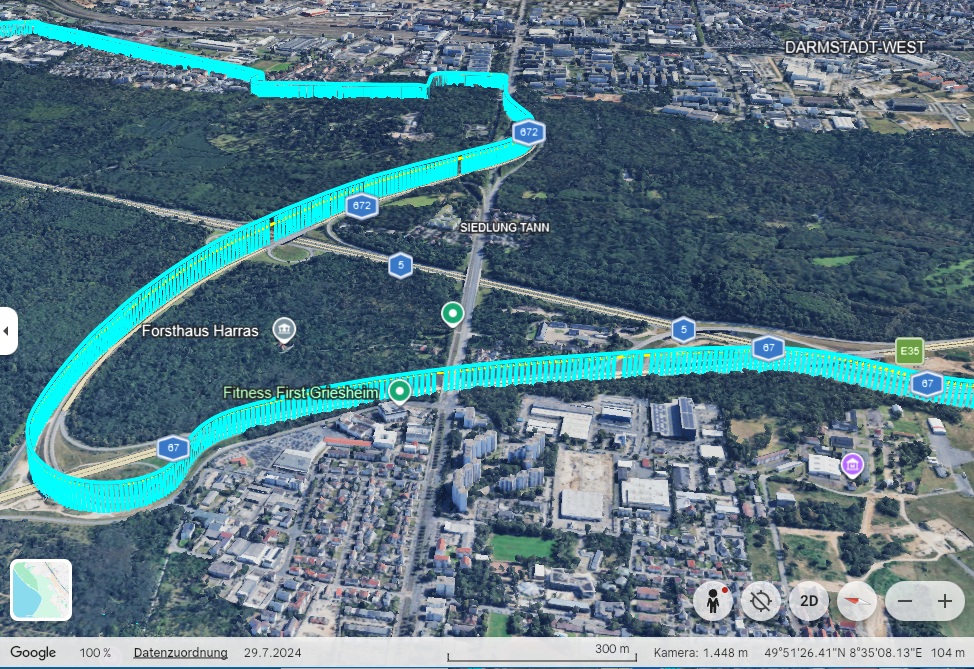
Google Earth .kml output is also possible with --kml output.kml:
GNSS Latency Estimation
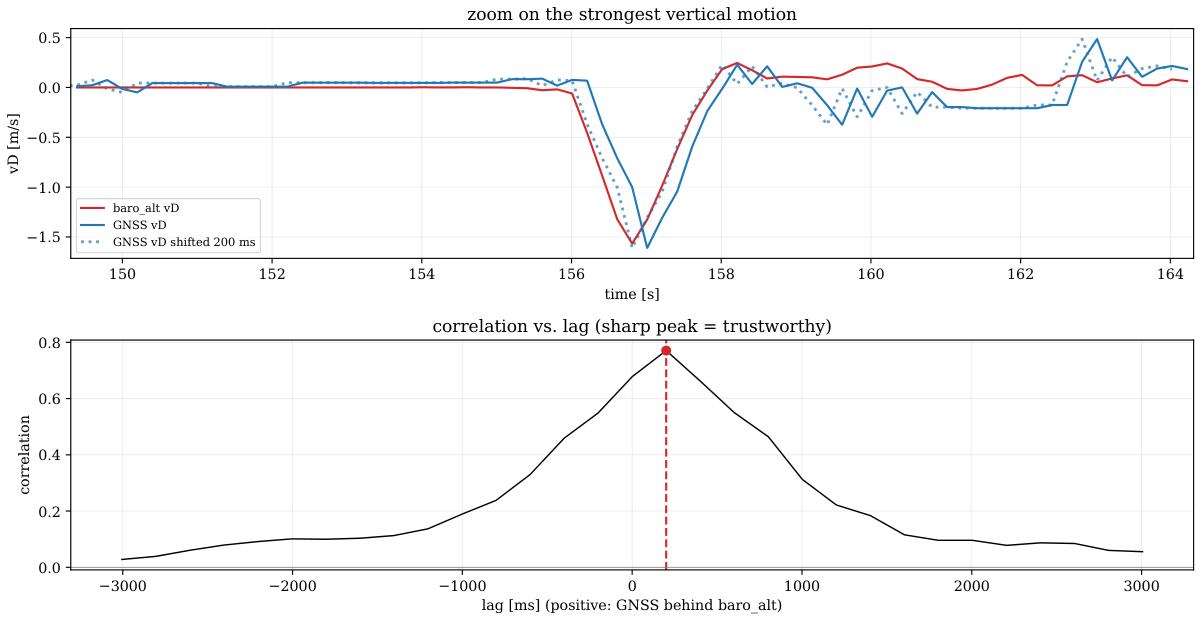
GNSS receivers report data with some latency
(transmission, internal processing, filtering) but
receiver and configuration dependent. inspostgui.py and replay.py measure
the real value for a specific configuration: IMU + barometric altitude has near-zero
latency, cross-correlating its vertical velocity against the
GNSS-reported vertical velocity around a real climb/descent results in a lag
with a sharp correlation peak (see the plot above).
Example for a u-blox X20P receiver delay estimation:
python3 python/replay.py datasets/pedestrian/07_outdoor_only/ --estimate-gnss-delay
Live Data Quickstart
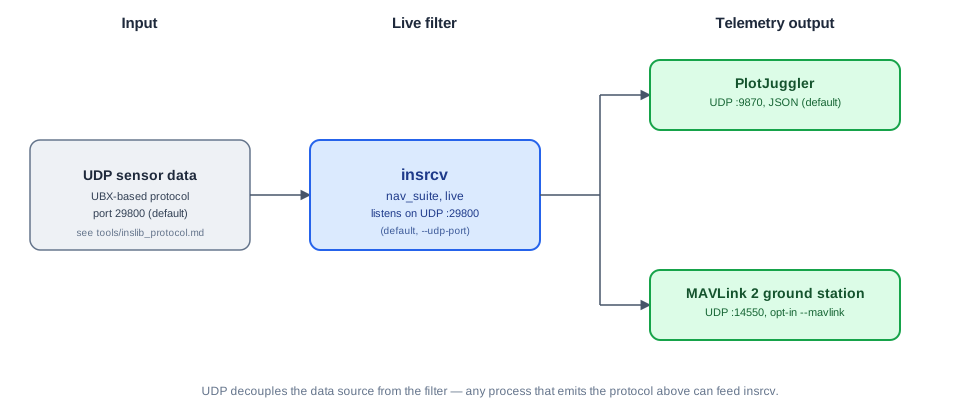
insrcv listens for UDP packets with sensor measurements. The packet
format is documented in tools/inslib_protocol.md.
Any process that sends this protocol format can feed it on UDP port 29800
(default). Output goes to PlotJuggler (UDP :9870, JSON) and optionally in
MAVLink format (UDP :14550).
make insrcv
./build/insrcv --mavlink   # run and wait for UDP sensor input
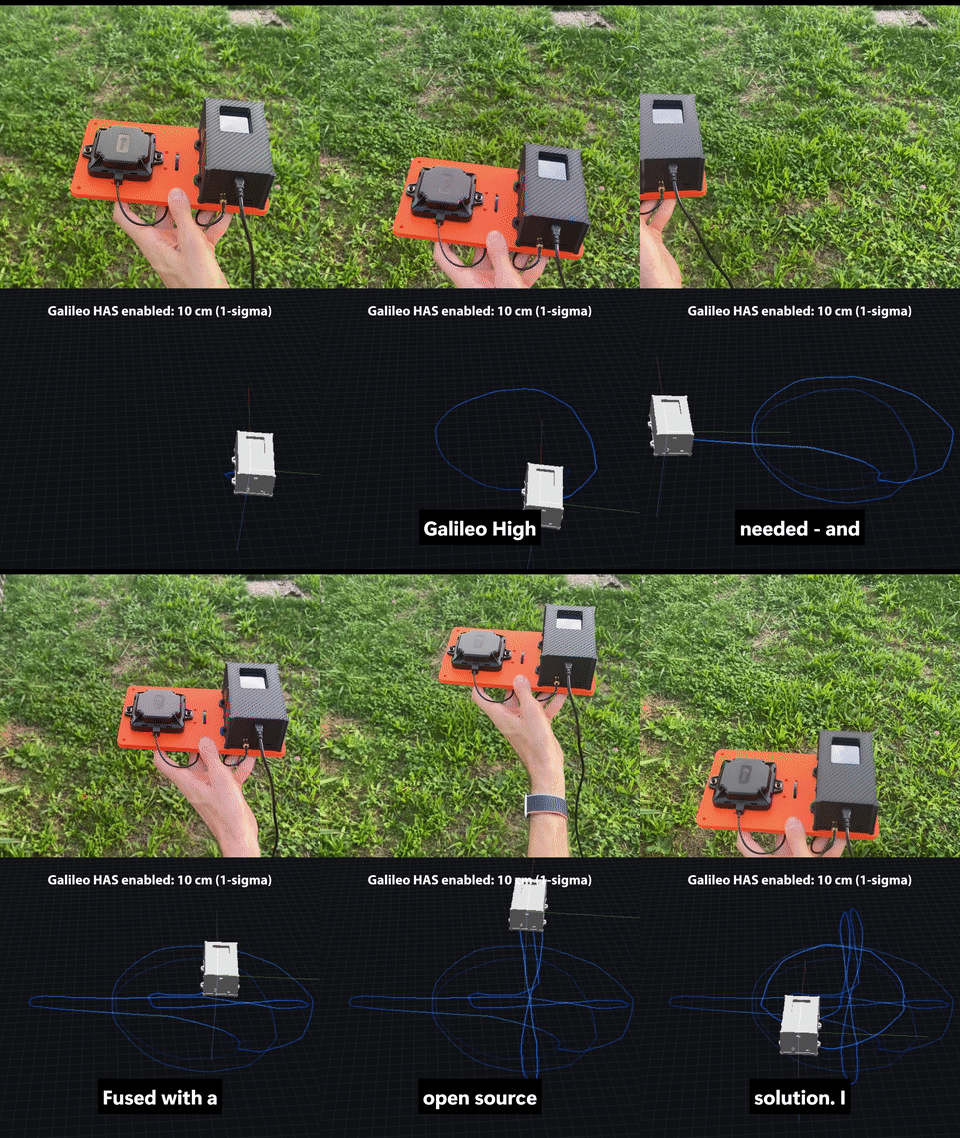
In action, fusing a live Galileo HAS-corrected GNSS fix:
Tutorials
- Galileo High Accuracy Service (HAS) support from e.g. u-blox X20-series for
<10 cm horizontal accuracy (1-sigma) without a correction service (requires compatible antenna)
- u-blox SPARTN/PointPerfect Flex (commercial) correction stream supported for
3-6 cm accuracy and convergence in seconds (source: u-blox)
- RTK via NTRIP RTCM corrections for
1 cm accuracy, from your own GNSS base station, a virtual base station, or a regional service such as SAPOS
Supported sensors
- Inertial Measurement Units (IMU): Accelerometer, Gyroscope
- GNSS/GPS Receivers (e.g. u-blox X20, F9P, etc.)
- GNSS Dual Antenna Compass Systems
- Magnetometers
- Barometers
- Local motion capture systems (mocap, like Lighthouse)
- OBDII Odometry Reader
- Virtual zero velocity (ZUPT), zero rotation rate (ZARU) sensors
Real world data sets
- UAV data: Crazyflie 2.1 Brushless UAV with accurate ground truth from Lighthouse mocap system
- Rotorcraft: MEMS vs. FOG (Fiber Optic Gyro reference) INS comparision while airborne in a rotorcraft
- Car: data with e.g. GNSS outages from a road tunnel or degraded satellite visibility in urban canyons
- Pedestrian: Handheld walking trials
- ArduPilot: comparison with ArduPilot EKF3 solution from the same measurements
- kfgins: comparison with navigation solution library from Wuhan University (i2Nav group)
- Paul Groves book: comparison with solution from Paul Groves book MATLAB example code
- MATLAB Navigation Toolbox: comparison with solution from MATLAB's Navigation Toolbox
(Not all datasets have an absolute ground truth available, e.g. the ArduPilot dataset is comparing the INSLIB solution with the ArduPilot solution)
Setup
The core C library only needs a C11 compiler and make (see Quickstart
above). The Python bindings, plotting and reference-board tools additionally
need a virtual environment:
sh python/setup_venv.sh      # one-time (Windows: python\setup_venv.bat)
. env.sh                     # activate the venv (POSIX/git-bash, any OS)
Directory Structure
📂 inslib/
├── Makefile              # Build: make test, make insrcv, ...
├── src/                  # Core library (.c/.h), no heap, no OS dependencies
│   └── nav_suite.h       # Main header: INS + AHRS + baro_alt wrapper
├── KFCore/               # Submodule: linear algebra, UDU/Bierman-Thornton filter
├── tests/                # Unit/integration tests
├── datasets/             # Real-world + simulated replay datasets
├── tools/                # C/Python reference board tools: calibration, GUI
├── python/               # Python bindings, plotting, replay harness
├── magneticmodel/        # WMM lookup table
├── doc/                  # Documentation, Doxygen, images
└── tutorial/             # Minimal C + Python usage examples
Reference Hardware
All tools (tools/) speak an open (UBX-based) protocol,
documented in tools/inslib_protocol.md.
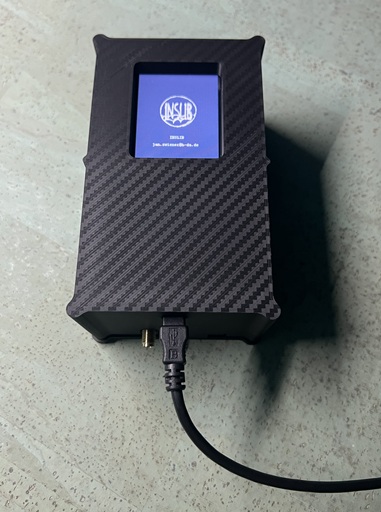
The reference board is a low-cost and ready-to-use development module (IMU,
u-blox GNSS receiver, magnetometer, barometer) for running INSLIB on real
hardware with pre-calibrated sensors. It implements the protocol above and is
ready to use out of the box. Its firmware itself is not public, get in touch if
you're interested in a collaboration with my university institute or in getting a unit.
Building your own sensor suite is also possible, an example conf (mid 2026 sensor landscape):
| Sensor |
Example part |
Notes |
| IMU |
TDK InvenSense ICM-45686, Bosch BMI563/BMI570, Analog Devices ADIS16505 or Murata SCH16T-K10 |
|
| Magnetometer |
MEMSIC MMC5603NJ or ST LIS3MDL |
|
| Barometer |
Bosch BMP581 or TE MS5611 |
|
| GNSS receiver |
u-blox F9P or X20 |
X20-series has L1/L2/L5 support and Galileo HAS decoding |
Reference Board Calibration GUI
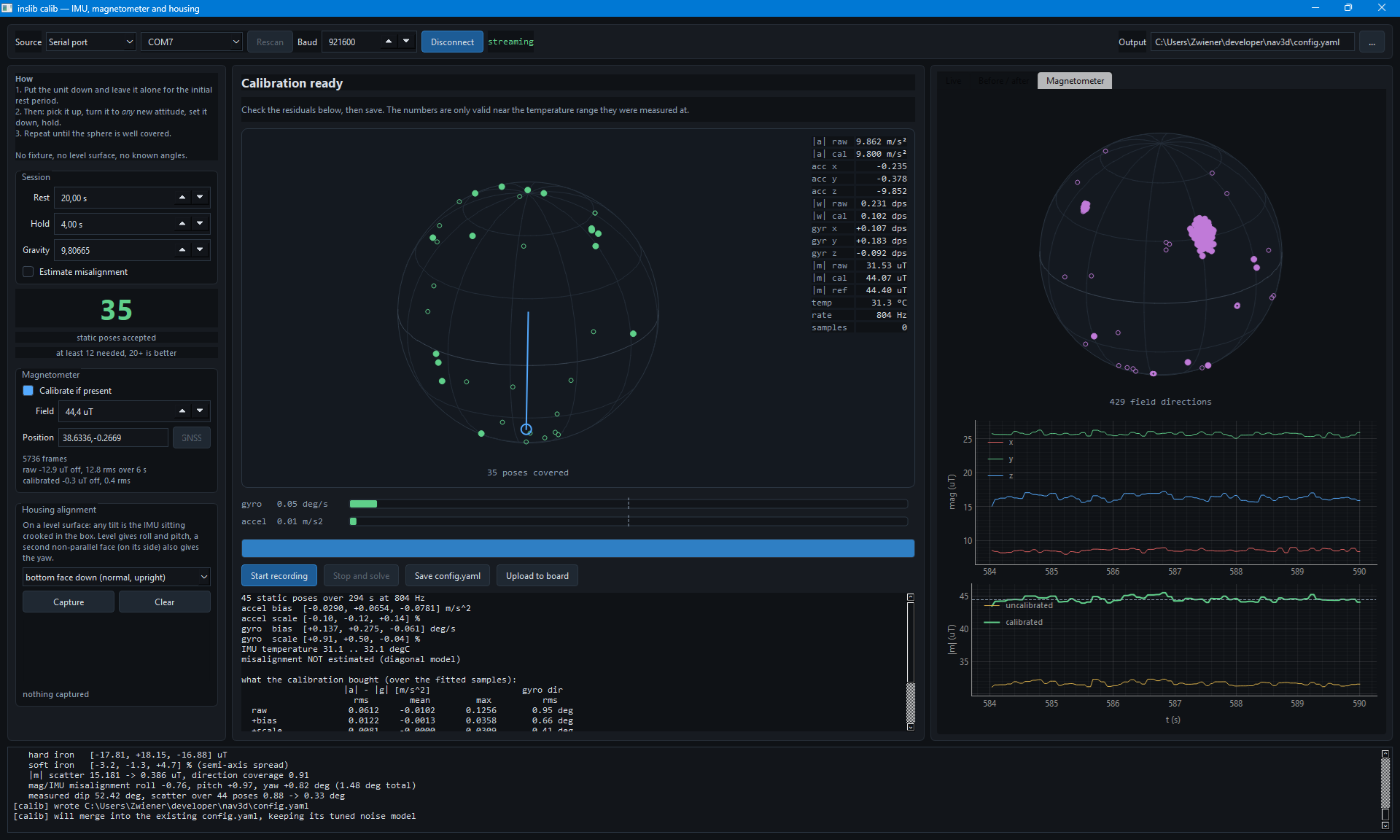
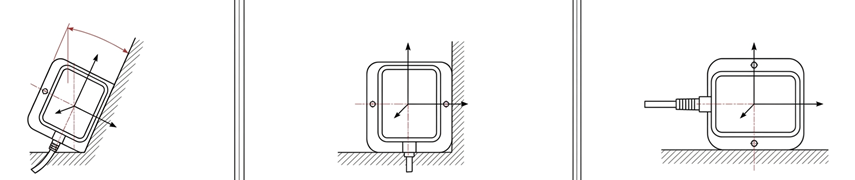
IMU/Magnetometer-Calibration + Housing-Alignment, user-friendly GUI for the
reference board. The GUI allows an easy calibration of the sensor hardware for
bias, scale and misalignment without the need for an expensive calibration
environment like robotic arms, except for a controlled temperature environment.
The sensor must be placed still for a few seconds in a variety of different orientations on a stable
surface:
Sensor Management GUI
Live-Control center for reference INS board
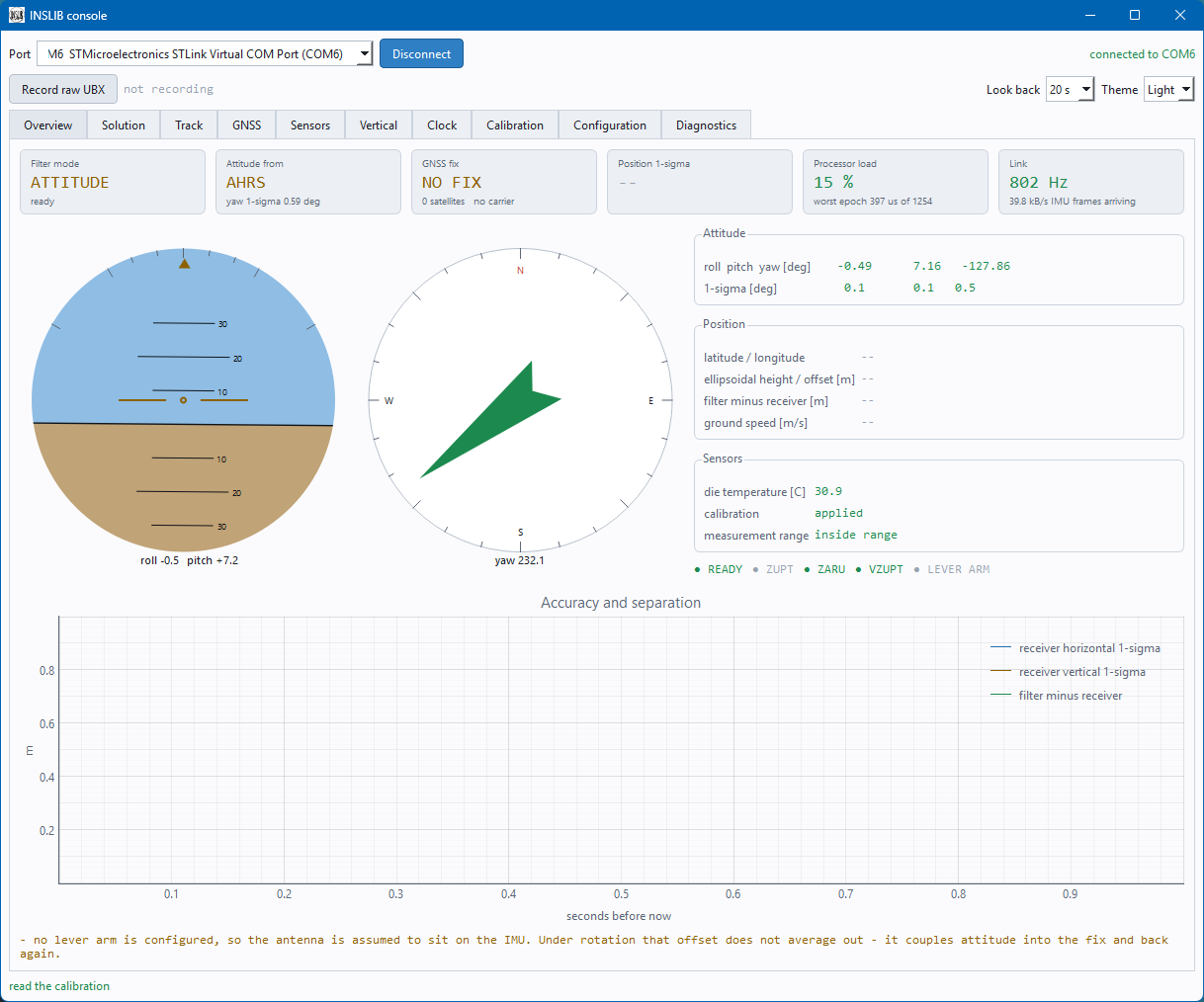
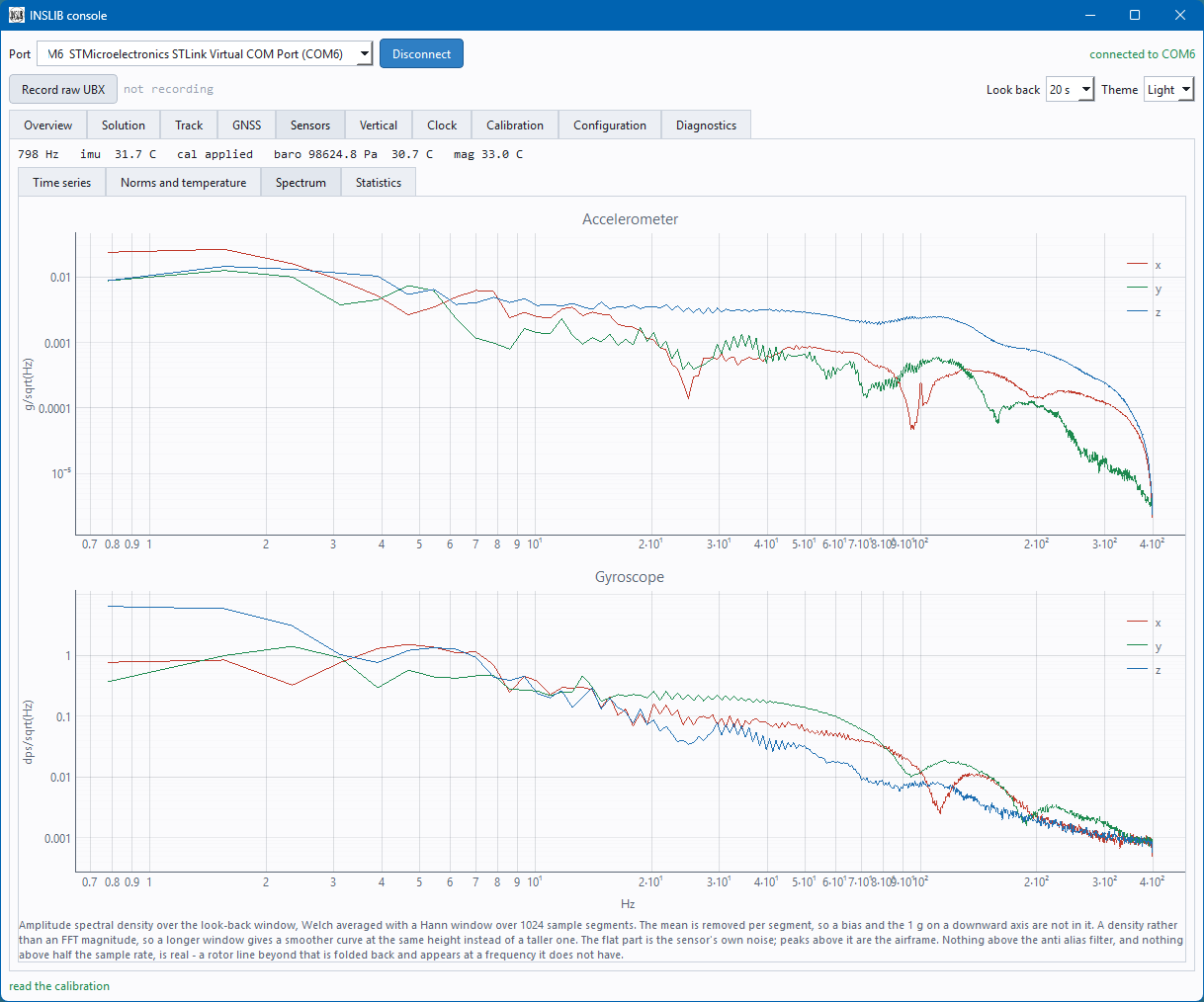
inslib_hub.py Stream, forward and log input data from reference boardinslib_convert_ubx_to_csv.py Convert reference board to .csv filesinslib_ubx_imu_calib.py Command line IMU-calibration toolinslib_cfg.py Reference board config read/writeinslib_clock_error.py Estimate MCU-clock error from reference board .csv loginslib_obd_speed.py Stream car velocity from OBD-II dongle
Common Pitfalls
IMU sensor processing is unforgiving: it is not enough to get one thing
right, the whole chain (timestamps, axis conventions, calibration,
filtering, etc.) has to line up properly. A list of common mistakes:
- Magnetometer not calibrated (the classic). Uncorrected hard-/soft-iron
bias means wrong yaw, use the calibration
GUI.
- IMU calibrated on a magnetic surface: the calibration
GUI fits the magnetometer from the same
session of static poses as the IMU, not a separate one.
A metal-legged table, or nearby gadgets/laptop biases the field it reads -
a genuinely non-magnetic and stable calibration environment is harder to find
than it sounds. For a UAV this does not apply: calibrate the
magnetometer already mounted in the airframe, at its final position.
- Accelerometer/gyroscope PSD and bias random walk not measured on the
target sensor and environment (classic as well): either not measured at all
(random defaults), or measured in a non-representative setting (e.g. an
office room, without the real vibration/thermal environment) - both make the
filter over- or under-confident in the IMU.
- GNSS reception too poor INSLIB expects good GNSS data. Indoors or under
heavy multipath, the library auto-init will reject the GNSS data. A
high-quality GNSS receiver with a matching high-quality antenna is a must.
- GNSS receiver not configured There are countless ways to misconfigure
a GNSS receiver. A working configuration for u-blox F9P and X20 receivers
can be found here (F9P) and here (X20).
- Timestamps not synchronized or not monotonic every sensor needs to be
aligned to a single monotonic timebase (
t_us). Clock issues break the
library.
- GNSS antenna lever arm not set: the offset between IMU and GNSS antenna
(
gnss: leverarm_frd) has a significant impact on position and attitude,
especially during dynamic turns.
- IMU and magnetometer axes not in the same body frame: INSLIB expects
one consistent FRD body frame for every sensor (see
coding_style.md), mismatched coordinate frames will produce nonsense outputs.
- GNSS latency not measured: a guessed
gnss: delay_ms biases position
during dynamic motion, see GNSS Latency
Estimation.
- Unexpected height source with GNSS + barometer: with both wired up, the
filter prefers the barometer for height by default (fail-safe: it keeps
working through a GNSS outage). Set
baro_height_disable: 1 in
config.yaml to force GNSS/local-position height instead.
- No anti-aliasing/low-pass filtering on a vibrating IMU: propeller or
engine vibration aliases into the accelerometer/gyroscope band and breaks
the noise model and introduce ghost accelerations. Must be filtered out before the data reaches INSLIB.
- Sensor data over-filtered: heavy internal/firmware smoothing adds
its own latency.
- IMU not calibrated over its operating temperature range: bias/scale
drift with temperature directly leaks into the solution. Generally
the sensor should be in a temperature stable environment.
- Weak sensors: not every low-cost sensor is good enough.
- Insufficient motion excitation for yaw observability without turns
(or magnetometer/GNSS-compass aiding), heading might not be reliable.
AI Use
- The core library (
src/) and the KFCore library is designed and written by a human with 20 years of experience in this field
- This
README.md is written by a human
- The realworld datasets are collected, analyzed and tested by a human
- The code is extended and improved by Claude Opus and Sonnet, doxygen comments are improved and added
- Code and comments written by Claude are reviewed by a human (no auto-commit)
insrcv is largely written by Claude- Unit tests, the build system and the Python GUI tools are basically written by Claude
References
- J. Wendel, Integrierte Navigationssysteme: Sensordatenfusion, GPS und Inertiale Navigation, 2nd ed., Oldenbourg, 2011.
- D. H. Titterton and J. L. Weston, Strapdown Inertial Navigation Technology, 2nd ed., IET, 2004.
- G. J. Bierman, Factorization Methods for Discrete Sequential Estimation, Academic Press, 1977.
- M. S. Grewal and A. P. Andrews, Kalman Filtering: Theory and Practice Using MATLAB, 4th ed., Wiley, 2015.
- G. Chang, "Robust Kalman filtering based on Mahalanobis distance as outlier judging criterion," Journal of Geodesy, vol. 88, no. 4, pp. 391-401, 2014.
- P. D. Groves, Principles of GNSS, Inertial, and Multisensor Integrated Navigation Systems, 2nd ed., Artech House, 2013.
- J. R. Carpenter and C. N. D'Souza, Navigation Filter Best Practices, NASA/TP-2018-219822, NF1676L-29886, 2018. PDF
- J. Zwiener, Robuste Zustandsschätzung zur Navigation und Regelung autonomer und bemannter Multikopter mit verteilten Sensoren, Schriftenreihe der Fachrichtung Geodäsie, Fachbereich Bau- und Umweltingenieurwissenschaften, Technische Universität Darmstadt, ISBN 978-3-935631-43-3, Heft 54, Darmstadt, 2019.

 INSLIB is a portable C library for 3D navigation state estimation that fuses IMU data with GNSS/GPS, barometer, magnetometer and other sensors through Kalman filters, used in drones, robotics, cars and aerospace projects.