




10.4K ·GitHub
这是什么?
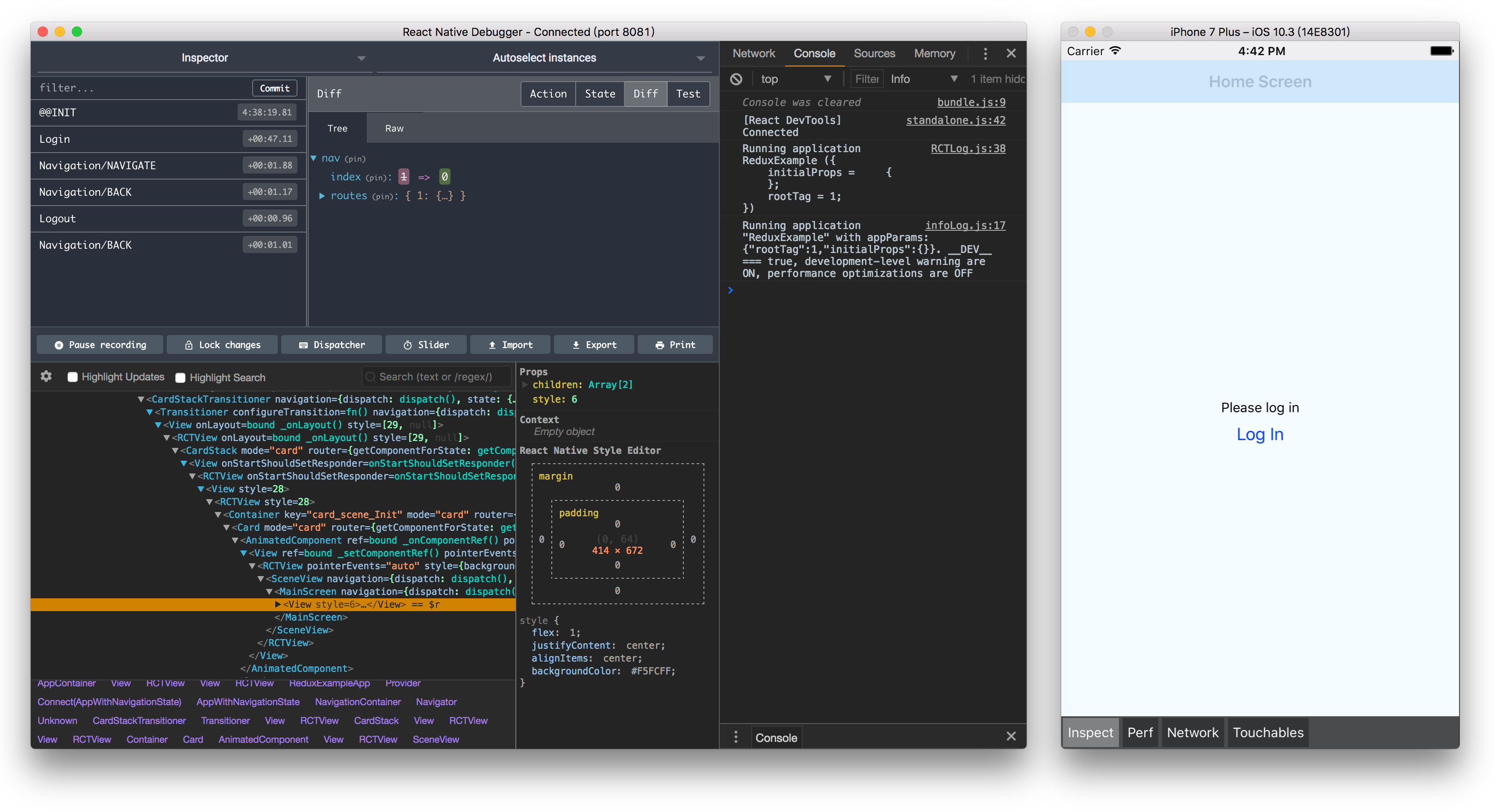
 一个用于调试 React Native 应用的桌面应用:在官方远程调试器的基础上内置了额外的开发者工具——React Inspector、Redux DevTools 和 Apollo Client DevTools。
一个用于调试 React Native 应用的桌面应用:在官方远程调试器的基础上内置了额外的开发者工具——React Inspector、Redux DevTools 和 Apollo Client DevTools。它是一个我直接运行的桌面应用,还是我添加到 React Native 项目里的库?它是一个独立的桌面应用(基于 Electron 构建),不是库:把它安装到你的电脑上,开发时你的 React Native 应用会连接到它,把它当作远程调试器使用。
它是一个独立的桌面应用(基于 Electron 构建),不是库:把它安装到你的电脑上,开发时你的 React Native 应用会连接到它,把它当作远程调试器使用。它支持哪些 React Native 版本?版本必须匹配:React Native Debugger 0.11 及更高版本要求 react-native 0.62 或更高——安装前请先查看 README 中的兼容性表格。
版本必须匹配:React Native Debugger 0.11 及更高版本要求 react-native 0.62 或更高——安装前请先查看 README 中的兼容性表格。我的应用用的是 Hermes 或新架构(New Architecture),这个调试器能用吗?暂时不行:这个应用目前只支持旧版远程调试器,所以使用 Hermes / JSI / 新架构的应用暂时不在支持范围内(相关支持在 discussion #774 中跟进)。
暂时不行:这个应用目前只支持旧版远程调试器,所以使用 Hermes / JSI / 新架构的应用暂时不在支持范围内(相关支持在 discussion #774 中跟进)。它只支持 macOS,还是也能在 Windows 和 Linux 上运行?它可以在 macOS、Windows 和 Linux 上运行——打包脚本覆盖了这三个平台;基于 Arch 的发行版还可以从 AUR 安装 react-native-debugger-bin。
它可以在 macOS、Windows 和 Linux 上运行——打包脚本覆盖了这三个平台;基于 Arch 的发行版还可以从 AUR 安装 react-native-debugger-bin。这个应用内置了哪些开发者工具?除了调试器本身:还有用于检查组件树的 React Inspector(来自 react-devtools-core)、使用与 redux-devtools-extension 相同 API 的 Redux DevTools,以及面向 GraphQL 的 Apollo Client DevTools。
除了调试器本身:还有用于检查组件树的 React Inspector(来自 react-devtools-core)、使用与 redux-devtools-extension 相同 API 的 Redux DevTools,以及面向 GraphQL 的 Apollo Client DevTools。为什么用它而不用官方的远程调试器?它底层就是官方的远程调试器,但在此基础上集成了 React Inspector、Redux DevTools 和 Apollo DevTools——这样元素检查、Redux 调试和 GraphQL 工具都集中在一个窗口里,不用分别打开不同的工具。
它底层就是官方的远程调试器,但在此基础上集成了 React Inspector、Redux DevTools 和 Apollo DevTools——这样元素检查、Redux 调试和 GraphQL 工具都集中在一个窗口里,不用分别打开不同的工具。我能用它查看网络请求吗?可以——网络检查通过应用内置的 Chrome 开发者工具完成;文档里还介绍了如何在控制台中启用“在编辑器中打开”的快捷方式。
可以——网络检查通过应用内置的 Chrome 开发者工具完成;文档里还介绍了如何在控制台中启用“在编辑器中打开”的快捷方式。What are similar projects?devhub, reactotron, responsively-app, reactide, Lepton, ivideo, mobilecode, medis
devhub, reactotron, responsively-app, reactide, Lepton, ivideo, mobilecode, medisWhich topics is it in?debugger, redux, graphql, react-native, mobile-development, electron, react, free, desktop-app, javascript, cross-platform, developer-tools
debugger, redux, graphql, react-native, mobile-development, electron, react, free, desktop-app, javascript, cross-platform, developer-tools