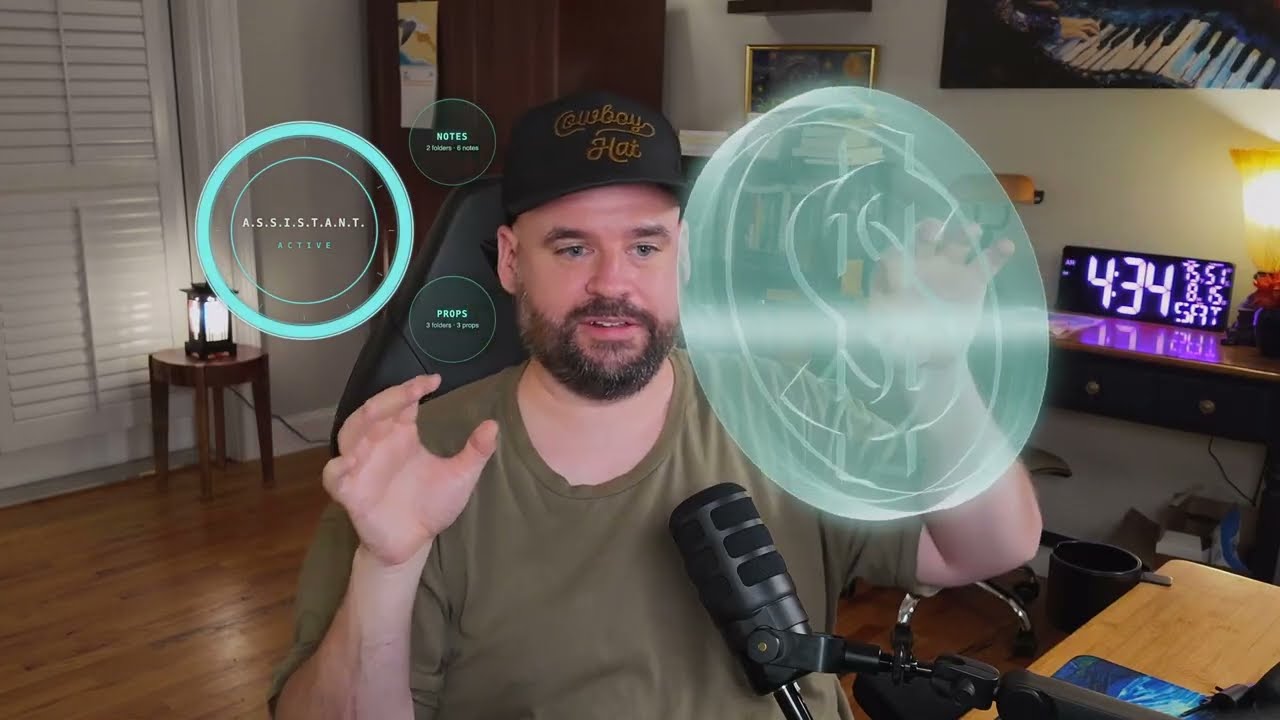

Что это такое?
 Barehands превращает вашу веб-камеру в отслеживающий руки интерфейс для ИИ: заметки, изображения и 3D-модели парят поверх видеопотока камеры как стеклянные карточки, которые вы сжимаете, бросаете, растягиваете и разрываете на части голыми руками — гарнитура или контроллеры не нужны.
Barehands превращает вашу веб-камеру в отслеживающий руки интерфейс для ИИ: заметки, изображения и 3D-модели парят поверх видеопотока камеры как стеклянные карточки, которые вы сжимаете, бросаете, растягиваете и разрываете на части голыми руками — гарнитура или контроллеры не нужны.Это нативное приложение или что-то, что работает в браузере?Это лёгкое локальное веб-приложение: сервер на чистом Python из stdlib отдаёт страницу, которую вы открываете в Chrome, а страница подтягивает отслеживание рук (Google MediaPipe) и 3D-рендеринг (three.js) с CDN при первом запуске.
Это лёгкое локальное веб-приложение: сервер на чистом Python из stdlib отдаёт страницу, которую вы открываете в Chrome, а страница подтягивает отслеживание рук (Google MediaPipe) и 3D-рендеринг (three.js) с CDN при первом запуске.Как его запустить?Склонируйте репозиторий и запустите приложенный скрипт (run.bat на Windows); откройте страницу в Chrome, разрешите камеру и начинайте махать руками. Если вы уже находитесь в сессии Claude Code, просто скажите 'clone then read barehands/barehands.md and set me up', и агент сам всё установит и настроит.
Склонируйте репозиторий и запустите приложенный скрипт (run.bat на Windows); откройте страницу в Chrome, разрешите камеру и начинайте махать руками. Если вы уже находитесь в сессии Claude Code, просто скажите 'clone then read barehands/barehands.md and set me up', и агент сам всё установит и настроит.Нужен ли установленный Python или что-то ещё заранее?Отдельная установка не нужна: сервер — это чистый stdlib Python (run.bat сам обходит фальшивую заглушку Python в Windows), а библиотеки отслеживания рук и 3D загружаются с публичных CDN при первом запуске, так что интернет нужен хотя бы раз.
Отдельная установка не нужна: сервер — это чистый stdlib Python (run.bat сам обходит фальшивую заглушку Python в Windows), а библиотеки отслеживания рук и 3D загружаются с публичных CDN при первом запуске, так что интернет нужен хотя бы раз.Всегда ли отслеживание рук работает надёжно?Пороги жестов настраивались на реальной руке в течение недель использования и измеряют форму руки как отношения, а не размеры, так что они должны держаться на разном расстоянии от камеры; но если жест срабатывает неверно для вашей руки или конфигурации, в TROUBLESHOOTING.md есть debug-оверлей, сэмплер поз и способ, которым ваш ИИ может перенастроить пороги.
Пороги жестов настраивались на реальной руке в течение недель использования и измеряют форму руки как отношения, а не размеры, так что они должны держаться на разном расстоянии от камеры; но если жест срабатывает неверно для вашей руки или конфигурации, в TROUBLESHOOTING.md есть debug-оверлей, сэмплер поз и способ, которым ваш ИИ может перенастроить пороги.Как подключить мой ИИ, чтобы он управлял доской?В Claude Code фраза 'read barehands.md and set me up' запускает мастер, который записывает конфиг и вставляет два хука в settings.json, чтобы кольцо на экране отражало ваши сессии. Вручную любая программа может писать в крошечный файл состояния или вызывать curl bin/board.sh, чтобы размещать карточки; для безопасности сервер держит белый список действий и «тюрьму» медиа-папки.
В Claude Code фраза 'read barehands.md and set me up' запускает мастер, который записывает конфиг и вставляет два хука в settings.json, чтобы кольцо на экране отражало ваши сессии. Вручную любая программа может писать в крошечный файл состояния или вызывать curl bin/board.sh, чтобы размещать карточки; для безопасности сервер держит белый список действий и «тюрьму» медиа-папки.Как добавить свои заметки или файлы на доску?Укажите орб на любую папку с markdown-файлами в barehands.json — существующее хранилище Obsidian подойдёт как есть. Изображения, прозрачные объекты и 3D-модели (включая голографические каркасные рендеры) кладутся в подпапки под media/, и только оттуда доска вообще берёт файлы.
Укажите орб на любую папку с markdown-файлами в barehands.json — существующее хранилище Obsidian подойдёт как есть. Изображения, прозрачные объекты и 3D-модели (включая голографические каркасные рендеры) кладутся в подпапки под media/, и только оттуда доска вообще берёт файлы.Какие жесты он понимает?Тап открывает/закрывает карточку, перетаскивание щипком перемещает её, удержание на месте при переносе вращает её в 3D, две руки масштабируют её, щелчок бросает её, хлопок очищает всю доску, а двухсекундный захват «когтем» притягивает далёкий объект к руке; пустой боковой drag щипком листает «взрывной» вид 3D-модели.
Тап открывает/закрывает карточку, перетаскивание щипком перемещает её, удержание на месте при переносе вращает её в 3D, две руки масштабируют её, щелчок бросает её, хлопок очищает всю доску, а двухсекундный захват «когтем» притягивает далёкий объект к руке; пустой боковой drag щипком листает «взрывной» вид 3D-модели.В чём подвох лицензии AGPL?Вы можете бесплатно использовать, изменять и даже продавать сервисы на основе barehands, в том числе коммерчески, но если вы передаёте свою версию кому-то другому или запускаете изменённую версию как сервис для других, эта версия должна оставаться open-source под той же лицензией AGPL-3.0.
Вы можете бесплатно использовать, изменять и даже продавать сервисы на основе barehands, в том числе коммерчески, но если вы передаёте свою версию кому-то другому или запускаете изменённую версию как сервис для других, эта версия должна оставаться open-source под той же лицензией AGPL-3.0.What are similar projects?AR.js, aframe, agenttrail, image-to-3d-pipeline, create-photo-flipbook-ui, meowmeowcatcam, three.js, aetherviz-master
AR.js, aframe, agenttrail, image-to-3d-pipeline, create-photo-flipbook-ui, meowmeowcatcam, three.js, aetherviz-masterWhich topics is it in?augmented-reality, gesture-control, webcam, threejs, webgl, agplv3, 3d, computer-vision, local-first, html, claude-code, ai-agents
augmented-reality, gesture-control, webcam, threejs, webgl, agplv3, 3d, computer-vision, local-first, html, claude-code, ai-agents