
What is this?
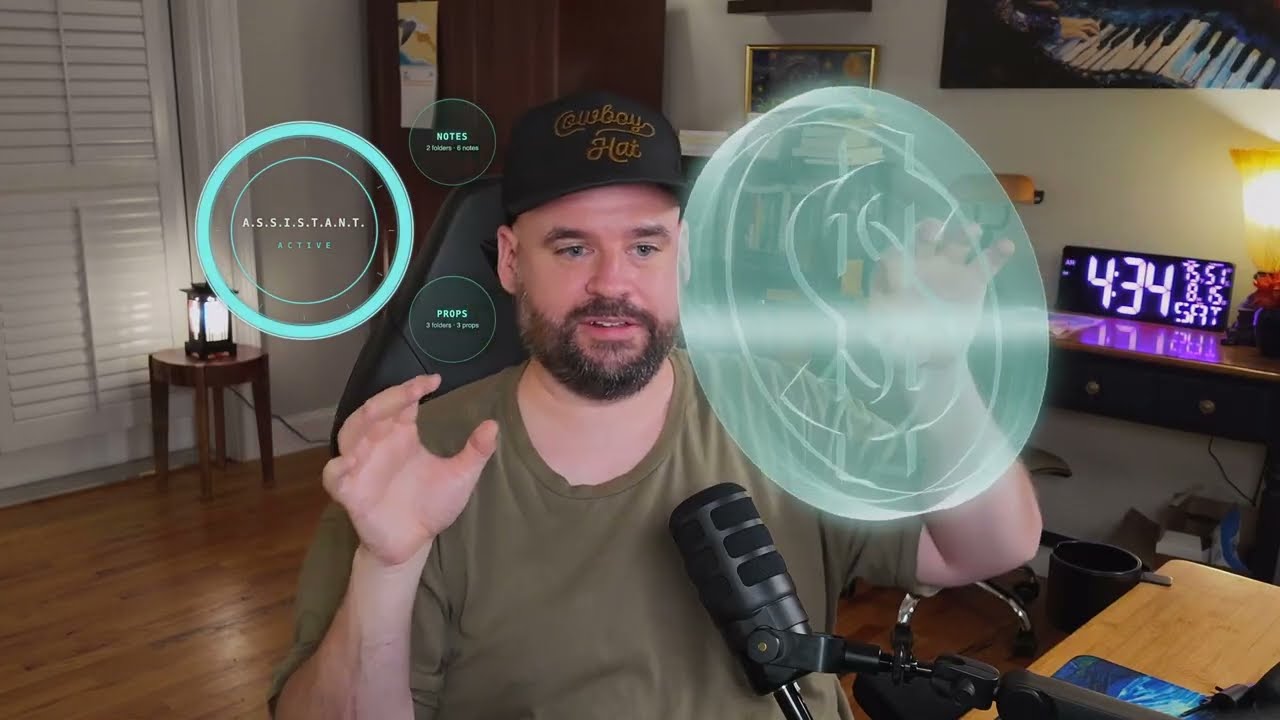
 Barehands turns your webcam into a hand-tracked interface for an AI: notes, images, and 3D models float over your camera feed as glass cards that you pinch, throw, stretch, and explode apart with your bare hands, no headset or controllers required.
Barehands turns your webcam into a hand-tracked interface for an AI: notes, images, and 3D models float over your camera feed as glass cards that you pinch, throw, stretch, and explode apart with your bare hands, no headset or controllers required.Is this a native app or something that runs in the browser?It is a lightweight local web app: a stdlib-Python server serves a page you open in Chrome, and the page pulls hand tracking (Google MediaPipe) and 3D rendering (three.js) from CDNs on first run.
It is a lightweight local web app: a stdlib-Python server serves a page you open in Chrome, and the page pulls hand tracking (Google MediaPipe) and 3D rendering (three.js) from CDNs on first run.How do I get it running?Clone the repo and run the included script (run.bat on Windows); open the page in Chrome, allow the camera, and start waving. If you are already in a Claude Code session, just say 'clone then read barehands/barehands.md and set me up' and the agent installs and configures it for you.
Clone the repo and run the included script (run.bat on Windows); open the page in Chrome, allow the camera, and start waving. If you are already in a Claude Code session, just say 'clone then read barehands/barehands.md and set me up' and the agent installs and configures it for you.Do I need Python or anything else installed first?No separate install: the server is just stdlib Python (run.bat handles Windows' fake Python stub for you), and hand tracking and 3D libraries load from public CDNs on first run, so you need internet at least once.
No separate install: the server is just stdlib Python (run.bat handles Windows' fake Python stub for you), and hand tracking and 3D libraries load from public CDNs on first run, so you need internet at least once.Does hand tracking always work reliably?Gesture thresholds were tuned on a real hand over weeks of use and measure hand shape as ratios rather than size, so they should hold at different camera distances, but if a gesture misfires for your hand or setup, TROUBLESHOOTING.md includes a debug overlay, pose sampler, and a method for your AI to re-tune the gates.
Gesture thresholds were tuned on a real hand over weeks of use and measure hand shape as ratios rather than size, so they should hold at different camera distances, but if a gesture misfires for your hand or setup, TROUBLESHOOTING.md includes a debug overlay, pose sampler, and a method for your AI to re-tune the gates.How do I connect my AI to control the board?In Claude Code, saying 'read barehands.md and set me up' runs a wizard that writes config and pastes two hooks into settings.json so the on-screen ring mirrors your sessions. Manually, any program can write to a tiny state file or curl bin/board.sh to stage cards, with the server enforcing an action allowlist and a media-folder jail for safety.
In Claude Code, saying 'read barehands.md and set me up' runs a wizard that writes config and pastes two hooks into settings.json so the on-screen ring mirrors your sessions. Manually, any program can write to a tiny state file or curl bin/board.sh to stage cards, with the server enforcing an action allowlist and a media-folder jail for safety.How do I add my own notes or files to the board?Point an orb at any folder of markdown files in barehands.json — an existing Obsidian vault works as-is. Images, transparent props, and 3D models (including hologram-wireframe renders) go in subfolders under media/, which is the only place the board will ever pull files from.
Point an orb at any folder of markdown files in barehands.json — an existing Obsidian vault works as-is. Images, transparent props, and 3D models (including hologram-wireframe renders) go in subfolders under media/, which is the only place the board will ever pull files from.What gestures does it understand?Tap opens/closes a card, pinch-drag moves it, holding still while carrying rotates it in 3D, two hands scale it, flicking throws it, clapping sweeps the whole board clean, and a two-second 'claw' grab yanks a distant object into your hand; an empty sideways pinch-drag scrubs a 3D model's exploded view.
Tap opens/closes a card, pinch-drag moves it, holding still while carrying rotates it in 3D, two hands scale it, flicking throws it, clapping sweeps the whole board clean, and a two-second 'claw' grab yanks a distant object into your hand; an empty sideways pinch-drag scrubs a 3D model's exploded view.What's the catch with the AGPL license?You can use, modify, and even sell services built on barehands for free, including commercially, but if you hand your version to someone else or run a modified version as a service for others, that version must stay open-source under the same AGPL-3.0 license.
You can use, modify, and even sell services built on barehands for free, including commercially, but if you hand your version to someone else or run a modified version as a service for others, that version must stay open-source under the same AGPL-3.0 license.What are similar projects?AR.js, aframe, agenttrail, image-to-3d-pipeline, create-photo-flipbook-ui, meowmeowcatcam, three.js, aetherviz-master
AR.js, aframe, agenttrail, image-to-3d-pipeline, create-photo-flipbook-ui, meowmeowcatcam, three.js, aetherviz-masterWhich topics is it in?augmented-reality, gesture-control, webcam, threejs, webgl, agplv3, 3d, computer-vision, local-first, html, claude-code, ai-agents
augmented-reality, gesture-control, webcam, threejs, webgl, agplv3, 3d, computer-vision, local-first, html, claude-code, ai-agents