bandwhich
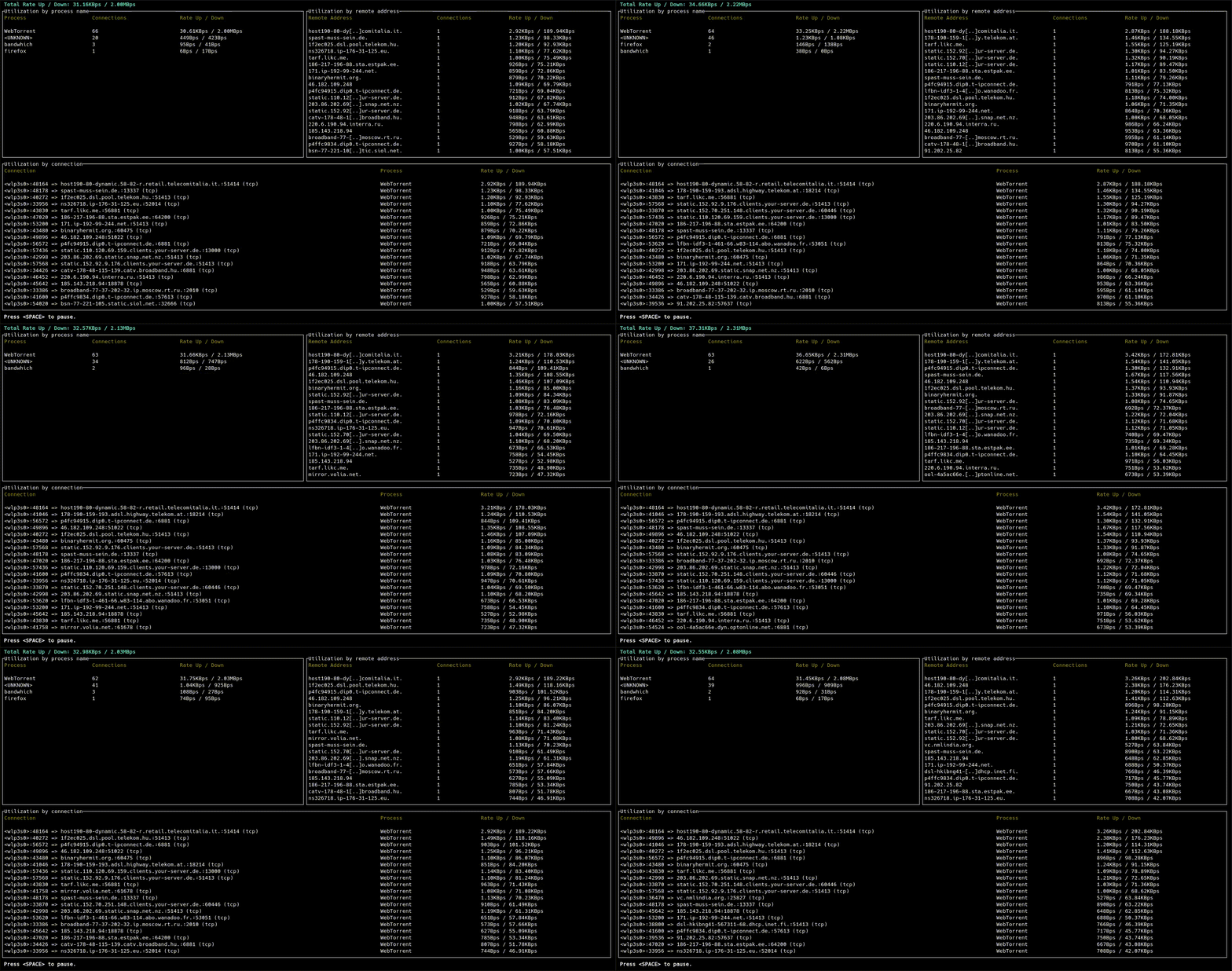
This is a CLI utility for displaying current network utilization by process, connection and remote IP/hostname
Table of contents
Project status
This project is in passive maintenance. Critical issues will be addressed, but
no new features are being worked on. However, this is due to a lack of funding
and/or manpower more than anything else, so pull requests are more than welcome.
In addition, if you are able and willing to contribute to this project long-term,
we would like to invite you to apply for co-maintainership.
For more details, see The Future of Bandwhich #275.
How does it work?
bandwhich sniffs a given network interface and records IP packet size, cross referencing it with the /proc filesystem on linux, lsof on macOS, or using WinApi on windows. It is responsive to the terminal window size, displaying less info if there is no room for it. It will also attempt to resolve ips to their host name in the background using reverse DNS on a best effort basis.
Installation
Downstream packaging status
For detailed instructions for each platform, see INSTALL.md.

Download a prebuilt binary
We offer several generic binaries in releases for various OSes.
| OS | Architecture | Support | Usage |
| Android | aarch64 | Best effort |
All modern Android devices.
Note that this is a pure binary file, not an APK suitable for general usage.
|
| Linux | aarch64 | Full |
64-bit ARMv8+ (servers, some modern routers, RPi-4+). |
| armv7hf | Best effort | 32-bit ARMv7 (older routers, pre-RPi-4). |
| x64 | Full |
Most Linux desktops & servers. |
| MacOS | aarch64 | Full |
Apple silicon Macs (2021+). |
| x64 |
Intel Macs (pre-2021). |
| Windows | x64 | Full |
Most Windows desktops & servers. |
Building from source
git clone https://github.com/imsnif/bandwhich.git
cd bandwhich
cargo build --release
For the up-to-date minimum supported Rust version, please refer to the rust-version field in Cargo.toml.
Cross-compiling
Cross-compiling for alternate targets is supported via cross. Here's the rough procedure:
- Check the target architecture. If on Linux, you can use
uname -m.
- Lookup rustc platform support for the corresponding target triple.
- Install
cross.
- Run
cross build --release --target <TARGET_TRIPLE>.
Android
Until cross-rs/cross#1222 is solved, use the latest HEAD:
cargo install --git https://github.com/cross-rs/cross.git cross
cross build --release --target aarch64-linux-android
Post install (Linux)
Since bandwhich sniffs network packets, it requires elevated privileges.
On Linux, there are two main ways to accomplish this:
1. setcap
- Permanently allow the
bandwhich binary its required privileges (called "capabilities" in Linux).
- Do this if you want to give all unprivileged users full access to bandwhich's monitoring capabilities.
- This is the recommended setup for single user machines, or if all users are trusted.
- This is not recommended if you want to ensure users cannot see others' traffic.
# assign capabilities
sudo setcap cap_sys_ptrace,cap_dac_read_search,cap_net_raw,cap_net_admin+ep $(command -v bandwhich)
# run as unprivileged user
bandwhich
Capabilities explained
cap_sys_ptrace,cap_dac_read_search: allow access to /proc/<pid>/fd/, so that bandwhich can determine which open port belongs to which process.cap_net_raw,cap_net_admin: allow capturing packets on your system.
2. sudo (or alternative)
- Require privilege escalation every time.
- Do this if you are an administrator of a multi-user environment.
sudo bandwhich
Note that if your installation method installed bandwhich to somewhere in
your home directory (you can check with command -v bandwhich), you may get a
command not found error. This is because in many distributions, sudo by
default does not keep your user's $PATH for safety concerns.
To overcome this, you can do any one of the following:
- make
sudo preserve your $PATH environment variable;
- explicitly set
$PATH while running bandwhich: sudo env "PATH=$PATH" bandwhich;
- pass the full path to
sudo: sudo $(command -v bandwhich).
Post install (Windows)
You might need to first install npcap for capturing packets on Windows.
Usage
Usage: bandwhich [OPTIONS]

Options:
  -i, --interface <INTERFACE>      The network interface to listen on, eg. eth0
  -r, --raw                        Machine friendlier output
  -n, --no-resolve                 Do not attempt to resolve IPs to their hostnames
  -s, --show-dns                   Show DNS queries
  -d, --dns-server <DNS_SERVER>    A dns server ip to use instead of the system default
      --log-to <LOG_TO>            Enable debug logging to a file
  -v, --verbose...                 Increase logging verbosity
  -q, --quiet...                   Decrease logging verbosity
  -p, --processes                  Show processes table only
  -c, --connections                Show connections table only
  -a, --addresses                  Show remote addresses table only
  -u, --unit-family <UNIT_FAMILY>  Choose a specific family of units [default: bin-bytes] [possible values: bin-bytes, bin-bits, si-bytes, si-bits]
  -t, --total-utilization          Show total (cumulative) usages
  -h, --help                       Print help (see more with '--help')
  -V, --version                    Print version
Contributing
See CONTRIBUTING.md.
License
MIT

 bandwhich 是一个命令行工具,可以直接在终端里显示当前的网络带宽占用情况,并按进程、连接以及远程 IP/主机名分别列出。