
这是什么?
 Phorminx 是一款本地优先的 Windows 桌面应用,把语音转成文字,用于听写和会议转录,带有可搜索的笔记和可选的本地 AI 格式化,而不必依赖付费的云端 AI 服务。
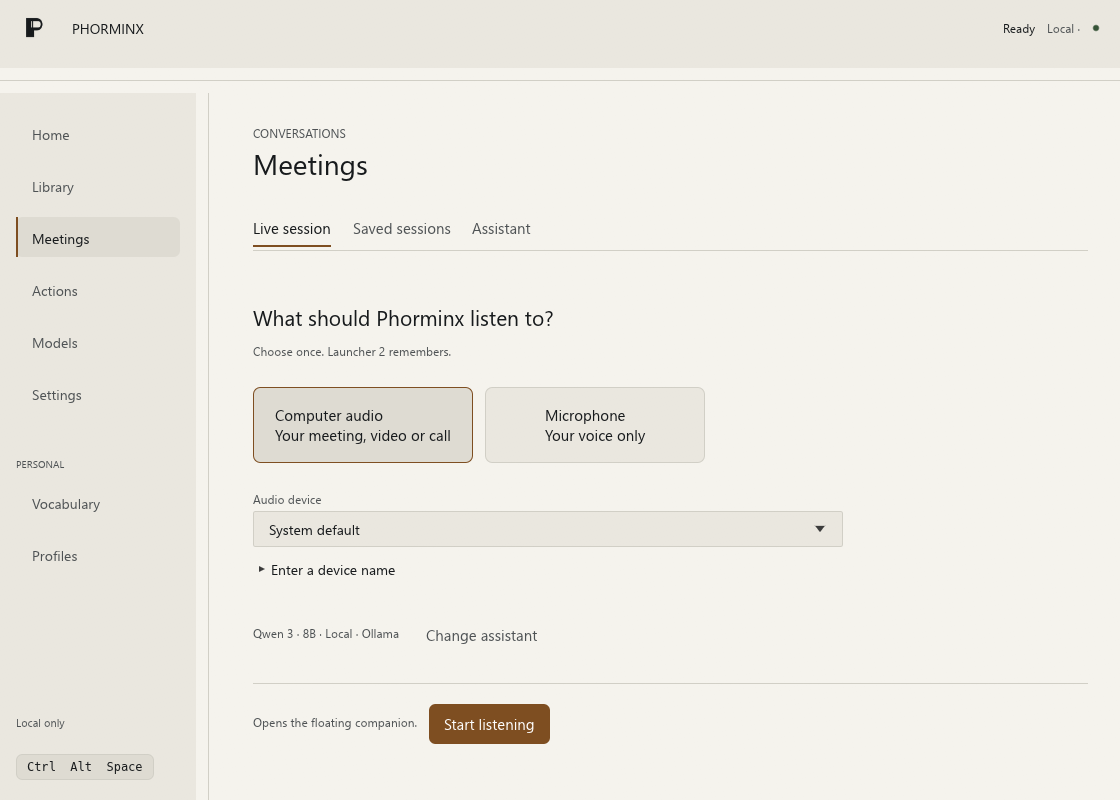
Phorminx 是一款本地优先的 Windows 桌面应用,把语音转成文字,用于听写和会议转录,带有可搜索的笔记和可选的本地 AI 格式化,而不必依赖付费的云端 AI 服务。它只是一个后台语音转文字工具,还是一个有自己界面的完整应用?它是一个完整的桌面应用,带有自己的启动器、一个带悬浮伴侣的 Meetings 工作区、可搜索的 Library,以及一个用于从转录文本触发 HTTP 请求的 Actions 工作区。
它是一个完整的桌面应用,带有自己的启动器、一个带悬浮伴侣的 Meetings 工作区、可搜索的 Library,以及一个用于从转录文本触发 HTTP 请求的 Actions 工作区。怎么让它跑起来?你要按照开发指南从源码构建 Phorminx;语音模型和 Vosk 运行时资源需要单独下载,并通过应用的设置和模型界面进行配置。
你要按照开发指南从源码构建 Phorminx;语音模型和 Vosk 运行时资源需要单独下载,并通过应用的设置和模型界面进行配置。要让它工作,我需要 Ollama 或 GPU 吗?不需要,听写不依赖任何 AI 服务:Instant 模式使用本地 Vosk 识别器,Accurate 模式使用 Whisper 并可选 Vulkan GPU 加速。只有可选的 AI 格式化步骤才需要本地 Ollama 模型。
不需要,听写不依赖任何 AI 服务:Instant 模式使用本地 Vosk 识别器,Accurate 模式使用 Whisper 并可选 Vulkan GPU 加速。只有可选的 AI 格式化步骤才需要本地 Ollama 模型。它已经适合日常使用了吗?还没有完全成熟,它被标注为 alpha 软件,识别准确率、延迟和兼容性取决于你的设备、音频来源和所选模型。
还没有完全成熟,它被标注为 alpha 软件,识别准确率、延迟和兼容性取决于你的设备、音频来源和所选模型。它也能在 Mac 或 Linux 上运行吗?不能,Phorminx 只面向 Windows 10/11 x64。
不能,Phorminx 只面向 Windows 10/11 x64。我的音频和转录数据会去哪里?语音识别在本地运行,正常使用时音频保存在内存里而不写入磁盘;保留的文本和设置存放在 %LOCALAPPDATA%\Phorminx 之下,不过启用可选的远程助手提供方或 HTTP 操作会把你的文本发送到那些外部目的地。
语音识别在本地运行,正常使用时音频保存在内存里而不写入磁盘;保留的文本和设置存放在 %LOCALAPPDATA%\Phorminx 之下,不过启用可选的远程助手提供方或 HTTP 操作会把你的文本发送到那些外部目的地。Instant 和 Accurate 两种听写模式有什么区别?Instant 模式使用常驻的 Vosk 识别器实现快速语音转文字;Accurate 模式使用 Whisper(可选 Vulkan 加速)以获得更高质量的转录。
Instant 模式使用常驻的 Vosk 识别器实现快速语音转文字;Accurate 模式使用 Whisper(可选 Vulkan 加速)以获得更高质量的转录。实际要怎么开始听写?按下默认的 Ctrl+Alt+Space 快捷键打开 P 启动器,选择 Dictate,开口说话,然后再按一次快捷键结束。
按下默认的 Ctrl+Alt+Space 快捷键打开 P 启动器,选择 Dictate,开口说话,然后再按一次快捷键结束。我能用语音触发自动化操作吗?可以,Actions 工作区让你保存使用转录文本替换或可选模型生成 JSON 的 HTTP 请求,并从同一个启动器发起。
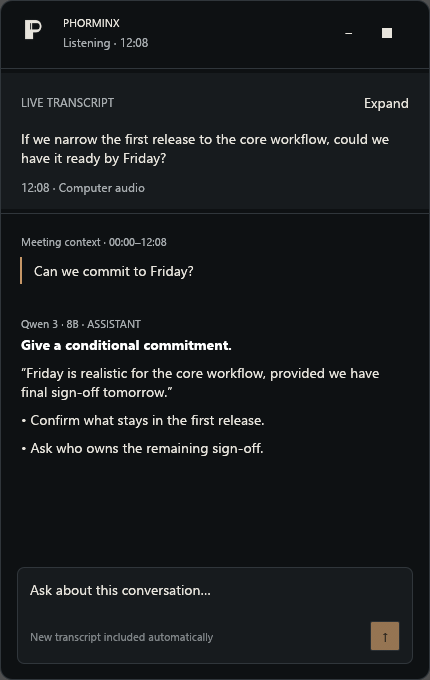
可以,Actions 工作区让你保存使用转录文本替换或可选模型生成 JSON 的 HTTP 请求,并从同一个启动器发起。向悬浮伴侣提问会打断会议录制吗?不会,发送助手问题时会带上最新捕获的转录上下文,而不会停止捕获。
不会,发送助手问题时会带上最新捕获的转录上下文,而不会停止捕获。What are similar projects?meetily, no-tipe-releases, parrot, lipflow, VideoHighlighter, screenpipe, openwhispr, omarchy-meeting-recorder
meetily, no-tipe-releases, parrot, lipflow, VideoHighlighter, screenpipe, openwhispr, omarchy-meeting-recorderWhich topics is it in?dictation, http-client, transcription, local-ai, whisper, vulkan, speech-to-text, speech-recognition, note-taking, semantic-search, windows-app, local-llm
dictation, http-client, transcription, local-ai, whisper, vulkan, speech-to-text, speech-recognition, note-taking, semantic-search, windows-app, local-llm