





What is this?
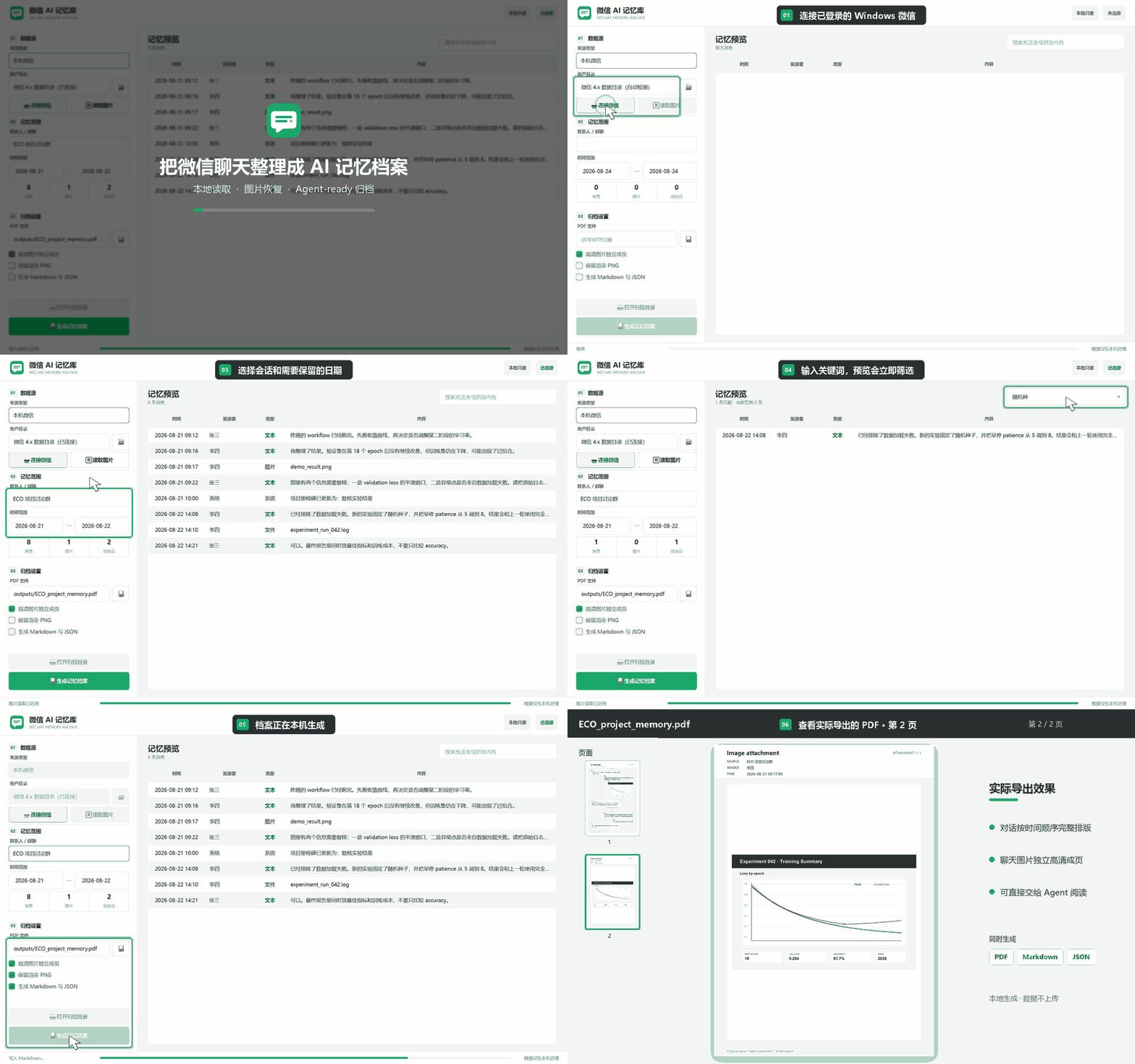
 A local-first Windows app that reads your WeChat 4.x chats directly, lets you filter them by conversation, date range and keyword, and exports the result as PDF, Markdown and structured JSON to build a personal, traceable chat memory archive.
A local-first Windows app that reads your WeChat 4.x chats directly, lets you filter them by conversation, date range and keyword, and exports the result as PDF, Markdown and structured JSON to build a personal, traceable chat memory archive.Is this a GUI app or a command-line tool?It is primarily a Windows desktop app built with PySide6, with a JSON-based fallback entry point and a command-line interface for generating the same export via scripts.
It is primarily a Windows desktop app built with PySide6, with a JSON-based fallback entry point and a command-line interface for generating the same export via scripts.How do I get it running?Download the portable WeChatAIMemory-Portable.exe from the v0.3.7-alpha Release and double-click to run with no install needed, or unzip the Windows-x64 build and run the EXE inside (keeping the internal folder). Then open the app, let it detect your WeChat account folder, click 'Connect WeChat', and confirm via QR scan within 5 minutes after WeChat restarts.
Download the portable WeChatAIMemory-Portable.exe from the v0.3.7-alpha Release and double-click to run with no install needed, or unzip the Windows-x64 build and run the EXE inside (keeping the internal folder). Then open the app, let it detect your WeChat account folder, click 'Connect WeChat', and confirm via QR scan within 5 minutes after WeChat restarts.Do I need Python or any dev tools installed to use it?No — the packaged release bundles Python, Qt, Frida, PDF and crypto runtimes so the target machine needs nothing extra. Running it from source instead requires Python 3.11 or later.
No — the packaged release bundles Python, Qt, Frida, PDF and crypto runtimes so the target machine needs nothing extra. Running it from source instead requires Python 3.11 or later.Is this ready for everyday use, or are there rough edges?It's still alpha software without code signing, so Windows SmartScreen and some antivirus tools may flag it because it uses Frida to read the running WeChat process. A WeChat app update could also break reading until the project adapts, and AI Q&A, RAG and OCR aren't implemented yet.
It's still alpha software without code signing, so Windows SmartScreen and some antivirus tools may flag it because it uses Frida to read the running WeChat process. A WeChat app update could also break reading until the project adapts, and AI Q&A, RAG and OCR aren't implemented yet.Does it work on Mac, or only Windows?Windows only, specifically Windows 10/11 x64 with the Windows WeChat 4.x client installed — there's no macOS or Linux support.
Windows only, specifically Windows 10/11 x64 with the Windows WeChat 4.x client installed — there's no macOS or Linux support.Where does my chat data go?Nothing leaves your machine: chat text, images and database keys stay local the whole time, there's no telemetry or remote AI calls, and the tool only reads a read-only temporary copy of the WeChat database that gets deleted when the session closes.
Nothing leaves your machine: chat text, images and database keys stay local the whole time, there's no telemetry or remote AI calls, and the tool only reads a read-only temporary copy of the WeChat database that gets deleted when the session closes.Why did the author build this instead of just saving chat screenshots?The goal is to give AI agents reliable context: project decisions, commitments and events often live only in scattered WeChat chats, so the tool extracts and structures them into a traceable local memory archive the model can actually reference.
The goal is to give AI agents reliable context: project decisions, commitments and events often live only in scattered WeChat chats, so the tool extracts and structures them into a traceable local memory archive the model can actually reference.What happens with voice messages in my chats?It decodes WeChat's SILK audio format and transcribes it locally using faster-whisper, caching the text. The first run needs to download a ~500MB 'small' model over the internet, but after that transcription works fully offline.
It decodes WeChat's SILK audio format and transcribes it locally using faster-whisper, caching the text. The first run needs to download a ~500MB 'small' model over the internet, but after that transcription works fully offline.What's planned for future versions?The roadmap includes a persistent memory store with incremental sync (v0.4), full-text search via SQLite FTS5 (v0.5), structured people/project/task entities (v0.6), local AI Q&A with source citations (v0.7), and a read-only MCP query interface (v0.8).
The roadmap includes a persistent memory store with incremental sync (v0.4), full-text search via SQLite FTS5 (v0.5), structured people/project/task entities (v0.6), local AI Q&A with source citations (v0.7), and a read-only MCP query interface (v0.8).How good is the recovered image quality?It restores original V2/WXGF images with EXIF orientation correction and produces both a preview page and a separate 300 DPI high-resolution page for each image in the exported archive.
It restores original V2/WXGF images with EXIF orientation correction and produces both a preview page and a separate 300 DPI high-resolution page for each image in the exported archive.Which topics is it in?data-extraction, archive, qt, local-ai, whisper, knowledge-management, speech-to-text, offline-first, wechat, privacy-first, windows-app, pdf
data-extraction, archive, qt, local-ai, whisper, knowledge-management, speech-to-text, offline-first, wechat, privacy-first, windows-app, pdf