Duckpad is a free, open-source visual tool for building data pipelines.
Connect steps on a canvas, write SQL or Python where you need it,
and see the data at every step. Powered by DuckDB.
Duckpad is a workspace for preparing and transforming data. You build a pipeline
by connecting steps on a canvas: load files or database tables, join, filter,
aggregate, export. Each step is a SQL query or a Python class that you can read
and edit, and each step keeps its result. You can open any table along the way
instead of guessing what the pipeline did.
It runs on your laptop or on a server your team shares. There is no cloud
service, no sign-up and no paid edition.
Use it to:
Prepare data. Combine CSV, Parquet and JSON files with PostgreSQL, Oracle
or S3 data, using guided forms or your own SQL. DuckDB extensions add
more formats, such as Excel.
Build results people can trust. Data tests block a result that contains
bad rows before it is published or exported, and you can trace a number back
to the source values behind it.
Run it again tomorrow. Every save is a Git commit. Review a change, then
run the approved version from the interface, the command line or your
scheduler.
Try it
You need Python 3.11+ and Git.
pip install duckpad
duckpad start
Your browser opens Duckpad: choose the administrator password, and you are in.
On macOS or Windows, run duckpad start --trusted-local instead, for your own
projects on your own machine. The default mode confines pipelines to the files
they are allowed to read, which requires Linux with Landlock; see the
platform requirements.
Then choose New project → Start from an example and Run to explore
a finished pipeline, or follow Duckpad in 15 minutes
to build your first one from scratch.
A closer look
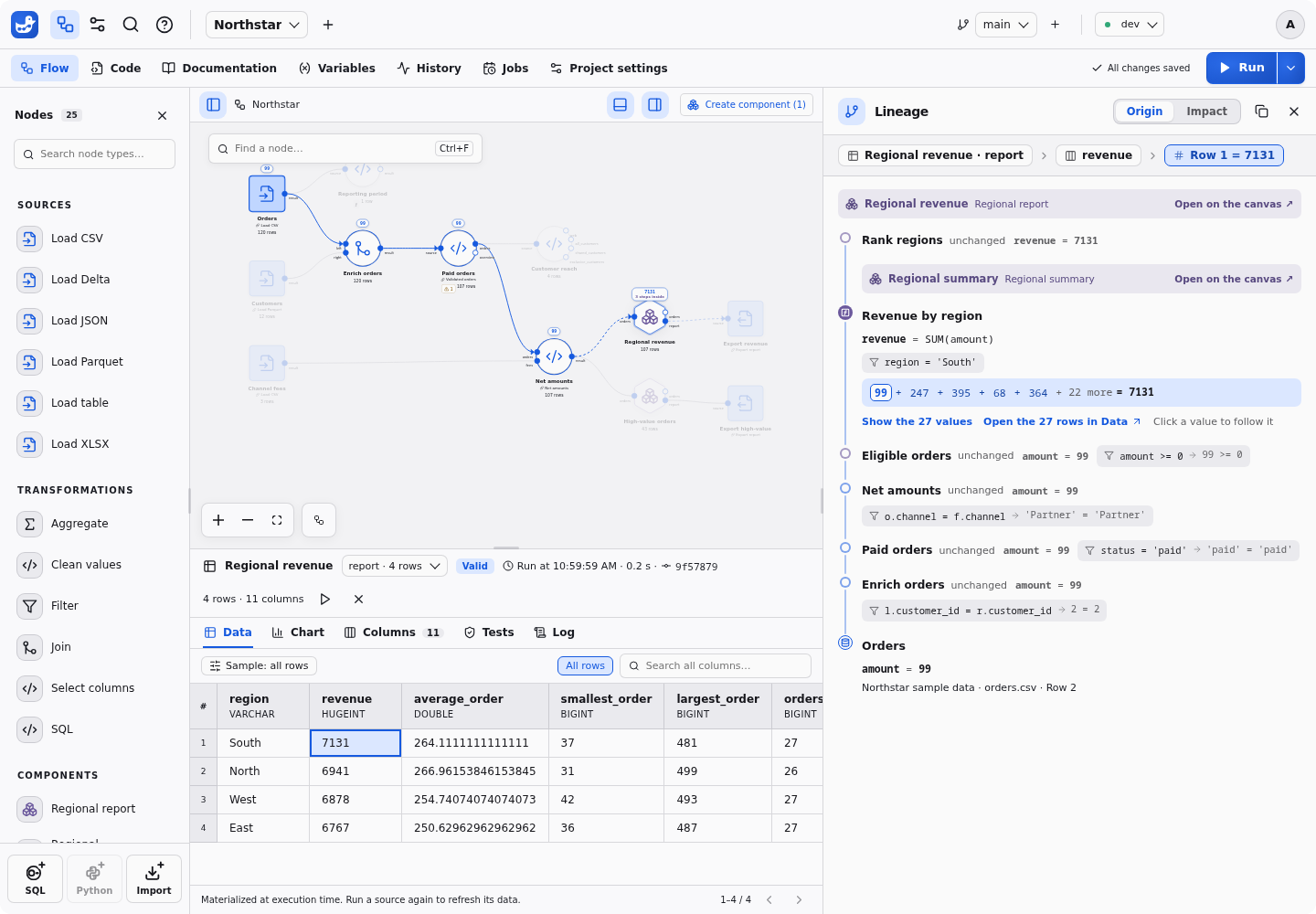
Trace a number back to its source
Click a cell in a result to see how it was calculated: the rows behind a total,
through joins and aggregates, down to the original source cells. Coverage is
explicit: when a step cannot be explained, Duckpad
tells you.
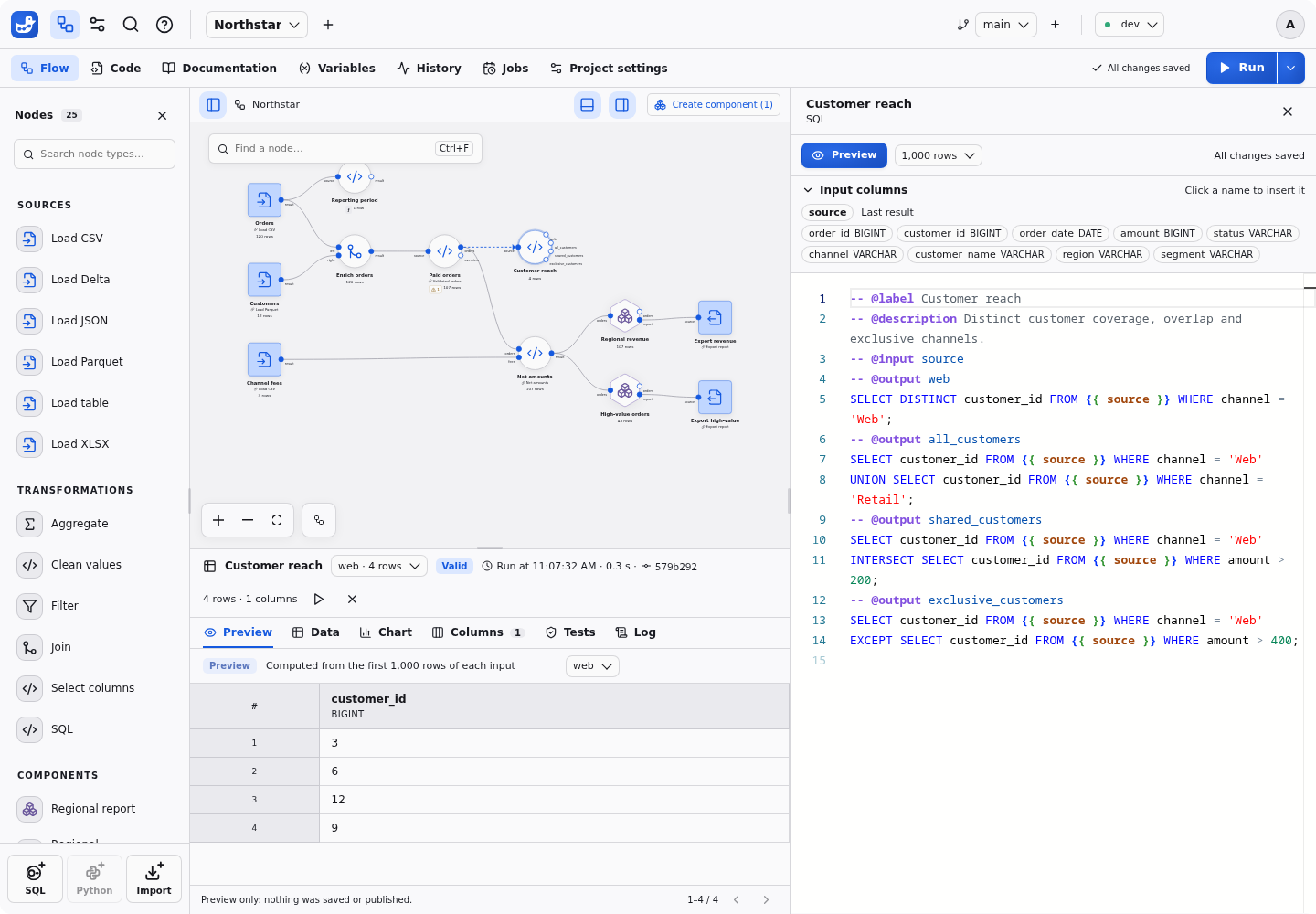
Write SQL and preview it on real rows
Guided forms cover the common steps: select and rename columns, clean values,
filter, join, aggregate. When you need more, open the code. It is plain DuckDB
SQL, with the input columns one click away, and you can
preview the query you are typing on real
rows.
The default palette also includes union, sorting,
deduplication, calculated columns, pivot/unpivot, reproducible sampling, ranking,
running totals and Parquet export. Every default has its own icon, and its SQL
and form parameter types are available to user-created nodes too.
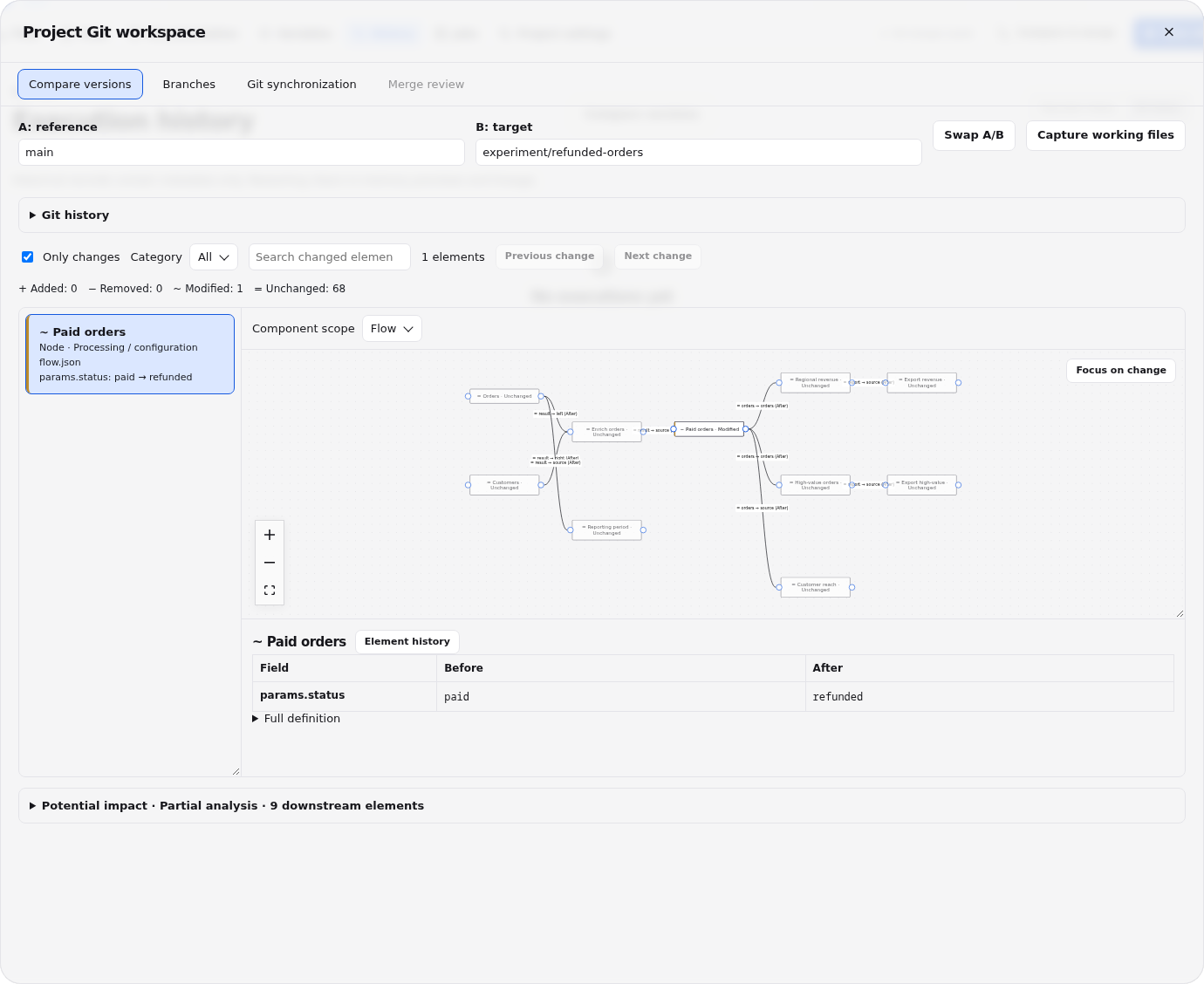
Review changes before they run
Work on a branch, compare two versions node by node, check the impact on the
data and merge after review. Projects are ordinary Git repositories, so you can
also push and pull them.
And also
Data tests and messages next to the
SQL they check, with the failing rows one click away.
Variables and environments:
define a value once and adapt it for development and production.
Charts of any result, declared with Vega-Lite and
versioned with the project.
Jobs that run a reviewed version, launched from the
interface, duckpad run or the automation API.
An AI assistant that explains a flow, makes edits
you can undo and asks before running anything. It is off until you connect a
provider of your choice, including a local model.
Team features: accounts, project roles, API tokens and
single sign-on.
Build your own nodes
The built-in nodes are a starting point. A node is a file: a SQL query with a
few comment directives, or a Python class. Duckpad reads the declarations and
turns them into ports, a parameter form and a palette entry. There is nothing
to compile or register.
A SQL node declares its inputs, typed parameters, outputs and tests in comments,
and optionally its icon and color:
-- @label Revenue breakdown
-- @description Total revenue for each value of the column you choose.
-- @icon chart-bar
-- @color green
-- @input orders
-- @param dimension: column(orders) = "region"
-- @param minimum: number = 100
-- @output result
SELECT {{ dimension }}, SUM(amount) AS revenue
FROM {{ orders }}
WHERE amount >= {{ minimum }}
GROUP BY ALL
ORDER BY revenue DESC;
-- @test revenue_is_positive
SELECT * FROM {{ result }} WHERE revenue <= 0;
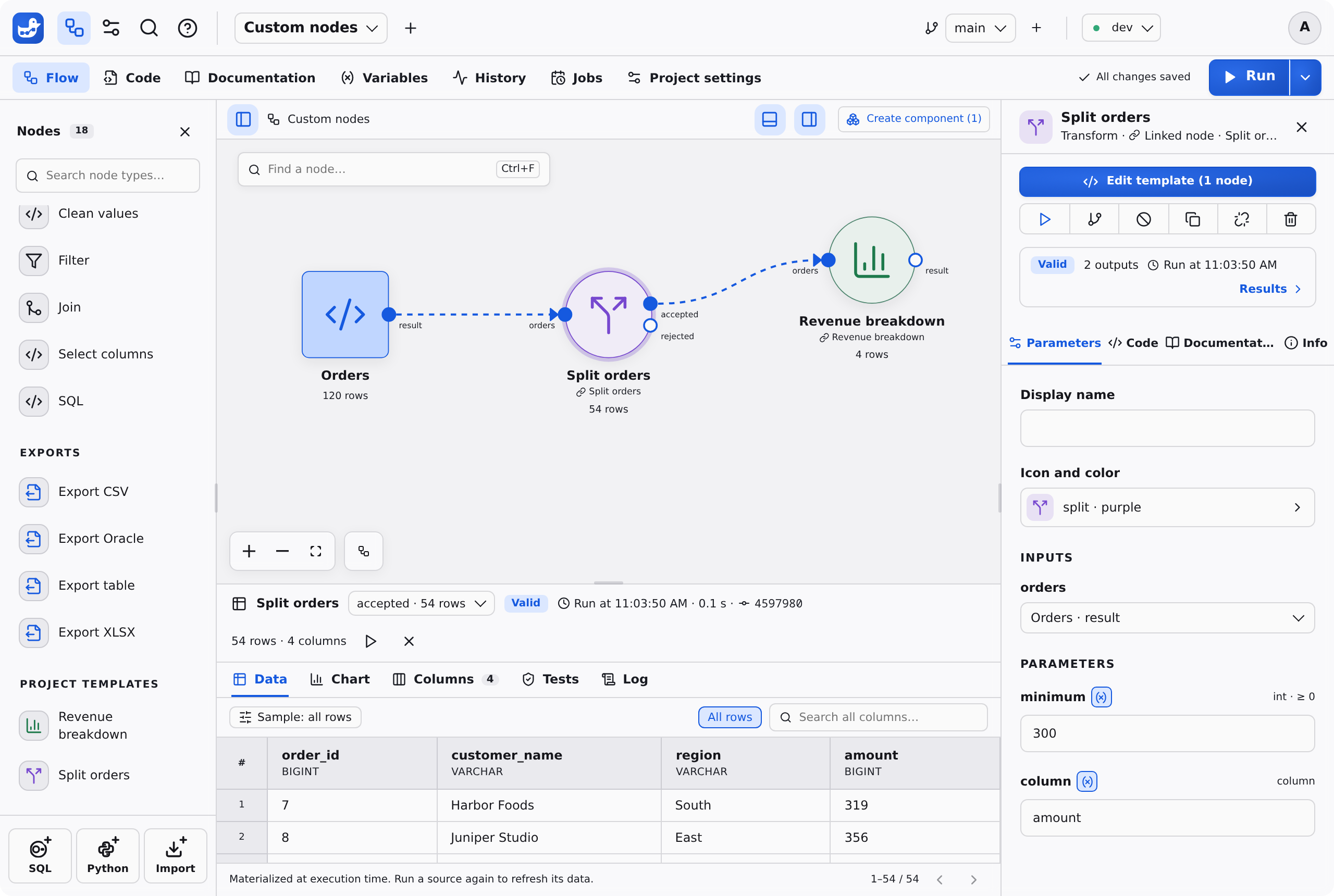
A Python node is a class with typed attributes. It receives and returns DuckDB
relations, and can use the packages your project declares:
import duckpad as dp
from duckdb import col


# @label Split orders
# @icon split
# @color purple
class Split(dp.Node):
    minimum: int = dp.param(default=300, ge=0)
    column: dp.Column = dp.param(default="amount", input="orders")

    class Outputs(dp.Outputs):
        accepted: dp.Relation
        rejected: dp.Relation

    def run(self, orders: dp.Relation) -> Outputs:
        return self.Outputs(
            accepted=orders.filter(col(self.column) >= self.minimum),
            rejected=orders.filter(col(self.column) < self.minimum),
        )
Click SQL or Python at the bottom of the palette, paste the code, and
the node is ready to drop into a pipeline. Python nodes are available once an
administrator enables Python for the project.
More ways to extend Duckpad:
Components: group several steps into one reusable
node with its own parameters, and import it into other projects.
Connectors: describe another
database or storage system in a short JSON definition.
DuckDB extensions: enable core and community
extensions per project, even on a server without Internet access.
Python packages: declare
dependencies in the project's pyproject.toml; Duckpad locks and installs
them.
Duckpad sits between visual data preparation tools and SQL frameworks.
If you come from
You will recognize
What Duckpad does differently
Visual data preparation tools such as Alteryx Designer, Dataiku DSS or KNIME
A canvas of connected steps, with a result to inspect at each one
Every step, including the guided ones, is SQL or Python you can read, edit and diff. See the vocabulary map for Dataiku and Alteryx users.
SQL frameworks such as dbt or SQLMesh
SQL files in Git, tests and environments
A visual canvas, with a result to inspect at each step and cell-level lineage through SQL. Duckpad computes in DuckDB, not inside your warehouse.
Notebooks and scripts
SQL and Python, quick iterations on real data
A dependency graph instead of cell order, a form for each step's parameters, and runs you can review and repeat.
Duckpad is probably not what you need for:
Data that requires a cluster. DuckDB computes on a single machine.
Streaming. Pipelines run as batches.
Dashboards. Charts illustrate a result; Duckpad is not a BI tool.
Scheduling. There is no built-in scheduler: cron, Airflow or another
orchestrator starts the Jobs.
Duckpad is young and moves fast. Releases are frequent, and a breaking one can
require a fresh instance: read the
release notes before upgrading.
Free and open source
Duckpad is released under the MIT license and has nothing to sell.
Everything is in the package. There is no paid edition, no hosted plan and
no feature kept back for one: single sign-on, roles and Jobs come with
pip install duckpad.
It runs where you decide. No license key and no telemetry. Nothing leaves
your machine or your server unless you connect it to something: a database,
a Git remote or an AI provider.
Your work stays yours. A project is a Git repository of plain-text files
(SQL, Python, JSON) that you can read, diff and move.
If Duckpad is useful to you, star the repository and tell a colleague: that is
how other people find it.






 Duckpad 是一个基于 DuckDB 构建的开源 SQL 工作区,可以让你搭建可视化的数据管道,把任意结果追溯到其源数据值,并用 Git 对所有内容进行版本管理。