

duckpad README

README проекта с github.com/hugues31/duckpad. Одним файлом markdown: README.md.

Duckpad

See the flow. Trust the result.

Duckpad is a free, open-source visual tool for building data pipelines.
Connect steps on a canvas, write SQL or Python where you need it, and see the data at every step. Powered by DuckDB.

Tests PyPI version Python versions License: MIT

Website · Quickstart · Documentation · Releases

A Duckpad pipeline: two sources are joined, filtered and aggregated into two exports, with the result table of the selected step under the canvas

▶ Watch Duckpad in action

What is Duckpad?

Duckpad is a workspace for preparing and transforming data. You build a pipeline by connecting steps on a canvas: load files or database tables, join, filter, aggregate, export. Each step is a SQL query or a Python class that you can read and edit, and each step keeps its result. You can open any table along the way instead of guessing what the pipeline did.

It runs on your laptop or on a server your team shares. There is no cloud service, no sign-up and no paid edition.

Use it to:

Try it

You need Python 3.11+ and Git.

pip install duckpad
duckpad start

Your browser opens Duckpad: choose the administrator password, and you are in.

On macOS or Windows, run duckpad start --trusted-local instead, for your own projects on your own machine. The default mode confines pipelines to the files they are allowed to read, which requires Linux with Landlock; see the platform requirements.

Then choose New project → Start from an example and Run to explore a finished pipeline, or follow Duckpad in 15 minutes to build your first one from scratch.

A closer look

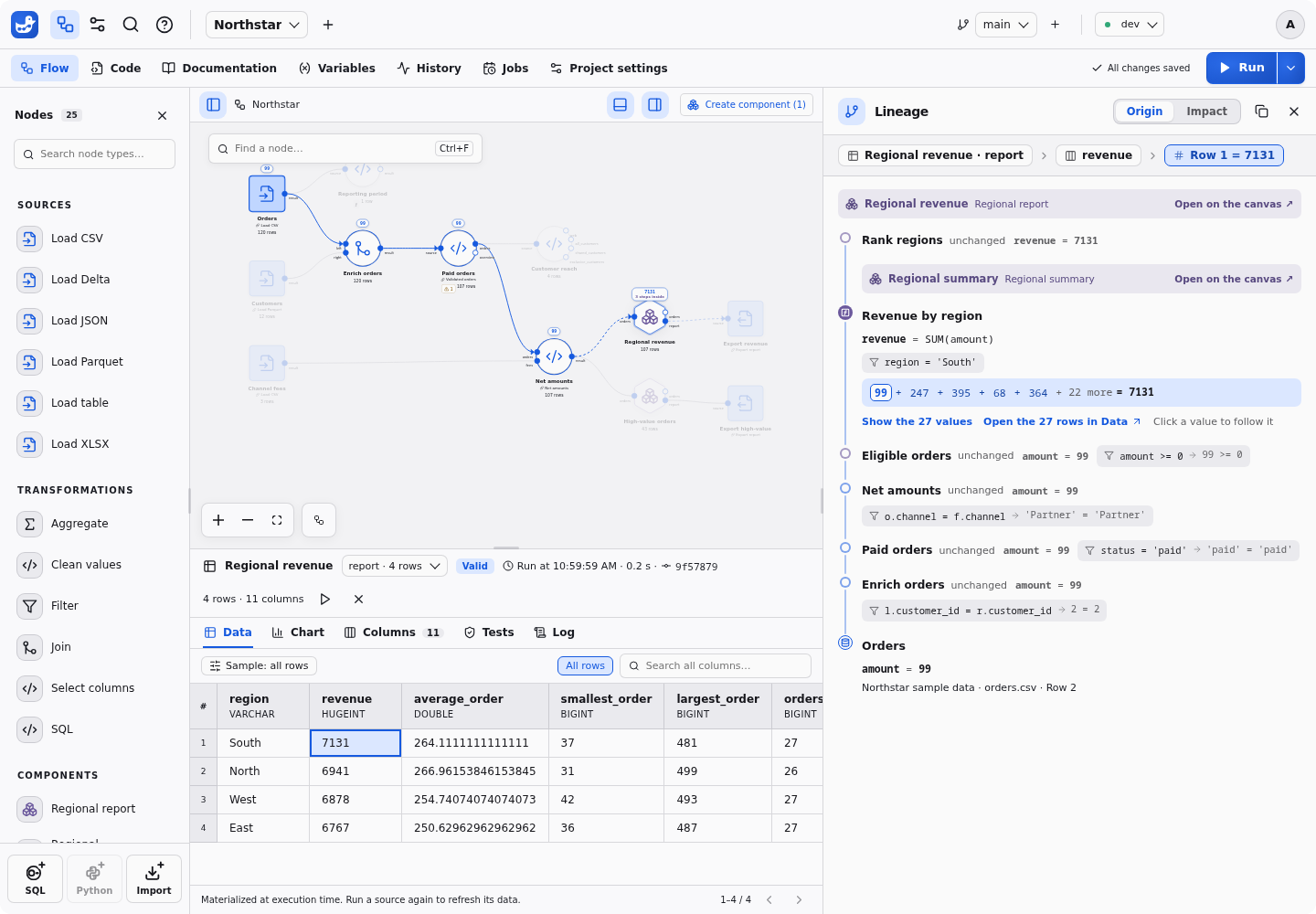
Trace a number back to its source

Click a cell in a result to see how it was calculated: the rows behind a total, through joins and aggregates, down to the original source cells. Coverage is explicit: when a step cannot be explained, Duckpad tells you.

The lineage of a regional revenue total: the first five of the 27 source amounts behind the sum

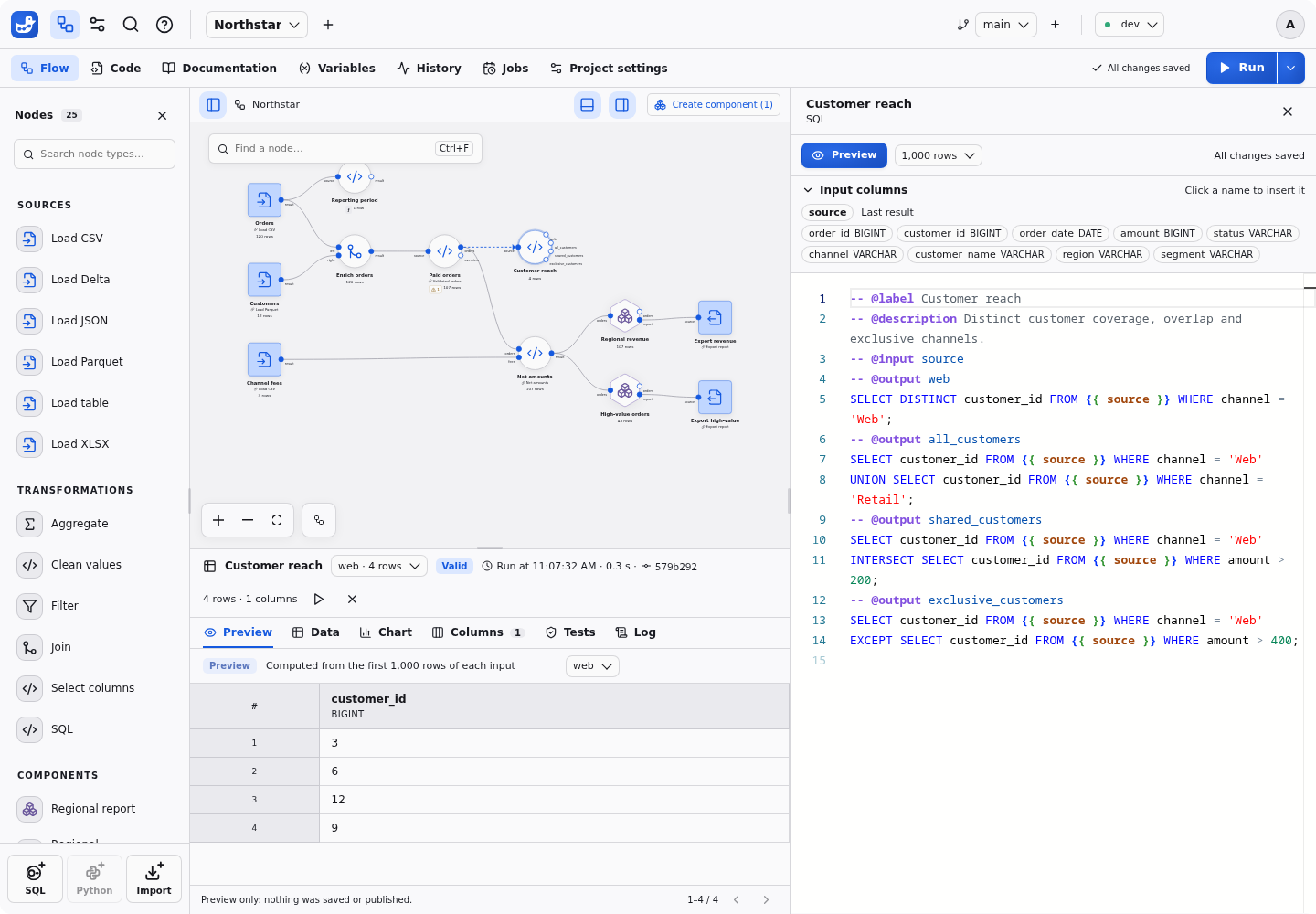
Write SQL and preview it on real rows

Guided forms cover the common steps: select and rename columns, clean values, filter, join, aggregate. When you need more, open the code. It is plain DuckDB SQL, with the input columns one click away, and you can preview the query you are typing on real rows.

The default palette also includes union, sorting, deduplication, calculated columns, pivot/unpivot, reproducible sampling, ranking, running totals and Parquet export. Every default has its own icon, and its SQL and form parameter types are available to user-created nodes too.

A SQL node edited beside the canvas, with its input columns and a preview of the result

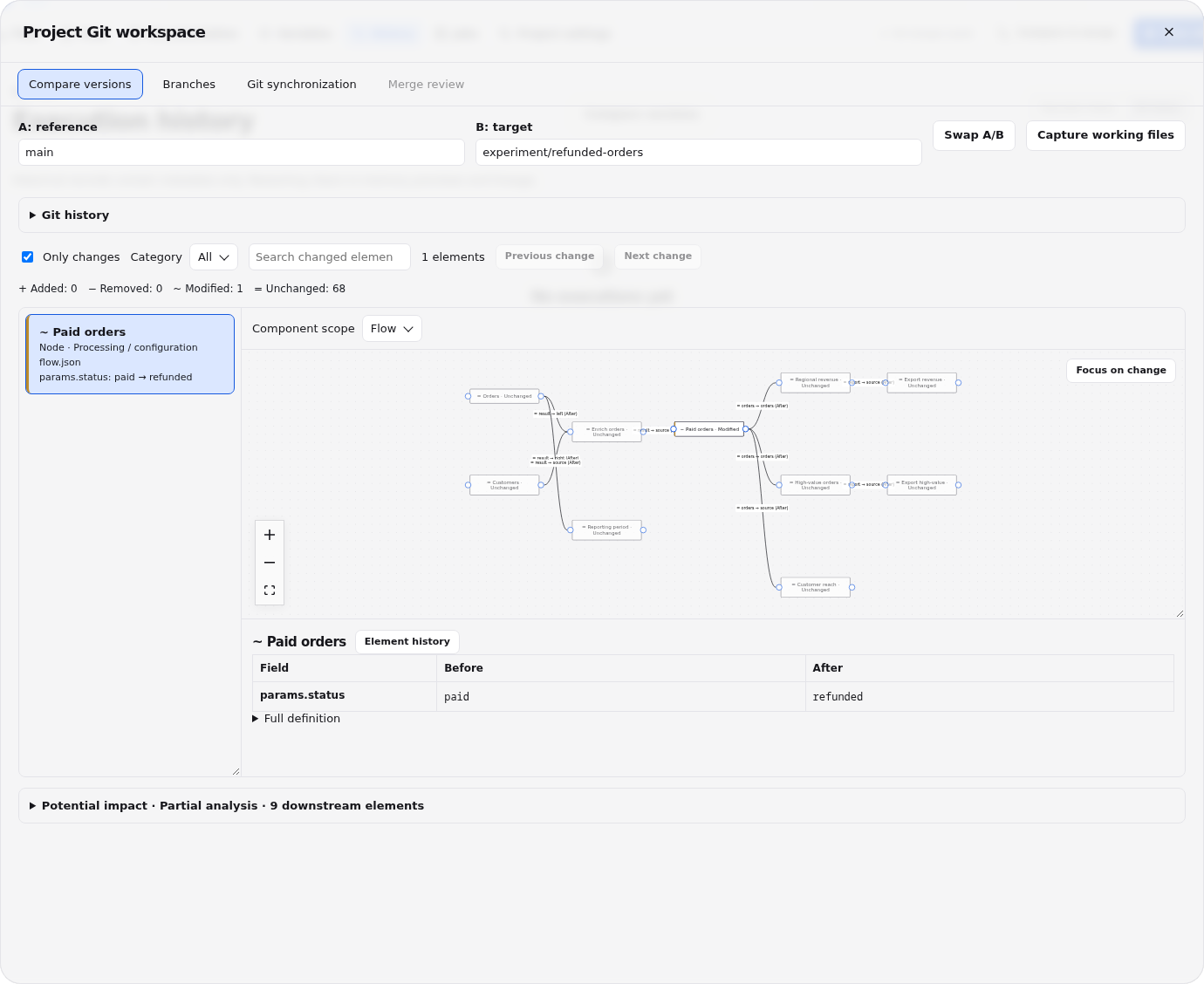
Review changes before they run

Work on a branch, compare two versions node by node, check the impact on the data and merge after review. Projects are ordinary Git repositories, so you can also push and pull them.

Two branches compared: the modified node stands out on the flow, with the changed parameter before and after

And also

Build your own nodes

The built-in nodes are a starting point. A node is a file: a SQL query with a few comment directives, or a Python class. Duckpad reads the declarations and turns them into ports, a parameter form and a palette entry. There is nothing to compile or register.

A SQL node declares its inputs, typed parameters, outputs and tests in comments, and optionally its icon and color:

-- @label Revenue breakdown
-- @description Total revenue for each value of the column you choose.
-- @icon chart-bar
-- @color green
-- @input orders
-- @param dimension: column(orders) = "region"
-- @param minimum: number = 100
-- @output result
SELECT {{ dimension }}, SUM(amount) AS revenue
FROM {{ orders }}
WHERE amount >= {{ minimum }}
GROUP BY ALL
ORDER BY revenue DESC;
-- @test revenue_is_positive
SELECT * FROM {{ result }} WHERE revenue <= 0;

A Python node is a class with typed attributes. It receives and returns DuckDB relations, and can use the packages your project declares:

import duckpad as dp
from duckdb import col


# @label Split orders
# @icon split
# @color purple
class Split(dp.Node):
    minimum: int = dp.param(default=300, ge=0)
    column: dp.Column = dp.param(default="amount", input="orders")

    class Outputs(dp.Outputs):
        accepted: dp.Relation
        rejected: dp.Relation

    def run(self, orders: dp.Relation) -> Outputs:
        return self.Outputs(
            accepted=orders.filter(col(self.column) >= self.minimum),
            rejected=orders.filter(col(self.column) < self.minimum),
        )

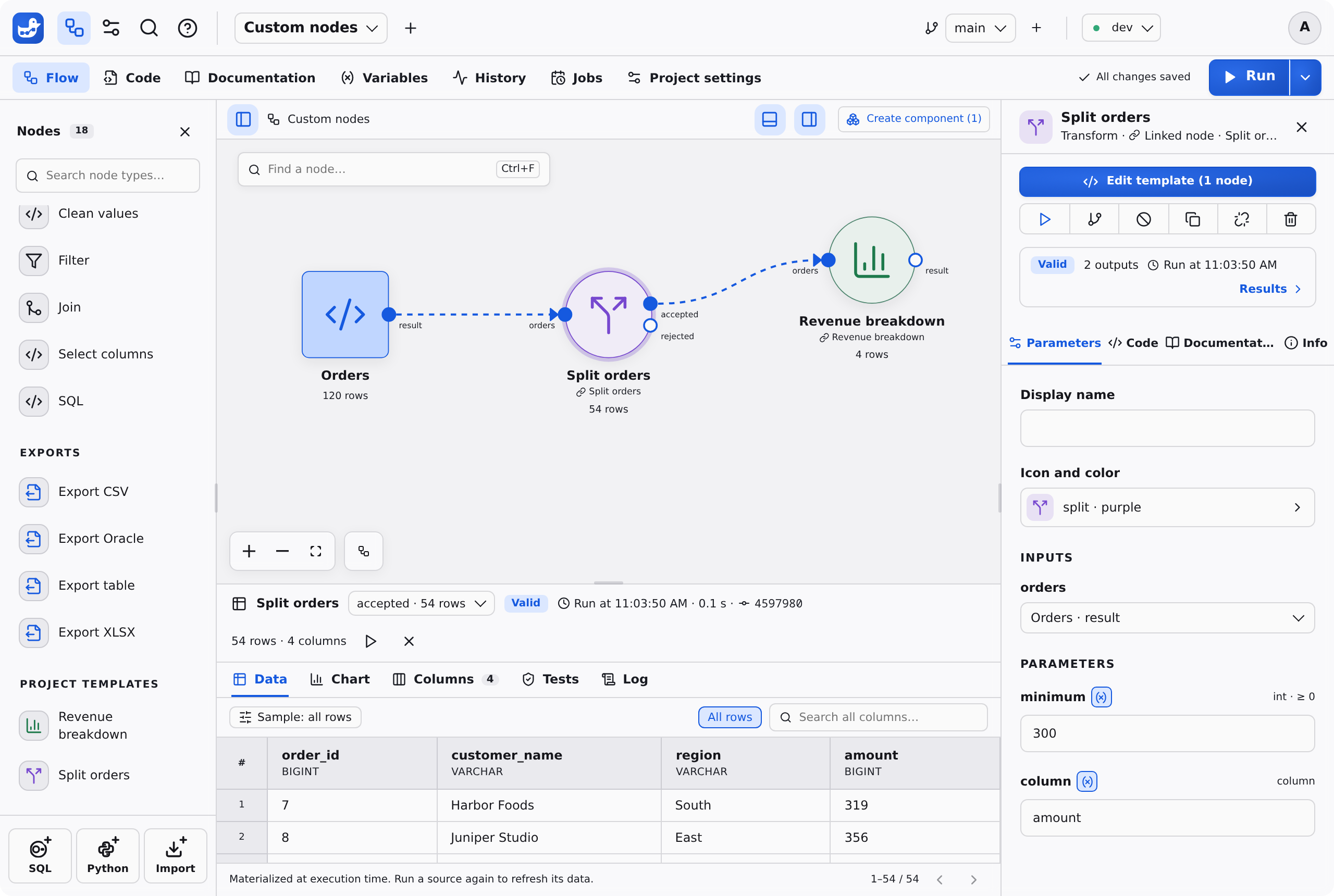
Click SQL or Python at the bottom of the palette, paste the code, and the node is ready to drop into a pipeline. Python nodes are available once an administrator enables Python for the project.

Both nodes in a pipeline: Duckpad generated their ports, their palette entries, their icons and the parameter form from the code

More ways to extend Duckpad:

See the SQL syntax and Python nodes guides for the full contracts.

How Duckpad compares

Duckpad sits between visual data preparation tools and SQL frameworks.

If you come from You will recognize What Duckpad does differently
Visual data preparation tools such as Alteryx Designer, Dataiku DSS or KNIME A canvas of connected steps, with a result to inspect at each one Every step, including the guided ones, is SQL or Python you can read, edit and diff. See the vocabulary map for Dataiku and Alteryx users.
SQL frameworks such as dbt or SQLMesh SQL files in Git, tests and environments A visual canvas, with a result to inspect at each step and cell-level lineage through SQL. Duckpad computes in DuckDB, not inside your warehouse.
Notebooks and scripts SQL and Python, quick iterations on real data A dependency graph instead of cell order, a form for each step's parameters, and runs you can review and repeat.

Duckpad is probably not what you need for:

Duckpad is young and moves fast. Releases are frequent, and a breaking one can require a fresh instance: read the release notes before upgrading.

Free and open source

Duckpad is released under the MIT license and has nothing to sell.

If Duckpad is useful to you, star the repository and tell a colleague: that is how other people find it.

Find the right guide

I want to… Guide
Install Duckpad or join a team instance Installation and accounts
Learn the basics with a small example Duckpad in 15 minutes
Upload my data and download a result Use your own data
Navigate, save and run a pipeline Workspace
Write SQL or prepare data with forms SQL syntax · Data preparation
Create my own nodes and reuse them SQL syntax · Python nodes · Components
Read from S3 or a database Connections
Check or explain a result Results · Data tests · Lineage
Review changes and automate a version Git · Jobs · CLI and automation · External agents and MCP
Fix a startup, source or execution problem Troubleshooting

The documentation index also covers variables, the assistant and instance administration. Reference material includes project files, architecture, validation, releases and security.

Contributing

Bug reports, ideas and pull requests are welcome. Open an issue or start with CONTRIBUTING.md.

duckpad (hugues31/duckpad)

Ищем в базе…

Что это такое?Duckpad — это открытая рабочая среда для SQL на основе DuckDB, которая позволяет строить визуальные конвейеры данных, отслеживать результат до исходных значений и вести версии всего через Git.
Это CLI-инструмент или GUI-приложение?Это веб-приложение, которое вы развёртываете сами: вы открываете его в браузере и собираете конвейеры визуально, а также есть встроенный редактор SQL для написания собственных запросов.
Как это запустить?Установите Python 3.11+ и Git, запустите пакет, чтобы поднять локальный сервер, затем откройте напечатанный локальный адрес и войдите, используя начальный пароль администратора, который выводится в терминале.
Что нужно установить перед запуском?Для запуска нужны только Python 3.11+ и Git; Node.js понадобится лишь в том случае, если вы планируете разрабатывать сам Duckpad.
Есть ли подводные камни при установке?Выполнение SQL работает только в Linux с Landlock ABI 2+ (ядро 5.19+ с включённым Landlock), поэтому в macOS или Windows в таком виде он не запустится.
Как создать первый конвейер?Выберите «New project», дайте проекту название, затем выберите «Start from an example» и «Create and Run pipeline», чтобы сразу увидеть работающий конвейер.
Могут ли члены команды работать над одним проектом вместе?Да, Duckpad поддерживает сохранение работы в Git с независимыми ветками, визуальное сравнение изменений и проверку слияний, а также управление доступом к проекту для каждой команды.
Что происходит при нажатии на ячейку результата?Нажав на корректную ячейку, вы можете изучить исходные значения, которые на неё повлияли, с явным указанием полноты отслеживания происхождения данных, и проследить число до данных, из которых оно получено.
Могут ли подключения отличаться в разных средах?Да, Duckpad позволяет настраивать подключения к источникам данных отдельно для каждой среды, при этом доступ к проекту остаётся под вашим контролем.
Какие есть похожие проекты?airbyte, ducklake, libredb-studio, airflow, dagster, walshadow, dolphinscheduler, projeto-dados-ia-databricks
Автор
hugues31
Размер
116 MB
Звёзды
321
Возраст
24 д
Коммиты · 90 дней