


platform README

The project's README from github.com/hcengineering/platform. As one markdown file: README.md.

Huly Platform

X (formerly Twitter) Follow GitHub License

⭐️ Your star shines on us. Star us on GitHub!

[!IMPORTANT] Hosted Huly is shutting down — please migrate your data.

The hosted Huly service is being discontinued because its hosting is no longer being funded. If you keep important data on the hosted platform, export and back it up, and migrate as soon as possible — we can help you move to either a self-hosted setup or a hosted option.

Not sure how? Follow the backup & restore guide for step-by-step instructions on downloading your backup and restoring it elsewhere.

The service shutdown is expected on July 20. Please make sure to export and migrate your data before then rather than wait until the last day.

Have questions or want updates? Join the Huly community to discuss migration and stay informed, or email us at [email protected] with any questions. This affects only the hosted Huly service — self-hosted deployments are not affected.

About

The Huly Platform is a robust framework designed to accelerate the development of business applications, such as CRM systems. This repository includes several applications, such as Chat, Project Management, CRM, HRM, and ATS. Various teams are building products on top of the Platform, including Huly and TraceX.

Huly

Self-Hosting

If you're primarily interested in self-hosting Huly without the intention to modify or contribute to its development, please use huly-selfhost. This project offers a convenient method to host Huly using docker, designed for ease of use and quick setup. Explore this option to effortlessly enjoy Huly on your own server.

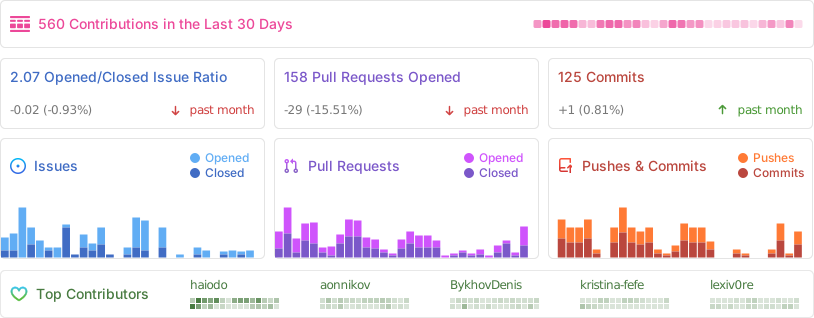
Activity

Alt

API Client

If you want to interact with Huly programmatically, check out our API Client documentation. The API client provides a typed interface for all Huly operations and can be used to build integrations and custom applications.

You can find API usage examples in the Huly examples repository.

Changelog

For detailed information about changes, improvements, and bug fixes in each version, see our Changelog.

Versions

The Huly Platform uses two types of version tags to distinguish between production-ready and development releases:

Architecture

For detailed information about the platform architecture, services, and their interactions, see our Architecture Overview.

Table of Contents

Pre-requisites

If you use nvm, run this after entering the repo to align your shell with the repository Node version:

nvm use

Verification

To verify the installation, perform the following checks in your terminal:

docker --version
docker compose version

Branches & Contributing

We periodically merge develop into staging to perform testing builds. Once we are satisfied with the build quality in our pre-release deployment, we merge changes into main and release a new version to the community.

Setup dev environment

To initialise the communication submodule

git submodule init
git submodule update

To update the communication submodule

git submodule update

Authentication

This project uses GitHub Packages for dependency management. To successfully download dependencies, you need to generate a GitHub personal access token and log in to npm using that token.

Follow these steps:

  1. Generate a GitHub Token:
  1. Authenticate with npm:
npm login --registry=https://npm.pkg.github.com

When prompted, enter your GitHub username, use the generated token as your password

Fast start

sh ./scripts/fast-start.sh

Installation

You need Microsoft's rush to install the application.

  1. Install Rush globally using the command:
npm install -g @microsoft/rush
  1. Navigate to the repository root and run the following commands:
rush install
rush build

Alternatively, you can just execute:

sh ./scripts/presetup-rush.sh

Build and run

Development environment setup requires Docker to be installed on system.

Support is available for both amd64 and arm64 containers on Linux and macOS.

cd ./dev/
rush build    # Will build all the required packages.
# rush rebuild  # could be used to omit build cache.
rush bundle   # Will prepare bundles.
rush package  # Will build all webpack packages.
rush validate # Will validate all sources with typescript and generate d.ts files required for ts-node execution.
rush svelte-check # Optional. svelte files validation using svelte-check.
rush docker:build   # Will build Docker containers for all applications in the local Docker environment.
rush docker:up # Will set up all the containers

Be aware rush docker:build will automatically execute all required phases like build, bundle, package.

Note: For resource-constrained machines, you can use the minified variants rush docker:min and rush docker:up:min to build and run only the required services (excludes hulypulse, redis, process, backup, rating, preview, link-preview, elastic, fulltext, payment, stats, print, sign, hulygun, hulykvs).

Alternatively, you can just execute:

sh ./scripts/build.sh

By default, Docker volumes named dev_db, dev_elastic, and dev_files will be created for the MongoDB, Elasticsearch, and MinIO instances.

Add the following lines to your hosts file:

127.0.0.1 huly.local
::1 huly.local

Accessing the URL http://huly.local:8087 will lead you to the app in development mode.

Limitations:

Run in development mode

Development mode allows for live reloading and a smoother development process.

cd dev/prod
rush validate
rushx dev-server

Then go to http://localhost:8080

Select "Sign up" on the right panel and click the "Sign up with password" link at the bottom. Enter the new user's credentials, then proceed to create a workspace for them.

Update project structure and database

If the project's structure is updated, it may be necessary to relink and rebuild the projects.

rush update
rush build

Troubleshooting

If a build fails, but the code is correct, try to delete the build cache and retry.

# from the project root
rm -rf common/temp/build-cache

Build & Watch

For development purpose rush build:watch action could be used.

It includes build and validate phases in watch mode.

Tests

Unit tests

rush test # To execute all tests

rushx test # For individual test execution inside a package directory

UI tests

cd ./tests
rush build
rush bundle
rush docker:build
## creates test Docker containers and sets up test database
./prepare.sh
## runs UI tests
rushx uitest

To execute tests in the development environment, please follow these steps:

cd ./tests
./create-local.sh ## use ./restore-local.sh if you only want to restore the workspace to a predefined initial state for sanity.
cd ./sanity
rushx dev-uitest # To execute all tests against the development environment.
rushx dev-debug -g 'pattern' # To execute tests in debug mode with only the matching test pattern.

Package publishing

node ./common/scripts/bump.js -p projectName

Additional testing

This project is tested with BrowserStack.

WSL build guide

This guide describes the nuances of building and running the application from source code located on your NTFS drive, which is accessible from both Windows and WSL.

Prerequisites

Disk Space Requirements

Ensure you have sufficient disk space available:

If there's insufficient space on your system drive (usually C:\), you can change the virtual disk location in Docker Settings → Resources → Advanced.

Docker WSL Integration

Make sure Docker is accessible from WSL:

  1. Go to Docker Settings → Resources → Advanced → WSL Integration
  2. Select the distribution where you'll be building and running the application
  3. Verify integration works by running this command in WSL:
    docker run hello-world
    

Common Issues and Solutions

Git Line Endings on Windows

Windows Git often automatically replaces line endings. Since most build scripts are .sh files, ensure your Windows checkout doesn't break them.

Solution options:

Elevated Privileges in WSL

Some commands in the instructions require elevated privileges when working in WSL. If you're using Ubuntu distribution, prefix commands with sudo:

sudo npm install -g @microsoft/rush

WSL Configuration

If the source code is located on a Windows NTFS drive, then edit the /etc/wsl.conf file in WSL (e.g., sudo nano /etc/wsl.conf) and add the following content if it doesn't exist:

[automount]
enabled = true
root = /mnt/
options = "metadata,umask=22,fmask=11"

[interop]
appendWindowsPath = false

However, we recommend storing the repository on a WSL disk, as this dramatically improves build and maintenance operations.

Running the Application

After these preparations, the build instructions should work without issues.

Port Conflicts

When starting the application (rush docker:up), some network ports in Windows might be occupied. You can fix port mapping in the \dev\docker-compose.yaml file.

Important: Depending on which port you change, you'll need to:

  1. Find what's using that port
  2. Update the new address in the corresponding service configuration

© 2025 Hardcore Engineering Inc.

platform (hcengineering/platform)

Searching Database…

27.9K ·GitHub
Что это такое?Huly — это универсальная платформа для управления проектами, которая позиционируется как альтернатива Linear, Jira, Slack и Notion. Этот репозиторий — сама платформа: фреймворк для бизнес-приложений, в который уже входят приложения для чата, управления проектами, CRM, HRM и ATS.
Так Huly — это готовое приложение или фреймворк для создания своего?Прежде всего это платформа-фреймворк: в репозитории лежит ядро плюс несколько готовых приложений, а поверх неё строятся и другие продукты — Huly и TraceX, например.
Как запустить свой собственный экземпляр Huly?Используйте отдельный проект huly-selfhost — он позволяет развернуть Huly с помощью Docker быстро и просто. Этот репозиторий нужен для разработки и участия в развитии платформы, а не для установки конечными пользователями.
Хостинг-версию правда закрывают?Да — облачный сервис Huly закрывается (ожидаемо 20 июля), потому что его хостинг больше не финансируется, поэтому экспортируйте и перенесите свои данные. Самостоятельно развёрнутые установки это не касается.
Он заработает на Apple Silicon или только на Mac с Intel?И там, и там — образы Docker собираются для amd64 и arm64, поэтому всё работает на Linux и macOS, включая Apple Silicon.
Могу ли я интегрировать Huly со своими инструментами?Да — есть типизированный API-клиент, покрывающий все операции Huly, с примерами использования в отдельном репозитории examples. Он предназначен для создания интеграций и собственных приложений поверх платформы.
Насколько тяжёлой будет локальная сборка для разработки?Полная сборка запускает множество вспомогательных сервисов — redis, elastic, fulltext, preview, backup, stats и другие. На машинах с ограниченными ресурсами используйте rush docker:min и rush docker:up:min, чтобы собрать и запустить только необходимые сервисы.
Как выбрать версию для развёртывания?Продакшн-релизы помечены тегами v, например v0.7.310, и сопровождаются заметками о релизе — именно их рекомендуется использовать для самостоятельной установки. Теги, начинающиеся с s, например s0.7.313, — это пре-релизы для разработки с экспериментальными возможностями; в продакшне их лучше избегать.
Где хранятся мои данные при самостоятельном размещении?На вашей собственной инфраструктуре, под вашим контролем. В проекте есть руководство по резервному копированию и восстановлению с пошаговыми инструкциями, как скачать бэкап и восстановить его в другом месте, — это же и есть рекомендуемый путь миграции в связи с закрытием облачного сервиса.
Size
309.3 MB
Stars
27.9K
Age
5y
Commits · 90 Days