






magika README

The project's README from github.com/google/magika. As one markdown file: README.md.

Magika

image NPM Version image image Go Version

OpenSSF Best Practices CodeQL Python Coverage Actions status PyPI Monthly Downloads PyPI Downloads

Magika is a novel AI-powered file type detection tool that relies on the recent advance of deep learning to provide accurate detection. Under the hood, Magika employs a custom, highly optimized model that only weighs about a few MBs, and enables precise file identification within milliseconds, even when running on a single CPU. Magika has been trained and evaluated on a dataset of ~100M samples across 200+ content types (covering both binary and textual file formats), and it achieves an average ~99% accuracy on our test set.

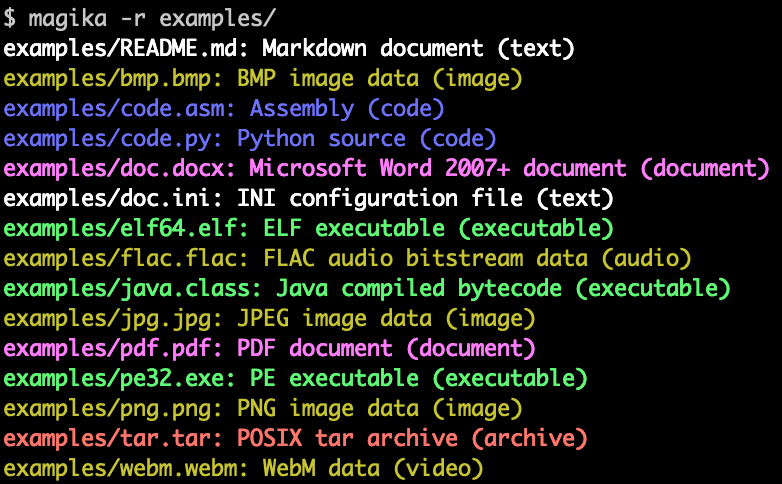
Here is an example of what Magika command line output looks like:

Magika is used at scale to help improve Google users' safety by routing Gmail, Drive, and Safe Browsing files to the proper security and content policy scanners, processing hundreds billions samples on a weekly basis. Magika has also been integrated with VirusTotal (example) and abuse.ch (example).

For more context you can read our initial announcement post on Google's OSS blog, you can consult Magika's website, and you can read more in our research paper, published at the IEEE/ACM International Conference on Software Engineering (ICSE) 2025.

You can try Magika without installing anything by using our web demo, which runs locally in your browser!

Highlights

Table of Contents

  1. Getting Started
    1. Installation
    2. Quick Start
  2. Documentation
  3. Security Vulnerabilities
  4. License
  5. Disclaimer

Getting Started

Installation

Command Line Tool

Magika ships a CLI written in Rust, and can be installed in several ways.

Via magika python package:

pipx install magika

Via brew (macOS / Linux)

brew install magika

Via installer script:

curl -LsSf https://securityresearch.google/magika/install.sh | sh

or:

powershell -ExecutionPolicy Bypass -c "irm https://securityresearch.google/magika/install.ps1 | iex"

Via magika-cli Rust package:

cargo install --locked magika-cli

Python package

pip install magika

JavaScript package

npm install magika

Quick Start

Here you can find a number of quick examples just to get you started.

To learn about Magika's inner workings, see the Core Concepts section of Magika's website.

Command Line Tool Examples

% cd tests_data/basic && magika -r * | head
asm/code.asm: Assembly (code)
batch/simple.bat: DOS batch file (code)
c/code.c: C source (code)
css/code.css: CSS source (code)
csv/magika_test.csv: CSV document (code)
dockerfile/Dockerfile: Dockerfile (code)
docx/doc.docx: Microsoft Word 2007+ document (document)
docx/magika_test.docx: Microsoft Word 2007+ document (document)
eml/sample.eml: RFC 822 mail (text)
empty/empty_file: Empty file (inode)
% magika ./tests_data/basic/python/code.py --json
[
  {
    "path": "./tests_data/basic/python/code.py",
    "result": {
      "status": "ok",
      "value": {
        "dl": {
          "description": "Python source",
          "extensions": [
            "py",
            "pyi"
          ],
          "group": "code",
          "is_text": true,
          "label": "python",
          "mime_type": "text/x-python"
        },
        "output": {
          "description": "Python source",
          "extensions": [
            "py",
            "pyi"
          ],
          "group": "code",
          "is_text": true,
          "label": "python",
          "mime_type": "text/x-python"
        },
        "score": 0.996999979019165
      }
    }
  }
]
% cat tests_data/basic/ini/doc.ini | magika -
-: INI configuration file (text)
% magika --help
Determines file content types using AI

Usage: magika [OPTIONS] [PATH]...

Arguments:
  [PATH]...
          List of paths to the files to analyze.

          Use a dash (-) to read from standard input (can only be used once).

Options:
  -r, --recursive
          Identifies files within directories instead of identifying the directory itself

      --no-dereference
          Identifies symbolic links as is instead of identifying their content by following them

      --colors
          Prints with colors regardless of terminal support

      --no-colors
          Prints without colors regardless of terminal support

  -s, --output-score
          Prints the prediction score in addition to the content type

  -i, --mime-type
          Prints the MIME type instead of the content type description

  -l, --label
          Prints a simple label instead of the content type description

      --json
          Prints in JSON format

      --jsonl
          Prints in JSONL format

      --format <CUSTOM>
          Prints using a custom format (use --help for details).

          The following placeholders are supported:

            %p  The file path
            %l  The unique label identifying the content type
            %d  The description of the content type
            %g  The group of the content type
            %m  The MIME type of the content type
            %e  Possible file extensions for the content type
            %s  The score of the content type for the file
            %S  The score of the content type for the file in percent
            %b  The model output if overruled (empty otherwise)
            %%  A literal %

  -h, --help
          Print help (see a summary with '-h')

  -V, --version
          Print version

For more examples and documentation about the CLI, see https://crates.io/crates/magika-cli.

Python Examples

>>> from magika import Magika
>>> m = Magika()
>>> res = m.identify_bytes(b'function log(msg) {console.log(msg);}')
>>> print(res.output.label)
javascript
>>> from magika import Magika
>>> m = Magika()
>>> res = m.identify_path('./tests_data/basic/ini/doc.ini')
>>> print(res.output.label)
ini
>>> from magika import Magika
>>> m = Magika()
>>> with open('./tests_data/basic/ini/doc.ini', 'rb') as f:
>>>     res = m.identify_stream(f)
>>> print(res.output.label)
ini

For more examples and documentation about the Python module, see the Python Magika module section.

Documentation

Please consult Magika's website for detailed documentation about:

Security Vulnerabilities

Please contact us directly at [email protected].

License

Apache 2.0; see LICENSE for details.

Disclaimer

This project is not an official Google project. It is not supported by Google and Google specifically disclaims all warranties as to its quality, merchantability, or fitness for a particular purpose.

magika (google/magika)

Searching Database…

18.7K ·GitHub
Что это такое?Magika — это инструмент для определения типа файлов на базе ИИ: небольшая модель глубокого обучения (несколько мегабайт) определяет, чем файл является на самом деле, за миллисекунды — даже на одном лишь процессоре.
Это утилита командной строки, библиотека или и то и другое?И то и другое: CLI, написанный на Rust, Python API, а также привязки для Rust, JavaScript/TypeScript (экспериментальный npm-пакет) и Go (в разработке).
Нужен ли установленный Python, чтобы пользоваться им?Нет. CLI — это бинарник на Rust, который можно получить через brew или скрипт-установщик; Python нужен только если вы хотите вызывать его как Python-модуль.
Что он возвращает, когда не уверен насчёт файла?Система порогов для каждого типа контента решает, доверять ли модели или откатиться к общим меткам вроде 'Generic text document' или 'Unknown binary data'; режимы предсказания (high-confidence, medium-confidence, best-guess) регулируют допустимый уровень ошибок.
Можно попробовать до установки чего-либо?Да — есть официальное веб-демо, которое запускает Magika локально прямо в вашем браузере, так что можно увидеть результаты распознавания, не устанавливая CLI и какие-либо пакеты.
Кто использует Magika в продакшене?Google прогоняет через него файлы из Gmail, Drive и Safe Browsing, чтобы выбрать подходящие сканеры безопасности и правил по контенту, обрабатывая сотни миллиардов образцов в неделю. Его также интегрировали VirusTotal и abuse.ch.
Это официальный проект Google?Хотя проект живёт в организации google на GitHub и работает в масштабах Google, в дисклеймере сказано, что это не официальный проект Google и что он не поддерживается и не гарантируется Google.
Creator
google
Size
223.6 MB
Stars
18.7K
Age
3y
Commits · 90 Days