


1.2K ·GitHub
What is this?
 API Anything watches a website's own frontend make a request, learns which parts are your inputs, and saves it as an operation. After that, your agent calls that operation over MCP, the CLI or TypeScript and gets plain JSON back instead of driving a headless browser.
API Anything watches a website's own frontend make a request, learns which parts are your inputs, and saves it as an operation. After that, your agent calls that operation over MCP, the CLI or TypeScript and gets plain JSON back instead of driving a headless browser.Is this a hosted API or something I run myself?It's a local tool: a CLI plus an MCP server that runs on your own machine using your network and your browser sessions, not a hosted service.
It's a local tool: a CLI plus an MCP server that runs on your own machine using your network and your browser sessions, not a hosted service.How do I install and connect it to my coding agent?Paste the install snippet into Claude Code, Codex or another coding agent; it checks for Node 22.13+, builds and installs the api-anything command, then connects the MCP server and skill to itself. You can also add it manually with 'codex mcp add api-anything -- api-anything mcp' or 'claude mcp add --scope user api-anything -- api-anything mcp'.
Paste the install snippet into Claude Code, Codex or another coding agent; it checks for Node 22.13+, builds and installs the api-anything command, then connects the MCP server and skill to itself. You can also add it manually with 'codex mcp add api-anything -- api-anything mcp' or 'claude mcp add --scope user api-anything -- api-anything mcp'.Do I need Chrome or Node installed first?Yes — Node 22.13+ is required to build and run it, and Google Chrome is needed only for creating new operations and as a fallback when a plain HTTP call is blocked.
Yes — Node 22.13+ is required to build and run it, and Google Chrome is needed only for creating new operations and as a fallback when a plain HTTP call is blocked.What happens if a site changes and breaks a saved operation?It re-learns the request and only saves the new version after a replay succeeds; if it still fails you get an error instead of someone else's data. There's no CAPTCHA solving, so if a site challenges real Chrome you have to clear it by hand.
It re-learns the request and only saves the new version after a replay succeeds; if it still fails you get an error instead of someone else's data. There's no CAPTCHA solving, so if a site challenges real Chrome you have to clear it by hand.Does it work the same on Windows as on macOS and Linux?Cookie import works on macOS and Linux across Chrome, Arc, Brave, Edge, Chromium and Firefox profiles (except keyring-encrypted cookies on Linux); on Windows, logging in just opens a Chrome window instead of importing cookies.
Cookie import works on macOS and Linux across Chrome, Arc, Brave, Edge, Chromium and Firefox profiles (except keyring-encrypted cookies on Linux); on Windows, logging in just opens a Chrome window instead of importing cookies.Where do my login sessions and credentials get stored?Credentials stay in ~/.api-anything, and saved operations hold only references to cookies and tokens, never the actual values, so a refreshed session keeps working without re-learning.
Credentials stay in ~/.api-anything, and saved operations hold only references to cookies and tokens, never the actual values, so a refreshed session keeps working without re-learning.What sites and operations are bundled out of the box?It ships 22 read operations across 9 sites, including Google Flights, Hacker News, X, Instagram, YouTube, Airbnb, Amazon, LinkedIn and Goodreads.
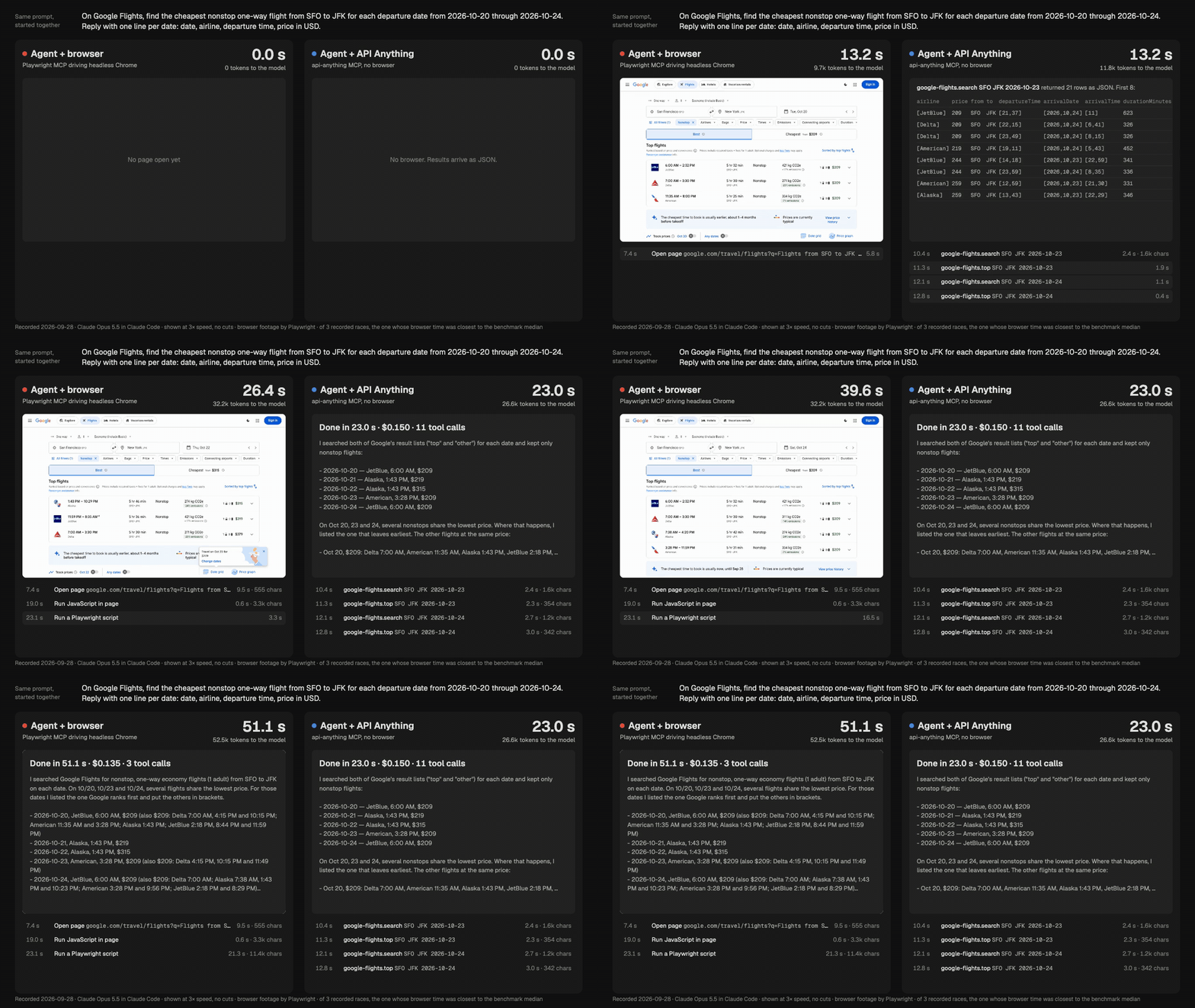
It ships 22 read operations across 9 sites, including Google Flights, Hacker News, X, Instagram, YouTube, Airbnb, Amazon, LinkedIn and Goodreads.How much faster is it than an agent driving a browser?In a Google Flights benchmark the same agent answered 1.5-2x sooner, read about half as many tokens, and cost the same or less; on Goodreads it answered 5 books in 30.5s versus 182.5s for a browser-driving agent.
In a Google Flights benchmark the same agent answered 1.5-2x sooner, read about half as many tokens, and cost the same or less; on Goodreads it answered 5 books in 30.5s versus 182.5s for a browser-driving agent.How does it teach itself a new site?You give it a page URL with a placeholder and two example inputs; headless Chrome loads the page for each example, the part that changed becomes a parameter, and the rest becomes a template, all without using an LLM.
You give it a page URL with a placeholder and two example inputs; headless Chrome loads the page for each example, the part that changed becomes a parameter, and the rest becomes a template, all without using an LLM.Can it write to a site, like sending a LinkedIn message?No write operations are bundled. Writes need an --allow-writes flag and have only been tested against a local fixture, not against real sites like LinkedIn.
No write operations are bundled. Writes need an --allow-writes flag and have only been tested against a local fixture, not against real sites like LinkedIn.What are similar projects?bb-browser, stagehand, oc, browser, reverse-api-engineer, webcmd, testsprite-cli, wigolo
bb-browser, stagehand, oc, browser, reverse-api-engineer, webcmd, testsprite-cli, wigoloWhich topics is it in?playwright, web-scraping, browser-automation, local-first, mcp-server, codex, agent, claude-code, mcp, api, automation, ai-agents
playwright, web-scraping, browser-automation, local-first, mcp-server, codex, agent, claude-code, mcp, api, automation, ai-agents