 DB-GPT: Open-Source Agentic AI Data Assistant
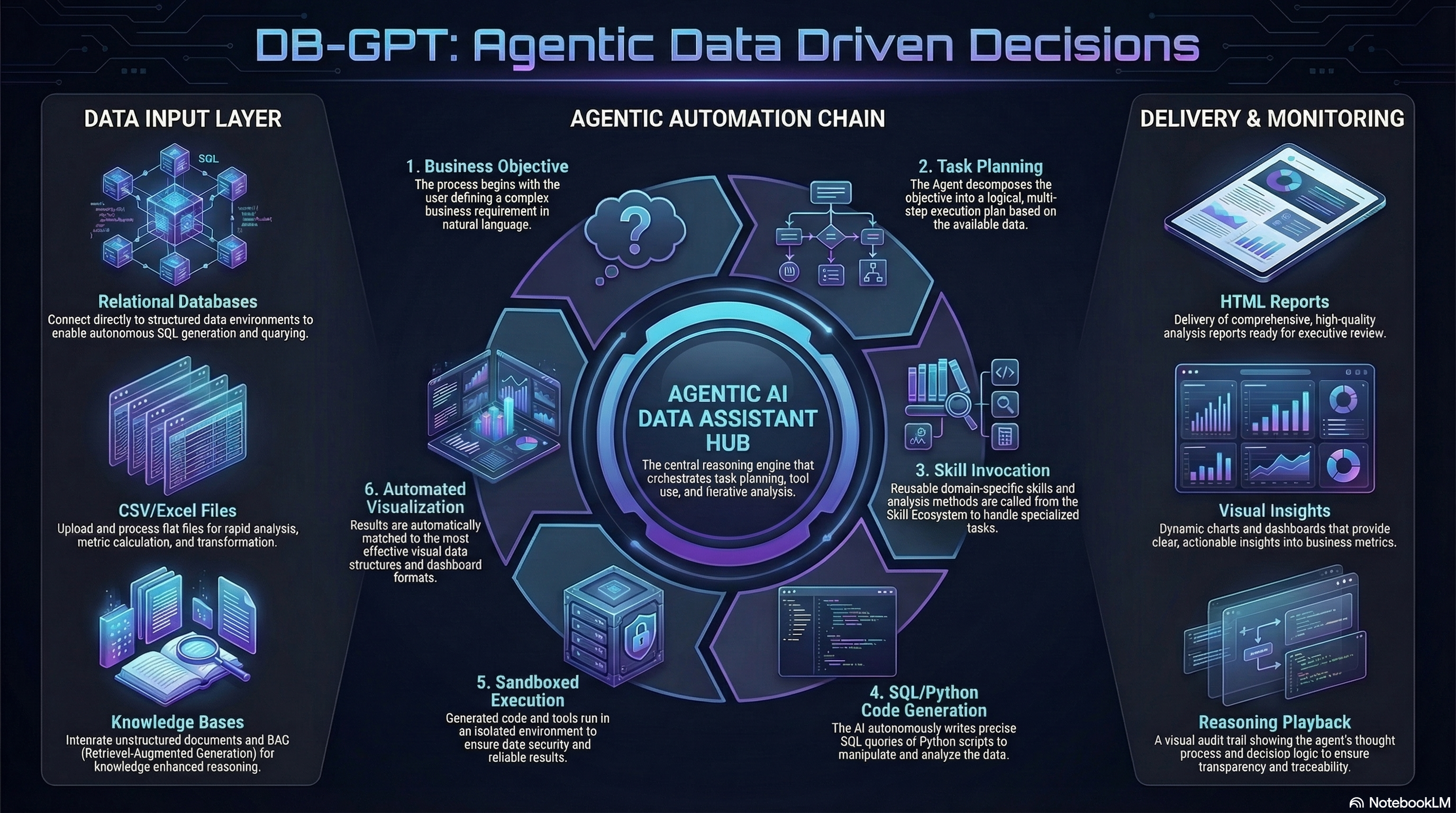
An open-source AI data assistant that connects to your data, writes SQL and code, runs skills in sandboxed environments, and turns analysis into reports, insights, and action.

What is DB-GPT?
DB-GPT is an open-source agentic AI data assistant for the next generation of AI + Data products.
It helps users and teams:
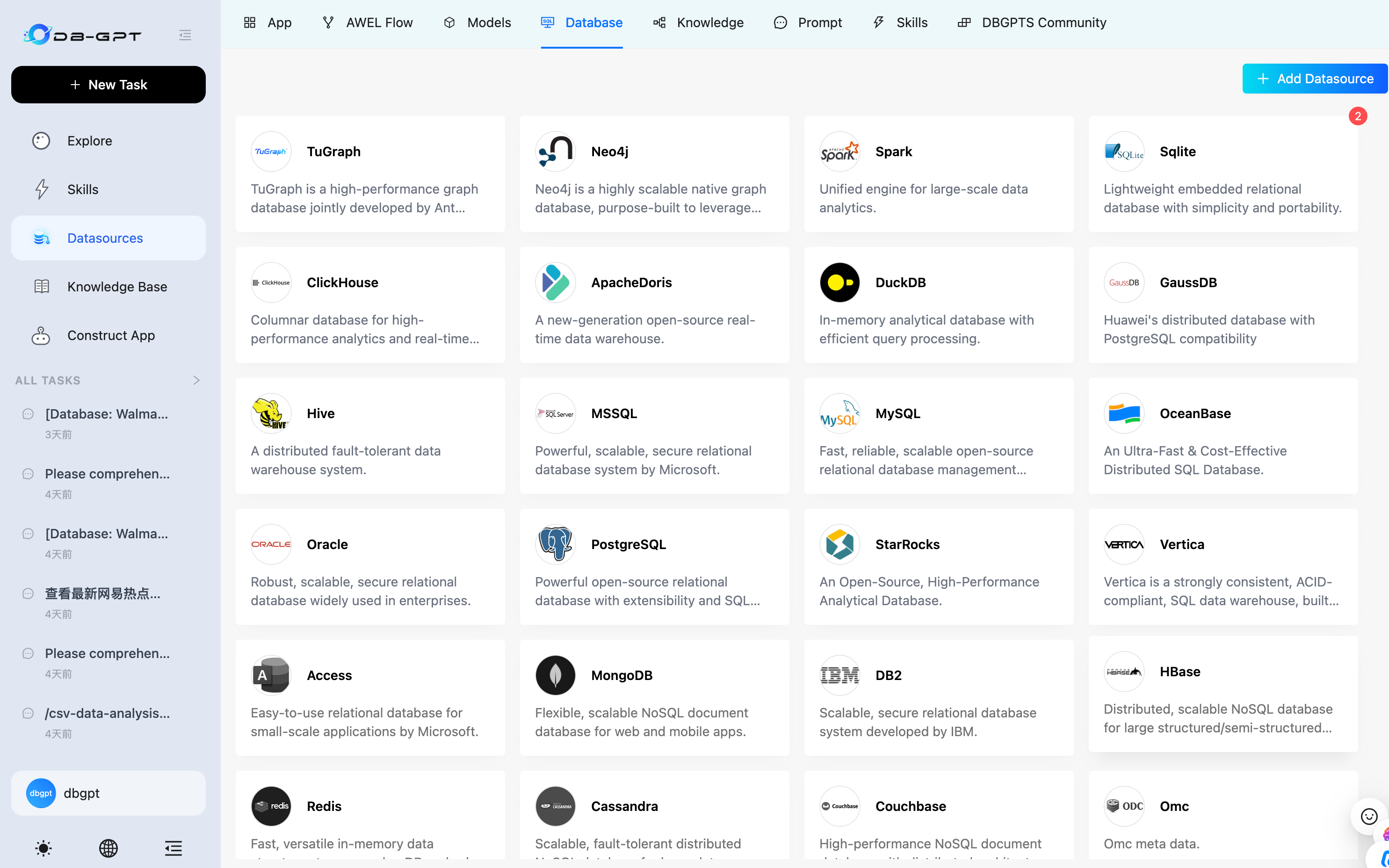
- connect to databases, CSV / Excel files, warehouses, and knowledge bases
- ask questions in natural language and let AI write SQL autonomously
- run Python- and code-driven analysis workflows
- load and execute reusable skills for domain-specific tasks
- generate charts, dashboards, HTML reports, and analysis summaries
- execute tasks safely in sandboxed environments
DB-GPT is also a platform for building AI-native data agents, workflows, and applications with agents, AWEL, RAG, and multi-model support.
Why DB-GPT?
1. Agentic data analysis
Plan tasks, break work into steps, call tools, and complete analysis workflows end to end.

2. Autonomous SQL + code execution
Generate SQL and code to query data, clean datasets, compute metrics, and produce outputs.


3. Multi-source data access
Work across structured and unstructured sources, including databases, spreadsheets, documents, and knowledge bases.
4. Skills-driven extensibility
Package domain knowledge, analysis methods, and execution workflows into reusable skills.

5. Sandboxed execution
Run code and tools in isolated environments for safer, more reliable analysis.

What you can do with DB-GPT
- Analyze CSV / Excel files and generate visual reports
- Connect to databases and produce profiling reports
- Ask business questions in natural language and let AI write SQL automatically
- Perform financial report analysis with code, charts, and narrative summaries
- Create and reuse SQL analysis skills and domain workflows
- Combine code, SQL, retrieval, and tools in a single agentic workflow
- Build next-generation AI + Data assistants for your team or product
Product Workflow
Explore data
Connect files, databases, and knowledge bases in one workspace.
Plan and execute
Let AI reason through the task, write SQL and code, and execute step by step.
Use skills
Load reusable skills for repeatable business analysis workflows.
Generate reports
Produce charts, dashboards, HTML reports, and decision-ready outputs.
Quick Start
Get DB-GPT running in minutes with the one-line installer (macOS & Linux):
curl -fsSL https://raw.githubusercontent.com/eosphoros-ai/DB-GPT/main/scripts/install/install.sh | bash
Or specify a profile and API key directly:
curl -fsSL https://raw.githubusercontent.com/eosphoros-ai/DB-GPT/main/scripts/install/install.sh \
  | OPENAI_API_KEY=sk-xxx bash -s -- --profile openai
For Kimi 2.5 via Moonshot API:
curl -fsSL https://raw.githubusercontent.com/eosphoros-ai/DB-GPT/main/scripts/install/install.sh \
  | MOONSHOT_API_KEY=sk-xxx bash -s -- --profile kimi
For MiniMax via the OpenAI-compatible API:
curl -fsSL https://raw.githubusercontent.com/eosphoros-ai/DB-GPT/main/scripts/install/install.sh \
  | MINIMAX_API_KEY=sk-xxx bash -s -- --profile minimax
Already have a local DB-GPT checkout? Reuse it instead of cloning ~/.dbgpt/DB-GPT:
OPENAI_API_KEY=sk-xxx \
  bash scripts/install/install.sh --profile openai --repo-dir "$(pwd)" --yes
Or reuse your local repo with Kimi 2.5:
MOONSHOT_API_KEY=sk-xxx \
  bash scripts/install/install.sh --profile kimi --repo-dir "$(pwd)" --yes
Or reuse your local repo with MiniMax:
MINIMAX_API_KEY=sk-xxx \
  bash scripts/install/install.sh --profile minimax --repo-dir "$(pwd)" --yes
After installation, start the server with the generated profile config:
cd ~/.dbgpt/DB-GPT && uv run dbgpt start webserver --profile <profile>
Then open http://localhost:5670.
Prefer to review the script first?
curl -fsSL https://raw.githubusercontent.com/eosphoros-ai/DB-GPT/main/scripts/install/install.sh -o install.sh
less install.sh
bash install.sh --profile openai
Install via PyPI
Install DB-GPT from PyPI and start it with a single command — no source checkout required.
Prerequisites: Python 3.10+ and uv (recommended) or pip.
1. Install
# Recommended: use uv
uv pip install dbgpt-app

# Or with pip
pip install dbgpt-app
The default installation includes the core framework (CLI, FastAPI, Agent), OpenAI-compatible LLM support, DashScope / Tongyi support, RAG document parsing, and ChromaDB vector store.
2. Start
dbgpt start
On first run, an interactive setup wizard will guide you through choosing an LLM provider and entering your API key. Once complete, the web server starts automatically.
3. Open the Web UI
Visit http://localhost:5670 — you're all set! 🎉
Advanced Installation


For Docker, local GPU models (vLLM, llama.cpp), or manual source-code setup, see the full docs:
Core Capabilities
Agentic Analysis
- task planning
- step-by-step execution
- tool use
- iterative reasoning
SQL + Code Execution
- natural language to SQL
- Python-based analysis and transformation
- metric calculation
- chart generation
Multi-Source Data Access
- relational databases
- CSV / Excel
- documents
- knowledge bases
- mixed-source workflows
Skills and Agents
- reusable skills
- domain workflows
- agent orchestration
- customizable execution flows
Reporting and Decision Support
- database profiling reports
- financial analysis reports
- visual reports and dashboards
- summaries and business insights
Safe Execution
- sandboxed code execution
- controlled tool use
- reproducible outputs and artifacts
Text2SQL Finetune
| LLM |
Supported |
| LLaMA |
✅ |
| LLaMA-2 |
✅ |
| BLOOM |
✅ |
| BLOOMZ |
✅ |
| Falcon |
✅ |
| Baichuan |
✅ |
| Baichuan2 |
✅ |
| InternLM |
✅ |
| Qwen |
✅ |
| XVERSE |
✅ |
| ChatGLM2 |
✅ |
More Information about Text2SQL finetune
Supported Models
Privacy and Security
We protect data privacy and execution safety through private model deployment, proxy desensitization, and sandboxed execution mechanisms.
Data Sources
Vision
We believe the future of data products goes beyond dashboards.
The next generation of AI + Data products will be:
- agentic
- multi-source
- skill-driven
- sandboxed
- capable of writing SQL and code
- able to turn analysis into reports, decisions, and action
DB-GPT aims to help developers and enterprises build that future.
Contribution
Contributors Wall
Licence
The MIT License (MIT)
DISCKAIMER
Citation
If you want to understand the overall architecture of DB-GPT, please cite Paper and Paper
If you want to learn about using DB-GPT for Agent development, please cite the Paper
@article{xue2023dbgpt,
      title={DB-GPT: Empowering Database Interactions with Private Large Language Models},
      author={Siqiao Xue and Caigao Jiang and Wenhui Shi and Fangyin Cheng and Keting Chen and Hongjun Yang and Zhiping Zhang and Jianshan He and Hongyang Zhang and Ganglin Wei and Wang Zhao and Fan Zhou and Danrui Qi and Hong Yi and Shaodong Liu and Faqiang Chen},
      year={2023},
      journal={arXiv preprint arXiv:2312.17449},
      url={https://arxiv.org/abs/2312.17449}
}
@misc{huang2024romasrolebasedmultiagentdatabase,
      title={ROMAS: A Role-Based Multi-Agent System for Database monitoring and Planning},
      author={Yi Huang and Fangyin Cheng and Fan Zhou and Jiahui Li and Jian Gong and Hongjun Yang and Zhidong Fan and Caigao Jiang and Siqiao Xue and Faqiang Chen},
      year={2024},
      eprint={2412.13520},
      archivePrefix={arXiv},
      primaryClass={cs.AI},
      url={https://arxiv.org/abs/2412.13520},
}
@inproceedings{xue2024demonstration,
      title={Demonstration of DB-GPT: Next Generation Data Interaction System Empowered by Large Language Models},
      author={Siqiao Xue and Danrui Qi and Caigao Jiang and Wenhui Shi and Fangyin Cheng and Keting Chen












 一个开源的 AI 智能体数据助手:连接数据库、文件或知识库,用大白话提问,AI 会自动编写 SQL 和代码、执行分析,并生成图表、仪表盘和报告。