 DB-GPT: Open-Source Agentic AI Data Assistant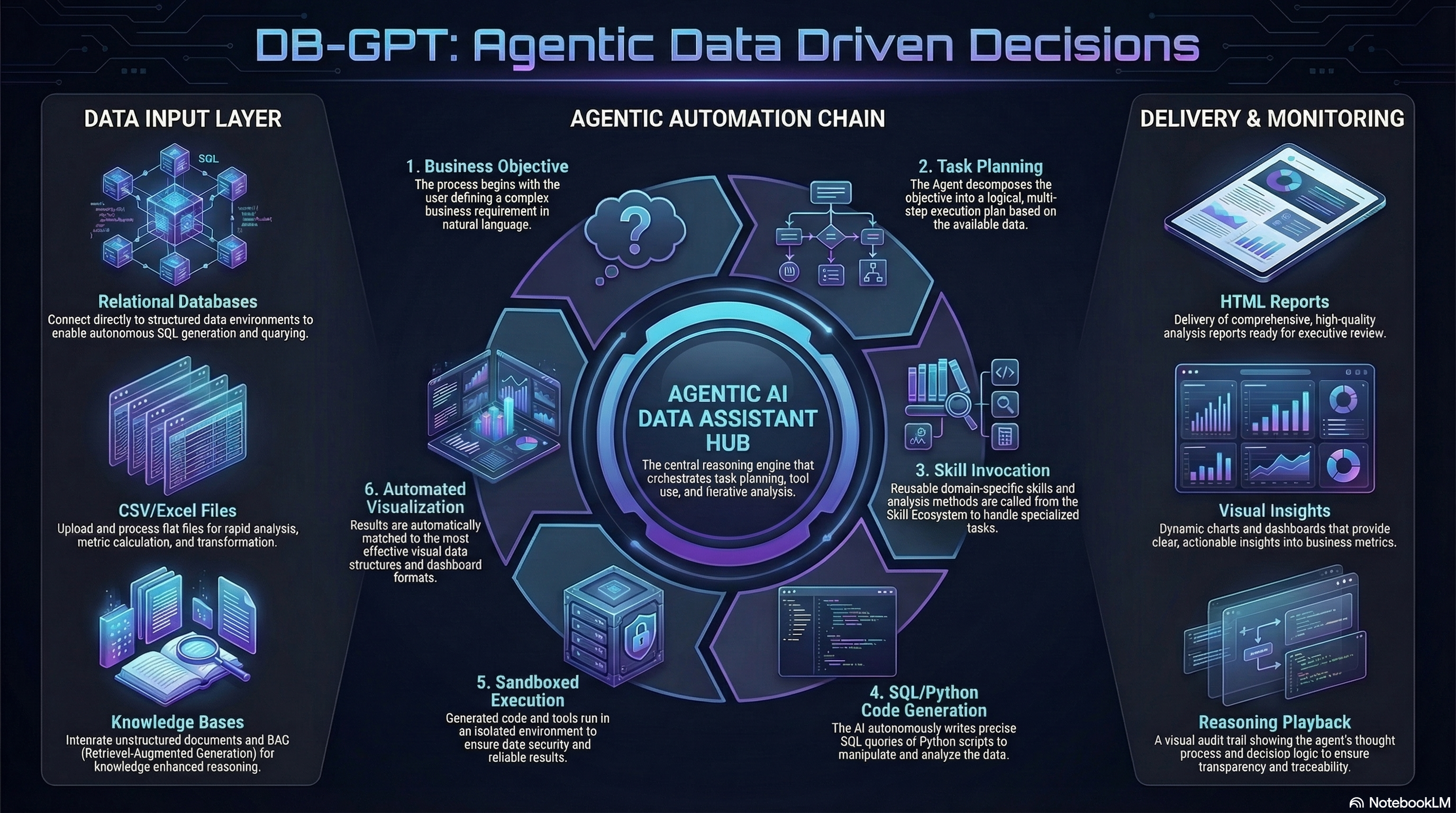














Что это такое?
 Открытый ИИ-ассистент для работы с данными: подключите базы данных, файлы или базы знаний, задайте вопрос обычным языком — и ИИ напишет SQL и код, выполнит анализ и подготовит графики, дашборды и отчёты.
Открытый ИИ-ассистент для работы с данными: подключите базы данных, файлы или базы знаний, задайте вопрос обычным языком — и ИИ напишет SQL и код, выполнит анализ и подготовит графики, дашборды и отчёты.Это облачный сервис или что-то, что я размещаю и запускаю сам?Что-то, что вы размещаете сами: устанавливается как Python-пакет, запускает локальный веб-сервер, и вы работаете с ним через веб-интерфейс в браузере. Также это платформа для создания приложений для работы с данными с ИИ в основе.
Что-то, что вы размещаете сами: устанавливается как Python-пакет, запускает локальный веб-сервер, и вы работаете с ним через веб-интерфейс в браузере. Также это платформа для создания приложений для работы с данными с ИИ в основе.Как его запустить?Однострочный установщик на macOS и Linux, либо установка с PyPI через Python 3.10+ и uv или pip. При первом запуске мастер настройки спросит провайдера LLM и API-ключ, после чего веб-сервер запустится автоматически.
Однострочный установщик на macOS и Linux, либо установка с PyPI через Python 3.10+ и uv или pip. При первом запуске мастер настройки спросит провайдера LLM и API-ключ, после чего веб-сервер запустится автоматически.Нужен ли платный API-ключ, или можно запускать модели локально?Мастер настройки предлагает провайдеров вроде OpenAI-совместимых API, DashScope, Kimi и MiniMax. Если хотите, чтобы обработка выполнялась на вашем железе, поддерживаются и локальные GPU-модели через vLLM или llama.cpp.
Мастер настройки предлагает провайдеров вроде OpenAI-совместимых API, DashScope, Kimi и MiniMax. Если хотите, чтобы обработка выполнялась на вашем железе, поддерживаются и локальные GPU-модели через vLLM или llama.cpp.Однострочный установщик работает и на Windows?Нет — быстрый установщик поддерживает только macOS и Linux. На Windows вам придётся пройти по документации расширенной установки, где также описаны Docker и установка вручную из исходного кода.
Нет — быстрый установщик поддерживает только macOS и Linux. На Windows вам придётся пройти по документации расширенной установки, где также описаны Docker и установка вручную из исходного кода.У меня чувствительные данные — куда они на самом деле попадают?Проект рассчитан на приватное развёртывание: конфиденциальность и безопасность выполнения основаны на частном развёртывании моделей, обезличивании через прокси и запуске в изолированной среде (песочнице), а вместо облачного API можно подключить локально размещённые модели.
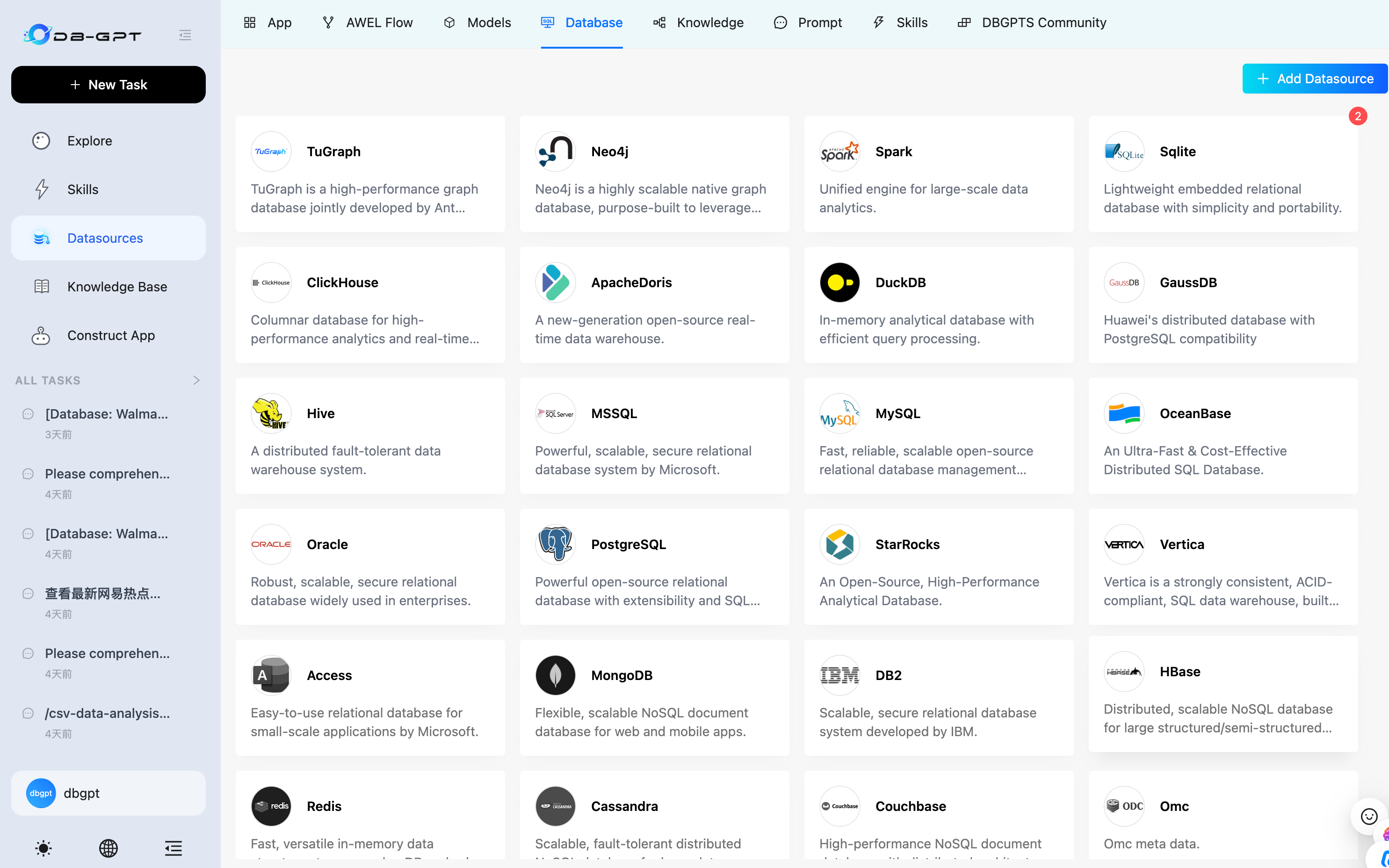
Проект рассчитан на приватное развёртывание: конфиденциальность и безопасность выполнения основаны на частном развёртывании моделей, обезличивании через прокси и запуске в изолированной среде (песочнице), а вместо облачного API можно подключить локально размещённые модели.С какими источниками данных он умеет работать?Реляционные базы данных, файлы CSV и Excel, документы и базы знаний — причём источники можно комбинировать в одном сценарии: запрос к базе и анализ таблицы могут быть частью одной задачи с ИИ-агентом.
Реляционные базы данных, файлы CSV и Excel, документы и базы знаний — причём источники можно комбинировать в одном сценарии: запрос к базе и анализ таблицы могут быть частью одной задачи с ИИ-агентом.Какие LLM он поддерживает?В списке поддерживаемых провайдеров — DeepSeek, Qwen, GLM, Llama, Gemma, Yi, Starling, SOLAR, Mixtral и Phi, а в быстром старте есть готовые профили для Kimi 2.5 через Moonshot и MiniMax через OpenAI-совместимый API.
В списке поддерживаемых провайдеров — DeepSeek, Qwen, GLM, Llama, Gemma, Yi, Starling, SOLAR, Mixtral и Phi, а в быстром старте есть готовые профили для Kimi 2.5 через Moonshot и MiniMax через OpenAI-совместимый API.Что входит в базовую установку с PyPI?Ядро фреймворка — CLI, сервер FastAPI и Agent — плюс поддержка OpenAI-совместимых и DashScope LLM, разбор документов для RAG и векторное хранилище ChromaDB, так что базовый сценарий RAG работает сразу после установки.
Ядро фреймворка — CLI, сервер FastAPI и Agent — плюс поддержка OpenAI-совместимых и DashScope LLM, разбор документов для RAG и векторное хранилище ChromaDB, так что базовый сценарий RAG работает сразу после установки.Могу ли я упаковать свои аналитические сценарии, чтобы переиспользовать их?Да — предметные знания, методы анализа и шаги выполнения объединяются в переиспользуемые навыки (skills), а с помощью AWEL на базе платформы можно собирать агентов, рабочие процессы и приложения.
Да — предметные знания, методы анализа и шаги выполнения объединяются в переиспользуемые навыки (skills), а с помощью AWEL на базе платформы можно собирать агентов, рабочие процессы и приложения.Which topics is it in?chromadb, text-to-sql, multi-model, gpt-4, llama-cpp, excel, csv, data-analysis, vector-database, fastapi, vllm, gpt
chromadb, text-to-sql, multi-model, gpt-4, llama-cpp, excel, csv, data-analysis, vector-database, fastapi, vllm, gpt