PaperBanana 🍌
Dawei Zhu, Rui Meng, Yale Song, Xiyu Wei, Sujian Li, Tomas Pfister and Jinsung yoon
Hi everyone! The original version of PaperBanana is already open-sourced under Google-Research as PaperVizAgent.
This repository forked the content of that repo and aims to keep evolving toward better support for academic paper illustration—though we have made solid progress, there is still a long way to go for more reliable generation and for more diverse, complex scenarios. PaperBanana is intended to be a fully open-source project dedicated to facilitating academic illustration for all researchers. Our goal is simply to benefit the community, so we currently have no plans to use it for commercial purposes.
Latest News
- 2026-03-24: PaperBanana is now hosted on Hugging Face Spaces. Many thanks to the Hugging Face team for their support.
- 2026-03-11: Published PaperBanana as a ClawHub skill — install with
clawhub install paperbanana.
- 2026-03-11: Added model selection to Streamlit UI — now supports choosing both Main Model (VLM) and Image Generation Model, with preset options and custom input.
- 2026-03-11: Added OpenRouter support — use models from OpenAI, Anthropic, and other providers via a unified API.
- 2026-03-11: Added Contributors section with all-contributors bot support.
TODO List
- Add support for using manually selected examples. Provide a user-friendly interface.
- Upload code for generating statistical plots.
- Upload code for improving existing diagrams based on style guideline.
- Expand the reference set to support more areas beyond computer science.
PaperBanana is a reference-driven multi-agent framework for automated academic illustration generation. Acting like a creative team of specialized agents, it transforms raw scientific content into publication-quality diagrams and plots through an orchestrated pipeline of Retriever, Planner, Stylist, Visualizer, and Critic agents. The framework leverages in-context learning from reference examples and iterative refinement to produce aesthetically pleasing and semantically accurate scientific illustrations.
Here are some example diagrams and plots generated by PaperBanana:
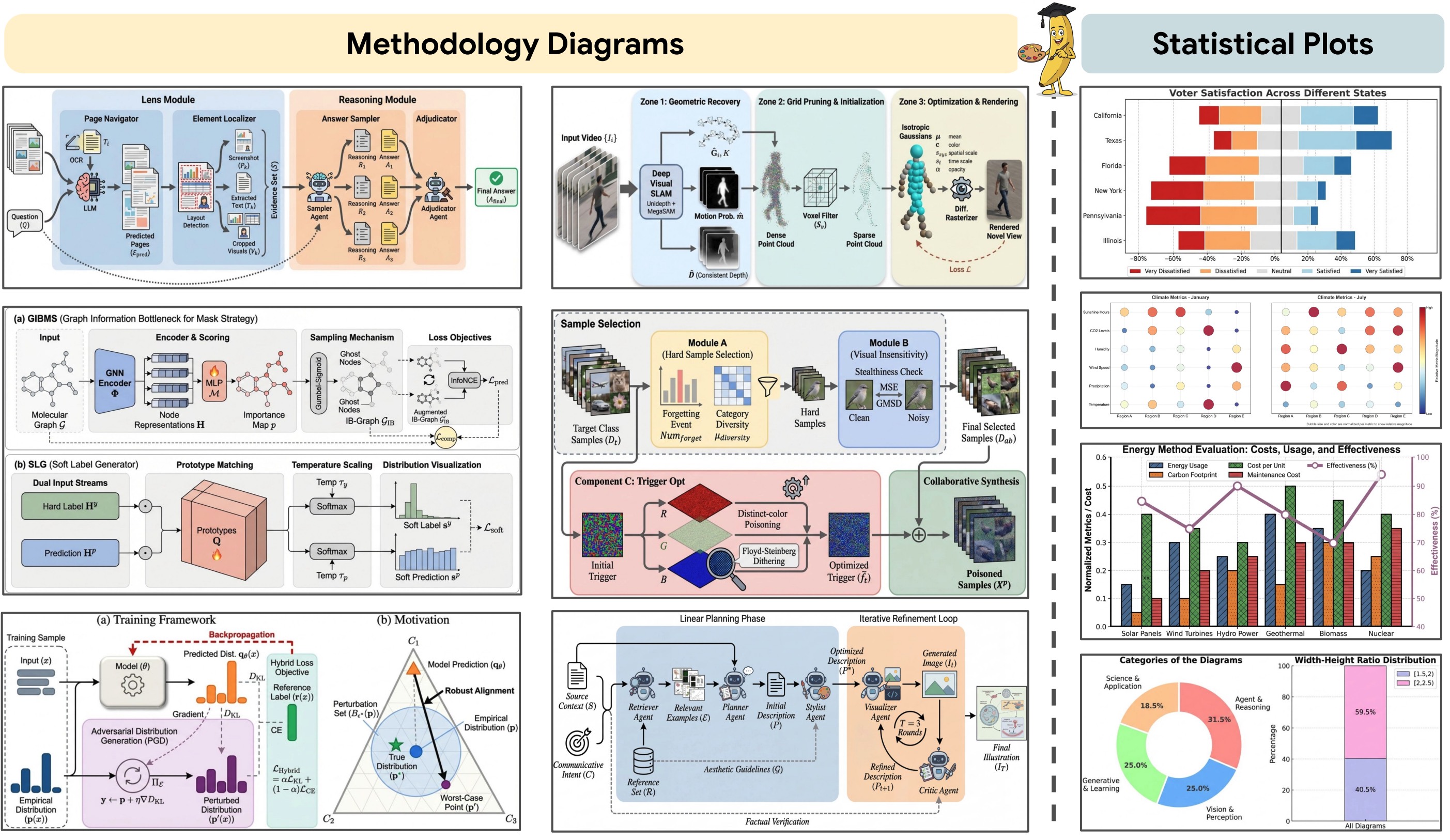
Overview of PaperBanana
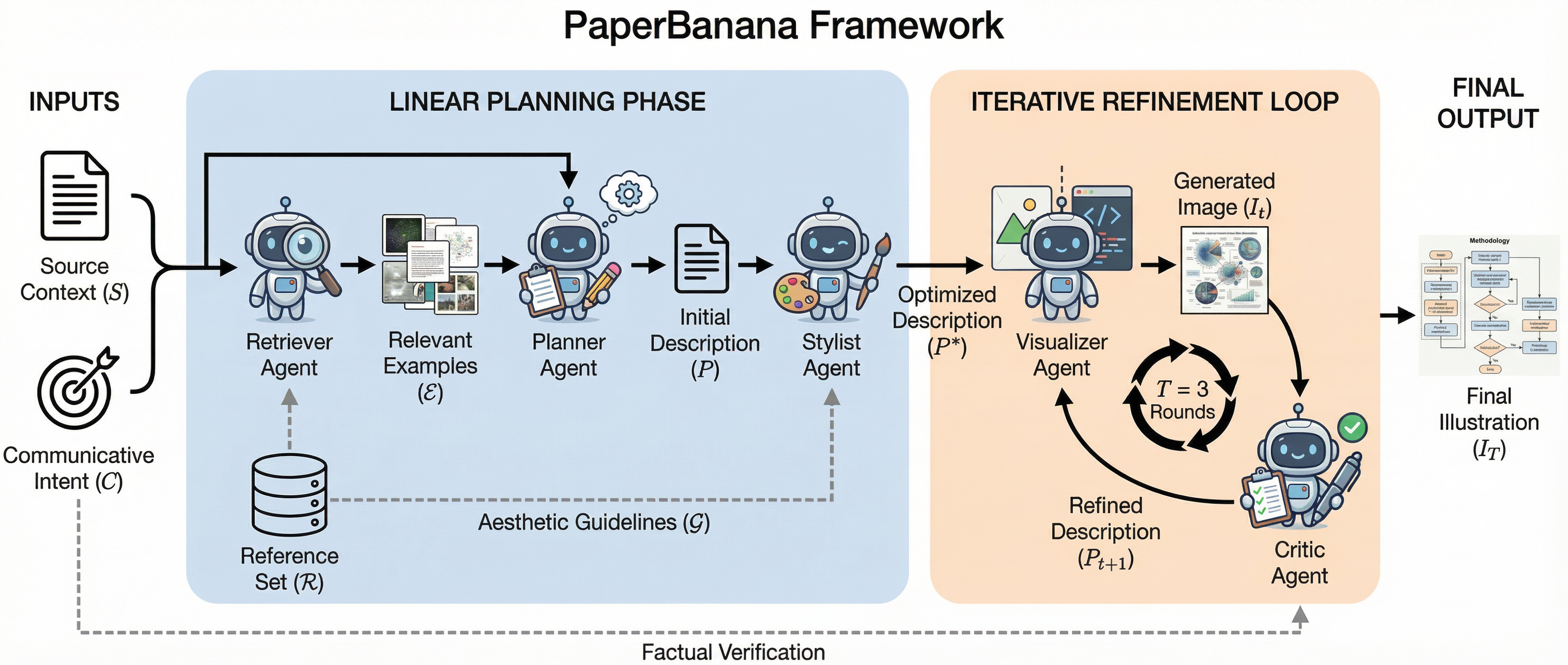
PaperBanana achieves high-quality academic illustration generation by orchestrating five specialized agents in a structured pipeline:
- Retriever Agent: Identifies the most relevant reference diagrams from a curated collection to guide downstream agents
- Planner Agent: Translates method content and communicative intent into comprehensive textual descriptions using in-context learning
- Stylist Agent: Refines descriptions to adhere to academic aesthetic standards using automatically synthesized style guidelines
- Visualizer Agent: Transforms textual descriptions into visual outputs using state-of-the-art image generation models
- Critic Agent: Forms a closed-loop refinement mechanism with the Visualizer through multi-round iterative improvements
Quick Start
Step1: Clone the Repo
git clone https://github.com/dwzhu-pku/PaperBanana.git
cd PaperBanana
Step2: Configuration
PaperBanana supports configuring API keys from a YAML configuration file or via environment variables.
We recommend duplicate the configs/model_config.template.yaml file into configs/model_config.yaml to externalize all user configurations. This file is ignored by git to keep your api keys and configurations secret. In model_config.yaml, remember to fill in the two model names (defaults.main_model_name and defaults.image_gen_model_name) and set at least one API key under api_keys—for example only google_api_key (Gemini), or only openrouter_api_key (OpenRouter). You do not need both; either one is enough. If both are configured, OpenRouter is preferred for routing when available.
Note that if you need to generate many candidates simultaneously, you will require an API key that supports high concurrency.
Step3: Downloading the Dataset
First download PaperBananaBench, then place it under the data directory (e.g., data/PaperBananaBench/). The framework is designed to function gracefully without the dataset by bypassing the Retriever Agent's few-shot learning capability. If interested in the original PDFs, please download them from PaperBananaDiagramPDFs.
Step4: Installing the Environment
We use uv to manage Python packages. Please install uv following the instructions here.
Create and activate a virtual environment
uv venv # This will create a virtual environment in the current directory, under .venv/
source .venv/bin/activate  # or .venv\Scripts\activate on Windows
Install python 3.12
uv python install 3.12
Install required packages
uv pip install -r requirements.txt
Launch PaperBanana
Option 1: Gradio Web App (Recommended)
Try it online — no setup required:
👉 PaperBanana on Hugging Face Spaces
To get started, enter your API key (OpenRouter or Google Gemini), then configure your desired parameters (pipeline mode, number of candidates, aspect ratio, etc.), paste your method section text and figure caption, and click Generate.
You can also run the Gradio app locally:
python app.py
The Gradio Figure Size setting maps 1-3cm and 4-6cm to 1k, 7-9cm and 10-13cm to 2k, and 14-17cm to 4k for Gemini and OpenRouter image-generation calls. OpenAI gpt-image requests continue to use their existing fixed-size API path.
Option 2: Interactive Demo (Streamlit)
The easiest way to launch PaperBanana is via the interactive Streamlit demo:
streamlit run demo.py
The web interface provides two main workflows:
1. Generate Candidates Tab:
- Paste your method section content (Markdown recommended) and provide the figure caption.
- Configure settings (pipeline mode, retrieval setting, number of candidates, aspect ratio, critic rounds).
- Click "Generate Candidates" and wait for parallel processing.
- View results in a grid with evolution timelines and download individual images or batch ZIP.
2. Refine Image Tab:
- Upload a generated candidate or any diagram.
- Describe desired changes or request upscaling.
- Select resolution (2K/4K) and aspect ratio.
- Download the refined high-resolution output.
Option 3: Command-Line Interface
You can also run PaperBanana from the command line:
# Basic usage with default settings
python main.py

# Advanced usage with custom settings
python main.py \
  --dataset_name "PaperBananaBench" \
  --task_name "diagram" \
  --split_name "test" \
  --exp_mode "dev_full" \
  --retrieval_setting "auto"

# Legacy matplotlib plot-code generation with no few-shot retrieval
python main.py \
  --dataset_name "PaperBananaBench" \
  --task_name "plot" \
  --split_name "test" \
  --exp_mode "vanilla" \
  --retrieval_setting "none"
Available Options:
--dataset_name: Dataset to use (default: PaperBananaBench)--task_name: Task type - diagram or plot (default: diagram)--split_name: Dataset split (default: test)--exp_mode: Experiment mode (see section below)--retrieval_setting: Retrieval strategy - auto, manual, random, or none (default: auto)
Experiment Modes:
vanilla: Direct generation without planning or refinementdev_planner: Retriever → Planner → Visualizerdev_planner_stylist: Retriever → Planner → Stylist → Visualizerdev_planner_critic: Retriever → Planner → Visualizer → Critic (multi-round)dev_full: Full pipeline with all agentsdemo_planner_critic: Demo mode (Retriever → Planner → Visualizer → Critic; no Stylist) without evaluationdemo_full: Demo mode (full pipeline) without evaluation
View pipeline evolution and intermediate results:
streamlit run visualize/show_pipeline_evolution.py
View evaluation results:
streamlit run visualize/show_referenced_eval.py
Project Structure
├── .venv/
│   └── ...
├── data/
│   └── PaperBananaBench/
│       ├── diagram/
│       │   ├── images/
│       │   ├── pdfs/
│       │   ├── test.json
│       │   └── ref.json
│       └── plot/
├── agents/
│   ├── __init__.py
│   ├── base_agent.py
│   ├── retriever_agent.py
│   ├── planner_agent.py
│   ├── stylist_agent.py
│   ├── visualizer_agent.py
│   ├── critic_agent.py
│   ├── vanilla_agent.py
│   └── polish_agent.py
├── prompts/
│   ├── __init__.py
│   ├── diagram_eval_prompts.py
│   └── plot_eval_prompts.py
├── style_guides/
│   ├── generate_category_style_guide.py
│   └── ...
├── utils/
│   ├── __init__.py
│   ├── config.py
│   ├── paperviz_processor.py
│   ├── eval_toolkits.py
│   ├── generation_utils.py
│   └── image_utils.py
├── visualize/
│   ├── show_pipeline_evolution.py
│   └── show_referenced_eval.py
├── scripts/
│   ├── run_main.sh
│   ├── run_demo.sh
├── configs/
│   └── model_config.template.yaml
├── results/
│   ├── PaperBananaBench_diagram/
│   └── parallel_demo/
├── main.py
├── demo.py
└── README.md
Key Features
Multi-Agent Pipeline
- Reference-Driven: Learns from curated examples through generative retrieval
- Iterative Refinement: Critic-Visualizer loop for progressive quality improvement
- Style-Aware: Automatically synthesized aesthetic guidelines ensure academic quality
- Flexible Modes: Multiple experiment modes for different use cases
Interactive Demo
- Parallel Generation: Generate up to 20 candidate diagrams simultaneously
- Pipeline Visualization: Track the evolution through Planner → Stylist → Critic stages
- High-Resolution Refinement: Upscale to 2K/4K using Image Generation APIs
- Batch Export: Download all candidates as PNG or ZIP
Extensible Design
- Modular Agents: Each agent is independently configurable
- Task Support: Handles both conceptual diagrams and data plots
- Evaluation Framework: Built-in evaluation against ground truth with multiple metrics
- Async Processing: Efficient batch processing with configurable concurrency
Around the release of this repo, we noticed several community efforts to reproduce this work. These efforts introduce unique perspectives that we find incredibly valuable. We highly recommend checking out these excellent contributions: (welcome to add if we missed something):
Additionally, alongside the development of this method, many other works have been exploring the same topic of automated academic illustration generation—some even enabling editable generated figures. Their contributions are essential to the ecosystem and are well worth your attention (likewise, welcome to add):
Overall, we are encouraged that the fundamental capabilities of current models have brought us much closer to solving the problem of automated academic illustration generation. With the community's continued efforts, we believe that in the near future we will have high-quality automated drawing tools to accelerate academic research iteration and visual communication.
We warmly welcome community contributions to make PaperBanana even better!
Contributors
Thanks to all contributors who helped improve PaperBanana, whether through code, bug reports, ideas, or feedback!













 PaperBanana 是一个开源框架,能把原始的科学内容转化为出版级质量的图表,就像一个由五个专业智能体组成的创意团队:Retriever(检索者)、Planner(规划者)、Stylist(风格师)、Visualizer(可视化者)和 Critic(评审者)。