












7.2K ·GitHub
Что это такое?
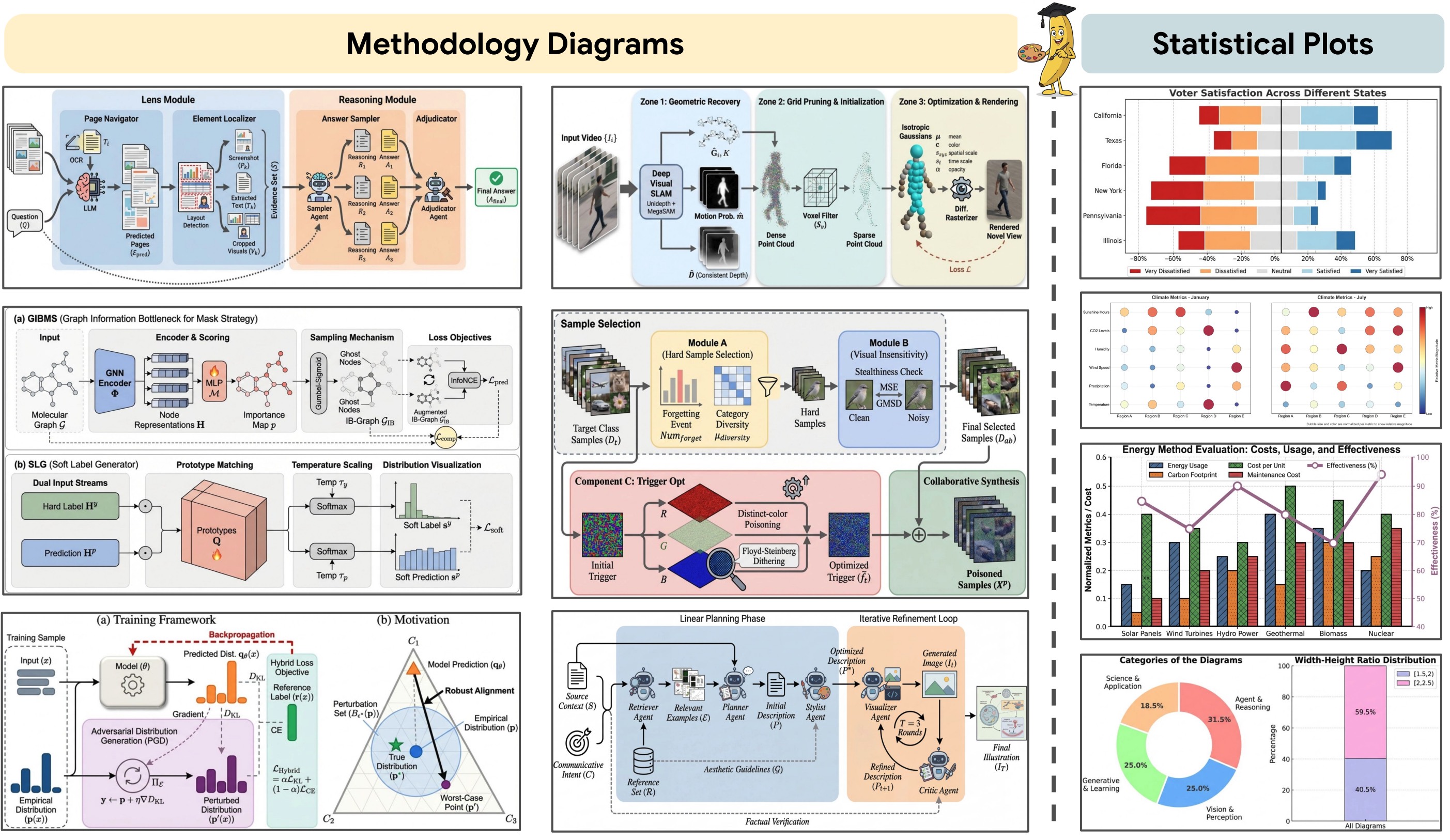
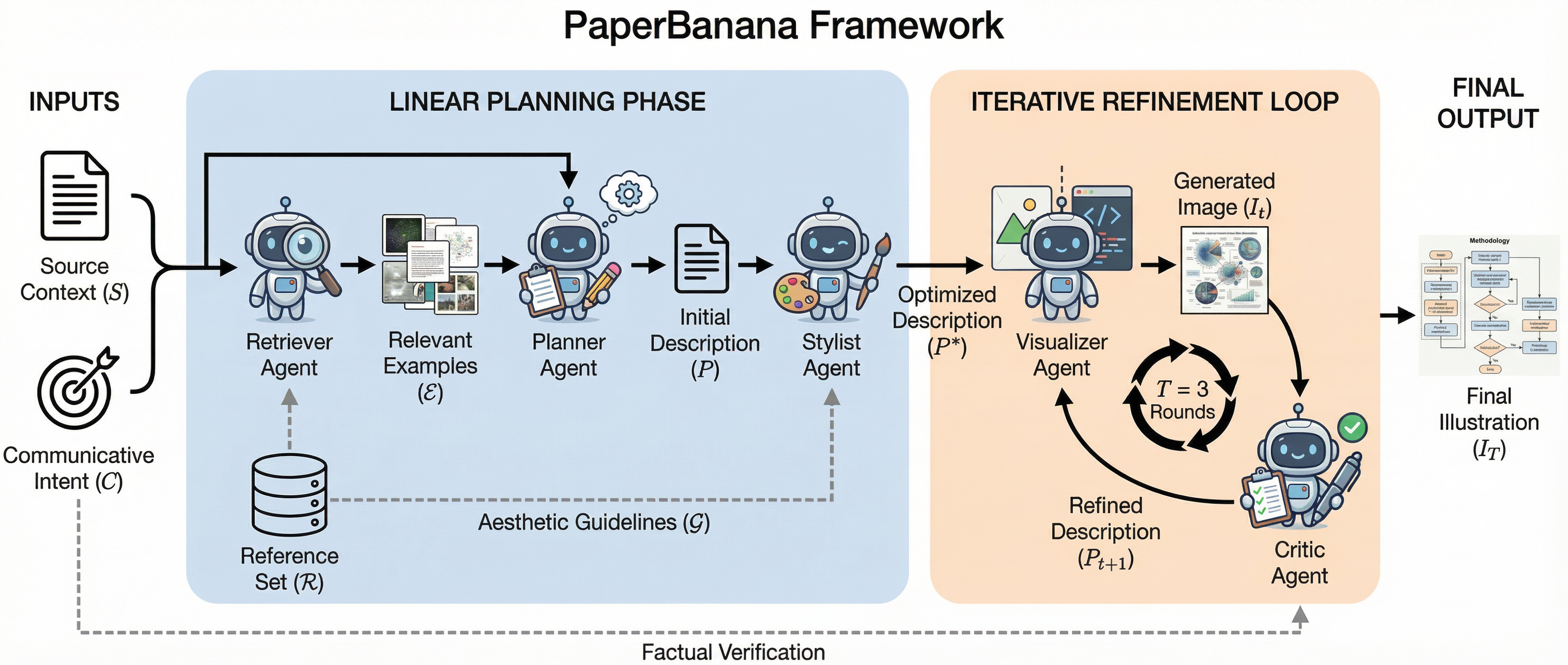
 PaperBanana — это опенсорсный фреймворк, который превращает исходный научный материал в диаграммы и графики публикационного качества. Работает как творческая команда из пяти специализированных агентов: Retriever, Planner, Stylist, Visualizer и Critic.
PaperBanana — это опенсорсный фреймворк, который превращает исходный научный материал в диаграммы и графики публикационного качества. Работает как творческая команда из пяти специализированных агентов: Retriever, Planner, Stylist, Visualizer и Critic.Это фреймворк, веб-приложение или утилита командной строки?Это Python-фреймворк, который можно использовать тремя способами: веб-приложение на Gradio (рекомендуется), интерактивное демо на Streamlit или через CLI. Есть также размещённая версия на Hugging Face Spaces — её можно попробовать вообще без настройки.
Это Python-фреймворк, который можно использовать тремя способами: веб-приложение на Gradio (рекомендуется), интерактивное демо на Streamlit или через CLI. Есть также размещённая версия на Hugging Face Spaces — её можно попробовать вообще без настройки.Как настроить проект локально и нужно ли скачивать какой-то датасет?Склонируйте репозиторий, скопируйте configs/modelconfig.template.yaml в configs/modelconfig.yaml со своим API-ключом, установите пакеты для Python 3.12 через uv, затем запустите Gradio или Streamlit. Датасет PaperBananaBench необязателен: без него Retriever просто пропускает свои few-shot примеры.
Склонируйте репозиторий, скопируйте configs/modelconfig.template.yaml в configs/modelconfig.yaml со своим API-ключом, установите пакеты для Python 3.12 через uv, затем запустите Gradio или Streamlit. Датасет PaperBananaBench необязателен: без него Retriever просто пропускает свои few-shot примеры.Нужен ли мне свой API-ключ, чтобы это запустить?Да — как минимум один из Google Gemini или OpenRouter; любого одного достаточно, а если настроите оба, предпочтение отдаётся OpenRouter. Для генерации множества кандидатов параллельно понадобится ключ с поддержкой высокой конкурентности.
Да — как минимум один из Google Gemini или OpenRouter; любого одного достаточно, а если настроите оба, предпочтение отдаётся OpenRouter. Для генерации множества кандидатов параллельно понадобится ключ с поддержкой высокой конкурентности.Какие у него сейчас есть ограничения?Авторы признают, что генерация пока не вполне надёжна для разнообразных и сложных сценариев. Подобранная коллекция образцов охватывает в основном компьютерные науки, а код для построения статистических графиков всё ещё в списке TODO, так что зрелый путь сегодня — именно диаграммы.
Авторы признают, что генерация пока не вполне надёжна для разнообразных и сложных сценариев. Подобранная коллекция образцов охватывает в основном компьютерные науки, а код для построения статистических графиков всё ещё в списке TODO, так что зрелый путь сегодня — именно диаграммы.Как он делает картинки такими, будто они из академической публикации?Retriever находит похожие примеры в специально собранной коллекции образцов для in-context learning, Planner составляет текстовое описание рисунка, а автоматически синтезированные рекомендации по стилю задают оформление результата; затем цикл Critic–Visualizer дорабатывает изображение за несколько раундов.
Retriever находит похожие примеры в специально собранной коллекции образцов для in-context learning, Planner составляет текстовое описание рисунка, а автоматически синтезированные рекомендации по стилю задают оформление результата; затем цикл Critic–Visualizer дорабатывает изображение за несколько раундов.Сколько вариантов рисунка он может сгенерировать и можно ли доработать понравившийся?До 20 кандидатов параллельно: они показываются сеткой с таймлайнами эволюции и экспортируются в PNG или общим ZIP-архивом. Во вкладке Refine можно загрузить любого кандидата (или свой собственный рисунок), описать изменения и увеличить результат до 2K или 4K.
До 20 кандидатов параллельно: они показываются сеткой с таймлайнами эволюции и экспортируются в PNG или общим ZIP-архивом. Во вкладке Refine можно загрузить любого кандидата (или свой собственный рисунок), описать изменения и увеличить результат до 2K или 4K.Можно ли запустить только часть конвейера агентов?Да. Режимы эксперимента варьируются от vanilla (прямая генерация без планирования и доработки) до devfull со всеми пятью агентами, с промежуточными вариантами вроде devplanner и devplannercritic; демо-режимы прогоняют те же конвейеры, но без оценки.
Да. Режимы эксперимента варьируются от vanilla (прямая генерация без планирования и доработки) до devfull со всеми пятью агентами, с промежуточными вариантами вроде devplanner и devplannercritic; демо-режимы прогоняют те же конвейеры, но без оценки.Откуда взялся PaperBanana?Это форк проекта PaperVizAgent от Google-Research, который продолжает его развивать. Проект полностью опенсорсный под лицензией Apache-2.0, коммерческих планов нет — заявленная цель авторов просто приносить пользу исследовательскому сообществу.
Это форк проекта PaperVizAgent от Google-Research, который продолжает его развивать. Проект полностью опенсорсный под лицензией Apache-2.0, коммерческих планов нет — заявленная цель авторов просто приносить пользу исследовательскому сообществу.What are similar projects?CodeVideoModel, latent-diffusion, InstantID, WanGP, RSIGame, AutoFigure-Edit, RedInk, GVS5H
CodeVideoModel, latent-diffusion, InstantID, WanGP, RSIGame, AutoFigure-Edit, RedInk, GVS5HWhich topics is it in?streamlit, gradio, openrouter, text-to-image, data-visualization, academic-research, agent-orchestration, image-generation, gemini, generative-ai, huggingface, multi-agent
streamlit, gradio, openrouter, text-to-image, data-visualization, academic-research, agent-orchestration, image-generation, gemini, generative-ai, huggingface, multi-agent