Search
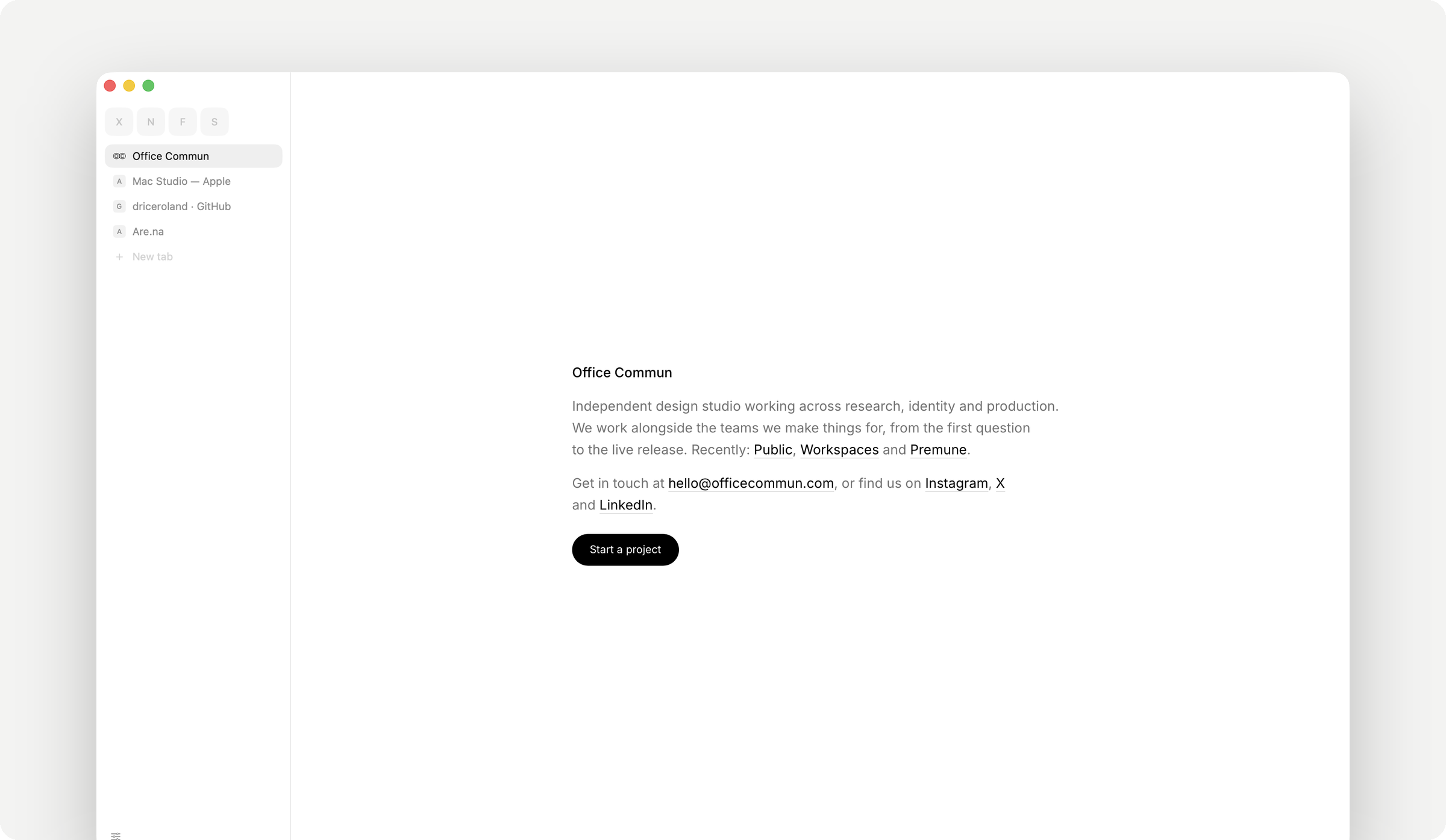
A small, fast, quiet web browser for the Mac, by Office Commun.
Download for macOS → · macOS 14 or later · free · about 3 MB
Or with Homebrew: brew install --cask driceroland/tap/search
What it is
Search is a browser with nothing in the way. A row of tabs — across the top or down the left, your choice — and the page. There is no toolbar, no start page, no sidebar of suggestions, no account to sign into, nothing that wants your attention. You type an address or a few words in one field and you are on the page.
It uses WebKit, the engine already inside every Mac (it is what Safari runs on). That is why the whole app is about 3 MB on disk and opens instantly: there is no second copy of Chromium to download, update and keep in memory.
It was built by a design studio that spends its whole day in a browser and was tired of the ones that had become products. This one is a tool.
What it does
- One field. Type an address and you go there; type words and you search. It finishes addresses from your own history and never sends what you type anywhere until you press Return.
- Tabs that stay out of the way. Pin the pages you keep open all day and they shrink to a letter or their icon. Tabs from your last session come back instantly and cost nothing until you click them.
⌘K lists your open tabs by name.
- Reading mode.
⇧⌘R strips a page down to the article.
- Hide anything, for good.
⇧⌘H, then click a cookie banner, a newsletter overlay, a rail of "related" nonsense — it goes, and it is still gone on that site next time, before the page has drawn a single frame.
- An ad blocker that runs before the page. Third-party trackers and ad networks are stopped at the network level, so there is nothing to render and nothing to slow down. On by default, off per site if something breaks.
- Video that follows you.
⇧⌘P lifts the video out of the page into a small window that stays above everything, including other apps.
- Passwords, in your keychain. Search offers to save a sign-in once it has actually worked, and offers your saved accounts under the field when you click it — the way Safari does, never filling anything on its own. Everything lives in the macOS keychain, encrypted by the system, readable only by Search. Bring yours in from Chrome, Arc, Dia, Brave or Edge in one click; nothing leaves the Mac.
- Light, dark, or the Mac's own. The frame and the pages follow.
- Bookmarks, history, downloads — each a panel, each searchable, each one keystroke away.
- Chrome extensions, without Chrome. Paste a Chrome Web Store link in Settings › Extensions, or open the extension's page in Search and press Add. It runs on WebKit's own extension engine — the one Safari uses — and where Chrome has APIs WebKit doesn't (bookmarks, history, downloads, side panel, offscreen documents, fonts, notifications, speech, OAuth sign-in), Search fills them in itself. They live behind the puzzle button; pin the ones you use often. Building your own? Load its folder as an unpacked extension and press Reload after each change, as in Chrome's developer mode. macOS 15.4 or later.
- Updates itself, quietly. Once a day it checks for a newer build, downloads it, verifies it is signed by Office Commun, and swaps it in for the next launch. Nothing restarts on its own.
What it doesn't do
On purpose:
- No extension you have to install to feel at home. Blocking ads, hiding clutter, reading mode, picture-in-picture and passwords are built in; extensions are there for everything else.
- No sync, no account, no cloud. Your tabs, history and passwords are on your Mac and nowhere else.
- No telemetry, no analytics, no crash reports sent anywhere. The only things that leave your Mac are the pages you ask for, their icons, and one small request a day to see whether there is a newer version.
- One window. Tabs are the only kind of "new" there is.
Privacy, concretely
| What |
Where it is |
Who can read it |
| Passwords |
The macOS login keychain, as ordinary keychain items tagged Search |
Search, signed by Office Commun. Any other app triggers the system's permission dialog. |
| History, bookmarks, open tabs, hidden elements |
Small JSON files in ~/Library/Application Support/Search/ |
You. |
| Cookies and site data |
WebKit's own store for the app |
The sites that set them, as in any browser. |
| Extensions |
Unpacked in ~/Library/Application Support/Search/Extensions/, their data in WebKit's extension store |
Each extension, within the permissions you accepted when adding it. |
| Anything else |
Nowhere. There is no server. |
— |
A private tab (⇧⌘N) has its own cookie jar and leaves nothing behind when it closes.
Keyboard
|
|
⌘L address · ⌘K switch tab · ⌘T new tab · ⌘W close · ⇧⌘T reopen |
⌘[ ⌘] back, forward · ⇧⌘[ ⇧⌘] previous, next tab · ⌘1–⌘9 jump |
⇧⌘S tabs across the top or down the left · ⌘S fold the sidebar away · ⇧⌘B bookmark this page |
⇧⌘R reading mode · ⇧⌘P float the video · ⇧⌘H hide something · ⇧⌘U what is hidden here |
⌘F find · ⌘D duplicate tab · ⇧⌘C copy address · ⇧⌘V paste and go |
⌘Y history · ⇧⌘J downloads · ⌘, settings · ⌥⌘L passwords |
⌃Tab and ⌃⇧Tab walk along the row of tabs; Tab stays the page's, for moving through a form. esc puts away whatever is open.
For developers
Why the source is here
So anyone can read exactly what a browser handling their passwords and history is doing, build it themselves, or fix something that bothers them. The code is small enough to actually read — about 12,700 lines of Swift, no dependencies beyond what Apple ships with macOS, one file per concern.
Building it
- macOS 14 or later, Xcode 16 / Swift 6 toolchain
swift build — runs the app straight from the SwiftPM binary./build.sh — assembles a real, double-clickable Search.app in build/, ad-hoc signed so it runs on your own Mac
A build you make yourself won't be notarized or carry Office Commun's Developer ID, so the first launch needs a right-click → Open (or an allow in System Settings → Privacy & Security). That's expected — it's the same thing that happens with any app that isn't from the App Store or a notarized DMG. Your own build also keeps its passwords apart from a signed Search's: the keychain tells the two apart by their signatures.
./build.sh release dmg also makes Search.dmg / Search.zip. ./build.sh release ship additionally notarizes and staples — that step needs a Developer ID certificate and Apple credentials, so it only really does anything for Office Commun's own releases.
How it's put together
- SwiftUI for everything drawn, AppKit for the handful of things SwiftUI doesn't reach on macOS (the window's title bar, dragging the window by an empty part of the tab row), WKWebView for pages.
- One
Tab per page. Its web view is built lazily — a tab restored from last session doesn't cost a process until you switch to it. That's most of why launching with twenty tabs is still instant. Each page runs in WebKit's own content process, as in Safari; a tab you close is really gone.
- The ad blocker is a
WKContentRuleList compiled once at launch and enforced inside WebKit's networking, before a request is made — zero cost at run time, unlike a JavaScript blocker.
- Hidden elements are a per-site list of selectors injected as a stylesheet at document start, so nothing is ever seen appearing and vanishing.
- Every colour is a light/dark pair in
Design.swift, resolved by the window's appearance; nothing else in the code knows which mode it is in.
- Extensions run on
WKWebExtension (macOS 15.4+). Crx.swift fetches an extension from the Chrome Web Store's public update address and checks the CRX3 signature against the extension's id before anything is unpacked. Extensions.swift is the browser's side of WebKit's contract — tabs, the window, permissions, popups. ExtensionShims.swift adds, at install, a small script to the extension's worker, pages and content scripts: it defines the Chrome APIs WebKit lacks — userScripts, privacy, browsingData, sessions, the old FileSystem API and more — as calls answered natively by Search, and mends the places where WebKit behaves differently from Chrome: replies from pages that don't answer, listeners added after a worker starts, workers WebKit loses track of, members and constants it leaves out. Extension pages are served from chrome-extension://<id>/, the address they have in Chrome, so servers and sites recognise them. ./bench ext-* drives all of it from the shell against a test run. ExtensionNative.swift speaks Chrome's native messaging to hosts registered in Chrome's NativeMessagingHosts folders.
Sources/Search/ is one file per concern: Vault.swift is the keychain, Shield.swift the ad blocker, Curtain.swift the hidden elements, Session.swift what comes back at launch, Updater.swift the update, Bench.swift the test socket, and so on. There's no framework of its own to learn first.
Testing it without closing it
Turn on Settings › General › Let a script drive Search and the running app listens on a Unix socket in its own folder (readable by your user only). ./bench at the root of the repository speaks it:
./bench open https://example.com     # a tab of its own, at the end of your row, marked with a flask
./bench wait 2e7e7e89                 # until it has loaded
./bench text 2e7e7e89                 # the page's text
./bench shot 2e7e7e89 out.png         # a picture of it
./bench click 2e7e7e89 "button.go"    # click, type, submit — through the page's own events
./bench probe                         # the window's state: open panels, a modal, every window
./bench close all
Bench tabs are never selected for you, never enter the session or the history, and go when the script says so. It is how this browser is tested while somebody is using it.
Contributing
Issues and pull requests are genuinely welcome — see CONTRIBUTING.md for how this is reviewed and what tends to get merged. The short version: small changes, no new dependencies, nothing that phones home.
License
MIT — see LICENSE. Do what you want with the code. "Search" and the app icon are Office Commun's; please rename a fork before distributing it under another name.

 Search 是 Office Commun 开发的一款小巧快速的基于 WebKit 的 macOS 浏览器,设计上没有任何工具栏、起始页、侧边栏或账户碍事。