[!CAUTION]
Nexus Launcher is an independent, unofficial project built on Xodus. It is not an official project or release from the upstream Xodus developers.
Please report all issues encountered with Nexus Launcher only in the Nexus Launcher repository, not in the upstream Xodus issue tracker or support channels.
Nexus Launcher includes its own changes, so a problem in Nexus Launcher does not necessarily indicate a problem in upstream Xodus.
An Xbox-inspired launcher built on Xodus,
using our patched Nexus backend and Nexus Runtime.
Browse the Store, install games you own or can access through a subscription,
and play with a managed runtime family. Xbox sign-in and cloud saves are available
for supported games.
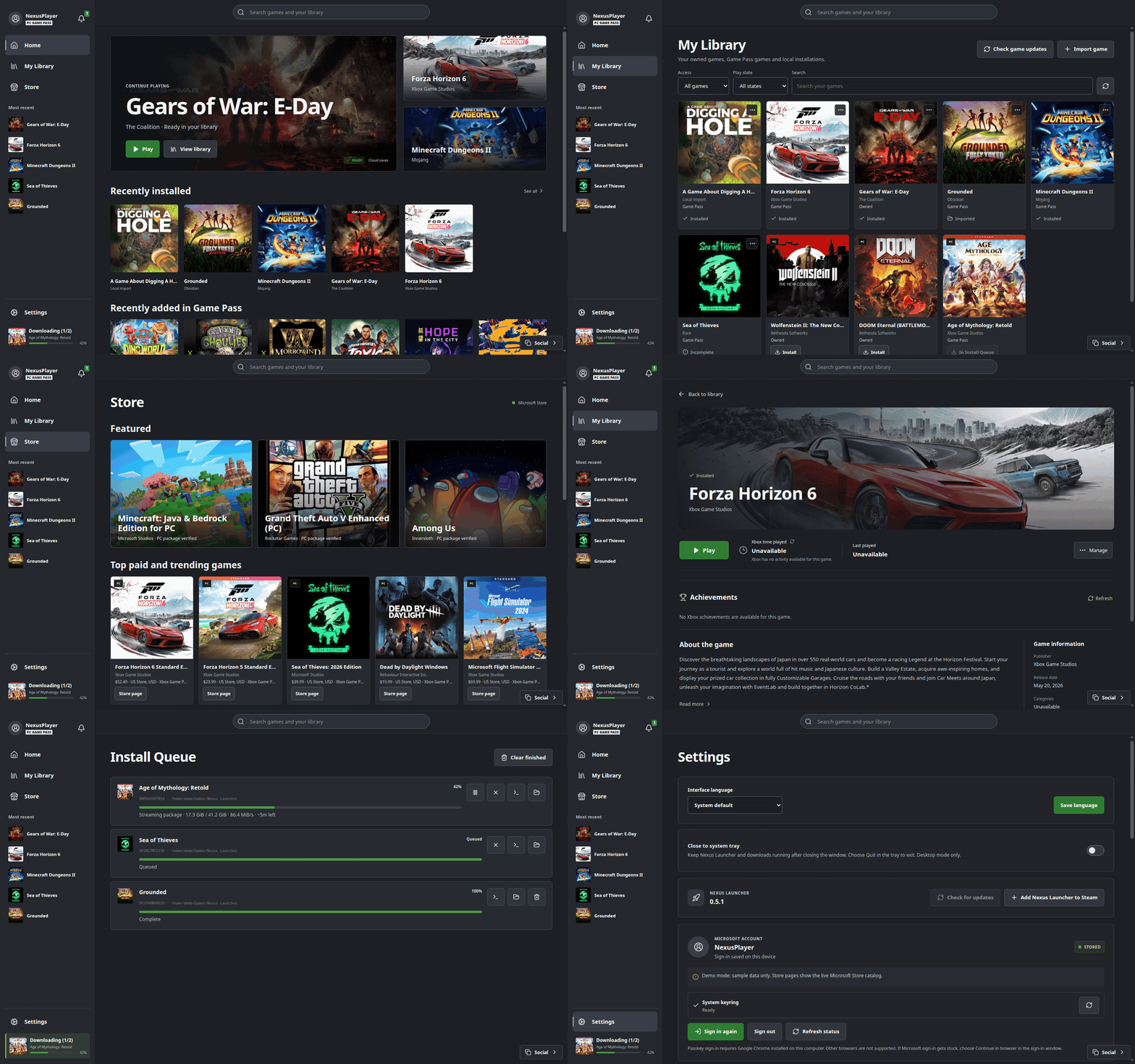
Preview with sample account data.
Help make Nexus Launcher available in your language. Open our
public Tolgee project, sign in and suggest
translations for the launcher interface. No coding or GitHub access is needed.
Maintainers review suggestions before including them in a release. Missing a
language? Request it in a GitHub issue.
Start translating → ·
Translation guide
Install
Download the latest Linux AppImage from Releases, make it executable and open it. Release assets are named Nexus-Launcher-<version>-<arch>.AppImage with a matching .sha512sum sidecar. Existing Xodus-Nexus-... release assets remain available for existing installations. Launcher versions before 0.5 only recognize the older asset names for in-app updates; use the installer or download the latest AppImage once, then later versions update in place. Stable releases currently ship for x86_64. Experimental ARM64 support requires matching native launcher, backend and runtime builds, compatible graphics drivers and FEX for x86 Windows games.
The current x86_64 runtime requires glibc 2.38 or newer (for example Ubuntu 24.04 or a current SteamOS, Fedora or Arch installation). Ubuntu 22.04 does not meet this requirement.
For an application-menu installation on supported distributions:
curl -fsSL https://raw.githubusercontent.com/domsvoboda/nexus-launcher/main/scripts/install.sh | bash
On first startup, the launcher installs and verifies the Nexus backend in
the background so you can sign in during setup. Install the Nexus Runtime
from Settings before launching games. A valid purchase or subscription is required.
If passkey sign-in gets stuck, choose Continue in browser in the sign-in
window. This option requires Google Chrome, either a native installation or the
Flatpak version available through Discover. Other browsers are not supported.
Setup guide and SteamOS requirements
Uninstall
Close Nexus Launcher and its games, then remove the application-menu installation without sudo:
curl -fsSL https://raw.githubusercontent.com/domsvoboda/nexus-launcher/main/scripts/uninstall.sh | bash
Games, saves, settings, downloaded runtimes, wallet credentials and system packages are kept. Installations made with older Xodus-Nexus-... asset names are removed by the same script.
For a custom installation, use the same XODUS_NEXUS_PREFIX and XDG_DATA_HOME as during installation.
To preview the files, download the script and run bash uninstall.sh --dry-run.
If you only downloaded an AppImage manually, delete that AppImage instead.
Use
- My Library combines owned, Game Pass and installed games, with Access, Play state and title filters.
- In My Library → In Game Pass, choose Recently added to Game Pass to show games in Microsoft's recent PC collection first.
- Open a game for its description, categories, screenshot gallery and available Xbox achievements, time played and last activity. Xbox data depends on the account and game.
- Store lets you browse and install supported PC games.
- New game installations show the estimated download size and free space on the destination drive. The downloader checks exact space requirements.
- Manage content installs licensed add-ons and campaign packages.
- Install Queue downloads games one at a time and lets you add more while downloading or playing another game. Pause and resume are supported, including manual resume after restarting the launcher.
- Cancelling a new installation can keep or delete its partial files. Existing games, updates and DLC keep their files.
- Right-click an installed game for settings, VC++ prerequisites, shortcuts or removal.
- Removing a game can keep its files or permanently delete its installation folder without using Trash. Saves inside that folder are deleted too; saves elsewhere are not affected.
- Game settings offer separate DualSense and DualShock 4 compatibility modes for controller detection. They apply only to the selected game. The DualSense fallback may disable advanced haptics and adaptive triggers.
- Game settings also choose the runtime family for that game. The choice follows the latest installed verified build of the family and keeps the same prefix and saves.
- Choose Add to Steam in the game menu, or Add Nexus Launcher to Steam in Settings, to create a Non-Steam shortcut with available artwork. Steam can stay running, including in Game Mode. Requires native Linux Steam; Flatpak Steam is not yet supported.
- Update the launcher, backend and each installed runtime family in Settings.
- Settings → Close to system tray keeps the launcher and downloads running after closing its window. Use the tray menu to reopen Nexus Launcher or quit. Requires a desktop system tray.
- Settings → Interface language selects a bundled translation independently of game language and Store region. Missing translations fall back to English.
- Settings → Downloads sets a combined game download speed limit in MiB/s (0 means unlimited). A supporting Nexus backend is required; saving the limit also applies it to active downloads.
- Settings → Shader cache sets the per-game Mesa/NVIDIA driver cache limit, 4 GiB by default. Changes apply on the next game launch; explicit environment overrides take precedence.
- For account, library or installation errors, use Settings → Nexus backend → Open backend diagnostic log. The local log contains safe error codes and operation results, not credentials. Review it before sharing.
In-game overlay
Enable Settings → Nexus Overlay to open friends, chats and party controls
while playing. Record a shortcut, choose the screen edge and save the settings.
The overlay requires Python 3, PyGObject, GTK 3 and WebKitGTK 4.1. Your desktop
may ask you to approve the shortcut on Wayland; fullscreen and monitor detection
depend on the desktop. The overlay is optional and disabled by default.
Offline play
Use Settings → Offline permissions while online to designate this PC for
offline play. Microsoft allows only one offline PC per account; changing it
removes the designation from the previous device and is subject to the limit
shown before confirmation. Launch each game online once afterwards. Supported
games can then start without a connection while their Microsoft-issued lease
remains valid. A compatible backend and runtime are required; online-only games
still need their servers. See Xbox offline-play guidance.
Wallet setup and unlocking
- If the service is stopped, use Start service. Supported KDE wallets should also start automatically when Nexus Launcher opens in Game Mode.
- If your wallet has a password, its native unlock window may appear. Enter your wallet password, which is not necessarily your Microsoft account password. Nexus Launcher does not receive this password.
- A wallet without a password should unlock without requiring password entry.
- If no wallet exists, use Create wallet and complete the system dialog. On KDE, choose Classic, blowfish encrypted file for a normal password-based wallet if you do not have a GPG encryption key. An empty password does not protect stored credentials.
- If setup or the password dialog does not work in Game Mode, try it in Desktop Mode first. If the problem persists, include the backend diagnostic log in your issue report.
Microsoft Store device limit
Microsoft Store supports up to 10 linked devices. If downloading or launching a
game fails with Microsoft Store device limit reached (licensing code 501),
open Microsoft Store device management
and sign in with the same Microsoft account. Unlink only an old device you no
longer use, then retry in Nexus Launcher. You do not need to sign out or reset the wallet.
Other license errors can have different causes.
Documentation ·
Report an issue
How it works
| Component |
Role |
| Nexus Launcher |
The desktop interface for the Store, library, downloads, settings and launching games. |
| Nexus backend |
Our patched build of Xodus, handling Microsoft account sign-in, genuine license checks, package downloads and launch preparation. |
| Nexus Runtime |
Our fork of Valve's Proton Experimental, assembling Wine, XGameRuntime, graphics translation and supporting libraries into one complete runtime. |
| Nexus Wine |
The matching Wine fork, providing Windows API compatibility and Nexus game fixes. |
| Nexus XGameRuntime |
Our fork of the upstream C++ XGameRuntime, providing game-facing account, cloud-save, package and Store/DLC interfaces. API coverage varies by game. |
The launcher asks the backend to prepare a licensed game, then starts it with
the selected Nexus Runtime family. Wine provides Windows compatibility; XGameRuntime
connects supported Xbox and Microsoft Store game APIs to the Nexus backend.
DXVK and VKD3D-Proton translate supported Direct3D graphics to Vulkan.
Install and update the Standard and optional CachyOS runtime families
independently in Settings. Each family bundles Wine and XGameRuntime at
matching revisions, so there is no need to install the individual forks
separately. Games choose an installed family in their own settings; an
unconfigured game uses Standard. Installed families follow their latest
verified build and reuse the existing prefix and saves. Compatibility and
online services still depend on the game.
Compatible games
These results come from manual testing and user reports. Other games may work,
but have not been verified and may encounter compatibility issues.
| Game |
Playable |
Status |
| Persona 3 Reload |
Yes |
Gameplay, network features and cloud saves work; expansion pass not recognized. (user report) |
| Forza Motorsport |
Partial |
Unreleased runtime: intro completed. Online play unverified. |
| Age of Empires II: Definitive Edition |
Yes |
Unreleased runtime: single-player works; CachyOS startup verified. Dynasties of India: Bengalis selectable. Online play unverified. |
| Age of Empires III: Definitive Edition |
Yes |
Unreleased runtime: works. Online play unverified. |
| Age of Empires: Definitive Edition |
Partial |
Unreleased runtime: menu and sign-in work; Multiplayer and LAN menus enabled. Gameplay unverified. |
| Age of Empires IV |
Startup verified |
Unreleased runtime: starts successfully; online play unverified. |
| Batman: Arkham Knight |
Yes |
Works with Standard and CachyOS runtimes. |
| Gears of War: E-Day |
Yes |
Playable online; Xbox playing status works. |
| Deep Rock Galactic |
Yes |
Playable online. |
| Minecraft Dungeons |
Yes |
Playable online with launcher 0.3.5; ownership failures also reported on other setups. |
| Minecraft Dungeons II |
Yes |
Playable online. |
| Minecraft for Windows |
Yes |
Playable online. For licensing code 501, check the Store device limit. |
| Minecraft Launcher |
Yes |
Sign-in and Java download/startup work with launcher 0.3.5; Java online unverified. Login failure also reported on another setup. |
| No Man's Sky |
Yes |
Playable online. |
| Valor Mortis |
Yes |
Fully playable. |
| Forza Horizon 6 |
Yes |
Playable online; some setups need VC++ prerequisites. Loading failures also reported. |
| Palworld |
Yes |
Playable online. |
| DOOM Eternal |
Yes |
Playable. |
| Microsoft Flight Simulator 2024 |
Partial |
Unreleased runtime: sign-in and main menu verified. Multiplayer unverified. |
| Microsoft Flight Simulator (2020) |
Startup verified |
Unreleased runtime: reaches Installation Manager. Content download and flights unverified. |
| SnowRunner |
Yes |
Unreleased runtime: works. Multiplayer and DLC unverified. |
| Ori and the Will of the Wisps |
Partial |
Unreleased Experimental runtime: sign-in and main menu work; gameplay unverified. |
| Like a Dragon: Infinite Wealth |
Partial |
Unreleased Experimental runtime: main menu works; gameplay unverified. |
| DOOM: The Dark Ages |
Yes |
Playable (user report). |
| Fallout 76 |
Yes |
Playable online; one reported setup requires gamescope to display correctly. |
| The Outer Worlds 2 |
Yes |
Playable. |
| Wolfenstein: The Old Blood |
Yes |
Playable. |
| Wasteland Remastered |
Yes |
Playable. |
| Danganronpa 2 |
Yes |
Playable. |
| Neon Abyss 2 |
Yes |
Playable. |
| Hollow Knight: Voidheart Edition |
Yes |
Playable. |
| Avowed |
Yes |
Playable. |
| Mortal Shell: Enhanced Edition |
Yes |
Playable (user report). |
| Sea of Thieves |
Yes |
Playable online. |
| Tony Hawk's Pro Skater 3 + 4 |
Partial |
Solo playable; Private Match loads a map. Joining other players and public matchmaking remain unconfirmed. (#88) |
| ARC Raiders |
No |
Launches but cannot connect to online services. (user report) |
| Hogwarts Legacy |
Yes |
Playable. (user report) |
| Halo Infinite |
Partial |
Unreleased Experimental runtime: main menu and campaign start; multiplayer unavailable (offline). |
| Halo: Campaign Evolved |
Yes |
Playable; may remain running after quitting. (user report) |
| Resonance: A Plague Tale Legacy |
Yes |
Desktop gameplay and Xbox cloud saves work. Steam Deck exit black screen also reported. (desktop report, Steam Deck report) |
| Resident Evil 2 |
Yes |
Playable; may remain running after quitting. (user report) |
| Wreckfest |
Yes |
Playable. (user report) |
| TUNIC |
Yes |
Playable. (user report) |
| Hades |
Yes |
Playable. (user report) |
| Hell Let Loose: Vietnam |
No |
Crashes after Easy Anti-Cheat initialization on Arch Linux with an Arc A770. (user report) |
| Human: Fall Flat |
Partial |
Public online game search fails. (user report) |
| Wolfenstein II: The New Colossus |
Yes |
Playable. (user report) |
| The Dungeon of Naheulbeuk: The Amulet of Chaos |
Yes |
Playable. (user report) |
| Soul Hackers 2 |
Yes |
Playable with launcher 0.3.8 (user report, #166). |
| Monster Boy and the Cursed Kingdom |
Yes |
Playable. (user report) |
| Hollow Knight: Silksong |
Yes |
Playable. (user report) |
| Teenage Mutant Ninja Turtles: Shredder's Revenge |
Yes |
Playable. (user report) |
| DRAGON QUEST XI S: Echoes of an Elusive Age - Definitive Edition |
No |
Crashes after the first loading screen. (user report) |
| ACA NEOGEO METAL SLUG |
No |
Crashes at launch. (user report) |
| SIGNALIS |
Yes |
Playable. (user report) |
| DREDGE |
Yes |
Playable. (user report) |
| Warhammer 40,000: Space Marine 2 |
Yes |
Playable; online unverified. (user report) |
| Indiana Jones and the Great Circle |
Yes |
First mission playable. (#78) |
| Microsoft Jewel |
No |
Crashes at launch. (user report) |
| Microsoft Bubble |
No |
Crashes at launch. (user report) |
| AI: THE SOMNIUM FILES - nirvanA Initiative |
Yes |
Playable; Store ID detection issue reported. (user report) |
| Minecraft Legends |
Yes |
Playable; an online session starts, but play with friends is unverified. (user report) |
| The Elder Scrolls: Arena |
No |
Crashes at launch. (user report) |
| The Elder Scrolls II: Daggerfall |
No |
Crashes at launch. (user report) |
| Wolfenstein: Enemy Territory |
Partial |
Playable, but cannot join PunkBuster-enabled servers. (user report) |
| Hell Let Loose |
No |
Crashes at startup. (user report) |
| Kingdom Come: Deliverance II |
Yes |
Playable. (#112) |
| PAC-MAN MUSEUM+ |
No |
Stops after the opening logos. (user report) |
| Farming Simulator 25 |
No |
Startup failure reported; updated runtime retest pending. (user report) |
| PowerWash Simulator 2 |
Yes |
Playable. (#69) |
| Young Souls |
Unverified |
Launches in Steam Deck Desktop Mode; gameplay unverified. (user report) |
| Remnant II |
Unverified |
Starts and exits cleanly; gameplay and online were not detailed. (user report) |
| The Witcher 3 |
No |
Currently crashes on launch. |
| LIMBO |
Yes |
Playable. |
| World War Z |
Partial |
Connects to online services and starts Quick Match search; joining a match is unverified. |
| Balatro |
Yes |
Playable. |
Full compatibility list
User reports describe individual setups, not universal compatibility. The wiki
links to report sources and the community spreadsheet. Launch-only reports do
not confirm gameplay or online support.
Screenshots
Library ·
Store ·
Social ·
Chat ·
Install queue ·
Settings
Independent project, not affiliated with Microsoft or Xbox. A valid game license
is required. Launcher: MIT license. The separate Nexus backend retains
its upstream GPLv3 license and ships with corresponding source.
The Nexus Runtime includes FFmpeg shared libraries under
LGPL 2.1 or later; its corresponding pinned source and build recipe accompany
each runtime release.
Contributing


 Xodus Nexus is an unofficial Xbox-inspired desktop launcher for Linux that lets you browse the Microsoft Store, install Xbox PC games you own or can access via subscription, and play them through a shared, patched runtime.