
The #1 Open Source AI Data Catalog
Enterprise-grade metadata platform enabling discovery, governance, and observability across your entire data ecosystem










Free Cloud Trial •
Quick Start •
Live Demo •
Documentation •
Slack Community •
YouTube
Built with ❤️ by DataHub and LinkedIn
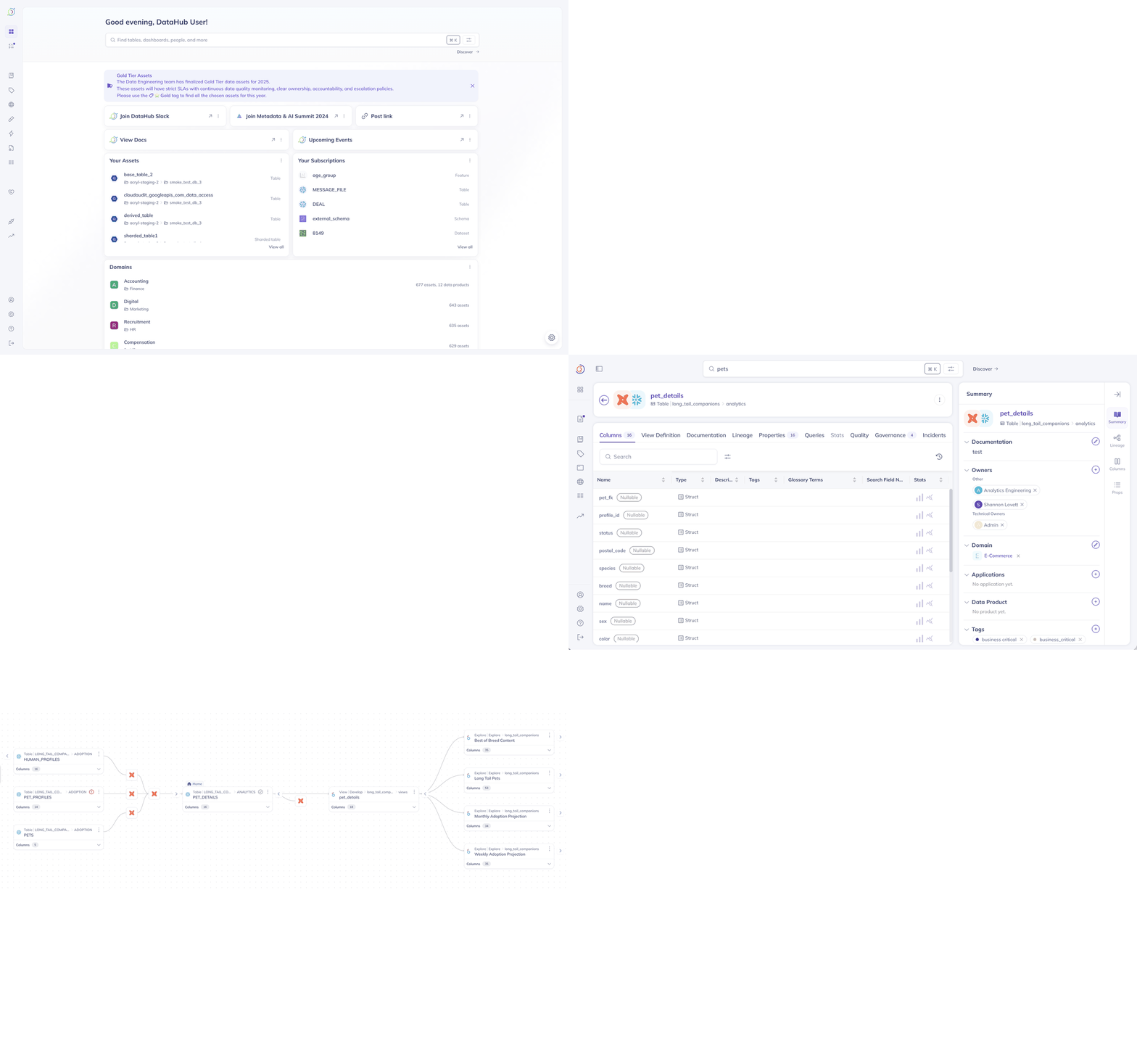
Search, discover, and understand your data with DataHub's unified metadata platform
📊 NEW: Open Source Analytics Agent
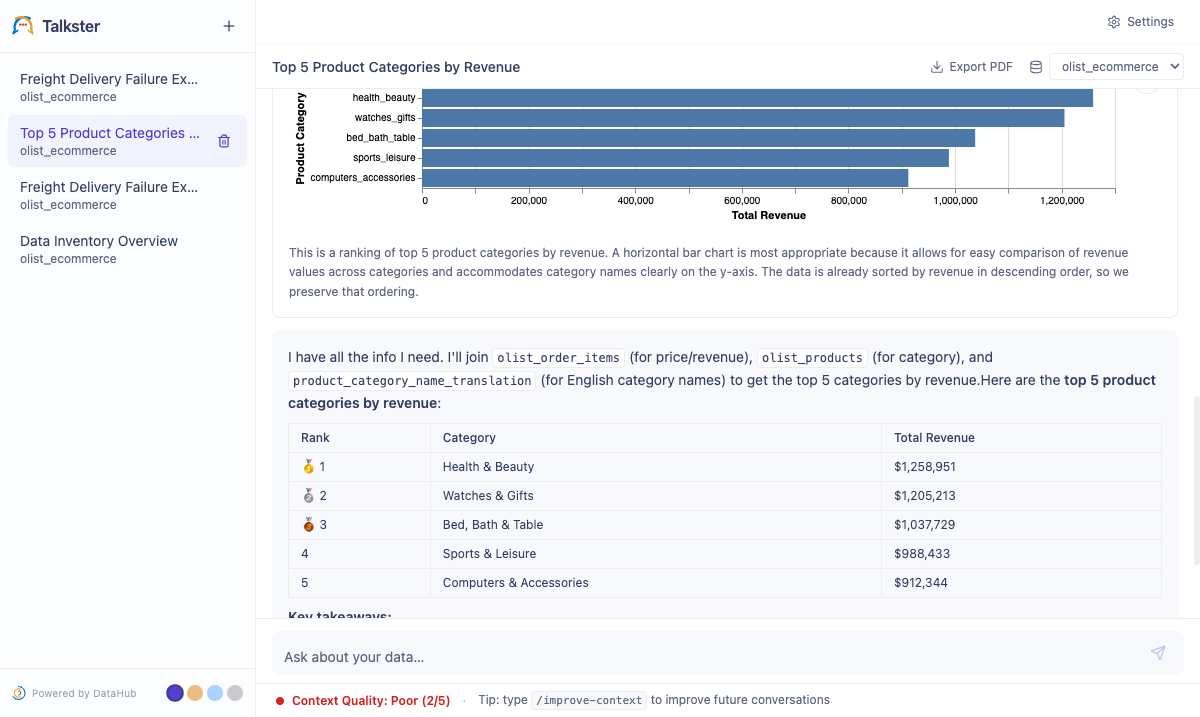
Ask data questions in plain English — get SQL, results, and charts back
Open-source agent grounded in your DataHub catalog. Apache 2.0. Bring your own LLM.
Quick start:
git clone https://github.com/datahub-project/analytics-agent.git
cd analytics-agent && bash quickstart.sh
Read the announcement → · Docs → · Repo →
Using AI coding assistants? Connect Cursor, Claude Desktop, or Cline directly to DataHub via the Model Context Protocol: npx -y @acryldata/mcp-server-datahub init
What is DataHub?
🔍 Finding the right DataHub? This is the open-source metadata platform at datahub.com (GitHub: datahub-project/datahub). It was previously hosted at datahubproject.io, which now redirects to datahub.com. This project is not related to datahub.io, which is a separate public dataset hosting service. See the FAQ below.
DataHub is the #1 open-source AI data catalog that enables discovery, governance, and observability across your entire data ecosystem. Originally built at LinkedIn, DataHub now powers data discovery at thousands of organizations worldwide, managing millions of data assets.
The Challenge: Modern data stacks are fragmented across dozens of tools—warehouses, lakes, BI platforms, ML systems, AI agents, orchestration engines. Finding the right data, understanding its lineage, and ensuring governance is like searching through a maze blindfolded.
The DataHub Solution: DataHub acts as the central nervous system for your data stack—connecting all your tools through real-time streaming or batch ingestion to create a unified metadata graph. Unlike static catalogs, DataHub keeps your metadata fresh and actionable—powering both human teams and AI agents.
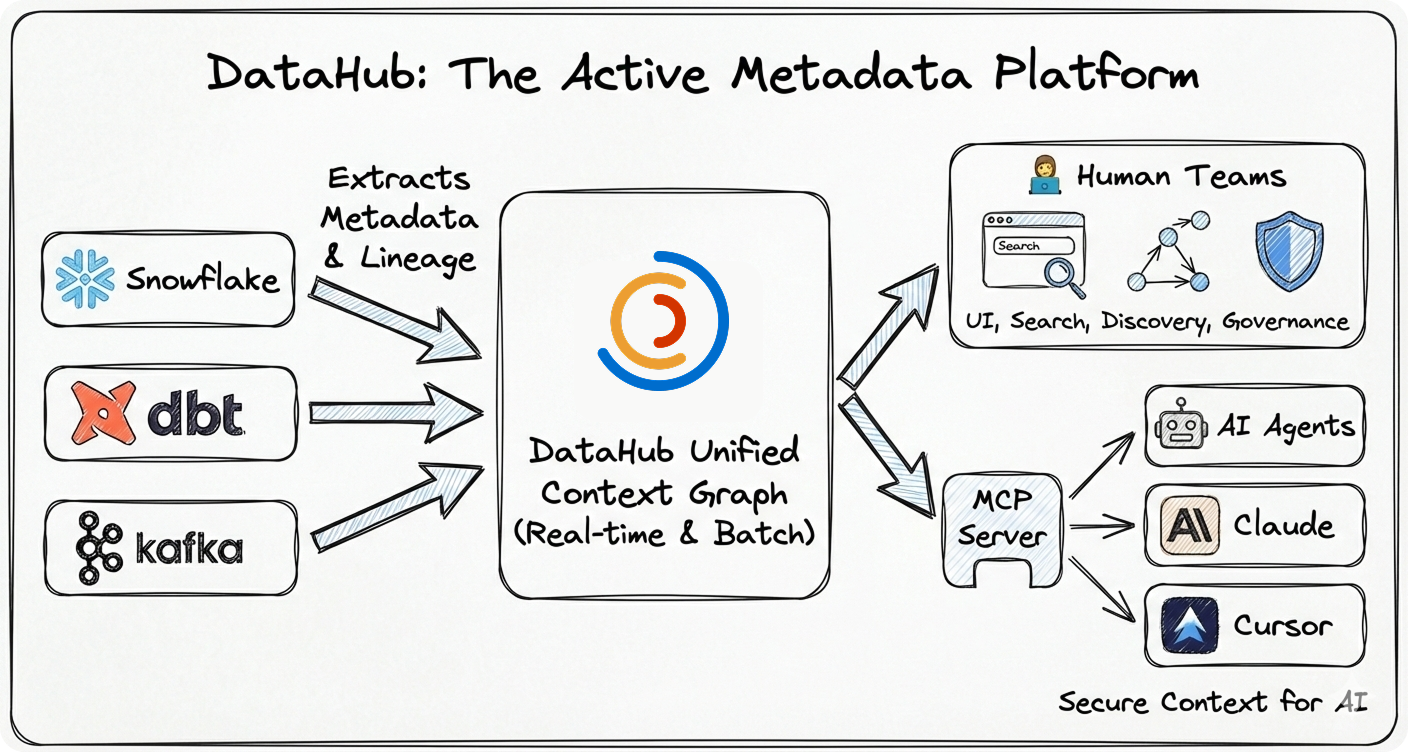
Why DataHub?
- 🚀 Battle-Tested at Scale: Born at LinkedIn to handle hyperscale data, now proven at thousands of organizations worldwide managing millions of data assets
- ⚡ Real-Time Streaming: Metadata updates in seconds, not hours or days
- 🤖 AI-Ready: Native support for AI agents via MCP, LLM integrations, and context management
- 🔌 Pioneering Ingestion Architecture: Flexible push/pull framework (widely adopted by other catalogs) with 80+ production-grade connectors extracting deep metadata—column lineage, usage stats, profiling, and quality metrics
- 👨💻 Developer-First: Rich APIs (GraphQL, OpenAPI), Python + Java SDKs, CLI tools
- 🏢 Enterprise Ready: Battle-tested security, authentication, authorization, and audit trails
- 🌍 Open Source: Apache 2.0 licensed, vendor-neutral, community-driven
🧠 The Context Foundation
Essential for modern data teams and reliable AI agents:
📑 Table of Contents
❓ Frequently Asked Questions
Is this the same project as datahub.io?
No. datahub.io is a completely separate project — a public dataset hosting service with no affiliation to this project. DataHub (this project) is an open-source metadata platform for data discovery, governance, and observability, hosted at datahub.com and developed at github.com/datahub-project/datahub.
What happened to datahubproject.io?
DataHub was previously hosted at datahubproject.io. That domain now redirects to datahub.com. All documentation has moved to docs.datahub.com. If you find references to datahubproject.io in blog posts or tutorials, they refer to this same project — just under its former domain.
Is DataHub related to LinkedIn's internal DataHub?
Yes. DataHub was originally built at LinkedIn to manage metadata at scale across their data ecosystem. LinkedIn open-sourced DataHub in 2020. It has since grown into an independent community project under the datahub-project GitHub organization, now hosted at datahub.com.
How do I install the DataHub metadata platform?
# macOS / Linux (simplest)
brew install datahub-project/tap/datahub

# Or via pip (any platform)
pip install acryl-datahub

datahub docker quickstart
See the Quick Start section below for full instructions. The PyPI package is acryl-datahub; the Homebrew tap is datahub-project/homebrew-tap.
🎨 See DataHub in Action
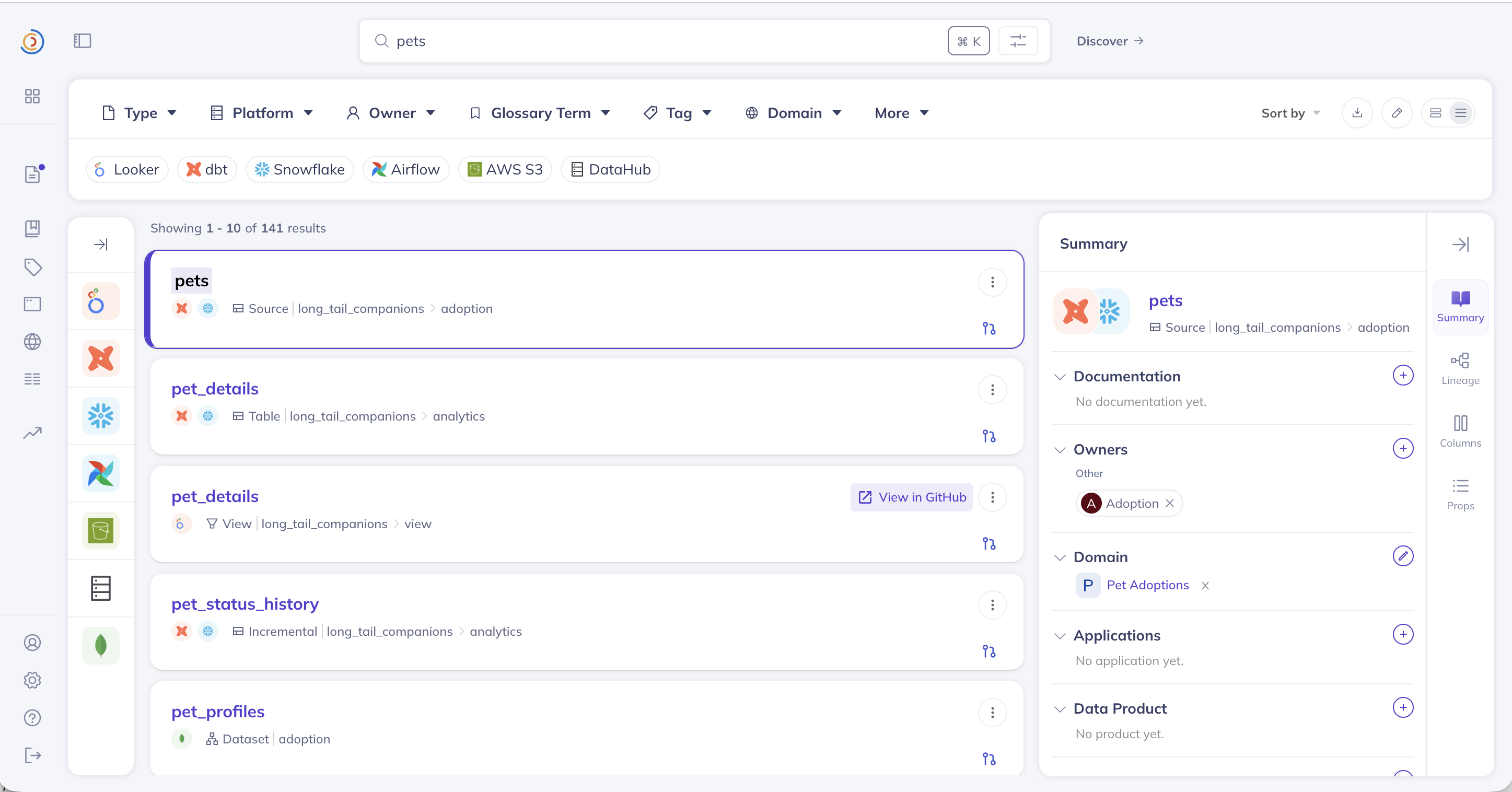
🔍 Universal Search
Find any data asset instantly across your entire stack
|
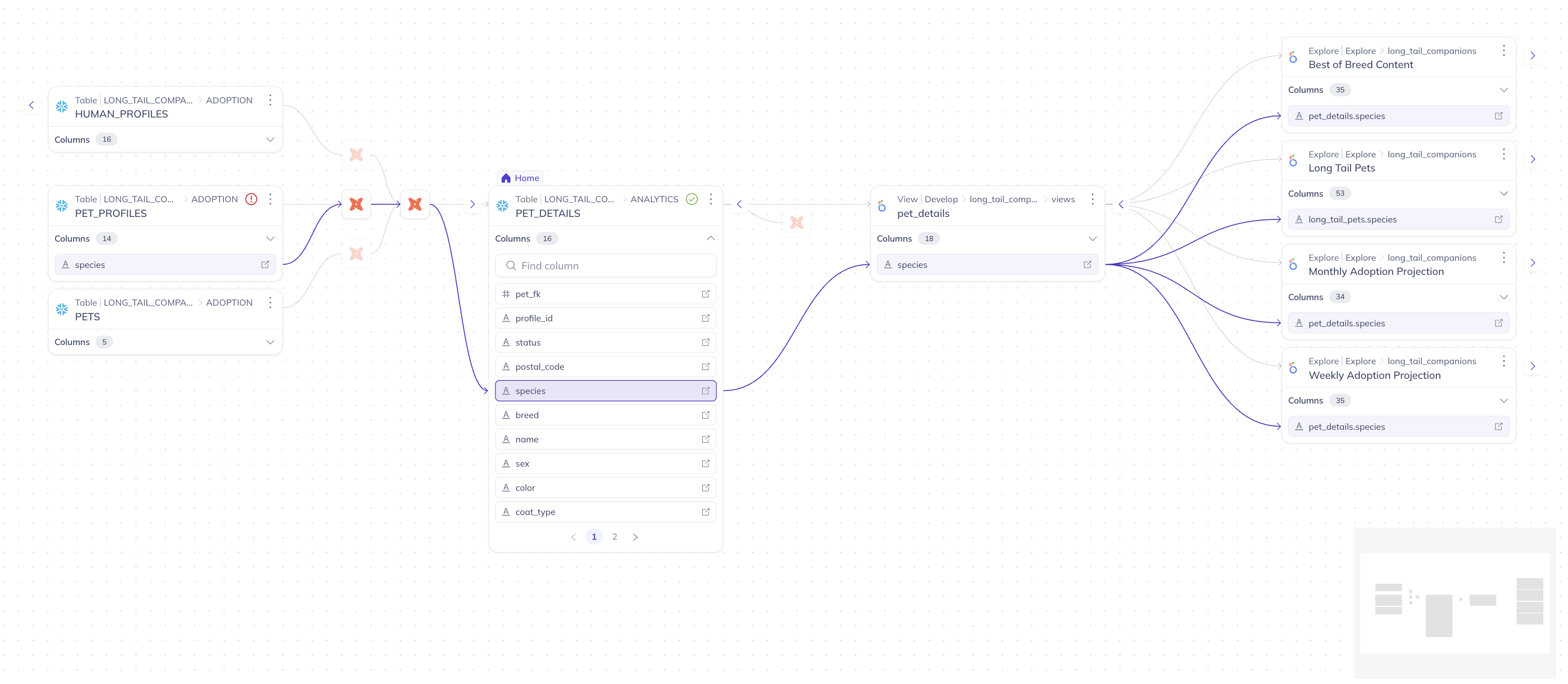
📊 Column-Level Lineage
Trace data flow from source to consumption
|
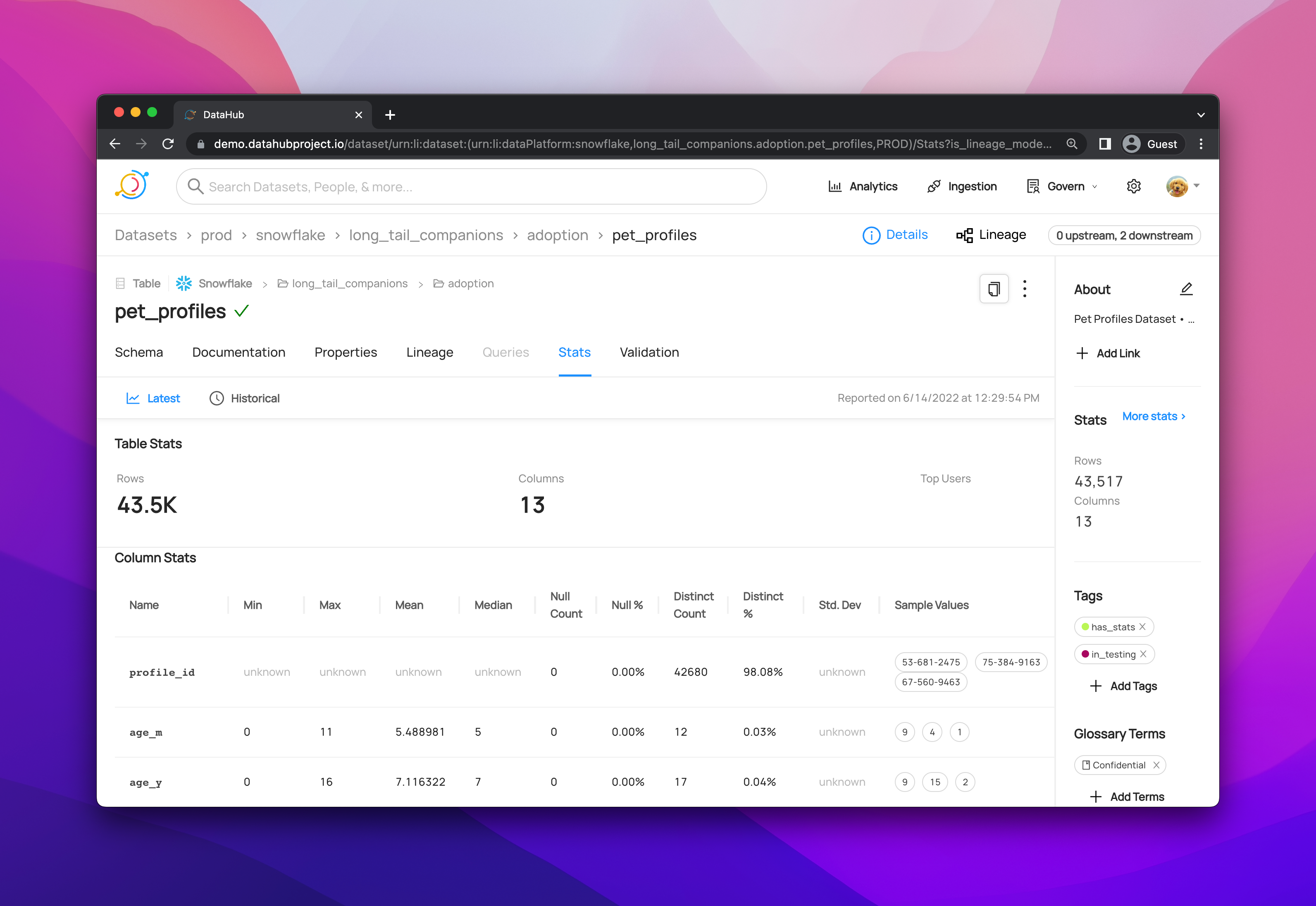
📋 Rich Dataset Profiles
Schema, statistics, documentation, and ownership
|
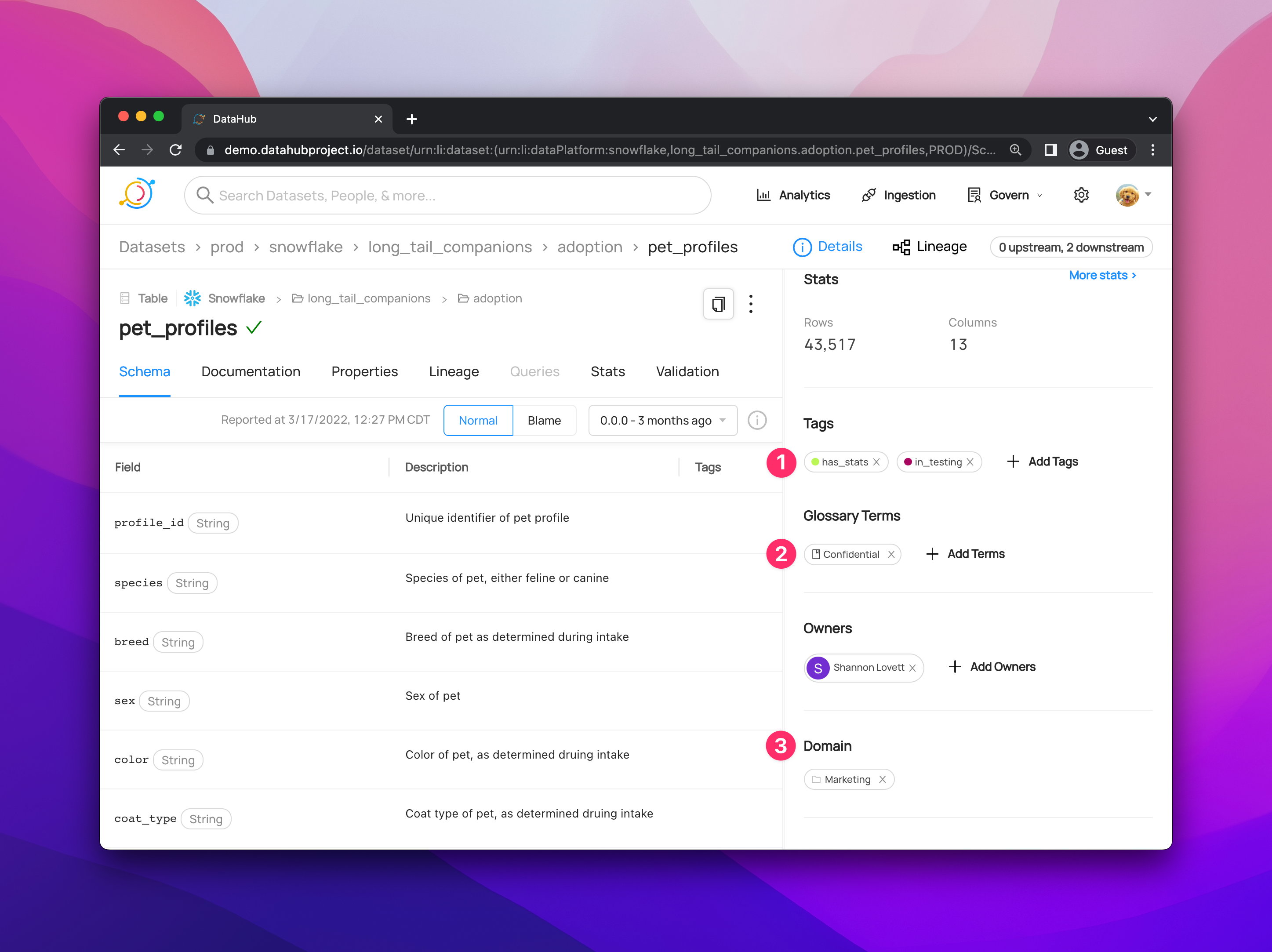
🏛️ Governance Dashboard
Manage policies, tags, and compliance
|
▶️ Watch DataHub in Action:
🚀 Quick Start
Option 1: Try the Hosted Demo (Fastest)
No installation required. Explore a fully-loaded DataHub instance with sample data instantly:
🌐 Launch Live Demo: demo.datahub.com
Option 2: Run Locally (Recommended)
Get DataHub running on your machine in under 2 minutes.
Prerequisites: Docker Desktop with 8GB+ RAM allocated.
Install the DataHub CLI using either Homebrew (macOS / Linux) or pip:
# Homebrew (macOS / Linux)
brew install datahub-project/tap/datahub

# Or pip (any platform)
python3 -m pip install --upgrade pip wheel setuptools
python3 -m pip install --upgrade acryl-datahub
Then launch DataHub locally via Docker:
datahub docker quickstart

# Access DataHub at http://localhost:9002
# Default credentials: datahub / datahub
Note: For pip, you can also use uv or other Python package managers.
What's included:
- ✅ Full Stack: GMS backend, React UI, Elasticsearch, MySQL, and Kafka.
- ✅ Sample Data: Pre-loaded datasets, lineage, and owners for exploration.
- ✅ Ingestion Ready: Fully prepared to connect your own local or cloud data sources.
Option 3: Run from Source (For Contributors)
Best for advanced users who want to modify the core codebase or run directly from the repository:
# Clone the repository
git clone https://github.com/datahub-project/datahub.git
cd datahub

# One-time setup (Python CLI + dev tooling)
scripts/dev/datahub-dev.sh setup

# Start DataHub (Gradle profiles under docker/profiles)
scripts/dev/datahub-dev.sh start

# Access DataHub at http://localhost:9002
# Default credentials: datahub / datahub
Next Steps
📦 Installation Options
DataHub supports three deployment models:
→ See all deployment guides (AWS, Azure, GCP, environment variables)
🏗️ Architecture Overview
- ✅ Streaming-First: Real-time metadata updates via Kafka
- ✅ API-First: All features accessible via APIs
- ✅ Extensible: Plugin architecture for custom entity types
- ✅ Scalable: Proven to 10M+ assets and O(1B) relationships at LinkedIn and other companies in production
- ✅ Cloud-Native: Designed for Kubernetes deployment
→ Full architecture breakdown: components, storage layer, APIs, and design decisions
💻 Use Cases & Examples
Example 1: Ingest Metadata from Snowflake
Use Case: Extract table metadata, column schemas, and usage statistics from Snowflake data warehouse.
Prerequisites:
- DataHub instance running (local or remote)
- Snowflake account with read permissions
- DataHub CLI installed (
pip install 'acryl-datahub[snowflake]')
# snowflake_recipe.yml
source:
  type: snowflake
  config:
    # Connection details
    account_id: "xy12345.us-east-1"
    warehouse: "COMPUTE_WH"
    username: "${SNOWFLAKE_USER}"
    password: "${SNOWFLAKE_PASSWORD}"

    # Optional: Filter specific databases
    database_pattern:
      allow:
        - "ANALYTICS_DB"
        - "MARKETING_DB"

sink:
  type: datahub-rest
  config:
    server: "http://localhost:8080"
# Run ingestion
datahub ingest -c snowflake_recipe.yml

# Expected output:
# ✓ Connecting to Snowflake...
# ✓ Discovered 150 tables in ANALYTICS_DB
# ✓ Discovered 75 tables in MARKETING_DB
# ✓ Ingesting metadata...
# ✓ Successfully ingested 225 datasets to DataHub
What gets ingested:
- Table and view schemas (columns, data types, descriptions)
- Table statistics (row counts, size, last modified)
- Lineage information (upstream/downstream tables)
- Usage statistics (query frequency, top users)
Example 2: Search for Datasets via Python SDK
Use Case: Programmatically search DataHub catalog and retrieve dataset metadata.
Prerequisites:
- DataHub instance accessible
- Python 3.8+ installed
- DataHub Python package installed (
pip install 'acryl-datahub[datahub-rest]')
from datahub.ingestion.graph.client import DatahubClientConfig, DataHubGraph

# Initialize DataHub client
config = DatahubClientConfig(server="http://localhost:8080")
graph = DataHubGraph(config)

# Search for datasets containing "customer"
urns = graph.get_urns_by_filter(
    entity_types=["dataset"],
    query="customer",
)

for urn in urns:
    print(f"Found: {urn}")

# Example output:
# Found: urn:li:dataset:(urn:li:dataPlatform:snowflake,analytics.customer_profiles,PROD)
# Found: urn:li:dataset:(urn:li:dataPlatform:bigquery,marketing.customer_segments,PROD)
Response format: Each result is a URN string uniquely identifying the dataset. Use the URN to fetch full metadata via the GraphQL or REST API.
Example 3: Query Lineage via GraphQL
Use Case: Retrieve upstream and downstream dependencies for a specific dataset.
Prerequisites:
- DataHub GMS endpoint accessible
- Dataset URN available from search or ingestion
GraphQL Query:
query GetLineage {
  dataset(
    urn: "urn:li:dataset:(urn:li:dataPlatform:snowflake,analytics.customer_profiles,PROD)"
  ) {
    # Get upstream dependencies (source tables)
    upstream: lineage(input: { direction: UPSTREAM }) {
      entities {
        urn
        ... on Dataset {
          name
          platform {
            name
          }
        }
      }
    }

    # Get downstream dependencies (consuming tables/dashboards)
    downstream: lineage(input: { direction: DOWNSTREAM }) {
      entities {
        urn
        type
        ... on Dataset {
          name
          platform {
            name
          }
        }
        ... on Dashboard {
          dashboardId
          tool
        }
      }
    }
  }
}
Execute via cURL:
curl -X POST http://localhost:8080/api/graphql \
  -H "Content-Type: application/json" \
  -d '{"query": "query GetLineage { ... }"}'
Response structure:
upstream: Array of datasets that feed into this datasetdownstream: Array of datasets, dashboards, or ML models that consume this dataset- Each entity includes URN, type, and basic metadata
Example 4: Add Documentation via Python API
Use Case: Programmatically add or update dataset documentation and custom properties.
Prerequisites:
- DataHub Python SDK installed
- Write permissions to DataHub instance
- Dataset already exists in DataHub (from ingestion)
from datahub.metadata.schema_classes import DatasetPropertiesClass
from datahub.emitter.mce_builder import make_dataset_urn
from datahub.emitter.rest_emitter import DatahubRestEmitter

# Create emitter to send metadata to DataHub
emitter = DatahubRestEmitter("http://localhost:8080")

# Create dataset URN (unique identifier)
dataset_urn = make_dataset_urn(
    platform="snowflake",
    name="analytics.customer_profiles",
    env="PROD"
)

# Define dataset properties
properties = DatasetPropertiesClass(
    description="""
    Customer profiles aggregated from CRM and transaction data.

    **Update Schedule:** Updated nightly via Airflow DAG `customer_profile_etl`
    **Data Retention:** 7 years for compliance
    **Owner:** Data Platform Team
    """,
    customProperties={
        "owner_team": "data-platform",
        "update_frequency": "daily",
        "data_sensitivity": "PII",
        "upstream_dag": "customer_profile_etl",
        "business_domain": "customer_analytics"
    }
)

# Emit

 DataHub is an open-source metadata platform that lets you discover, understand, and govern data across your entire data stack, connecting warehouses, lakes, BI tools, and AI agents into one unified metadata graph.