Goshen Email
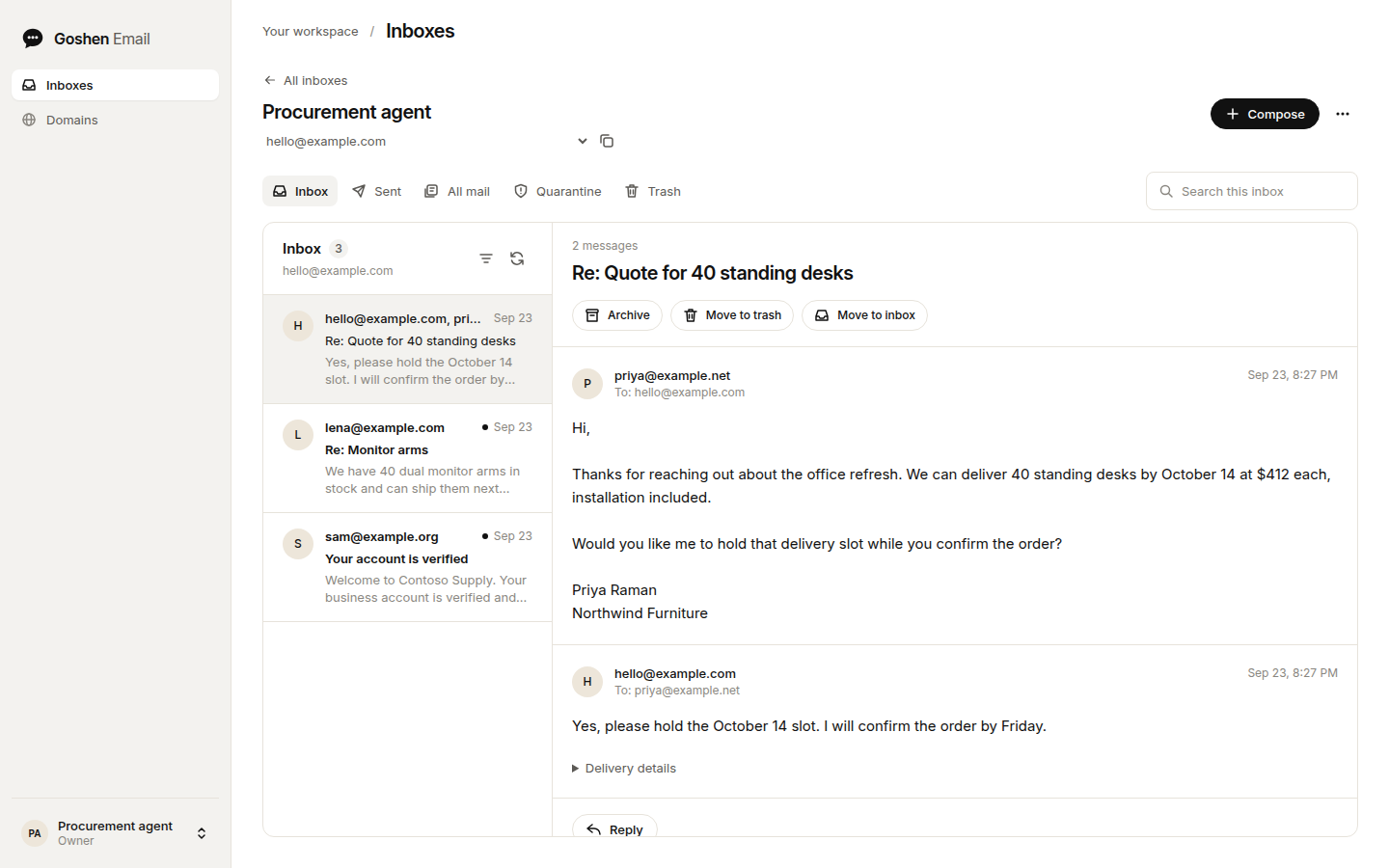
Email inboxes for AI agents. Each agent gets a real address, threads,
attachments, and an API key that reaches only its own mail. People see the same
mail in a dashboard, where they can reply, check delivery, and release
quarantined messages.
Hosted service ·
Documentation ·
API reference ·
Contributing ·
License
What it does
- One API call creates an inbox. Inboxes send, receive, and reply, and replies
stay threaded with the original conversation.
- The REST API has 17 operations, described in an
OpenAPI document. A JSON CLI and an MCP server (hosted
or stdio) expose the same 17 operations. There is no SDK; call the REST API
from any language.
- An account key reaches every inbox in its account, limited to the scopes you
pick. A mailbox key reaches one inbox. No key can release quarantine or
create other keys.
- Every send needs an idempotency key. Retrying a timed-out send with the same
key and contents never sends a second copy.
- Mail on custom domains arrives through an SMTP gateway that checks SPF, DKIM,
and DMARC and scans with Rspamd and ClamAV. Spam, failed authentication, and
malware wait in quarantine until a person releases them.
- Signed webhooks report new mail and delivery outcomes: delivered, deferred,
bounced, failed, rejected, and complained.
- Optional triage labels new mail with a category, whether it needs a reply,
and an urgency score.
How it fits together
flowchart LR
  agent["Agent or app"] -->|"API key or MCP"| api["API Worker"]
  person["Person"] --> dashboard["Dashboard"]
  dashboard --> api
  api --> db[("PostgreSQL through Hyperdrive")]
  api --> r2[("R2: raw mail and attachments")]
  api <-->|"managed domains"| cloudflare["Cloudflare Email Routing and Sending"]
  api <-->|"custom domains"| gateway["SMTP gateway: Postfix, Rspamd, ClamAV"]
| Path |
Contents |
apps/email |
The API, a Cloudflare Worker. It stores mailboxes, sends and receives mail, and serves the REST API, the older RPC API, and hosted MCP. |
apps/email-dashboard |
The dashboard, homepage, and docs site. It runs as a Cloudflare Worker, or as a Node server for local or VPS hosting. |
apps/email-web |
A redesigned dashboard on Pluto's design system. It calls the dashboard's /api routes, holds no credentials, and is not deployed yet. |
apps/email-gateway |
The SMTP gateway for domains at any DNS provider, packaged with Docker. |
packages/email-client |
Private API client shared by the CLI and MCP server. Not published. |
packages/email-cli |
Command-line client that prints JSON. |
packages/email-mcp |
MCP server over stdio. |
ops/email |
The gateway's Docker Compose, Caddy, and Rspamd configuration, plus reviewed SQL for the hosted database. |
ops/autumn |
Plan definitions for hosted billing. |
docs |
Operator guides and the OpenAPI document. |
Try it locally
You need Node.js 24 and pnpm 10.15.1. The local fixture runs the API and the
dashboard against an in-memory PostgreSQL database (PGlite). Routing, domain
checks, sending, and file storage are test doubles, so you need no accounts or
credentials, and no mail leaves your machine.
git clone https://github.com/boringcomputers/goshen-email.git
cd goshen-email
pnpm install --frozen-lockfile
pnpm build
pnpm --filter @bezalel/email exec tsx test/dashboard-fixture.ts
Open http://127.0.0.1:3038/app and sign in with the fixture password,
fixture-dashboard-password-fixture-dashboard-password-. Create an inbox with
the username hello, then deliver a message to it from a second terminal:
curl -X POST http://127.0.0.1:3039/receive \
  -H 'Content-Type: application/json' \
  -d '{"inboxId":"[email protected]","subject":"Hello from the fixture"}'
The message appears in the inbox. Mail you send or reply with from the
dashboard stays inside the fixture; curl http://127.0.0.1:3039/sends lists it.
The fixture listens on loopback only. Don't deploy it.
Self-host
Goshen Email runs on Cloudflare. A deployment needs:
- A Cloudflare account on the Workers Paid plan, with Email Sending and Email
Routing set up for your domain.
- A PostgreSQL database that Cloudflare Hyperdrive can reach. The guide uses
PlanetScale.
- An R2 bucket, plus a delivery queue and its dead-letter queue.
- For customer domains at other DNS providers, a server that allows SMTP on
port 25.
apps/email/wrangler.jsonc and apps/email-dashboard/wrangler.jsonc contain
the hosted service's account ID, resource IDs, routes, and domains. Replace
them with your own before you deploy. The Worker guide
lists the API Worker's settings. In the dashboard's file:
- Point the
MAIL_API service binding at your API Worker's name, and set
MAIL_WORKER_URL to that Worker's HTTPS origin.
- Set
DASHBOARD_PUBLIC_URL and routes to your dashboard's domain.
- Remove the
NATIVE_MAIL_API service binding and the NATIVE_MAIL_*
variables. They connect the hosted dashboard to a separate Bezalel
deployment.
- Set up the API Worker with the Worker guide. It
covers the Cloudflare account, secrets, R2, and queues.
- Create the database and connect Hyperdrive with the
database guide. Put a direct connection string in
apps/email/.env as DATABASE_URL and run pnpm migrate. It applies the
full schema and is safe to rerun on upgrades.
- Pick a dashboard. The Cloudflare Worker dashboard supports public
passwordless accounts; follow the account guide. The
Node dashboard below uses one shared owner password and can see every inbox,
so use it only for a single operator.
- For customer domains, deploy the SMTP gateway with its
runbook.
- Deploy with
pnpm deploy:worker, then pnpm deploy:dashboard. Deploy the
API first, because a newer dashboard calls operations an older API rejects.
Triage needs a TypeSafe API key.
Billing uses Autumn and Stripe; without AUTUMN_SECRET_KEY
the API runs unmetered.
The CI workflow in this repository deploys the hosted service when a commit
lands on main. In a fork, remove the deploy job from
.github/workflows/ci.yml or point it at your own Cloudflare secrets.
Run the Node dashboard
cp apps/email-dashboard/.env.example apps/email-dashboard/.env
openssl rand -hex 32
Save the generated value as DASHBOARD_PASSWORD. Set MAIL_WORKER_URL to your
API Worker's HTTPS origin and MAIL_API_TOKEN to its platform token. Don't
reuse the token as the password.
pnpm build
pnpm start
Open http://127.0.0.1:3031/app. The Worker token stays on the dashboard
server. Sessions expire after eight hours, signing out revokes them, and a
restart signs everyone out.
To serve it remotely, put it behind an HTTPS reverse proxy that preserves the
Host header, and set DASHBOARD_PUBLIC_URL to the exact public origin. Set
HOST=0.0.0.0 if the proxy runs outside the dashboard's container. List the
proxy's IP addresses in DASHBOARD_TRUSTED_PROXY_IPS and have the proxy
overwrite X-Real-IP with the client's IP, so login throttling applies per
client. Requests from a trusted proxy without a valid X-Real-IP can't sign in.
Use the API
Create a key under API keys in the dashboard, then:
export GOSHENEMAIL_BASE_URL="https://api.goshenemail.com"   # or your own API Worker
export GOSHENEMAIL_API_KEY="bze_..."

curl "$GOSHENEMAIL_BASE_URL/v1/inboxes" \
  -H "Authorization: Bearer $GOSHENEMAIL_API_KEY" \
  -H 'Content-Type: application/json' \
  -d '{"username":"research","displayName":"Research agent"}'
The quickstart continues with
sending and reading replies. The developer guide covers
the CLI and MCP. The CLI and the stdio MCP server aren't on npm yet, so build
them from this checkout.
The project started inside Bezalel. The internal workspace packages
(@bezalel/email, @bezalel/email-dashboard, @bezalel/email-gateway) and the
account key prefix bze_ keep names from that time.
Development
| Command |
What it does |
pnpm build |
Builds every package. The Workers build with Wrangler dry runs, so nothing deploys. |
pnpm check |
Type-checks the workspace and fails if generated API files or docs are stale. |
pnpm test |
Runs every package's tests on PGlite with test doubles for Cloudflare, R2, and SMTP. |
pnpm test:postgres |
Runs the API tests through the production PostgreSQL driver. Needs TEST_DATABASE_URL; see the database guide. |
pnpm source:check |
Checks files extracted from Bezalel against the hashes in SOURCE.json. |
pnpm api:generate |
Regenerates the OpenAPI document, client types, and CLI and MCP schemas after a contract change. |
pnpm docs:generate |
Rebuilds the docs site from apps/email-dashboard/docs/ and the OpenAPI document. |
pnpm dev |
Starts the Node dashboard with file watching on port 3031. |
pnpm dev:worker |
Starts the API Worker locally on port 8788. It needs a local PostgreSQL database. |
Local tests can't prove live delivery, DNS, Cloudflare routing, Hyperdrive, R2,
queues, or cron. The SMTP runbook's deployment canary checks those against a
real deployment.
Documentation
The public docs at goshenemail.com/docs cover
the API from an agent developer's side. The guides here cover running it.
| Guide |
Covers |
| Worker setup |
Cloudflare setup, secrets, delivery tracking, suppression, quarantine, and failure handling |
| Database |
PostgreSQL, Hyperdrive, migrations, and local databases |
| SMTP gateway |
Customer domains, Postfix, Rspamd, ClamAV, TLS, and deployment canaries |
| Accounts |
Passwordless sign-up and sign-in |
| Cloudflare Access |
Optional invitation-only sign-in |
| Developer tools |
API keys, REST, CLI, and MCP |
| RPC API |
The older RPC interface, mailbox provisioning, and webhooks |
| Inbox setup |
The first-inbox flow for new accounts |
| Settings |
Organization, profile, and notification settings |
| Triage |
Categories, needs-reply, urgency, and what data leaves the Worker |
| Pricing |
Hosted plans and Autumn billing |
| Dashboard UX and design system |
Dashboard behavior and visual tokens |
| Web app |
The Pluto-design dashboard: local runs, checks, and rollout |
The native-*, verification, and evidence files in docs/ record the
hosted deployment's releases and the original extraction.
Where it came from
Goshen Email began as the email service inside Bezalel, a private Boring
Computers project. SOURCE.md records the extracted revision and
how fixes move between the two projects.
Contributing and security
Read CONTRIBUTING.md before opening a pull request. Report
vulnerabilities privately as described in SECURITY.md, never in
a public issue. Everyone taking part follows the
code of conduct.
License
Goshen Email uses the
Functional Source License 1.1 with an Apache 2.0 future license,
FSL-1.1-ALv2. You can use, modify, and self-host it for any purpose, including
inside a business. You can't offer it, or anything built from it, in a
commercial product or service that competes with Goshen Email. Each release
becomes available under Apache 2.0 two years after we publish it.
We published earlier commits under AGPL-3.0-only, and copies taken from them
keep that license.

 Goshen Email 为 AI 智能体提供真实的电子邮件收件箱,每个收件箱都有自己的地址、会话线程、附件和作用域受限的 API 密钥;同时还有一个面向人的仪表板,让人可以阅读同样的邮件、回复并放行被隔离的邮件。