QuantDinger can submit real orders when live trading is explicitly enabled.
Start with paper trading, use restricted API keys, and review the risk and
compliance requirements for your jurisdiction. This project does not provide
investment advice.
What QuantDinger is
QuantDinger is an open-source AI Trading OS for independent traders, Python
strategy authors, and small teams. Its local-first, self-hosted design keeps
market data, strategy code, broker credentials, and deployment under the
operator's control.
The project combines:
multi-provider AI market research and analysis;
Python indicators and Strategy API V2 development;
server-side backtesting and experiment workflows;
paper and live execution across crypto exchanges and traditional brokers;
web, mobile H5, human API, Agent Gateway, and MCP access;
PostgreSQL-backed state, durable workers, audit logs, and optional monitoring.
It is not a black-box signal service. Strategy code, risk settings, credentials,
and deployment remain under the operator's control.
What changed in v5
The v5 backend is organized around explicit runtime and operational boundaries:
the HTTP API no longer owns long-running trading or scheduler loops;
trading, scheduling, Celery jobs, and migrations run as separate processes;
Celery handles finite, retryable work while long-lived strategy runtimes stay
in the trading worker;
cache Redis and durable job Redis use separate instances and eviction policies;
high-risk API contracts are represented in OpenAPI and protected by tests;
JSON logs, request IDs, Prometheus metrics, dashboards, and alert rules are
available through an optional observability overlay;
the production overlay runs backend processes as a non-root user with a
read-only root filesystem, dropped capabilities, and resource limits;
CI checks syntax, lint, tests, release gates, Compose files, dependencies,
source security, secrets, API compatibility, version drift, and text encoding.
The source version is declared in VERSION. Git release tags use the
same semantic version with a leading v, for example v5.0.1.
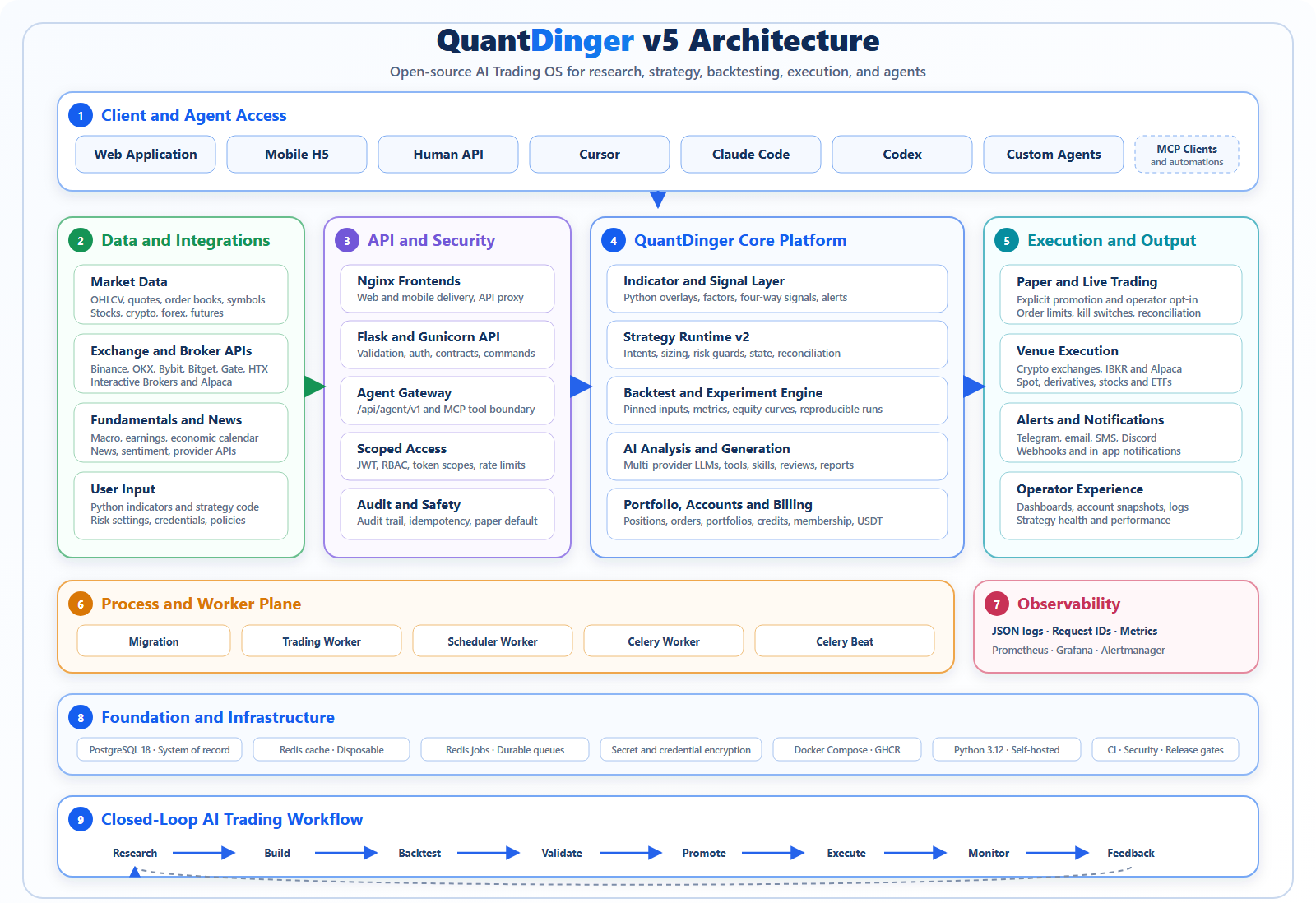
The diagram above shows the complete product and process architecture. The
runtime topology below focuses on container-to-container ownership and data flow.
flowchart TB
    C["Web / Mobile / API / MCP clients"]
    FE["Nginx frontend services"]
    API["Flask + Gunicorn API"]
    PG[("PostgreSQL")]
    CACHE[("Redis cache")]
    JOBS[("Redis jobs")]
    TW["Trading worker"]
    SW["Scheduler worker"]
    CW["Celery worker"]
    BEAT["Celery beat"]
    PROM["Prometheus"]
    GRAF["Grafana"]
    ALERT["Alertmanager"]

    C --> FE --> API
    API --> PG
    API --> CACHE
    API -->|"durable commands"| PG
    TW -->|"leases, orders, heartbeats"| PG
    SW -->|"schedules, monitoring, heartbeats"| PG
    API -->|"finite async jobs"| JOBS
    BEAT --> JOBS --> CW
    CW --> PG
    API -. metrics .-> PROM
    PG -. exporter .-> PROM
    CACHE -. exporter .-> PROM
    JOBS -. exporter .-> PROM
    PROM --> GRAF
    PROM --> ALERT
One backend image is reused by several containers with different commands:
Process
Responsibility
migration
Applies the database schema and exits before application services start.
backend
Handles HTTP, authentication, validation, and durable command submission.
trading-worker
Owns strategy runtimes, pending orders, broker sessions, and reconciliation.
scheduler-worker
Runs portfolio, deployment, payment, and signal schedules.
celery-worker
Executes finite AI, backtest, experiment, report, and maintenance jobs.
On a fresh database, the backend creates the initial administrator from
ADMIN_USER, ADMIN_PASSWORD, and optional ADMIN_EMAIL. Passwords are stored
as hashes, never as plaintext. An existing PostgreSQL volume is not overwritten:
the backend only replaces the untouched legacy quantdinger / 123456
administrator when a non-default administrator is explicitly configured. It
never overwrites an account whose password was already changed, and it refuses
to promote an existing account that already uses the requested username.
Manual Docker deployments retain quantdinger / 123456 only for backward
compatibility when the administrator variables are left at their defaults. This
credential is not suitable for an internet-facing deployment; change it before
first start or immediately after the first login. The one-command installer does
not accept 123456 as the chosen password.
The Settings UI writes runtime configuration to /app/.env. In the GHCR stack
this is the host backend.env; in a source deployment it is
backend_api_python/.env. Current backend images automatically give runtime UID
10001 ownership and keep mode 600. Do not use chmod 755 or recursive 777:
these files contain passwords and API keys, and 755 still does not grant write
access to UID 10001 when root owns the file.
The hardened production override intentionally mounts /app/.env read-only.
When using docker-compose.production.yml, manage configuration on the host and
recreate the services instead of saving it from the Settings UI. See the
English guide or
中文指南 for
legacy-image recovery and rootless/NFS notes.
Monitoring services stay on 127.0.0.1. Use a VPN, SSH tunnel, or authenticated
reverse proxy for remote administration. See
Observability for dashboards, alerts, retention, and
receiver configuration.
Security model
Broker credentials and MFA secrets are encrypted with a stable
CREDENTIAL_ENCRYPTION_KEY.
Agent tokens are hashed, scoped, rate-limited, and audit-logged.
Agent trading is paper-only by default; live access requires both token and
server-side authorization.
Long-running strategy ownership uses leases, heartbeats, and fencing tokens.
Production containers run without root privileges or Linux capabilities.
Host port defaults are loopback-only; public access should terminate at a TLS
reverse proxy.
Report vulnerabilities privately according to SECURITY.md. Do
not include credentials, account data, or exploitable details in public issues.
Strategy and integration surfaces
Area
Current surface
Indicators
Python chart overlays, markers, bands, and signals.
Strategies
Strategy API V2 intents, sizing, risk, backtests, and live runtime.
Crypto
Binance, OKX, Bitget, Bybit, Gate, HTX, and adapter extensions.
Traditional brokers
IBKR and Alpaca workflows.
AI providers
OpenRouter, OpenAI-compatible APIs, Google, DeepSeek, Grok, MiniMax, and custom endpoints.
Automation
Human API, Agent Gateway, MCP server, Celery jobs, schedules, and notifications.
The Agent Gateway is exposed under /api/agent/v1. The included MCP server lets
clients such as Cursor, Claude Code, and Codex call approved tools without
receiving broker credentials or administrator JWTs.
Live trading through an agent requires all of the following:
API changes should follow API conventions, update the
OpenAPI artifact when required, and pass the compatibility workflow.
Repository layout
This repository contains the backend, worker processes, deployment definitions,
operations configuration, documentation, and MCP server. The desktop and mobile
client source code live in separate repositories; this repository consumes their
published images in the Compose stacks.
QuantDinger/
|-- .github/workflows/                 CI, security, compatibility, and release checks
|-- backend_api_python/                Backend application and all backend processes
|   |-- app/
|   |   |-- __init__.py                Flask application factory and core wiring
|   |   |-- startup.py                 Process-aware startup hooks and service singletons
|   |   |-- celery_app.py              Celery application and task registration
|   |   |-- commands/                  Migration, scheduler, trading, and health entrypoints
|   |   |-- config/                    Environment-backed database, Redis, and provider config
|   |   |-- routes/                    Human HTTP API route facades
|   |   |   `-- agent_v1/              Scoped Agent Gateway API under /api/agent/v1
|   |   |-- openapi/                   OpenAPI schemas, tags, registration, and export support
|   |   |-- services/                  Domain workflows and third-party integrations
|   |   |   |-- backtest_engine/       Backtest execution components
|   |   |   |-- live_trading/          Normalized crypto exchange adapters
|   |   |   |-- alpaca_trading/        Alpaca broker integration
|   |   |   |-- ibkr_trading/          Interactive Brokers integration
|   |   |   |-- strategy_runtime/      Strategy signals, intents, execution, and state
|   |   |   `-- strategy_v2/           Versioned strategy contracts and runtime services
|   |   |-- data_sources/              Raw market-data source adapters
|   |   |-- data_providers/            Aggregated market, macro, news, and sentiment providers
|   |   |-- markets/                   Market and symbol normalization
|   |   |-- tasks/                     Finite, retryable Celery jobs
|   |   |-- workers/                   Long-lived worker process shells
|   |   |-- runtime/                   Process-role and ownership helpers
|   |   |-- observability/             Request context, metrics, and HTTP instrumentation
|   |   `-- utils/                     Shared low-level database, cache, auth, and logging helpers
|   |-- migrations/                    PostgreSQL schema and seed migrations
|   |-- scripts/                       Backend maintenance and validation commands
|   |-- tests/                         Unit, contract, integration, and release-gate tests
|   |-- run.py                         Local Flask and Gunicorn application entrypoint
|   |-- Dockerfile                     Shared image for API and worker containers
|   `-- docker-entrypoint.sh           Container command dispatcher
|-- docs/
|   |-- architecture/                  Boundaries, concurrency, API, and extension design
|   |-- deployme
QuantDinger (OpenByteInc/QuantDinger)
Choose a tag and it will appear here. With no tags selected, all catalog projects are shown.
Searching Database…
Choose a tag and it will appear here. With no tags selected, all catalog projects are shown.
What is this?QuantDinger is an open-source, self-hosted AI Trading OS: it lets you research trading ideas with AI, write Python strategies on a Strategy API, backtest them server-side, and run paper or live trading across crypto exchanges and traditional brokers, with web, mobile, API, and MCP access.
Is this a trading bot or a full self-hosted platform?It's a full self-hosted platform made of separate backend, trading-worker, scheduler-worker, and Celery processes behind PostgreSQL and Redis, not a single bot script or a black-box signal service.
How do I get it running?The fastest path is the one-command installer for Linux/macOS or Windows PowerShell, which downloads the GHCR Docker Compose stack, generates required secrets, and starts it; you can also check out the source and run Docker Compose with your own .env secrets.
Do I need Python or Node.js installed first?No — the prebuilt-image path only requires Docker with Compose v2; Python 3.12 is only needed if you build from source for backend development.
Can it place real money trades right away?No, agent-driven trading is paper-only by default; going live requires a trading-scoped token, paperonly=false, server-side AGENTLIVETRADINGENABLED=true, and operator-configured limits.
How are my broker credentials and API keys protected?Broker credentials and MFA secrets are encrypted with a stable CREDENTIALENCRYPTIONKEY, agent tokens are hashed, scoped, rate-limited, and audit-logged, and the runtime .env files are locked down to a non-root UID.
Which exchanges and brokers can I trade on?Crypto trading covers Binance, OKX, Bitget, Bybit, Gate, HTX and adapter extensions, while traditional markets are covered through IBKR and Alpaca broker workflows.
Which AI providers can power the research and strategies?QuantDinger supports OpenRouter, OpenAI-compatible APIs, Google, DeepSeek, Grok, MiniMax, and custom endpoints for its multi-provider AI market research.
Can coding agents like Claude Code or Cursor control it?Yes — an included MCP server and an Agent Gateway at /api/agent/v1 let tools such as Cursor, Claude Code, and Codex call approved trading functions without ever receiving broker credentials or admin JWTs.
Can I turn this into my own trading SaaS?Yes, it ships with multi-tenant user management, billing, payments, and settlement so operators can launch their own branded trading SaaS on top of the stack.













 QuantDinger is an open-source, self-hosted AI Trading OS: it lets you research trading ideas with AI, write Python strategies on a Strategy API, backtest them server-side, and run paper or live trading across crypto exchanges and traditional brokers, with web, mobile, API, and MCP access.