
36.9K ·GitHub
What is this?
 MockingBird is a PyTorch voice-cloning toolbox: it learns a voice from a short audio clip and generates arbitrary Mandarin speech in real time. The repo is no longer actively updated — the author is building an optimized cloud-hosted version instead.
MockingBird is a PyTorch voice-cloning toolbox: it learns a voice from a short audio clip and generates arbitrary Mandarin speech in real time. The repo is no longer actively updated — the author is building an optimized cloud-hosted version instead.Is it a desktop app, a web service, or a terminal tool?All three. There's a PyQt5 desktop toolbox (python demo_toolbox.py), a web server you open in a browser (python web.py) that can serve results with remote calling, and a command line (python gen_voice.py yourwavfile.wav).
All three. There's a PyQt5 desktop toolbox (python demo_toolbox.py), a web server you open in a browser (python web.py) that can serve results with remote calling, and a command line (python gen_voice.py yourwavfile.wav).What does it take to get it running?Install Python 3.7+, PyTorch and ffmpeg, then pip install -r requirements.txt — the file is stale, so add pip install webrtcvad-wheels if it complains. After that you need a synthesizer model, then start web.py or demo_toolbox.py.
Install Python 3.7+, PyTorch and ffmpeg, then pip install -r requirements.txt — the file is stale, so add pip install webrtcvad-wheels if it complains. After that you need a synthesizer model, then start web.py or demo_toolbox.py.Can I just download a pretrained model and start cloning, or do I have to train?Encoder and vocoder come pretrained, but you must train or download a synthesizer: the original model is incompatible with Chinese symbols, and the demo CLI won't work until you add one.
Encoder and vocoder come pretrained, but you must train or download a synthesizer: the original model is incompatible with Chinese symbols, and the demo CLI won't work until you add one.Will it run on an M1 Mac without a fight?Windows, Linux and even M1 macOS are supported, but the PyQt5 toolbox isn't M1-compatible — on Apple Silicon use web.py, or follow the README's Rosetta (x86) recipe that compiles pyworld and ctc-segmentation from source.
Windows, Linux and even M1 macOS are supported, but the PyQt5 toolbox isn't M1-compatible — on Apple Silicon use web.py, or follow the README's Rosetta (x86) recipe that compiles pyworld and ctc-segmentation from source.Do I need a powerful GPU for this?Realistically yes for training: the author tested PyTorch 1.9.0 on a Tesla T4 and a GTX 2060, and if you hit VRAM limits you lower the batch size in the relevant hparams.py file.
Realistically yes for training: the author tested PyTorch 1.9.0 on a Tesla T4 and a GTX 2060, and if you hit VRAM limits you lower the batch size in the relevant hparams.py file.Does it clone English voices, or is it Chinese-only?It's built for Mandarin and tested on Chinese datasets like aidatatang200zh, magicdata and aishell3. It's a fork of Real-Time-Voice-Cloning, which supports English — so for English output you'd go back to the original project.
It's built for Mandarin and tested on Chinese datasets like aidatatang200zh, magicdata and aishell3. It's a fork of Real-Time-Voice-Cloning, which supports English — so for English output you'd go back to the original project.What models are under the hood?It implements the SV2TTS pipeline: a GE2E speaker encoder, a Tacotron-based synthesizer with Global Style Tokens, and a vocoder of your choice — WaveRNN, HiFi-GAN or Fre-GAN — that turns spectrograms back into audio.
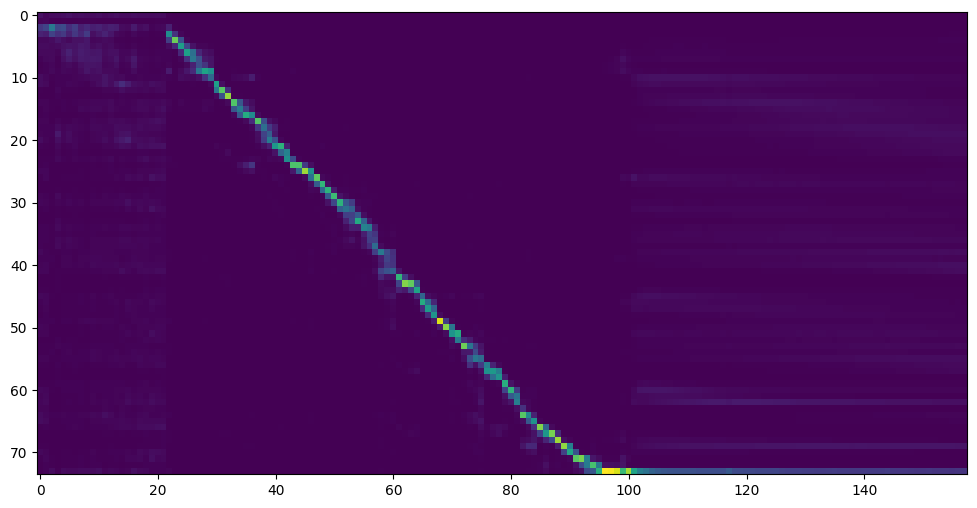
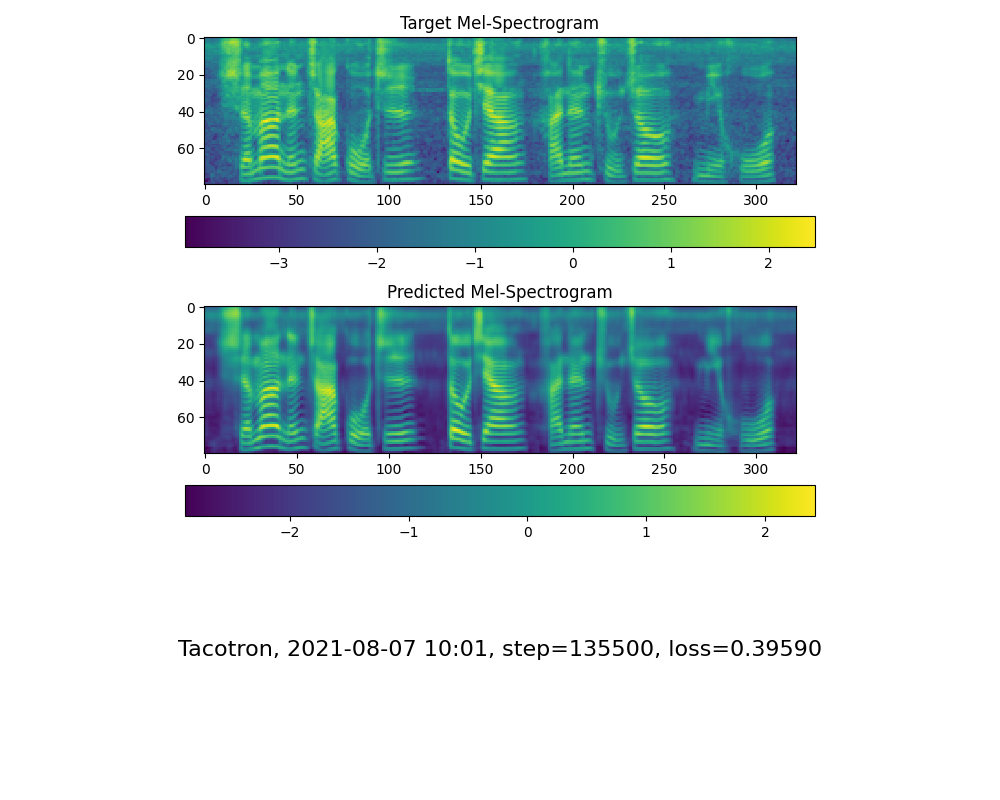
It implements the SV2TTS pipeline: a GE2E speaker encoder, a Tacotron-based synthesizer with Global Style Tokens, and a vocoder of your choice — WaveRNN, HiFi-GAN or Fre-GAN — that turns spectrograms back into audio.How long does synthesizer training take?The README gives milestones rather than hours: the author saw the attention plot appear after about 18k steps and the loss drop below 0.4 after 50k steps — stop once attention looks clean and the loss satisfies you.
The README gives milestones rather than hours: the author saw the attention plot appear after about 18k steps and the loss drop below 0.4 after 50k steps — stop once attention looks clean and the loss satisfies you.Where do I get training data?From open Mandarin speech sets — aidatatang200zh, magicdata, aishell3 and data_aishell — with OpenSLR originals and Google Drive mirrors listed in the FAQ; for aidatatang200zh you must also unzip every archive under corpus/train.
From open Mandarin speech sets — aidatatang200zh, magicdata, aishell3 and data_aishell — with OpenSLR originals and Google Drive mirrors listed in the FAQ; for aidatatang200zh you must also unzip every archive under corpus/train.What are similar projects?MOSS-TTS-Nano, VoxCPM, Real-Time-Voice-Cloning, breeze-tts, GPT-SoVITS, MOSS-TTS, OmniVoice, PaddleSpeech
MOSS-TTS-Nano, VoxCPM, Real-Time-Voice-Cloning, breeze-tts, GPT-SoVITS, MOSS-TTS, OmniVoice, PaddleSpeechWhich topics is it in?voice-ai, speech, web-server, qt, voice-cloning, speech-synthesis, audio-processing, tts, text-to-speech, real-time, cuda, pytorch
voice-ai, speech, web-server, qt, voice-cloning, speech-synthesis, audio-processing, tts, text-to-speech, real-time, cuda, pytorch